Accidentally deleted standard PS/2 mouse driver, want to restore it

InteLStaT

New member
Local time
4:40 AM
Messages
4
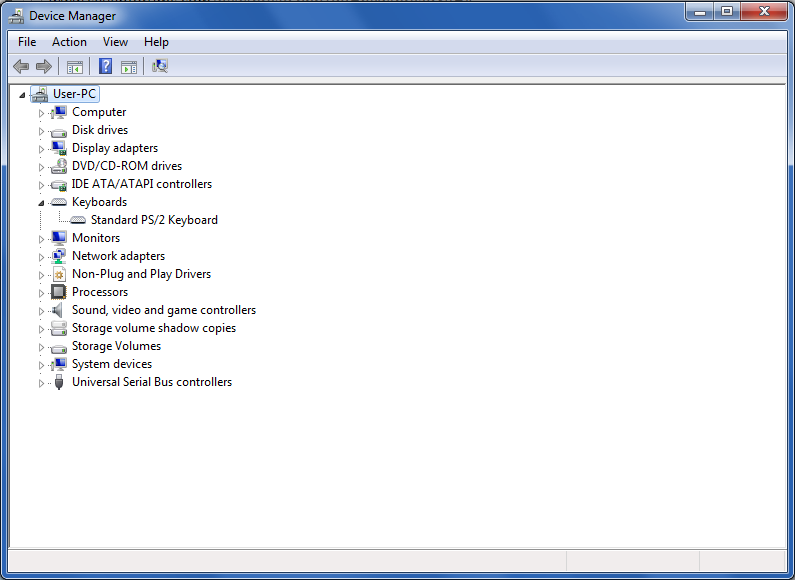
I was playing a 3D shooter video game, when I noticed my mouse was behaving in an odd way like never before. If I moved it fast enough, suddenly the first person camera of my character (the cursor) would stop moving, and instead my system would fire a single mousewheel scrolldown. I don't know if it was the game being glitchy, but after noticing this behaviour I tried to clean the bottom of my mouse and press the mousewheel several times, it didn't fix anything. Instead it did the exact opposite of it; my mouse completely stopped moving on the screen. The lights indicating that the mouse is plugged in were still on, and if I moved the mouse the lights would become stronger indicating movement, but the pointer didn't move on the screen. I plugged it in and out several times, but to no avail. I had no idea what happened but I was sure it's not the problem with the mouse since it was working (the lights). (I had another mouse to try if it works but at this point I didn't. I'll mention that mouse later.). Eventually I went into the Device Manager, and under "Mice and other pointing devices" I right-clicked on "Standard PS/2 Mouse", then Properties, then under the Driver tab I clicked Uninstall for the reason I've read that my system would reinstall it after I reboot it. It didn't. And now I have no hope what to do, I have tried to somehow reinstall all drivers, I tried an other mouse too, didn't work, I tried to get back the driver in all the ways possible but it seems I can only get it back if I completely reinstall my Windows 7, which I don't want. On the picture below you can see how the "Mice and and other pointing devices" is completely missing now.
9mYRUXy.png

If you didn't read the whole text, the thing you have to know: I uninstalled my PS/2 mouse driver in the Device Manager under "Mouse and other pointing devices", and the latter can't be seen anymore on the Device Manager, nor the PS/2, as presented on the picture. I just want to restore/reset/get back/reinstall the driver, and maybe get another mouse that's going to work properly. Note that I do not want to reinstall my OS. Thanks in advance.
 

My Computer My Computer

At a glance

Windows 7 Professional x64Intel Pentium CPU G3250 @ 3.20 GHz, 2 cores4 GBnVidia GT 730
Computer type
PC/Desktop
Computer Manufacturer/Model Number
Asus
OS
Windows 7 Professional x64
CPU
Intel Pentium CPU G3250 @ 3.20 GHz, 2 cores
Memory
4 GB
Graphics Card(s)
nVidia GT 730
Antivirus
AVG 2015 Free version
Browser
Google Chrome
Welcome to our forum InteLStaT.

Try these.

1. Reboot with the PS2 mouse plugged in and see if Windows 7 picks it up and installs the driver. PS2 drivers are native to Windows 7.

2. If that doesn't work. Start your computer and then plug the PS2 mouse in and see if Windows 7 installs the driver.

3. It never hurts to do this little tutorial by Brink and see if the system files can be corrected if need be. Please read completely.

http://www.sevenforums.com/tutorials/1538-sfc-scannow-command-system-file-checker.html
 

My Computer My Computer

At a glance

Windows 10 Pro. 64/ version 1709 Windows 7 Pr...Intel i7-6800K @ 4.3Corsair Platinum 16 gig @2400EVGA GTX 1070 OC
Computer type
PC/Desktop
Computer Manufacturer/Model Number
Home made Desktop
OS
Windows 10 Pro. 64/ version 1709 Windows 7 Pro/64
CPU
Intel i7-6800K @ 4.3
Motherboard
ASUS X-99 Deluxe II
Memory
Corsair Platinum 16 gig @2400
Graphics Card(s)
EVGA GTX 1070 OC
Monitor(s) Displays
Asus 27" LED LCD/VE278Q
Screen Resolution
1920-1080 or 1280-720 HDMI
Hard Drives
INTEL SSD 730-240 Gb Sata 3.0/
PSU
EVGA Platium 1200W
Case
Phanteks Luxe Tempered Glass 8 fans/ one radiator
Cooling
XSPC/ Water Cooled CPU
Keyboard
Das 4 Professional
Mouse
Logitech M705/MX Anywhere 2-S
Internet Speed
100 mbits
Antivirus
Microsoft Security Essentials/ Malwarebytes Premium 3.0/ SAS
Browser
I.E. 11 default/Firefox/ ISP Time Warner Cable/Spectrum
Other Info
LG BluRay Burner/
Sound system-KLipsch-THX/
Icy Dock ssd Hot Swap bays.
Thanks for the fast response, Bear, I'll try your suggestions.
EDIT: First two suggestions didn't work. I've read the tutorial and did everything as stated. The file checker repaired some files, but after reboot, still didn't work, and made my computer un-genuine. I checked what drivers the PS/2 keyboard uses, finding out one of them was "kbdclass.sys", so following this analogy I found out the one the mouse should use is "mouclass.sys", which was present in System32/drivers all the time, but didn't seem to be used by the system at all.
 
Last edited:

My Computer My Computer

At a glance

Windows 7 Professional x64Intel Pentium CPU G3250 @ 3.20 GHz, 2 cores4 GBnVidia GT 730
Computer type
PC/Desktop
Computer Manufacturer/Model Number
Asus
OS
Windows 7 Professional x64
CPU
Intel Pentium CPU G3250 @ 3.20 GHz, 2 cores
Memory
4 GB
Graphics Card(s)
nVidia GT 730
Antivirus
AVG 2015 Free version
Browser
Google Chrome
InteLStaT

I see you didn't delete USB controller from dev. mgr. Does your PC have usb port? Maybe borrow a usb mouse from a friend or buy one, might work. Sounds like your PS/2 mouse itself was failing and it needed replacement.

edit-you stated " I tried an other mouse too, didn't work," you didn't say what type it was :)
 

My Computer My Computer

At a glance

Windows 7 Ultimate x64
Computer type
PC/Desktop
OS
Windows 7 Ultimate x64
I do have USB ports, but I don't have USB mouses and in my area everyone mostly uses PS/2 mouses because they are the only thing sold... the other mouse I tried was PS/2 too, and it was the exact same model from the exact same manufacturer, I knew it worked because I have used it in the past. Tried both of the mouses on an other computer and they worked fine, but they didn't on the problematic computer.
EDIT: Right now I'm using the Ease of Access numpad mouse control.
 

My Computer My Computer

At a glance

Windows 7 Professional x64Intel Pentium CPU G3250 @ 3.20 GHz, 2 cores4 GBnVidia GT 730
Computer type
PC/Desktop
Computer Manufacturer/Model Number
Asus
OS
Windows 7 Professional x64
CPU
Intel Pentium CPU G3250 @ 3.20 GHz, 2 cores
Memory
4 GB
Graphics Card(s)
nVidia GT 730
Antivirus
AVG 2015 Free version
Browser
Google Chrome
You for sure have a problem with Windows 7.

If running sfc /scannow brings up Non Genuine your Windows 7 installation and activation is in question.

Did you run sfc /scannow 3 time with a reboot after each one?
 

My Computer My Computer

At a glance

Windows 10 Pro. 64/ version 1709 Windows 7 Pr...Intel i7-6800K @ 4.3Corsair Platinum 16 gig @2400EVGA GTX 1070 OC
Computer type
PC/Desktop
Computer Manufacturer/Model Number
Home made Desktop
OS
Windows 10 Pro. 64/ version 1709 Windows 7 Pro/64
CPU
Intel i7-6800K @ 4.3
Motherboard
ASUS X-99 Deluxe II
Memory
Corsair Platinum 16 gig @2400
Graphics Card(s)
EVGA GTX 1070 OC
Monitor(s) Displays
Asus 27" LED LCD/VE278Q
Screen Resolution
1920-1080 or 1280-720 HDMI
Hard Drives
INTEL SSD 730-240 Gb Sata 3.0/
PSU
EVGA Platium 1200W
Case
Phanteks Luxe Tempered Glass 8 fans/ one radiator
Cooling
XSPC/ Water Cooled CPU
Keyboard
Das 4 Professional
Mouse
Logitech M705/MX Anywhere 2-S
Internet Speed
100 mbits
Antivirus
Microsoft Security Essentials/ Malwarebytes Premium 3.0/ SAS
Browser
I.E. 11 default/Firefox/ ISP Time Warner Cable/Spectrum
Other Info
LG BluRay Burner/
Sound system-KLipsch-THX/
Icy Dock ssd Hot Swap bays.
Yes, I did, and I meant that after running sfc /scannow for the first time, and then rebooting, the non-genuine message appeared in the bottom right of my screen. My Windows was genuine before. In the Properties of Computer, it acts like it's completely unactivated, and asks for the product key, which I have already entered when I bought my computer. To this day I forgot the product key sadly, and trying to open the activation dialog from the Properties just gives me this error:
C:\Windows\system32\slui.exe
Windows cannot access the specified device, path, or file. You may not have the appropriate permissions to access the item.​
 

My Computer My Computer

At a glance

Windows 7 Professional x64Intel Pentium CPU G3250 @ 3.20 GHz, 2 cores4 GBnVidia GT 730
Computer type
PC/Desktop
Computer Manufacturer/Model Number
Asus
OS
Windows 7 Professional x64
CPU
Intel Pentium CPU G3250 @ 3.20 GHz, 2 cores
Memory
4 GB
Graphics Card(s)
nVidia GT 730
Antivirus
AVG 2015 Free version
Browser
Google Chrome
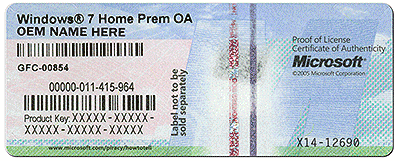
You should have a Microsoft stick on your computer that looks something like this. Do you have such a sticker. It still might be in the Microsoft packaging of the DVD.
Is it for Windows 7 Professional as per your System Specs.


Computer type PC/Desktop
System Manufacturer/Model Number Asus
OS Windows 7 Professional x64
CPU Intel Pentium CPU G3250 @ 3.20 GHz, 2 cores


coa-stickers.gif
 

My Computer My Computer

At a glance

Windows 10 Pro. 64/ version 1709 Windows 7 Pr...Intel i7-6800K @ 4.3Corsair Platinum 16 gig @2400EVGA GTX 1070 OC
Computer type
PC/Desktop
Computer Manufacturer/Model Number
Home made Desktop
OS
Windows 10 Pro. 64/ version 1709 Windows 7 Pro/64
CPU
Intel i7-6800K @ 4.3
Motherboard
ASUS X-99 Deluxe II
Memory
Corsair Platinum 16 gig @2400
Graphics Card(s)
EVGA GTX 1070 OC
Monitor(s) Displays
Asus 27" LED LCD/VE278Q
Screen Resolution
1920-1080 or 1280-720 HDMI
Hard Drives
INTEL SSD 730-240 Gb Sata 3.0/
PSU
EVGA Platium 1200W
Case
Phanteks Luxe Tempered Glass 8 fans/ one radiator
Cooling
XSPC/ Water Cooled CPU
Keyboard
Das 4 Professional
Mouse
Logitech M705/MX Anywhere 2-S
Internet Speed
100 mbits
Antivirus
Microsoft Security Essentials/ Malwarebytes Premium 3.0/ SAS
Browser
I.E. 11 default/Firefox/ ISP Time Warner Cable/Spectrum
Other Info
LG BluRay Burner/
Sound system-KLipsch-THX/
Icy Dock ssd Hot Swap bays.
Back
Top