
Accidently lost Intel Graphics ... how to recover?

Contours

New member
Local time
6:37 PM
Messages
11
In troubleshooting a color correction problem on my Win7 64-bit system, I naively changed a setting via the system tray icon:

Graphics Options >> Output to >> Digital Display (I believe it was previously set to Extended Desktop)

Now I get a "No Signal" message on my monitor ... so I've pretty much lost use of the PC.

Restoring to last good configuration doesn't work, because I've rebooted too many times trying different things. "Last good" has lost its meaning.

I can boot in Safe Mode and can then disable the Intel driver ... which lets me then boot in 640 x 480 mode. But I can't find any way to run the Intel Graphics and Media Control Center.

Help will be greatly appreciated.

Thanks in advance.
 

Attachments
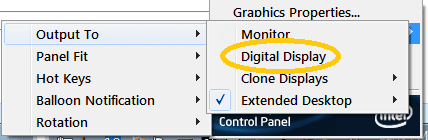
  • Accidental Setting.png
    Accidental Setting.png
    5.4 KB · Views: 14

My Computer My Computer

At a glance

Windows 7 Professional 32-bit
Computer Manufacturer/Model Number
Acer Veriton
OS
Windows 7 Professional 32-bit
Suggest you Safe boot with networking,
Go to the intel site download the
Troubleshooting

run it see what it pulls.

Roy
 

My Computer My Computer

At a glance

W7 home premium 32bit/W7HP 64bit/w10 tp insid...E5300 dual core3gbNvidia Geforce 7100 Nforce 630i
Computer type
PC/Desktop
Computer Manufacturer/Model Number
medionl/Aspire 6930G/acer x55a
OS
W7 home premium 32bit/W7HP 64bit/w10 tp insider ring
CPU
E5300 dual core
Motherboard
medion MS7366
Memory
3gb
Graphics Card(s)
Nvidia Geforce 7100 Nforce 630i
Monitor(s) Displays
avixc
Internet Speed
n (isp resticted to 72)
Antivirus
mse/pands
Browser
palemoon
Other Info
Belkin Fd7050 n USB using Railink RT2870 drivers, more upto date
Thanks for your response.

FWIW, I've been to their site and searched for over an hour. Everything in troubleshooting seems oriented toward beginners experiencing basic problems.

And, at this point, I very leary of just trying things. I feel like my PC is hanging by a thread. One wrong move could render it useless. I need to find a clear course of action that makes sense ... and hopefully something someone else has used.
 

My Computer My Computer

At a glance

Windows 7 Professional 32-bit
Computer Manufacturer/Model Number
Acer Veriton
OS
Windows 7 Professional 32-bit
Well, after another couple of hours of trying things, I saw a suggestion for reverting to a recent restore point.

I tried it and it worked. "System Recovery ... Restore ... select from those available". Luckily, I had one that yesterday's Win7 update had made.

So, I'm out of the woods. But I consider this a MAJOR flaw in Intel's "operating logic". Even changing the screen pixel dimensions gives a "want to keep?" option. THIS SHOULD, TOO. (are you listening, Intel?)

I'm going to post this issue on the Intel Graphics forum. If I get a "remedy", I'll post it back here.
 

My Computer My Computer

At a glance

Windows 7 Professional 32-bit
Computer Manufacturer/Model Number
Acer Veriton
OS
Windows 7 Professional 32-bit
fyi from safe mode you can click on igfxCPL.cpl, its within c:\windows\sytem32
 

My Computer My Computer

At a glance

Win7 pro x64stock i7 7700kCorsair Vengeance LPX 16GB (2x8GB) DDR4 @ 320...integrated Intel HD 630
Computer type
PC/Desktop
Computer Manufacturer/Model Number
diy
OS
Win7 pro x64
CPU
stock i7 7700k
Motherboard
Gigabyte Z270N-WIFI mini-ITX
Memory
Corsair Vengeance LPX 16GB (2x8GB) DDR4 @ 3200MHz
Graphics Card(s)
integrated Intel HD 630
Sound Card
onboard Realtek ALC1220
Monitor(s) Displays
two vertically mounted samsung 55" 4k un55mu8000
Screen Resolution
1920x1280
Hard Drives
256GB Samsung EVO 960 M.2 pci-e NVMe SSD
PSU
SilverStone Nightjar ST45NF 450Watt Fanless
Case
No case. Motherboard is mounted directly onto power supply
Cooling
Evercool low profile 815EP with Panaflow 12L fan at 7v
Keyboard
Ortek MCK-86 mini
Mouse
Belkin 5-button USB
Internet Speed
spectrum 400mbps
Back
Top