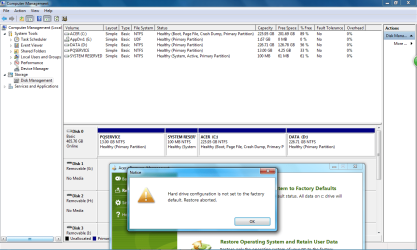
acer erecovery management:error hard drive configuration is not set to

windows 7 lover

New member
Local time
10:48 AM
Messages
4
i have a acer aspire 4920 and i want to restore it to factory default. i downloaded acer erecovery management and i click on restore system to factory default.A error message pops up saying hard drive configuration is not set to factory default restore aborted. how do i fix it.


My Computer My Computer

At a glance

windows 7 ultimate x64
Computer type
Laptop
Computer Manufacturer/Model Number
acer aspire 4920
OS
windows 7 ultimate x64
Hard Drives
local disk (c)

data (d)
Antivirus
avast free
Browser
fire fox
Do you have the recovery disks or a recovery partition?
Is D2D enabled in bios?
 

My Computer My Computer

At a glance

windows 7 ultimate x64
Computer type
PC/Desktop
OS
windows 7 ultimate x64
i have not got any recovery disks. the recovery partition is still there. D2D is enabled in bios but alt and f10 doesn't work
 

My Computer My Computer

At a glance

windows 7 ultimate x64
Computer type
Laptop
Computer Manufacturer/Model Number
acer aspire 4920
OS
windows 7 ultimate x64
Hard Drives
local disk (c)

data (d)
Antivirus
avast free
Browser
fire fox
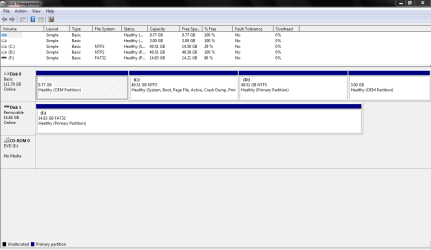
can you post a screen shot of how the drives and partitions look like in disk management?
 

My Computer My Computer

At a glance

windows 7 ultimate x64
Computer type
PC/Desktop
OS
windows 7 ultimate x64
here it is
 

Attachments

  • Capture.PNG
    Capture.PNG
    17.7 KB · Views: 15

My Computer My Computer

At a glance

windows 7 ultimate x64
Computer type
Laptop
Computer Manufacturer/Model Number
acer aspire 4920
OS
windows 7 ultimate x64
Hard Drives
local disk (c)

data (d)
Antivirus
avast free
Browser
fire fox
You have 3 partitions on your hard drive:

OEM partition: this appears to be empty.

C: for Windows; about 35 GB used of the 50 available.

D: virtually empty;

I don't know what those pictures would have looked like on the day you bought the machine, but it looks to me like you are out of luck since OEM and D both appear to have nothing useful on them.

You might be able to order a set of recovery disks from Acer directly.
 

My Computer My Computer

At a glance

Windows 7 Home Premium SP1, 64-bitIntel Skylake i5-6600K, not overclocked8 GB HyperX DDR4-2666 (2 x 4 GB)none; graphics are integrated on CPU
Computer type
PC/Desktop
Computer Manufacturer/Model Number
Ignatz Special; 4 speed manual gearbox; factory air conditioning; one of one
OS
Windows 7 Home Premium SP1, 64-bit
CPU
Intel Skylake i5-6600K, not overclocked
Motherboard
AsRock Z170M Extreme 4, micro ATX
Memory
8 GB HyperX DDR4-2666 (2 x 4 GB)
Graphics Card(s)
none; graphics are integrated on CPU
Sound Card
onboard: Realtek ALC1150; external: USB Behringer UF0-202
Monitor(s) Displays
Dell S2340M 23 inch IPS
Screen Resolution
1600 x 900
Hard Drives
System: Crucial MX100 series SSD, 128 GB;
Data: Samsung Spinpoint 103SJ, 1 TB;
Backup: WD Caviar Green WD30EZRX-00D8PB0, 3 TB
PSU
Rosewill SilentNight 500 watt fanless, semi-modular
Case
Antec Solo II
Cooling
Noctua NH-U12S; Noctua F12 intake, Noctua S12A exhaust
Keyboard
Microsoft 200 6JH-00001 USB
Mouse
Dell or Microsoft optical wired; USB
Antivirus
Microsoft Security Essentials and Malwarebytes Premium
Browser
Pale Moon
Other Info
All fans PWM; speeds at idle: CPU circa 500 rpm; intake circa 600 rpm; exhaust circa 600 rpm; CPU temps 27 idle and 47 C load in a warm room (27 C/81 F) when running Intel Extreme Tuning Utility stress test.
I think the poster above is correct. You seem to have two oem partitions. One is visible: can you verify the contents? For the other one you will need to assign a letter to it first before you can view the contents
 

My Computer My Computer

At a glance

windows 7 ultimate x64
Computer type
PC/Desktop
OS
windows 7 ultimate x64
how much do the recovery disks cost?
 

My Computer My Computer

At a glance

windows 7 ultimate x64
Computer type
Laptop
Computer Manufacturer/Model Number
acer aspire 4920
OS
windows 7 ultimate x64
Hard Drives
local disk (c)

data (d)
Antivirus
avast free
Browser
fire fox
I don't know what those pictures would have looked like on the day you bought the machine, but it looks to me like you are out of luck since OEM and D both appear to have nothing useful on them.

All OEM Recovery partitions, will show empty disk management.

@ windows 7 lover

Manual how to use Acer eRecovery Management here:
ftp://ftp.support.acer-euro.com/notebook/empowering_technology/NB%20ET2%20user's%20guide/Acer%20eRecovery%20Management%20English.pdf

Have you tried pressing <Alt+F10> at boot up, to goto the Acer eRecovery Management.
http://support.acer.com/acerpanam/desktop/0000/Acer/AspireE360/AspireE360faq40.shtml

How do I restore my computer using the eRecovery Management program?
You can Order Acer recovery disks from here:
https://secure.tx.acer.com/RCDB/Main.aspx?brand=acer
or
Acer | Recovery Media
Check in Accessories
or check the main web site.
Acer Worldwide - Select your local country or region

You may/may not have the option to make a USB Recovery Disk.
 

My Computer My Computer

At a glance

ME/XP/Vista/Win7
OS
ME/XP/Vista/Win7
I had the same problem too:(
 

Attachments

  • help.png
    help.png
    53.3 KB · Views: 4

My Computer My Computer

At a glance

Windows 7 Ultimate x64AMD Athlon(tm) II X4 635 Processor4GBATI Radeon HD 3200 Graphics
Computer type
PC/Desktop
Computer Manufacturer/Model Number
Acer
OS
Windows 7 Ultimate x64
CPU
AMD Athlon(tm) II X4 635 Processor
Motherboard
Acer Aspire M3300 AMD Motherboard
Memory
4GB
Graphics Card(s)
ATI Radeon HD 3200 Graphics
Sound Card
Realtek High Definition Audio
Hard Drives
Hitachi HDT721050SLA360 ATA Device
Antivirus
360 Antivirus
Browser
Maxthon Browser
How to fix this

I ran into the same issue after deleting the D: drive "Data" to try and increase the space of the boot partition C: What you need to do is create a new D: drive by shrinking the the boot partition, create a new simple volume D: named Data. After you do this it will allow you to run the erecovery program and reload your OS.

BTW I don't think there is a special size for the D" drive I made mine 50Gb and it works fine.

Regards,

Scott
 

My Computer My Computer

At a glance

Windows 10
Computer type
PC/Desktop
OS
Windows 10
Back
Top