Acer eRecovery not working -- need fresh install

CarvedDuck

New member
Member
Local time
1:58 PM
Messages
93
Hi All,

I want to do a clean install of Vista on my 6-year old Acer laptop.

I have searched here and found some threads, but nothing is working.

There is no eRecovery management tools when windows is running, booted. No "c:\Acer" folder.

When I follow the Acer instructions

  1. Immediately, press ALT on the keyboard and start tapping F10.
    Continue holding ALT and tapping F10 as the unit boots up.
  2. A screen stating "Starting Acer Erecovery" should appear.
    (Release ALT and stop tapping F10 at this point)
After a few seconds I get a Windows "Edit Boot Options" screen with

"Edit boot options for: Microsoft Windows Vista"
It provides two options "Enter=action" and "Escape=exit" both do the same thing and boot through to Windows.


I have tried this about 5 times and always the same result. No Acer eRecovery screen.


The PQService partition is alive and healthy so I know it is there, just can't get to it.


Any thoughts and suggestions? Of course, I have no recovery CD :D


Thanks
 

My Computer My Computer

At a glance

Win7 Starter
OS
Win7 Starter
Can you post a screen shot of your disk management window? To get there, click start orb, right click computer, select manage, in the left pane select disk management. You should see all your drives and the hidden partition containing the OS that should say healthy (recovery partition).
 

My Computer My Computer

At a glance

Windows 7 Ultimate 64 bitAMD Phenom II X4 965 Black EditionGSkill 4 X 2 GB PC 8500XFX Radeon HD 6790 D
Computer Manufacturer/Model Number
Custom built
OS
Windows 7 Ultimate 64 bit
CPU
AMD Phenom II X4 965 Black Edition
Motherboard
Gigabyte GA-MA790X-DS4
Memory
GSkill 4 X 2 GB PC 8500
Graphics Card(s)
XFX Radeon HD 6790 D
Sound Card
On board RealTek HD
Monitor(s) Displays
Dual monitors:Samsung SyncMaster S20B300
Screen Resolution
1600 X 900
Hard Drives
Seagate Barracuda 1TB (primary)
Seagate Barracuda 2 X 320 GB
PSU
Ultra X4 750 watt fully modular
Case
Thermaltake Overseer RX 1 full tower
Cooling
Core-Contact 92 mm CPU Cooler
Keyboard
Logitech G510
Mouse
Razor DeathAdder
Internet Speed
50/5 Mbps UL/DL
Other Info
Optical: Super Muliti DVD burner w/lightscribe, Hauppauge WinTV HVR-1800
   Information
We always assume you have made your Recovery Disks using the OEM manufacturer's Recovery Media Creator app the first day you had your new PC.
& made the Startup Repair CD.
startup repair disc-create


Did you make the OEM manufacturer's Recovery Disks?

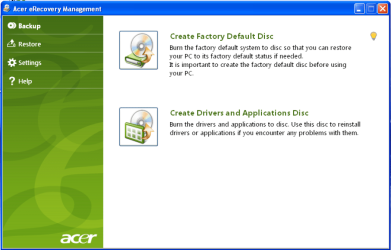
Acer001.PNG


Have you tried pressing <Alt+F10> at boot up, to goto the Acer eRecovery Management.
Acer Support: Frequently Asked Questions list for How to use Acer eRecovery

You can Order Acer recovery disks from here:
https://secure.tx.acer.com/RCDB/Main.aspx?brand=acer


Immediately, press ALT on the keyboard and start tapping F10.
Continue holding ALT and tapping F10 as the unit boots up.

Press <Alt+F10> at boot up, to goto the Acer eRecovery Management. ONCE ONLY DO NOT START TAPPING ANY KEYS.
 

My Computer My Computer

At a glance

ME/XP/Vista/Win7
OS
ME/XP/Vista/Win7
@bassfish, I had checked the recovery partition and mentioned it was Healthy and is about 6G from memory, but will do a screen grab for you. I will post later as I don't have the Acer here.

@theog: Ummm, I mentioned all of those in my original post, in fact I copied and pasted from the Acer link. Nothing works. I had also tried a single Alt-F10 and still get the EditBootOptions... I am not going to spend 30-bucks ($20+$10 shipping) for the recovery CD.

Slightly new development, this morning when I turned the Acer on I got the Acer Corp "Thanks for purchasing a new Acer notebook..." so it thinks it has been reset, but everything is still there untouched when it boots. Also there was definitely no eRecovery offered or processed at any time.
 

My Computer My Computer

At a glance

Win7 Starter
OS
Win7 Starter
Back
Top