My Computer
- Computer type
- PC/Desktop
- OS
- 32 bit


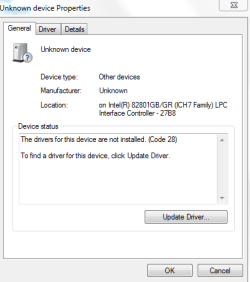
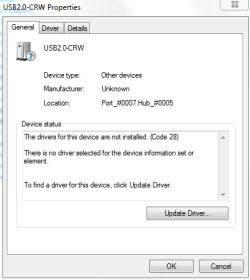
Then I'll have to take a look at the Chipset driver, but everything is working fine and how is it possible that the chipset driver was not installed? The USB ports are working good.Hi there ... Looks like you need the Chipset and Card Reader Driver ... How are your USB Ports working ?

Thanks for the explanation.Windows has a generic driver to give basic functionality. Exactly for situations like yours: new installs and before you have a chance to install the manufacturer's driver.
The manufacturer's driver will provide all the functionality needed, beyond the basic.
Not yet, because I'm not home. If I'm home I will check the backsite for the serial number so I can't find some drivers.Did you get sorted ?
The Serial Number = X13-04657, can you find some drivers? I get the message no service avalaible?Did you get sorted ?
There´s no model number present, maybe this one: CO.P1201.001?Hi there .. Do you know the Model Number .. As nothing is coming up with The Serial Number

Its an Desktop (PC)Hi again ... Is your Laptop a travel mate ?
I don´t see it on the list? And it has 2 GB of memory.Looked around using the serial# X13-04657 and found Aspire 5520
Acer Support: Aspire 5520 Series Specifications
Don's SF specs say Desktop though
Side note: if the machine has 4 GB of memory, I suggest re-installing Win7 x64.
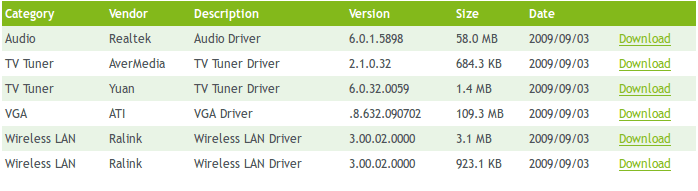
There´s no Chipset in the list and also the card reader driver not?
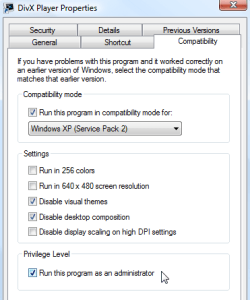
Because it is not possible at W7? I use the picture below as an example, but to this, that is the right maner?You can install the Vista 32 bit chipset driver in Compatibility Mode.
http://www.sevenforums.com/tutorials/316-compatibility-mode.html