
Acer Problems

Salil999

Banned
Local time
3:46 PM
Messages
9
Hey guys!

I recently upgraded to Windows 7 Home Premium from Windows Vista Home Basic, and I LOVE WINDOWS 7!! It's truly amazing! But when I booted it up, it didn't install the acer applications. Like, it comes with McAfee 90 day Trial, or WinDVD 8 full version. I really want to know, and if someone can help me out, it would be helpful! Thank you!

I included the picture just incase...
 

Attachments
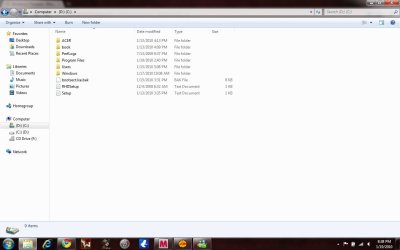
  • Pic inside Local Disk.jpg
    Pic inside Local Disk.jpg
    52.5 KB · Views: 27

My Computer

Computer Manufacturer/Model Number
Acer
OS
Windows 7 Home Premium x86
CPU
AMD Athlon 64
Memory
3.00 GB ( 2.75 Useable )
Graphics Card(s)
ATI Radeon X1200 Series
Sound Card
Realtek HD Codec
Screen Resolution
1280 X 800
Hard Drives
2 Hard Drives
C: - 70 GB
D: - 70 GB
Mouse
Brown Microsoft Mouse
Internet Speed
15 MB/S - 20 MB/S
Other Info
Recently upgraded Windows Vista Home Basic to Windows 7 Home Premium 4 free.
did you perform a clean boot or an upgrade from vista?
 

My Computer

Computer Manufacturer/Model Number
Custom
OS
Windows 7 Ultimate Signature Edition
CPU
Intel Core i7 Extreme 3.33GHz
Motherboard
EVGA X-58 SLI Classified
Memory
12GB DDR3
Graphics Card(s)
2x EVGA 285 2GB in SLI
Sound Card
Creative Labs X-Fi ExtremeGamer
Monitor(s) Displays
30" Viewsonic
Hard Drives
2x1TB Western Digital 7200RPM in RAID 0/1TB WD My Book External HDD
PSU
Thermaltake 1000w supporting quad SLI
Case
Thermaltake Armor Full Tower
Cooling
Thermaltake V1 CPU+DIY Liquid cooling
If you purchased the win7 from MS then the added software that came with your computer on a clean install would be gone... A clean install is usually the way to go as if possible saves you from a lot of other problems. GL :)
 

My Computer

Computer Manufacturer/Model Number
Toshiba Satellite
OS
Windows 7 Home Premium 64-bit
CPU
Pentium(R) Dual-Core T4300 @ 2.10GHz
Motherboard
Toshiba Model KSWAA - Chipset Intel GL40 Rev 07
Memory
3 GB DDR2 PC2-6400 (400 MHz) Samsung M4 70T2864Q23-CF7
Graphics Card(s)
Mobile Intel GMA4500M 32bit OS (64bit OS) dynamically
Sound Card
Realtek ALC272-GR Software Sound
Monitor(s) Displays
16.0" HD TFT with TrueBrite Matrix colour LCD display
Screen Resolution
1366 x 768
Hard Drives
FUJITSU MJA2320BH G2-(S2) 320GB (5400RPM) Serial-ATA
Keyboard
Canadian Bilingual Keyboard 105 keys with 13 Function keys
Mouse
Touchpad Point device & Lexma USB Mouse
Internet Speed
Walking is Faster
Other Info
Wireless LAN Realtek RTL89191SE 802.11n PCI-E NIC + a
LAN Realek PCIe FE Family Controller and
TOSHIBA Software Modem
The goodies are put on by Acer (that's how Acer collects a few extra bucks from the sponsors). Your Win7 comes from Microsoft - without bloat (as some would call it).
 

My Computer

Computer Manufacturer/Model Number
HP, Dell, Gateway, Toshiba - 4 laptops and 2 desktops
OS
Vista, Windows7, Mint Mate, Zorin, Windows 8
CPU
from 1.6GHz Duo to i7
Monitor(s) Displays
2x HP w2207
Hard Drives
5x HDD, 7x SSD, 12x Externals
Keyboard
with trackball - no mices
Mouse
Trackball mice
Internet Speed
DSL 6000
When it said to upgrade, I hit Custom Options... does that change anything?
 

My Computer

Computer Manufacturer/Model Number
Acer
OS
Windows 7 Home Premium x86
CPU
AMD Athlon 64
Memory
3.00 GB ( 2.75 Useable )
Graphics Card(s)
ATI Radeon X1200 Series
Sound Card
Realtek HD Codec
Screen Resolution
1280 X 800
Hard Drives
2 Hard Drives
C: - 70 GB
D: - 70 GB
Mouse
Brown Microsoft Mouse
Internet Speed
15 MB/S - 20 MB/S
Other Info
Recently upgraded Windows Vista Home Basic to Windows 7 Home Premium 4 free.
Windows 7 Acer

The goodies are put on by Acer (that's how Acer collects a few extra bucks from the sponsors). Your Win7 comes from Microsoft - without bloat (as some would call it).

Is there a way to get the pre-installed stuff back? Because I REALLY hate wasted space on my Local Disk.
 

My Computer

Computer Manufacturer/Model Number
Acer
OS
Windows 7 Home Premium x86
CPU
AMD Athlon 64
Memory
3.00 GB ( 2.75 Useable )
Graphics Card(s)
ATI Radeon X1200 Series
Sound Card
Realtek HD Codec
Screen Resolution
1280 X 800
Hard Drives
2 Hard Drives
C: - 70 GB
D: - 70 GB
Mouse
Brown Microsoft Mouse
Internet Speed
15 MB/S - 20 MB/S
Other Info
Recently upgraded Windows Vista Home Basic to Windows 7 Home Premium 4 free.
The goodies are put on by Acer (that's how Acer collects a few extra bucks from the sponsors). Your Win7 comes from Microsoft - without bloat (as some would call it).

Is there a way to get the pre-installed stuff back? Because I REALLY hate wasted space on my Local Disk.

maybe. You would need the installation .exe. Go and Google the programs you are missing. Those that are free, you can install from the internet. But even if those exact programs are not available, there are always similar programs that come for free. but stuff like McAfee I would not use anyhow. Use MSE instead - a lot better.
 

My Computer

Computer Manufacturer/Model Number
HP, Dell, Gateway, Toshiba - 4 laptops and 2 desktops
OS
Vista, Windows7, Mint Mate, Zorin, Windows 8
CPU
from 1.6GHz Duo to i7
Monitor(s) Displays
2x HP w2207
Hard Drives
5x HDD, 7x SSD, 12x Externals
Keyboard
with trackball - no mices
Mouse
Trackball mice
Internet Speed
DSL 6000
The goodies are put on by Acer (that's how Acer collects a few extra bucks from the sponsors). Your Win7 comes from Microsoft - without bloat (as some would call it).

Is there a way to get the pre-installed stuff back? Because I REALLY hate wasted space on my Local Disk.

maybe. You would need the installation .exe. Go and Google the programs you are missing. Those that are free, you can install from the internet. But even if those exact programs are not available, there are always similar programs that come for free. but stuff like McAfee I would not use anyhow. Use MSE instead - a lot better.

What is MSE? Sorry, I'm not too good...
 

My Computer

Computer Manufacturer/Model Number
Acer
OS
Windows 7 Home Premium x86
CPU
AMD Athlon 64
Memory
3.00 GB ( 2.75 Useable )
Graphics Card(s)
ATI Radeon X1200 Series
Sound Card
Realtek HD Codec
Screen Resolution
1280 X 800
Hard Drives
2 Hard Drives
C: - 70 GB
D: - 70 GB
Mouse
Brown Microsoft Mouse
Internet Speed
15 MB/S - 20 MB/S
Other Info
Recently upgraded Windows Vista Home Basic to Windows 7 Home Premium 4 free.

My Computer

Computer Manufacturer/Model Number
HP, Dell, Gateway, Toshiba - 4 laptops and 2 desktops
OS
Vista, Windows7, Mint Mate, Zorin, Windows 8
CPU
from 1.6GHz Duo to i7
Monitor(s) Displays
2x HP w2207
Hard Drives
5x HDD, 7x SSD, 12x Externals
Keyboard
with trackball - no mices
Mouse
Trackball mice
Internet Speed
DSL 6000
http://www.microsoft.com/Security_Essentials/ Look at the Help&Support button on that page for more detail.

I use both of them on my new Acer as Mac Afee comes with the laptop, and is a trial version valid for 60days...(after being registred)

MSE is handy and runs smooth in the background and seems light.
Yes i can tell, MSE's running well and detect/repair easily trojan or unwelcome patches.

Mac Afee looks good to me for the integrated cleaner that can be automated. I don't know much about mac Afee but the welcome center is easy to use.
 

My Computer

Computer type
PC/Desktop
Computer Manufacturer/Model Number
Custom Build
OS
Windows 7 Professional SP1 - x64 [Non-UEFI Boot]
CPU
Ivy Bridge Core i5 3570K (Delidded)
Motherboard
Asus P8Z77-V LE PLUS
Memory
G.Skill "Ares" DDR3 PC3-12800 - 1600MHz (16Gb)
Graphics Card(s)
Asus Dual-RX480-O4G
Sound Card
Creative Sound Blaster Z w/5.1 sound system
Monitor(s) Displays
Asus IPS 23"
Screen Resolution
16/9
Hard Drives
Internal:
500Go Sata 6Gb/s (x2)
500Go Sata 3Gb/s (x2)
SSD 60Go Sata 6Gb/s
PSU
In Win C 900W Series 80+ Platinum
Case
Thermaltake Chaser A71
Cooling
Custom Water Cooling Loop
Keyboard
Cooler Master QuickFire XTi
Mouse
Razer Imperator 2012 (4G)
Antivirus
MSE
Browser
IE 11.0.xxx Rtm
Other Info
"Raid0" with Intel Smart Response Technology (HDD/SSD)
Ask A PC Question!

Hi, there are very similar posts and answers on www.askapcquestion.co.uk . If not they offer one to one free help on the site and have helped me over the last few weeks quite a lot! .. Good luck anyway!
 

My Computer

OS
vista
NoN. It is not a good idea to run 2 security suites side by side. That can lead to conflicts and unforseen problems. I would suggest that you decide for one only.
 

My Computer

Computer Manufacturer/Model Number
HP, Dell, Gateway, Toshiba - 4 laptops and 2 desktops
OS
Vista, Windows7, Mint Mate, Zorin, Windows 8
CPU
from 1.6GHz Duo to i7
Monitor(s) Displays
2x HP w2207
Hard Drives
5x HDD, 7x SSD, 12x Externals
Keyboard
with trackball - no mices
Mouse
Trackball mice
Internet Speed
DSL 6000
I upgraded my Acer 7720 laptop from Vista to Win 7. I did an upgrade, not a clean install, but I cleaned up the PC and installed whatever the Win 7 upgrade advisor flagged before upgrading. The Windows Media Player 11 will play Videos and the mentioned free Microsoft Security Essentials will work fine for a Security package, along with the free MBAM spyware program. As Window 7 does not have a built in e-mail program, download the free Windows Live Mail program. If you need Microsoft Office type applications, download the free (they take donations) Open Office suite of programs - www.openoffice.org
 

My Computer

Computer type
PC/Desktop
Computer Manufacturer/Model Number
My Own Build
OS
Windows 10 64 bit
CPU
Intel i7 6700K
Motherboard
ASUS ROG Maximus VIII Hero
Memory
16GB Corsair Dominator
Graphics Card(s)
Intel CPU Graphics
Sound Card
RealTek
Monitor(s) Displays
27" Dell S2719dgf
Screen Resolution
2560X1440
Hard Drives
1 TB Samsung 850 EVO SSD for Win 10 Pro
500GB Samsung 850 EVO SSD for Win 10 Insider
2 TB drive for backup
PSU
EVGA Supernova 750G2
Case
BeQuiet Silent Base 600
Cooling
Deepcool Captain 120EX
Keyboard
Microsoft Wireless 2000
Mouse
Microsoft wireless
Internet Speed
100 MB/sec (Cable)
Antivirus
Microsoft Defender and Malwarebytes
Browser
Edge/Firefox
Other Info
Cakewalk (Sonar) by BandLab and Studio One 4.1 Pro recording studio software. MOTU 896Mk3 Hybrid recording interface, Frontier Tranzport wireless control unit, Behringer X-Touch Control Surface.
Five USB connected optical drives for CD Audio production using Nero BurningROM
NoN. It is not a good idea to run 2 security suites side by side. That can lead to conflicts and unforseen problems. I would suggest that you decide for one only.

Hi there, Yes I aware of that...
I have anyway remove MSE from my computer two days ago because an application was blocked in the background.

The furnished Security Suite in Windows7-RTM, "Windows Defender" took an automatic relay just after removing MSE , so i've no choice running two of them, but looks Windows defender is far less agressive to my needs now.:)

I should be able to disable W.D in the Services and set it to manual or disable. I'll see that

Mac Afee is on period trial for me at the moment so i don't disable it.
 
Last edited:

My Computer

Computer type
PC/Desktop
Computer Manufacturer/Model Number
Custom Build
OS
Windows 7 Professional SP1 - x64 [Non-UEFI Boot]
CPU
Ivy Bridge Core i5 3570K (Delidded)
Motherboard
Asus P8Z77-V LE PLUS
Memory
G.Skill "Ares" DDR3 PC3-12800 - 1600MHz (16Gb)
Graphics Card(s)
Asus Dual-RX480-O4G
Sound Card
Creative Sound Blaster Z w/5.1 sound system
Monitor(s) Displays
Asus IPS 23"
Screen Resolution
16/9
Hard Drives
Internal:
500Go Sata 6Gb/s (x2)
500Go Sata 3Gb/s (x2)
SSD 60Go Sata 6Gb/s
PSU
In Win C 900W Series 80+ Platinum
Case
Thermaltake Chaser A71
Cooling
Custom Water Cooling Loop
Keyboard
Cooler Master QuickFire XTi
Mouse
Razer Imperator 2012 (4G)
Antivirus
MSE
Browser
IE 11.0.xxx Rtm
Other Info
"Raid0" with Intel Smart Response Technology (HDD/SSD)
1. If you have a problem MSE blocking a program, go to Settings > Exclude files and Locations > add the .exe of this program to that list.
2. Yes, when you uninstall MSE, Defender will take over. They use the same msmpeng.exe so it can only be one or the other.
3. I would use MSE in any case and get rid of McAfee. But make sure you use the mcpr.exe to uninstall it.
 

My Computer

Computer Manufacturer/Model Number
HP, Dell, Gateway, Toshiba - 4 laptops and 2 desktops
OS
Vista, Windows7, Mint Mate, Zorin, Windows 8
CPU
from 1.6GHz Duo to i7
Monitor(s) Displays
2x HP w2207
Hard Drives
5x HDD, 7x SSD, 12x Externals
Keyboard
with trackball - no mices
Mouse
Trackball mice
Internet Speed
DSL 6000
1. If you have a problem MSE blocking a program, go to Settings > Exclude files and Locations > add the .exe of this program to that list.
2. Yes, when you uninstall MSE, Defender will take over. They use the same msmpeng.exe so it can only be one or the other.
3. I would use MSE in any case and get rid of McAfee. But make sure you use the mcpr.exe to uninstall it.

Humm...In MSE i was excluding a special folder not to be scan and a specific file ".something" either...I might try to exclude .exe next time.

About Windows Defender, looks it doesn't use as often the Msmpeng.exe engine...

as MSE was running constantly the msmpeng.exe engine and tooked at least 663500Kb space to run and I did get warned by the Windows 7 center performance to get rid of Msmpeng.exe engine.

For Mac Afee, it is really integrated inside Windows 7 and taking over the firewall..The only point to me is when running a scan it does takes a lot of ressources!!!!
So I run it only once a week.

I do use Mac Afee for my own purpose to see if it gonna betrayed me over windows firewall.
Looks Mac Afee respond well at the moment and let me use it's parameters to smoothly overide him in some Windows7 "Advanced Parameters" Tab of the FireWall Center.

But everything have an end and mac Afee is not free!:D
 
Last edited:

My Computer

Computer type
PC/Desktop
Computer Manufacturer/Model Number
Custom Build
OS
Windows 7 Professional SP1 - x64 [Non-UEFI Boot]
CPU
Ivy Bridge Core i5 3570K (Delidded)
Motherboard
Asus P8Z77-V LE PLUS
Memory
G.Skill "Ares" DDR3 PC3-12800 - 1600MHz (16Gb)
Graphics Card(s)
Asus Dual-RX480-O4G
Sound Card
Creative Sound Blaster Z w/5.1 sound system
Monitor(s) Displays
Asus IPS 23"
Screen Resolution
16/9
Hard Drives
Internal:
500Go Sata 6Gb/s (x2)
500Go Sata 3Gb/s (x2)
SSD 60Go Sata 6Gb/s
PSU
In Win C 900W Series 80+ Platinum
Case
Thermaltake Chaser A71
Cooling
Custom Water Cooling Loop
Keyboard
Cooler Master QuickFire XTi
Mouse
Razer Imperator 2012 (4G)
Antivirus
MSE
Browser
IE 11.0.xxx Rtm
Other Info
"Raid0" with Intel Smart Response Technology (HDD/SSD)
http://www.microsoft.com/Security_Essentials/ Look at the Help&Support button on that page for more detail.

I use both of them on my new Acer as Mac Afee comes with the laptop, and is a trial version valid for 60days...(after being registred)

MSE is handy and runs smooth in the background and seems light.
Yes i can tell, MSE's running well and detect/repair easily trojan or unwelcome patches.

Mac Afee looks good to me for the integrated cleaner that can be automated. I don't know much about mac Afee but the welcome center is easy to use.
It is not a good idea to use more than one AV.
 

My Computer

Computer Manufacturer/Model Number
DIY
OS
W7x64 Pro, SuSe 12.1/** W7 x64 Pro, XP MCE
CPU
Phenom II 1090T w/Noctua NH-D14 /**4400+ X2 w/CM Hyper TX 3
Motherboard
ASRock 890FX Deluxe 4/**A8N-SLI
Memory
2 x 2GB Patriot PGS34g1600LLKA/**4x1GB Corsair VS
Graphics Card(s)
EVGA GTX460 SC/**EVGA 8800GTS
Sound Card
Asus Xonar D2X/**Xonar D1
Monitor(s) Displays
Acer X233H, Dell E152FPc /**LG M237-WD
Screen Resolution
1920x1080 & 1024x768/**1980x1080
Hard Drives
WDC 2TB, 1.5TB, 1TB, 500GB,Seagate 500GB , Maxtor 80GB /**500GB Seagate & WDC 1TB Black
PSU
CM RS600 w/ APC BX1000G/**Antec 500 TP w/ APC BX1000
Case
HAF922/**Antec 1040IIB
Cooling
3x200mm, 1x140 and 1x120mm/**5x80mm fans
Keyboard
Logitech Media USB/**Saitek Eclipse
Mouse
Cordless Trackman Wheel/**Ditto
Internet Speed
3.3Mbps
Other Info
SB 560 5.1 w/ Sennheiser RS140/**Creative T20 speakers, Dvico FusionHDTV7 Gold RT, Cisco E3000, HP 5510V AIO, Linksys E3000, Belkin F5U237 hub and **F5D8055 adapter
(** = 2nd rig)
I am sure MSE will leave your program alone when you put the .exe on the exclusion list. I had the same problem with an innocent, clean program that would take 3 minutes to load whilst the msmpeng.exe was massaging it. Once I put it on the exclusion list (the program .exe that is), the program came up instantly - which I expect because my Win7 is on an SSD.
 

My Computer

Computer Manufacturer/Model Number
HP, Dell, Gateway, Toshiba - 4 laptops and 2 desktops
OS
Vista, Windows7, Mint Mate, Zorin, Windows 8
CPU
from 1.6GHz Duo to i7
Monitor(s) Displays
2x HP w2207
Hard Drives
5x HDD, 7x SSD, 12x Externals
Keyboard
with trackball - no mices
Mouse
Trackball mice
Internet Speed
DSL 6000
Back
Top