Acronis shortcut, "damaged"

stereo

New member
Member
VIP
Local time
9:44 AM
Messages
541
Can someone explain, please, what's going on here ?
All the shortcuts are okay, on the desktop or in Start Menu, only the Acronis shortcut is "damaged".
I uninstalled and reinstalled again Acronis, but same story.
But if i click on this shortcut, is working fine.
I attache here 2 images.
One is in the folder where Acronis is installed: C/Program Files/ Acronis
The second one is the shortcut from Start Menu.
Any ideas ??
Thanks.
 

Attachments

  • acronis .jpg
    acronis .jpg
    39.7 KB · Views: 42
  • acronis start menu.jpg
    acronis start menu.jpg
    4.1 KB · Views: 407

My Computer

Computer type
PC/Desktop
OS
Windows 7 Ultimate x64
CPU
Intel7 4790K
Motherboard
Gigabyte GA-Z97X UD5H
Memory
8 GB DDR3
Graphics Card(s)
GTX 980Ti G1
Sound Card
SoundBlaster X-FI XtremeGamer
Monitor(s) Displays
Samsung UE40JU6550 UHD
Screen Resolution
3840 X 2160
Hard Drives
1 SSD Intel 330
2 x Western Digital 6400 AAKS
1 x Western Digital 3200 AAKS
PSU
Corsair 750W
Case
Cooler Master HAF 922

My Computer

Computer Manufacturer/Model Number
self-assembled
OS
Windows 7 Ultimate 32bit
CPU
AMD Phenom II X3 720 Processor
Motherboard
Gigabyte GA-MA78GM-S2H Revision 1.0
Memory
Transcend DDR2 (PC2 6400) 4 X 1GB
Graphics Card(s)
Integrated + ATI Radeon 4550
Sound Card
Integrated Realtek ALC 889A
Monitor(s) Displays
DELL 1704 FPT
Screen Resolution
1280 x 1024
Hard Drives
Western Digital Caviar SE16 250 GB x2 in RAID 0
PSU
Coolermaster 400 W
Case
Zebronics Cube
Cooling
stock
Keyboard
Microsoft - wired
Mouse
Microsoft - wired
Internet Speed
ADSL 256-512Kbps
stereo:

You said the link is working?

Try this:


  • Right-click the Icon and choose Properties
  • Click the "Change Icon" button
  • In the window that opens up browse to your Acronis folder and choose the file TrueImage.exe
  • It should show you the Icon you are looking for; select it and 'OK' your way out...
 

My Computer

Computer Manufacturer/Model Number
OEM - Me
OS
Windows 7 Home Premium x64
CPU
AMD Phenom II X6 1600T
Motherboard
GigaByte GZ-990FXA-UD3
Memory
16GB PC3-10700 (1342MHz)
Graphics Card(s)
ATI Radeon 5770 HD (x2) CrossFire
Sound Card
On-board RealTek chipset
Monitor(s) Displays
3x Hanns-G 1920x1080 Monitors
Screen Resolution
3x Hanns-G 1920x1080 Monitors
Hard Drives
Intel 25-V SSD 40GB: 218 MB/s AT: 0.1ms
Intel X-25M SSD 80GB: 230MB/s AT: 0.1ms
Seagate 750GB: 133 MB/s AT: 13ms (perpendicular storage)
Buffalo HD-PCTU3 1TB External drive
PSU
OCZ Stealth X Stream 750W
Case
Cheap (unknown)
Cooling
Stock
Keyboard
HP USB
Mouse
LogiTech USB
Internet Speed
1.5 Mbps - Slow - At the tail-end of a rural network
Other Info
Printer: Epson Stylus C-84
Scanner: HP 3500C Flatbed
DVD-RW: Plextor
DVD-ROM: Unknown
WEI: 7.4
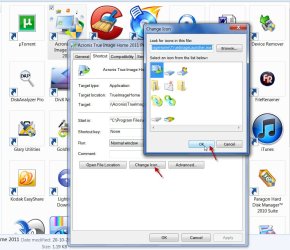
^I made a screenshot for the above and this is it.

missingimages.jpg

I did not post it in the first instance. The reason:

I reexamined the attachments in his post. The image of the .exe file does not appear in the Acronis Program Files folder itself. So this method will not show the image since it is missing in the source itself. ( I am also not sure whether rebuilding the icon cache as suggested will work or not. :) )

Anyway it is OK since it may be of use to those who read this thread.
 

My Computer

Computer Manufacturer/Model Number
self-assembled
OS
Windows 7 Ultimate 32bit
CPU
AMD Phenom II X3 720 Processor
Motherboard
Gigabyte GA-MA78GM-S2H Revision 1.0
Memory
Transcend DDR2 (PC2 6400) 4 X 1GB
Graphics Card(s)
Integrated + ATI Radeon 4550
Sound Card
Integrated Realtek ALC 889A
Monitor(s) Displays
DELL 1704 FPT
Screen Resolution
1280 x 1024
Hard Drives
Western Digital Caviar SE16 250 GB x2 in RAID 0
PSU
Coolermaster 400 W
Case
Zebronics Cube
Cooling
stock
Keyboard
Microsoft - wired
Mouse
Microsoft - wired
Internet Speed
ADSL 256-512Kbps
Ponmayilal:

"I reexamined the attachments in his post. The image of the .exe file does not appear in the Acronis Program Files folder itself. So this method will not show the image since it is missing in the source itself."

I don't understand what you mean by "the image of the .exe file..."

The screen shot you posted above is for the TrueImage Launcher not the TrueImage program. (see the Address Bar?)

You can still use one of those icons, if you like. Neither Acronis nor Windows cares which icon you use.
 

My Computer

Computer Manufacturer/Model Number
OEM - Me
OS
Windows 7 Home Premium x64
CPU
AMD Phenom II X6 1600T
Motherboard
GigaByte GZ-990FXA-UD3
Memory
16GB PC3-10700 (1342MHz)
Graphics Card(s)
ATI Radeon 5770 HD (x2) CrossFire
Sound Card
On-board RealTek chipset
Monitor(s) Displays
3x Hanns-G 1920x1080 Monitors
Screen Resolution
3x Hanns-G 1920x1080 Monitors
Hard Drives
Intel 25-V SSD 40GB: 218 MB/s AT: 0.1ms
Intel X-25M SSD 80GB: 230MB/s AT: 0.1ms
Seagate 750GB: 133 MB/s AT: 13ms (perpendicular storage)
Buffalo HD-PCTU3 1TB External drive
PSU
OCZ Stealth X Stream 750W
Case
Cheap (unknown)
Cooling
Stock
Keyboard
HP USB
Mouse
LogiTech USB
Internet Speed
1.5 Mbps - Slow - At the tail-end of a rural network
Other Info
Printer: Epson Stylus C-84
Scanner: HP 3500C Flatbed
DVD-RW: Plextor
DVD-ROM: Unknown
WEI: 7.4
^ an icon with a generic image and an icon with an application-specific image. I think you should be able to catch it now.

The OP presents the problem that he sees only a generic icon for the Acronis software shortcut, that being the shortcut for trueimage.exe. He has circled the actual trueimage.exe in the Acronis program folder which is also generic, which he calls as "damaged". The link is still functional. Only the specific image is lost. If you now read my post I think you should be able to make sense of it, if I had really made it non-sense. May be :).

I had not simulated the fault condition in my screen shot. It is only illustrative of the procedure.

If I were able to simulate the fault condition presented by the OP, the shortcut will be a generic icon and the first icon in the "Select an icon from the list below" will also be a generic icon as that is what is there in the program folder - the source as per his screenshot. (whichever the shortcut refers to. Forget whether it refers to truemage.exe or trueimagelauncher.exe. I just checked that both launch the same screen in True Image Home 2011 and the shortcut it had put on my desktop links to trueimagelauncher.exe)

That said, I routinely find a few desktop icons losing their specific image every now and then. I just follow the above procedure and find the application-specific icon is the first icon in the list and selected automatically. I double click the icon or click on OK but nothing happens. Repeat it a second time and the shortcut icon regains its original image. This is not a big or troublesome issue and so I have not bothered to find a permanent solution. If someday, sometime I stumble upon a permanent solution, I will implement it then. :)
 
Last edited:

My Computer

Computer Manufacturer/Model Number
self-assembled
OS
Windows 7 Ultimate 32bit
CPU
AMD Phenom II X3 720 Processor
Motherboard
Gigabyte GA-MA78GM-S2H Revision 1.0
Memory
Transcend DDR2 (PC2 6400) 4 X 1GB
Graphics Card(s)
Integrated + ATI Radeon 4550
Sound Card
Integrated Realtek ALC 889A
Monitor(s) Displays
DELL 1704 FPT
Screen Resolution
1280 x 1024
Hard Drives
Western Digital Caviar SE16 250 GB x2 in RAID 0
PSU
Coolermaster 400 W
Case
Zebronics Cube
Cooling
stock
Keyboard
Microsoft - wired
Mouse
Microsoft - wired
Internet Speed
ADSL 256-512Kbps
Back
Top