Solved Activation issue after clean install on new hard drive

Sounds like it's not able to locate the recovery partition and is simply defaulting to Boot Manager.

There isn't anything related to Recovery in Advanced Boot Options, is there?
 

My Computer My Computer

At a glance

Windows 7 Ultimate x64
OS
Windows 7 Ultimate x64
Sounds like it's not able to locate the recovery partition and is simply defaulting to Boot Manager.

I think because my 'recovery' is just a bunch of files in a folder, it's got no partition to utilise.
 

My Computer My Computer

At a glance

Windows 7 Home Premium 32bitPentium Dual-Core CPU T4300 2.10GHz3.00GB
Computer Manufacturer/Model Number
Samsung R530
OS
Windows 7 Home Premium 32bit
CPU
Pentium Dual-Core CPU T4300 2.10GHz
Memory
3.00GB
Hard Drives
Hitachi Travelstar SATA 2.5" 750GB
Sounds like it's not able to locate the recovery partition and is simply defaulting to Boot Manager.

I think because my 'recovery' is just a bunch of files in a folder, it's got no partition to utilise.

But it does exist on the old drive, the machine just can't locate it.
 

My Computer My Computer

At a glance

Windows 7 Ultimate x64
OS
Windows 7 Ultimate x64
So plug in the old HD exactly as it was plugged at factory. Set it first to boot (shouldn't make a difference tho).

Again what is the key given on first screen or in Manual for running Factory Recovery? Try that key repeatedly.

If it will work on old HD it may work when old HD is cloned or imaged over to new one.
 
Sounds like it's not able to locate the recovery partition and is simply defaulting to Boot Manager.

There isn't anything related to Recovery in Advanced Boot Options, is there?

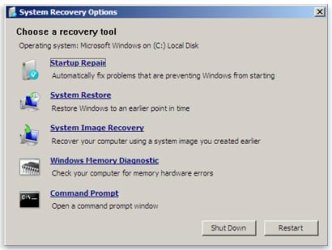
The first option is Repair my computer

which takes me to:
 

Attachments

  • 66b9e3c2-bb67-47bf-802c-b753b54bcc19_48.jpg
    66b9e3c2-bb67-47bf-802c-b753b54bcc19_48.jpg
    18.6 KB · Views: 2

My Computer My Computer

At a glance

Windows 7 Home Premium 32bitPentium Dual-Core CPU T4300 2.10GHz3.00GB
Computer Manufacturer/Model Number
Samsung R530
OS
Windows 7 Home Premium 32bit
CPU
Pentium Dual-Core CPU T4300 2.10GHz
Memory
3.00GB
Hard Drives
Hitachi Travelstar SATA 2.5" 750GB
Have a look at the init.wcl and int.w00 files with a hex editor - hxd is free and easy to use.

View attachment HxD.zip

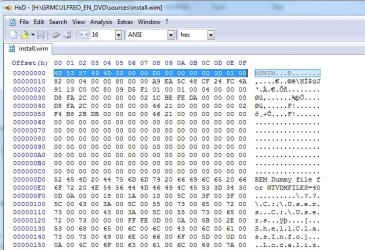
A .wim file looks like this:

hxd0.jpg

The .sny files look like this:

hxd1.jpg

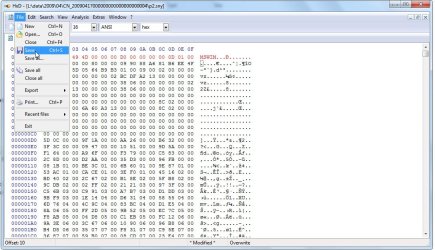
Simple to replace those first 16 bytes with the correct ones.

Copy these and paste them in

4D 53 57 49 4D 00 00 00 D0 00 00 00 00 0D 01 00

hxdpaste.jpg

hxd2.jpg

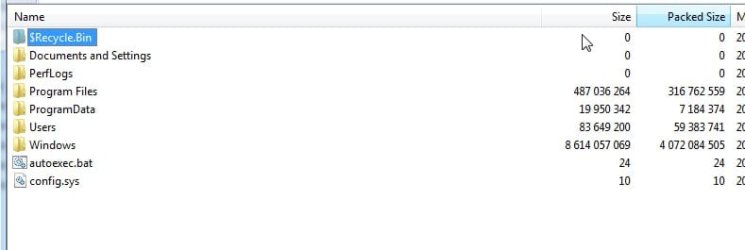
Now if that worked, it is a .wim and opens fine with 7-zip.

Hopefully you will see these inside. If so, that is your Install.wim.

hxd5.jpg

Just rename it to install.wim.
 

My Computers My Computers

  • At a glance

    7 X64i5 84002x8gb 3200mhz
    Computer type
    PC/Desktop
    OS
    7 X64
    CPU
    i5 8400
    Motherboard
    gigabyte b365m ds3h
    Memory
    2x8gb 3200mhz
    Hard Drives
    various
    PSU
    pure power 11 400w cm
    Case
    Coolermaster
    Cooling
    cryorig m9i
  • At a glance

    7x64g54008gb ddr4 2400
    Computer type
    PC/Desktop
    OS
    7x64
    CPU
    g5400
    Motherboard
    ga b365m ds3h
    Memory
    8gb ddr4 2400
    PSU
    xfx pro 450w
SIW2, this change can be made to the copy the OP added to a subfolder on the new drive? And then can be utilized from there?
 

My Computer My Computer

At a glance

Windows 7 Ultimate x64
OS
Windows 7 Ultimate x64
this change can be made to the copy the OP added to a subfolder on the new drive

yes

And then can be utilized from there?

yes - he will need the wim he is installing from on a different patition than he is installing to.

It can be used again if needs to reinstall in the future.

I haven't seen a Samsung one before - it is extremely likely they have just changed the headers - like Sony do.
 

My Computers My Computers

  • At a glance

    7 X64i5 84002x8gb 3200mhz
    Computer type
    PC/Desktop
    OS
    7 X64
    CPU
    i5 8400
    Motherboard
    gigabyte b365m ds3h
    Memory
    2x8gb 3200mhz
    Hard Drives
    various
    PSU
    pure power 11 400w cm
    Case
    Coolermaster
    Cooling
    cryorig m9i
  • At a glance

    7x64g54008gb ddr4 2400
    Computer type
    PC/Desktop
    OS
    7x64
    CPU
    g5400
    Motherboard
    ga b365m ds3h
    Memory
    8gb ddr4 2400
    PSU
    xfx pro 450w
Now if that worked, it is a .wim and opens fine with 7-zip.

Hopefully you will see these inside. If so, that is your Install.wim.

View attachment 225197

Just rename it to install.wim.

Replaced initial 16 with those. Won't open in 7 zip, no idea what I'm doing wrong.

What I have done is using Macrium created an image of the Recovery partition on old drive, it now shows as drive H in my new one.

Does this make it easier to tackle now?
 

My Computer My Computer

At a glance

Windows 7 Home Premium 32bitPentium Dual-Core CPU T4300 2.10GHz3.00GB
Computer Manufacturer/Model Number
Samsung R530
OS
Windows 7 Home Premium 32bit
CPU
Pentium Dual-Core CPU T4300 2.10GHz
Memory
3.00GB
Hard Drives
Hitachi Travelstar SATA 2.5" 750GB
yes - he will need the wim he is installing from on a different patition than he is installing to.

It can be used again if needs to reinstall in the future.

She... :p
 

My Computer My Computer

At a glance

Windows 7 Home Premium 32bitPentium Dual-Core CPU T4300 2.10GHz3.00GB
Computer Manufacturer/Model Number
Samsung R530
OS
Windows 7 Home Premium 32bit
CPU
Pentium Dual-Core CPU T4300 2.10GHz
Memory
3.00GB
Hard Drives
Hitachi Travelstar SATA 2.5" 750GB
...is a scotsWOMAN :) (despite the alias!)

(see - I do keep an eye on you!)
 

My Computer My Computer

At a glance

Win 7 x64 Home Premium (and x86 VirtualBox VM...i3 370M/i7 6500U8GB - finally :)/8GBit's an i3, dude!/dual Intel&nVidia
Computer type
Laptop
Computer Manufacturer/Model Number
Asus K52F or Lenovo B51-80
OS
Win 7 x64 Home Premium (and x86 VirtualBox VM)/Win10
CPU
i3 370M/i7 6500U
Motherboard
Asus/Lenovo
Memory
8GB - finally :)/8GB
Graphics Card(s)
it's an i3, dude!/dual Intel&nVidia
Sound Card
onboard
Monitor(s) Displays
15.6" built-in
Screen Resolution
1366x768/1920x1080
Hard Drives
750GB Seagate internal
Sundry external drives attached to other computers on the local network
1TB SSD on the Lenovo
PSU
n/a
Internet Speed
as much as I can get - usually on a dongle/phone, so <1MB/s
Antivirus
MSE/Defender
Browser
IE11/12/Edge/Chrome/FF(if I must)

My Computer My Computer

At a glance

Windows 7 Home Premium 32bitPentium Dual-Core CPU T4300 2.10GHz3.00GB
Computer Manufacturer/Model Number
Samsung R530
OS
Windows 7 Home Premium 32bit
CPU
Pentium Dual-Core CPU T4300 2.10GHz
Memory
3.00GB
Hard Drives
Hitachi Travelstar SATA 2.5" 750GB
Okay so after making a Macrium image of Recovery partition from old drive, it showed up alongside C: etc as drive H.

I used EasyBCD to add boot.wim from the Sources folder to add new entry.

Restarted, hit F4 to access Samsung Recovery Solution but again, the only option appearing is Windows 7.

So the plan is to try this with the init. files instead of boot.wim, add the entry and try that way?
 

My Computer My Computer

At a glance

Windows 7 Home Premium 32bitPentium Dual-Core CPU T4300 2.10GHz3.00GB
Computer Manufacturer/Model Number
Samsung R530
OS
Windows 7 Home Premium 32bit
CPU
Pentium Dual-Core CPU T4300 2.10GHz
Memory
3.00GB
Hard Drives
Hitachi Travelstar SATA 2.5" 750GB
Those big files will not be bootable.

That is what boot.wim is for.

I used EasyBCD to add boot.wim from the Sources folder to add new entry.

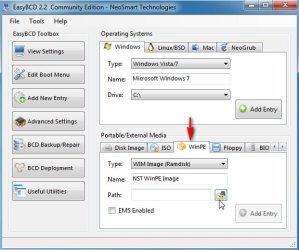
If you added as a winpe entry, you should have an entry on your initial boot menu called NST WINPE.

easy-winpe.jpg

No need to use F4 - just restart windows normally and you should see the menu.

Select that and see what happens.
 

My Computers My Computers

  • At a glance

    7 X64i5 84002x8gb 3200mhz
    Computer type
    PC/Desktop
    OS
    7 X64
    CPU
    i5 8400
    Motherboard
    gigabyte b365m ds3h
    Memory
    2x8gb 3200mhz
    Hard Drives
    various
    PSU
    pure power 11 400w cm
    Case
    Coolermaster
    Cooling
    cryorig m9i
  • At a glance

    7x64g54008gb ddr4 2400
    Computer type
    PC/Desktop
    OS
    7x64
    CPU
    g5400
    Motherboard
    ga b365m ds3h
    Memory
    8gb ddr4 2400
    PSU
    xfx pro 450w
I will also try selecting NST WINPE as default, as it was still set to Windows 7.

Here goes...
 

My Computer My Computer

At a glance

Windows 7 Home Premium 32bitPentium Dual-Core CPU T4300 2.10GHz3.00GB
Computer Manufacturer/Model Number
Samsung R530
OS
Windows 7 Home Premium 32bit
CPU
Pentium Dual-Core CPU T4300 2.10GHz
Memory
3.00GB
Hard Drives
Hitachi Travelstar SATA 2.5" 750GB
Weird. Since I restarted H is no more.

Can I add a boot entry from the copied Recovery folder in C: and boot from there or does it have to be a different drive?
 

My Computer My Computer

At a glance

Windows 7 Home Premium 32bitPentium Dual-Core CPU T4300 2.10GHz3.00GB
Computer Manufacturer/Model Number
Samsung R530
OS
Windows 7 Home Premium 32bit
CPU
Pentium Dual-Core CPU T4300 2.10GHz
Memory
3.00GB
Hard Drives
Hitachi Travelstar SATA 2.5" 750GB
Yes you can add a .wim that is anywhere.

Probably best to have all the recovery folder on a different partition from the one you will be installing to

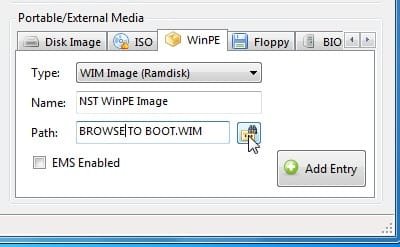
If it is a .wim , it must be added as a winpe entry.

You need to browse to the wim , then click Add Entry:

easy-winpe2.jpg


Boot.wim should boot up fine.

There will be some kind of oem restore/reinstall program in it.

That is likely to get lost - it probably won't recognize where it is.

Worth a try.

Don't worry about that for now - just see if you can get it to boot up.
 

My Computers My Computers

  • At a glance

    7 X64i5 84002x8gb 3200mhz
    Computer type
    PC/Desktop
    OS
    7 X64
    CPU
    i5 8400
    Motherboard
    gigabyte b365m ds3h
    Memory
    2x8gb 3200mhz
    Hard Drives
    various
    PSU
    pure power 11 400w cm
    Case
    Coolermaster
    Cooling
    cryorig m9i
  • At a glance

    7x64g54008gb ddr4 2400
    Computer type
    PC/Desktop
    OS
    7x64
    CPU
    g5400
    Motherboard
    ga b365m ds3h
    Memory
    8gb ddr4 2400
    PSU
    xfx pro 450w
Ok the NST WINPE option came up at boot. Went with that and it took me to Samsung Recovery Solution which hung at the initial screen, similar to how the old drive behaved at boot.

I'm gonna get on the desktop and try again, leave it to hang and see if it does anything in it's own time.
 

My Computer My Computer

At a glance

Windows 7 Home Premium 32bitPentium Dual-Core CPU T4300 2.10GHz3.00GB
Computer Manufacturer/Model Number
Samsung R530
OS
Windows 7 Home Premium 32bit
CPU
Pentium Dual-Core CPU T4300 2.10GHz
Memory
3.00GB
Hard Drives
Hitachi Travelstar SATA 2.5" 750GB
The samsung reinstall app. is expecting to find a pre defined partition layout - it is also expecting to find it's install media in particular place.

No surprise it is hanging.

What I would normally do is mount the boot.wim and drop in a little batch file - start that up with winpeshl.in, and the batch file will do the job using imagex to a partition you select.

However, for that to work - you need to be able to point it at some kind of install.wim file.

Because you haven't been able to get an install.wim created - it's not much use here.

I am not familiar with the Samsung recovery files. I would need to get hold of them to figure out how to get an installable wim .
 

My Computers My Computers

  • At a glance

    7 X64i5 84002x8gb 3200mhz
    Computer type
    PC/Desktop
    OS
    7 X64
    CPU
    i5 8400
    Motherboard
    gigabyte b365m ds3h
    Memory
    2x8gb 3200mhz
    Hard Drives
    various
    PSU
    pure power 11 400w cm
    Case
    Coolermaster
    Cooling
    cryorig m9i
  • At a glance

    7x64g54008gb ddr4 2400
    Computer type
    PC/Desktop
    OS
    7x64
    CPU
    g5400
    Motherboard
    ga b365m ds3h
    Memory
    8gb ddr4 2400
    PSU
    xfx pro 450w
I changed one of the init files to init.wim, added it to EasyBCD boot.

Chose NST WINPE when I restarted to see what happens and got this:

Windows failed to start. A recent hardware or software change might be the cause. To fix the problem:

1. Insert your Windows Installation disc and restart your computer.
2. Choose your language settings and click 'Next'
3. Click repair your computer.

If you do not have this disc, contact your system administrator or computer manufacturer for assistance.

File: \Windows\System32\Boot\Winload.exe

Status: 0xc000000d

Info: The selected entry could not beloaded because the application is missing or corrupt.
 

My Computer My Computer

At a glance

Windows 7 Home Premium 32bitPentium Dual-Core CPU T4300 2.10GHz3.00GB
Computer Manufacturer/Model Number
Samsung R530
OS
Windows 7 Home Premium 32bit
CPU
Pentium Dual-Core CPU T4300 2.10GHz
Memory
3.00GB
Hard Drives
Hitachi Travelstar SATA 2.5" 750GB
Back
Top