Solved Active partition changing safety

Cabinhook

New member
Local time
8:16 AM
Messages
22
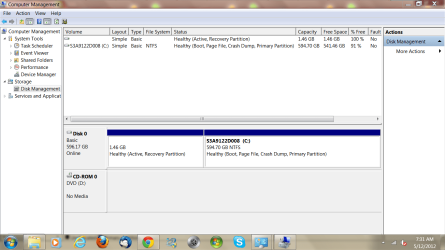
I have a few niggly windows 7 system problems unable to fix. I was doing a disc management check and there are 2 partitions, one for system recovery and the usual C disc partition with everything on it. I noticed that the recovery partition is marked as the active one. Is that correct or is it possible to change to the C drive as the active one without stuffing up. If things did go astray in changing it over how would I recover it again. The screen capture shows the status, thanks Jeff
 

Attachments

  • Capture.PNG
    Capture.PNG
    54.9 KB · Views: 24

My Computer

Computer Manufacturer/Model Number
toshiba
OS
Windows 7 home premium
CPU
I5
Motherboard
Toshiba
Memory
4gb
You want the C primary as the one seen as being active. Somehow the roles got switched there!

There are three methods to see the C primary remarked again explained in one guide for this to look over. One requires a 3rd party drive partitioning program like Partition Wizard. http://www.sevenforums.com/tutorials/71432-partition-mark-active.html
 

My Computers

System One System Two

  • Computer type
    PC/Desktop
    Computer Manufacturer/Model Number
    Custom builds = 2
    OS
    W7 Ultimate x64/W10 Pro x64/W11 Pro Triple Boot - Main PC W7 Remote PC Micro ATX W7 Pro x64/W11 Pro
    CPU
    AMD Phenom II X4 975 Deneb 3.6ghz - 965 2nd remote pc
    Motherboard
    Gigabyte GA-790XTA-UD4-Gigabyte GA-880GM-D2H remote pc
    Memory
    Kingston Hyper X DDR3 1600 1.5v 16gb - Hyper X Fury 8gb 2nd
    Graphics Card(s)
    MSI HD Radeon 5750 1gb - MSI HD Radeon 6450 on mini tower
    Sound Card
    Creative Labs X-Fi Xtreme Audio P - Realtek onooard 2nd case
    Monitor(s) Displays
    ASUS VW199T-P 19" HP 2082a Main-HP 2082a 20" remote pc
    Screen Resolution
    Asus 1440x900 - HP 1600x900
    Hard Drives
    WD Black 1TB HD per OS W7, W10, and pending W11 presently on 500gb OS Drive - Pending Triple 1TB HDs for Spanned Storage/backup volume
    Single 2TB external USB enclosure, single 1TB System 7 Host/Boot drive, Pending 8TB external HD for system image b
    PSU
    Corsair 750TX - primary / Corsair CX600 - second
    Case
    Antec 900-2 - SSD compatible / NZXT Vulcan mini tower
    Cooling
    Zalman CNPS9900A
    Keyboard
    AZIO L70 Backlit Letters Gaming - ONN Cordless/USB
    Mouse
    MSI DS200 Programmable, Logitech Cordless
    Internet Speed
    30mbps upgrade - primary hard wired - mini tower usb WiFi
    Antivirus
    GFI VIPRE Internet Security 2014 on W7 2016 beta on W10,
    Browser
    Cyberfox, WaterFox 64bit FF variants, FireFox x64, Pale Moon
    Other Info
    Accomdata fan cooled usb 2.0 PIDE/Sata II, III external enclosure.
    Sambient usb/eSata PATA/Sata II, III external enclosure.
  • Computer type
    PC/Desktop
    System Manufacturer/Model Number
    CUSTOM ASSEMBLY
    OS
    W7 Pro x64/W11 Pro
    CPU
    AMD Deneb 3.6ghz - 965
    Motherboard
    Gigabyte GA-880GM-D2H remote pc
    Memory
    Kingston Hyper X Fury 8gb
    Graphics Card(s)
    MSI HD Radeon 6450 DVI Output
    Sound Card
    Realtek onooard Creative or Other separate PENDING
    Monitor(s) Displays
    VIZIO 32" LCD TV Separate LCD Pending
    Screen Resolution
    1600x1080
    Hard Drives
    WD 500GB OS Host/Boot WD Green 1TB Storage/Backup
    PSU
    Corsair 600W - THERMALTAKE 600W spare case
    Case
    NZXT Vulcan mini tower
    Cooling
    Twin 120mm Top Fans - 240mm Side Cover
    Keyboard
    ONN Cordless/USB Logitech Cordless
    Mouse
    ONN USB/Cordless - Logitech Cordless
    Internet Speed
    DSL 5G
    Browser
    MS Edge, FireFox, WaterFox x64, FireFox Nightly
    Other Info
    OS Testing-Remote Access to Main TeamViewer
Some OEM's mark Recovery active so it will boot from its hotkey. Unless you changed it then I'd leave it alone.

However if you decide to do what most tech enthusiasts do and get the superior Clean Reinstall - Factory OEM Windows 7 then you can make your Recovery disks first and delete all partitions during the reinstall.
 
I noticed that the recovery partition is empty. 100% free space. Is that normal.
 

My Computer

Computer type
PC/Desktop
Computer Manufacturer/Model Number
Home made Desktop
OS
Windows 10 Pro. 64/ version 1709 Windows 7 Pro/64
CPU
Intel i7-6800K @ 4.3
Motherboard
ASUS X-99 Deluxe II
Memory
Corsair Platinum 16 gig @2400
Graphics Card(s)
EVGA GTX 1070 OC
Monitor(s) Displays
Asus 27" LED LCD/VE278Q
Screen Resolution
1920-1080 or 1280-720 HDMI
Hard Drives
INTEL SSD 730-240 Gb Sata 3.0/
PSU
EVGA Platium 1200W
Case
Phanteks Luxe Tempered Glass 8 fans/ one radiator
Cooling
XSPC/ Water Cooled CPU
Keyboard
Das 4 Professional
Mouse
Logitech M705/MX Anywhere 2-S
Internet Speed
100 mbits
Antivirus
Microsoft Security Essentials/ Malwarebytes Premium 3.0/ SAS
Browser
I.E. 11 default/Firefox/ ISP Time Warner Cable/Spectrum
Other Info
LG BluRay Burner/
Sound system-KLipsch-THX/
Icy Dock ssd Hot Swap bays.
Thanks, I'm not too computer savvy but I know how to mark the C drive as active but if the machine wont boot afterwards where do I go from there.
 

My Computer

Computer Manufacturer/Model Number
toshiba
OS
Windows 7 home premium
CPU
I5
Motherboard
Toshiba
Memory
4gb
yes I thought that it was strange also that the recovery partition was 100% free, how can that be ?
 

My Computer

Computer Manufacturer/Model Number
toshiba
OS
Windows 7 home premium
CPU
I5
Motherboard
Toshiba
Memory
4gb
Recovery files are hidden. There's at least the boot files there. You can see them by unhiding System and Hidden files in Control Panel>Folder Options>View.

Why do you want to change the boot partition to C? You might be removing Recovery's ability to boot when needed. Or did you change the Active flag to Recovery and wish to undo it now?

If you want to get rid of the Recovery Partition then make the Recovery disks first and we will give you the exact steps.

Otherwise you are making trouble for yourself for what reason?
 
Last edited:
With my limited know how I naturally thought that C should be the main drive and that the recovery partition is just for that purpose only. I have had some niggly problems ie backup and restore no good, no info in the boot section of msconfig, slow boot and shutdown, plus hibernation stopped working
 

My Computer

Computer Manufacturer/Model Number
toshiba
OS
Windows 7 home premium
CPU
I5
Motherboard
Toshiba
Memory
4gb
Thanks for the info Greg.
 

My Computer

Computer type
PC/Desktop
Computer Manufacturer/Model Number
Home made Desktop
OS
Windows 10 Pro. 64/ version 1709 Windows 7 Pro/64
CPU
Intel i7-6800K @ 4.3
Motherboard
ASUS X-99 Deluxe II
Memory
Corsair Platinum 16 gig @2400
Graphics Card(s)
EVGA GTX 1070 OC
Monitor(s) Displays
Asus 27" LED LCD/VE278Q
Screen Resolution
1920-1080 or 1280-720 HDMI
Hard Drives
INTEL SSD 730-240 Gb Sata 3.0/
PSU
EVGA Platium 1200W
Case
Phanteks Luxe Tempered Glass 8 fans/ one radiator
Cooling
XSPC/ Water Cooled CPU
Keyboard
Das 4 Professional
Mouse
Logitech M705/MX Anywhere 2-S
Internet Speed
100 mbits
Antivirus
Microsoft Security Essentials/ Malwarebytes Premium 3.0/ SAS
Browser
I.E. 11 default/Firefox/ ISP Time Warner Cable/Spectrum
Other Info
LG BluRay Burner/
Sound system-KLipsch-THX/
Icy Dock ssd Hot Swap bays.
It's somewhat unusual that there's no System flag on Recovery showing that the boot files do in fact reside there. However it's not enough to move Active flag if you didn't move it there yourself.

But just to be sure I'd boot into Win7 DVD or System Repair Disk to run Startup Repair - Run up to 3 Separate Times to see if it finds some things to fix and plants the System flag on the Active partition where it should be. This may help with some of the boot-related issues.
 
Thanks, I have already done this to no avail along with disc check, disc cleanup and system file checker. I'm now at the stage where because windows 8 is now available I'm thinking of upgrading to it and hope it sorts out all the crap.
 

My Computer

Computer Manufacturer/Model Number
toshiba
OS
Windows 7 home premium
CPU
I5
Motherboard
Toshiba
Memory
4gb
You ran Startup Repair from disk three separate times with reboot in between each?

Just checkin.
 
I did it from the recovery computer repair option on the hard disc ie f8 prior to boot then repair computer then startup repair which would not complete itself due to errors
 

My Computer

Computer Manufacturer/Model Number
toshiba
OS
Windows 7 home premium
CPU
I5
Motherboard
Toshiba
Memory
4gb
You may have a problem with the system restore capability or at least the OEM's installation of the recovery tools when running into Startup repair errors. That should fly through and restart the system in only a matter of seconds when no problems are present.

A repair cd you can burn and boot up from would have the Startup repair tool as well as command prompt options. You can boot from one you burn or even borrow a 7 dvd for the same edition while the repair cd burned by that Windows installation would be advised to repair the boot.

Now the clean everything up and eliminate "Bloatwares" idea works as long as you are familiar with looking up all the drivers for everything once a clean install of Windows is seen to. That means looking the WiFi as well as video, sound, and chipset drivers for that model at the main support. It's not that much different then doing the same with a Vista laptop which I had to do a few time recently due to a new larger drive replacing the old and cleaning malwares off one older laptop! (not to mention the 7 laptop that also saw a scam ware infection cleaned off!)

The one way to view the 100mb System Reserved boot partition with a custom install of 7 however onto a raw drive where the Windows installer creates that second small partition was to restore a full system image onto a second drive and then assigning a drive letter to the image's 100mb to see it added as a new logical drive. On any OEM system that is the last thing you want.

Better off booting live from a Linux live disk to see just where the Boot folder and Bootmgr file is located. Mounting the hidden recovery partition as a logical drive can leave it exposed to some forms of malwares it wouldn't generally see. Accidental deletion of boot files could be another possible concern. Burning recovery disks and creating system image backups are the best moves when you know everything is working at 100%!
 

My Computers

System One System Two

  • Computer type
    PC/Desktop
    Computer Manufacturer/Model Number
    Custom builds = 2
    OS
    W7 Ultimate x64/W10 Pro x64/W11 Pro Triple Boot - Main PC W7 Remote PC Micro ATX W7 Pro x64/W11 Pro
    CPU
    AMD Phenom II X4 975 Deneb 3.6ghz - 965 2nd remote pc
    Motherboard
    Gigabyte GA-790XTA-UD4-Gigabyte GA-880GM-D2H remote pc
    Memory
    Kingston Hyper X DDR3 1600 1.5v 16gb - Hyper X Fury 8gb 2nd
    Graphics Card(s)
    MSI HD Radeon 5750 1gb - MSI HD Radeon 6450 on mini tower
    Sound Card
    Creative Labs X-Fi Xtreme Audio P - Realtek onooard 2nd case
    Monitor(s) Displays
    ASUS VW199T-P 19" HP 2082a Main-HP 2082a 20" remote pc
    Screen Resolution
    Asus 1440x900 - HP 1600x900
    Hard Drives
    WD Black 1TB HD per OS W7, W10, and pending W11 presently on 500gb OS Drive - Pending Triple 1TB HDs for Spanned Storage/backup volume
    Single 2TB external USB enclosure, single 1TB System 7 Host/Boot drive, Pending 8TB external HD for system image b
    PSU
    Corsair 750TX - primary / Corsair CX600 - second
    Case
    Antec 900-2 - SSD compatible / NZXT Vulcan mini tower
    Cooling
    Zalman CNPS9900A
    Keyboard
    AZIO L70 Backlit Letters Gaming - ONN Cordless/USB
    Mouse
    MSI DS200 Programmable, Logitech Cordless
    Internet Speed
    30mbps upgrade - primary hard wired - mini tower usb WiFi
    Antivirus
    GFI VIPRE Internet Security 2014 on W7 2016 beta on W10,
    Browser
    Cyberfox, WaterFox 64bit FF variants, FireFox x64, Pale Moon
    Other Info
    Accomdata fan cooled usb 2.0 PIDE/Sata II, III external enclosure.
    Sambient usb/eSata PATA/Sata II, III external enclosure.
  • Computer type
    PC/Desktop
    System Manufacturer/Model Number
    CUSTOM ASSEMBLY
    OS
    W7 Pro x64/W11 Pro
    CPU
    AMD Deneb 3.6ghz - 965
    Motherboard
    Gigabyte GA-880GM-D2H remote pc
    Memory
    Kingston Hyper X Fury 8gb
    Graphics Card(s)
    MSI HD Radeon 6450 DVI Output
    Sound Card
    Realtek onooard Creative or Other separate PENDING
    Monitor(s) Displays
    VIZIO 32" LCD TV Separate LCD Pending
    Screen Resolution
    1600x1080
    Hard Drives
    WD 500GB OS Host/Boot WD Green 1TB Storage/Backup
    PSU
    Corsair 600W - THERMALTAKE 600W spare case
    Case
    NZXT Vulcan mini tower
    Cooling
    Twin 120mm Top Fans - 240mm Side Cover
    Keyboard
    ONN Cordless/USB Logitech Cordless
    Mouse
    ONN USB/Cordless - Logitech Cordless
    Internet Speed
    DSL 5G
    Browser
    MS Edge, FireFox, WaterFox x64, FireFox Nightly
    Other Info
    OS Testing-Remote Access to Main TeamViewer
Thanks, this is getting a bit too deep for me but I have made considerable progress by uninstalling all the accessory programs put on as extras by Toshiba then only reinstalling the ones that I really use and as a result everything is now almost back to normal with the exception of windows backup and restore which doesnt work. in that regard I have downloaded Todo and that does the job fine.
 

My Computer

Computer Manufacturer/Model Number
toshiba
OS
Windows 7 home premium
CPU
I5
Motherboard
Toshiba
Memory
4gb
That suggests you have deeper problems with the preinstall being seen there. You may have to get busy creating a recovery disk and even make a usb installation key(goes a little faster and smoother) and plan a fresh install folowing the guide greg posted earlier to get a fully working copy of Windows running.

The backup tools especially the option for creating a full system are generally found reliable unless there's a problem. A clean install of course while leaving the factory recvery partition intact can clean up the C volume as well as eliminate any bloatwares easy enough. From there you simply look up the drivers needed.

Once any Windows install becomes buggy the solution used here would be simply nuking the present C primary entirely even on the laptops I cleaned up when those were trashed by malwares. Before making backups with any program as far as the OS side having things in prime condition is what you would want. The Windows Easy Transfer tool can usually restore user files and program settings once everything is back on fresh again.

Another thing to suggest here would be running a diagnostics tool on the main drive itself to see if that is starting to see bad sectors which can cause a variety of issues. The hard drives in laptops generally end up taking a bit more pounding overall then any 3 1/2" on a desktop and tend to wear faster at times.

Scheduling the Disk Check tool to run on the next startup can also be a help to solve problems when errors are present on the C volume. To open up an elevated command prompt go to Start>All Programs>Accessories and right cilck on the command prompt icon. You want to select the run as admin option and type in "chkdsk /r". Once you press enter you will need to answer the yes or no message with Y to see the tool scheduled.

You likely have seen that before if you had an improper shutdown where you pressed a key to cancel the Disk Check tool when Windows was first starting up. This time you would want it to run and hopefully fix what it can. If the laptop has a Samsung or Hitachi drive in it the Sea Tools would be one hard drive diagnostics option to run. SeaTools for Windows | Seagate

Hitachi and Samsung still have their own tools of course with a list of the top 6 free ones seeing those and the Sea Tools included at Top 6 Free Hard Drive Diagnostic Softwares - Data Recovery Blog

 

My Computers

System One System Two

  • Computer type
    PC/Desktop
    Computer Manufacturer/Model Number
    Custom builds = 2
    OS
    W7 Ultimate x64/W10 Pro x64/W11 Pro Triple Boot - Main PC W7 Remote PC Micro ATX W7 Pro x64/W11 Pro
    CPU
    AMD Phenom II X4 975 Deneb 3.6ghz - 965 2nd remote pc
    Motherboard
    Gigabyte GA-790XTA-UD4-Gigabyte GA-880GM-D2H remote pc
    Memory
    Kingston Hyper X DDR3 1600 1.5v 16gb - Hyper X Fury 8gb 2nd
    Graphics Card(s)
    MSI HD Radeon 5750 1gb - MSI HD Radeon 6450 on mini tower
    Sound Card
    Creative Labs X-Fi Xtreme Audio P - Realtek onooard 2nd case
    Monitor(s) Displays
    ASUS VW199T-P 19" HP 2082a Main-HP 2082a 20" remote pc
    Screen Resolution
    Asus 1440x900 - HP 1600x900
    Hard Drives
    WD Black 1TB HD per OS W7, W10, and pending W11 presently on 500gb OS Drive - Pending Triple 1TB HDs for Spanned Storage/backup volume
    Single 2TB external USB enclosure, single 1TB System 7 Host/Boot drive, Pending 8TB external HD for system image b
    PSU
    Corsair 750TX - primary / Corsair CX600 - second
    Case
    Antec 900-2 - SSD compatible / NZXT Vulcan mini tower
    Cooling
    Zalman CNPS9900A
    Keyboard
    AZIO L70 Backlit Letters Gaming - ONN Cordless/USB
    Mouse
    MSI DS200 Programmable, Logitech Cordless
    Internet Speed
    30mbps upgrade - primary hard wired - mini tower usb WiFi
    Antivirus
    GFI VIPRE Internet Security 2014 on W7 2016 beta on W10,
    Browser
    Cyberfox, WaterFox 64bit FF variants, FireFox x64, Pale Moon
    Other Info
    Accomdata fan cooled usb 2.0 PIDE/Sata II, III external enclosure.
    Sambient usb/eSata PATA/Sata II, III external enclosure.
  • Computer type
    PC/Desktop
    System Manufacturer/Model Number
    CUSTOM ASSEMBLY
    OS
    W7 Pro x64/W11 Pro
    CPU
    AMD Deneb 3.6ghz - 965
    Motherboard
    Gigabyte GA-880GM-D2H remote pc
    Memory
    Kingston Hyper X Fury 8gb
    Graphics Card(s)
    MSI HD Radeon 6450 DVI Output
    Sound Card
    Realtek onooard Creative or Other separate PENDING
    Monitor(s) Displays
    VIZIO 32" LCD TV Separate LCD Pending
    Screen Resolution
    1600x1080
    Hard Drives
    WD 500GB OS Host/Boot WD Green 1TB Storage/Backup
    PSU
    Corsair 600W - THERMALTAKE 600W spare case
    Case
    NZXT Vulcan mini tower
    Cooling
    Twin 120mm Top Fans - 240mm Side Cover
    Keyboard
    ONN Cordless/USB Logitech Cordless
    Mouse
    ONN USB/Cordless - Logitech Cordless
    Internet Speed
    DSL 5G
    Browser
    MS Edge, FireFox, WaterFox x64, FireFox Nightly
    Other Info
    OS Testing-Remote Access to Main TeamViewer
Back
Top