
Add buttons to Win7 folder toolbars like in XP?

Verne

New member
Local time
2:57 AM
Messages
5
I recently moved from XP to Win7 and I'm still getting used to it. I've done some basic customization (Thanks, Win 7 Forums!) but I've run into a problem. In WinXP I routinely added new buttons to the folder toolbar to provide easy 1-click access to "delete", "refresh", etc. See the image below, with the red areas highlighted to show new buttons added via the right-click/customize... menu.
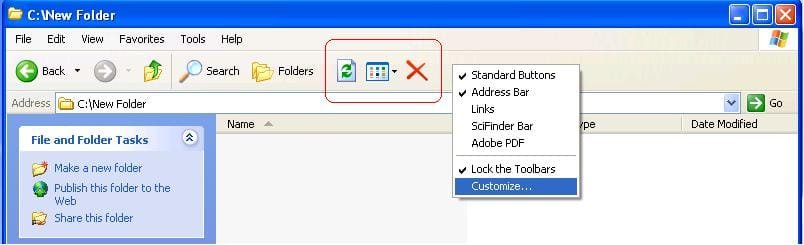
WinXP toolbar customization.JPG

How would I do the same sort of thing in Win7? See the Win7 image below. I would like to add "delete", "refresh", etc. to either of the green-highlighted areas. Is this possible?

Win7 toolbar customization.JPG

Thanks,
Verne
 

My Computer My Computer

OS
Windows 7 Professional

My Computer My Computer

Computer type
PC/Desktop
Computer Manufacturer/Model Number
Self Assembled
OS
Microsoft Windows 10 Pro Insider Preview 64-bit
CPU
Intel(R) Core(TM) i3-4130 CPU @ 3.40GHz
Motherboard
Gigabyte Technology Co., Ltd. B85M-D3H
Memory
Corsair Vengence 4GB x2 (8.00GB Dual-Channel DDR3 @ 798MHz)
Graphics Card(s)
2047MB GeForce GTS 450 (ZOTAC International)
Sound Card
Onboard (Realtek High Definition Audio)
Monitor(s) Displays
LG Flatron E2040T
Screen Resolution
1600x900
Hard Drives
Western Digital 1 TB
Seagate 500 GB
PSU
Corsair VS550
Case
Cooler Master K380
Cooling
Cooler Master Seidon 120V Plus
Keyboard
Logitech MK260r
Mouse
Logitech MK260r
Internet Speed
PMPL Broadband
Antivirus
Windows Defender + MBAM
Browser
Firefox
Other Info
Dell Studio 15" Laptop
Thanks

Thanks ivo. I am a bit daunted by the first approach, but I have taken the second approach and installed portions of Classic Shell that suited me. I have the Delete button in place, along with a few others, via Classic Shell's extra toolbar, but I'm still considering how to get the Refresh button up there.

I appreciate the links!
 

My Computer My Computer

OS
Windows 7 Professional
To add Refresh, you have to edit the Explorer.ini file.
Basicaly you need to add a new item in the ToolbarItems list and then describe it. For Command use "refresh". For the icon you will need to find a suitable icon. I can recommend "shell32.dll,16739".
Don't forget to remove the semi-colon from the ToolbarItems line. This post will get you started. SourceForge.net: Classic Shell: Topic: HOWTO: Customize the toolbar

BTW, why do you need a refresh button? It is right there on the right side of the address bar.
 

My Computer My Computer

Computer Manufacturer/Model Number
Me :) I build all my PCs
OS
Windows 7 Home 64, Vista Ultimate 64
Thanks

Thanks ivo. Getting the Classic Shell toolbar with the Delete button was a big help. Re: the refresh button to the side of the address bar, I know it's there but I'm a creature of habit! I'm deciding whether it's worth the effort to add it to the lower bar, or just get used to stretching that mouse hand a little further. :p

Thanks again for your assistance.
 

My Computer My Computer

OS
Windows 7 Professional
Back
Top