Add/Remove Default Start Menu Items

Phylum

New member
Local time
1:20 PM
Messages
4
I'm preparing a Windows 7 image for deployment, and there are a number of items I'd like to change on the Start Menu and Taskbar. Unfortunately, however, these are not items convered under the Tarkbar and Start Menu Properties box.


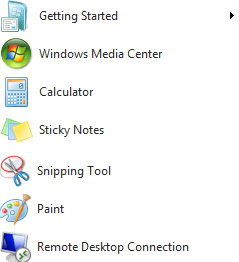
An out of the box Win 7 installation will have a number of items on the Start Menu by default, but we don't want any of them
  • Getting Started
  • displayswitch
  • Remote Desktop Connection
  • Sticky Notes
  • Snipping Tool
  • Calculator
  • Paint
  • Magnifier
These icons are different because they aren't 'pinned' but rather held there like a list of recently used items.
  • How can I clear this?
As for the Taskbar, the default pinned icons usually include IE, Windows Explorer, Windows Media Player, and perhaps something else, but we only want to keep IE available and unpin the rest.

Despite setting the CopyProfile directive to true in my sysprep unattend file, even though I've fully customized the Admin account, various Start Menu and Taskbar customizations don't replace the Default [User] template profile. To overcome the pin/unpin issue I wrote a script that would run during the user's first logon to do this. (I can link someone if they need/want it.)

  • Is there an easier way to setup default pinned/unpinned items in the Default [User] profile?
Update 6/12: For what its worth, I solved this and posted the solution here
SOLVED: How to Pin to Start Menu/Task Bar for Default User
 
Last edited:

My Computer My Computer

At a glance

Windows 7
OS
Windows 7
On the start menu you can right click, remove from list.

the taskbar you right click, unpin from taskbar.

As for how to not have them there in the first place, I don't know how you would do that.
 

My Computer My Computer

At a glance

Win 10 Pro x64Intel I5-2500K @3.3GHz16GB G.Skill Ripjaws X (4x4GB)EVGA GeForce 750 Ti SC 2GB
Computer type
PC/Desktop
Computer Manufacturer/Model Number
Self Built
OS
Win 10 Pro x64
CPU
Intel I5-2500K @3.3GHz
Motherboard
Asrock P67 Extreme4
Memory
16GB G.Skill Ripjaws X (4x4GB)
Graphics Card(s)
EVGA GeForce 750 Ti SC 2GB
Sound Card
ASUS Xonar DG 5.1 Channels 24-bit 96KHz PCI Interface Sound
Monitor(s) Displays
auria eq2367
Screen Resolution
1920 x 1080
Hard Drives
250GB Samsung 850 EVO SSD
1TB WD Blue
1TB Hitachi
PSU
SeaSonic X 650W 80 Plus Gold
Case
Corsair Obsidian 750D
Cooling
Corsair H60, Three 140mm case fans
Keyboard
Logitech Wireless Keyboard K520
Mouse
Logitech Wireless Mouse M310
Internet Speed
Wave Broadband ~ 100 dn 5 up
Antivirus
Windows Defender, Malwarebytes Premium
Browser
Edge, IE11, Chrome
Other Info
Laptop specs: HP g7-1365dx /
CPU: AMD A6-3420M APU with Radeon(tm) HD Graphics /
RAM: Crucial 8Gb (2x4Gb) /
SSD: Crucial M4-CT128M4SSD2 ATA Device/ FW 000F /
GFX: AMD Radeon HD 6520G /
OS: Windows 10 Pro x64
Thanks for the prompt response!


Yes you are correct in that one can go in and manually 'remove from list' each item. If I we were only dealing with a small number of users, I wouldn't mind, but when we're talking over 1500 people, they're...
  • not going to read the instructions on how to remove the icons,
  • going to have questions about said icons which translates into increased call volume requesting support for these features, which isn't bad in and of itself, but its beyond our current training scope.
Not to mention, it looks unpolished and this won't fly with management. I'm guessing those icons are stored someplace in the registry, but I'm not sure where I can find that or how, since, even running a registry monitoring tool, will capture way too much information.
 
Last edited:

My Computer My Computer

At a glance

Windows 7
OS
Windows 7
Phylum,

If you didn't find this answer, I found one that might help. Below are the links, but I'm putting in a brief description before the links for those on the Windows SevenForums.

Brief description
Microsoft is now enforcing the way that you create the default profile. Copying the profile can have some odd effects on new users if the profile is not cleaned up and copied over correctly. The "copyprofile" option in the sysprep does not do everything and is not fully documented yet. We could at least hope that Microsoft or someone would document this. The vbscript that was created by JuliusPIV on the Microsoft Technet forums is great. I didn't want to Pin any icons on the Start Menu or Taskbar, so I modified it and just unpinned everything. I think on the site, the "End Function" line is missing from the script.

Where answer was fixed...
SOLVED: How to Pin to Start Menu/Task Bar for Default User

Link referred to in answer...
Pin Items to the Start Menu or Windows 7 Taskbar via Script - The Deployment Guys - Site Home - TechNet Blogs

Reason you have to do it this way... (Microsoft blog)
Configuring Default User Settings – Full Update for Windows 7 and Windows Server 2008 R2 - The Deployment Guys - Site Home - TechNet Blogs

Hope this helps someone.

Dan V.
 

My Computer My Computer

At a glance

Mac OS X 10.6.3, Windows 7, Windows XP, Linux...
OS
Mac OS X 10.6.3, Windows 7, Windows XP, Linux variations
Easiest is to set the "number of recent programs on display" to zero. You can do that in the Start properties.
 

My Computer My Computer

At a glance

Vista, Windows7, Mint Mate, Zorin, Windows 8from 1.6GHz Duo to i7
Computer Manufacturer/Model Number
HP, Dell, Gateway, Toshiba - 4 laptops and 2 desktops
OS
Vista, Windows7, Mint Mate, Zorin, Windows 8
CPU
from 1.6GHz Duo to i7
Monitor(s) Displays
2x HP w2207
Hard Drives
5x HDD, 7x SSD, 12x Externals
Keyboard
with trackball - no mices
Mouse
Trackball mice
Internet Speed
DSL 6000
Thanks for the prompt response!


Yes you are correct in that one can go in and manually 'remove from list' each item. If I we were only dealing with a small number of users, I wouldn't mind, but when we're talking over 1500 people, they're...
  • not going to read the instructions on how to remove the icons,
  • going to have questions about said icons which translates into increased call volume requesting support for these features, which isn't bad in and of itself, but its beyond our current training scope.
Not to mention, it looks unpolished and this won't fly with management. I'm guessing those icons are stored someplace in the registry, but I'm not sure where I can find that or how, since, even running a registry monitoring tool, will capture way too much information.

I hate to be captain obvious here but using the group policy editor for this is the way to go.

If you open a command prompt and type gpedit.msc, go to "User configuration" then too "Administrative Templates" then scroll down a bit to "Start Menu and Taskbar". You will see the list of things you can adjust or remove for your User group. You might need to experiment a bit to get the desired effect. You may need to make the adjusment on both the Standard and Extended tabs. Right clicking will give you more filter options.
 

My Computer My Computer

At a glance

Windows 7 Ult, Windows 8.1 Pro,Q9650-4.275GHz, E8600 4.5GHz, E6750-3.8GHzG.Skill PC2 9600 1200Mhz 5 5 5 15 2TGTX480
Computer type
PC/Desktop
Computer Manufacturer/Model Number
Home built
OS
Windows 7 Ult, Windows 8.1 Pro,
CPU
Q9650-4.275GHz, E8600 4.5GHz, E6750-3.8GHz
Motherboard
Evga 780i FTW
Memory
G.Skill PC2 9600 1200Mhz 5 5 5 15 2T
Graphics Card(s)
GTX480
Sound Card
Asus Xonar D2
Monitor(s) Displays
HannsG
Screen Resolution
1680X1050
Hard Drives
GSkill Phoenix Pro 120GB SSD
PSU
ThermalTake Toughpower 1000Watt modular
Case
ThermalTake XaserV
Cooling
Xigmatek S1283
Keyboard
Logitech G15
Mouse
Logitech G9
Internet Speed
T1
Hi all
Thanks again for following up. Just as a farmer doesn't plant 1 seed, I posted this issue in a number of places. Using the information I found the Deployment Guy's blog I wrote my own script and posted the solution on the Technet site.

Also, I fixed the missing End Function :) thanks for that!

Now that I had the solution, and keeping in the spirit of open source, sharing the wealth of knowledge, and just closing the loop in general, I went back to, what I thought was, every forum where I posted.

So I apologize for not marking this as resolved - But thanks for the attention!
 
Last edited:

My Computer My Computer

At a glance

Windows 7
OS
Windows 7
I hate to be captain obvious here but using the group policy editor for this is the way to go.

If you open a command prompt and type gpedit.msc, go to "User configuration" then too "Administrative Templates" then scroll down a bit to "Start Menu and Taskbar". You will see the list of things you can adjust or remove for your User group. You might need to experiment a bit to get the desired effect. You may need to make the adjusment on both the Standard and Extended tabs. Right clicking will give you more filter options.

No worries Chev65. You are correct in that one has the ability to add/remove certain icons from the Stat and Taskbar, or simply enable/disable the ability to PIN icons on the Start Menu and Taskbar. However, from what I recall reading, and in my own investigation, the icons PIN'd to the Start Menu and Taskbar that I wanted to remove were not configurable via GPO. That is to say, I didn't see any option to remove the following (and then some) icons from the Start Menu
  • Getting Started
  • displayswitch
  • Remote Desktop Connection
  • Sticky Notes
  • Snipping Tool
  • Calculator
  • Paint
  • Magnifier
Nor did I see an option to unpin Explorer or Windows Media Player from the Taskbar.

Based on what I've read in several areas on the Microsoft Technet forums among other forums online, I've determined theres no built-in easy way to do this. Now that I've figured this out, I doubt I'll be looking into this much further. That is unless of course someone has a proof of concept of an easier way!

If you find that I overlooked something, please let me know.
 

My Computer My Computer

At a glance

Windows 7
OS
Windows 7
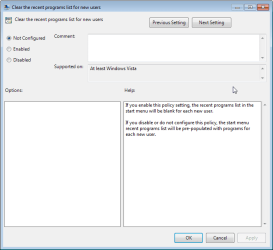
There is an easy way in group policy - User Policy\Admin Templates\Start Menu and Taskbar - Clear the recent programs list for new users.

Definition; If you enable this setting, the recent programs list will be blank for each new user
 

My Computer My Computer

At a glance

win 7 64
OS
win 7 64
I know this is an old thread - I am not sure where to look exactly.

Want to get rid of these items only.

=also unsure where to look for
User Policy\Admin Templates\Start Menu and Taskbar

Should I be looking here, see attachments.
 

Attachments

  • SnagIt-05062015 172922.png
    SnagIt-05062015 172922.png
    7.2 KB · Views: 28
  • SnagIt-05062015 173655.png
    SnagIt-05062015 173655.png
    30 KB · Views: 0
  • SnagIt-05062015 173657.png
    SnagIt-05062015 173657.png
    12 KB · Views: 29

My Computer My Computer

At a glance

Windows 7 Ultimate x64
OS
Windows 7 Ultimate x64
What are you trying to do exactly?
 

My Computer My Computer

At a glance

Windows 7 Ultimate x64 SP1AMD Phenom 2 1090T2x8GB Kingston HyperX Fury Black 1600Mhz Unga...MSI GTX 970 Gaming 4G
Computer type
PC/Desktop
Computer Manufacturer/Model Number
Custom Build
OS
Windows 7 Ultimate x64 SP1
CPU
AMD Phenom 2 1090T
Motherboard
Gigabyte GA-890FXA-UD5
Memory
2x8GB Kingston HyperX Fury Black 1600Mhz Unganged
Graphics Card(s)
MSI GTX 970 Gaming 4G
Sound Card
Realtek On-Board HD 7.1 Audio / Logitech G35
Monitor(s) Displays
3xAcer GD245HQ
Screen Resolution
1920x1080
Hard Drives
Samsung 850 Pro 512GB SSD - OS /
WD Caviar Black SATA 3 - 1 TBx2 - Dynamic RAID 0 /
WD Caviar Green SATA 2 - 640GBx2 - Dynamic RAID 0 /
WD Caviar Green SATA 2 - 640GB - Internal Backup /
Seagate Barracude SATA 3 - 3TB - External Backup/ Sync
PSU
HighPower 1000W
Case
Cooler Master HAF 932
Cooling
Noctua NH-D14
Keyboard
Logitech G19
Mouse
Logitech G500
Internet Speed
100/4 Mbit Cable (100GB quota)
Antivirus
ZoneAlarm Extreme Security / MBAM Pro / MBAE Free / SAS Free
Browser
IE 11 - Firefox - Chrome
Other Info
Logitech F710/ G27/ G940/ Z5500 // TrackIR 5 // Nvidia 3D Surround Vision
What are you trying to do exactly?

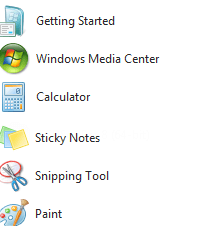
trying to get rid of some of the items in the startmenu
they get back even after removing from the list and reboot

=

saw a registry tweak on
[Resolved] Get rid of Start Menu items after install? - Unattended Windows 7/Server 2008R2 - MSFN Forum

But I am unsure it that does the trick..

[HKEY_CURRENT_USER\Software\Microsoft\Windows\CurrentVersion\Explorer\Advanced] "Start_MinMFU"=dword:00000000 "Start_JumpListItems"=dword:00000000
 

Attachments

  • SnagIt-06062015 184429.png
    SnagIt-06062015 184429.png
    6 KB · Views: 8

My Computer My Computer

At a glance

Windows 7 Ultimate x64
OS
Windows 7 Ultimate x64
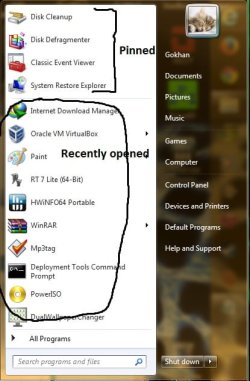
If you are talking about recently opened (see below):
start menu layout.jpg

then simply, right click start menu orb - properties - customize - (down at the bottom) number of recent programs to display - change it to 0. Ok - Apply
 

My Computer My Computer

At a glance

Windows 7 Ultimate x64 SP1AMD Phenom 2 1090T2x8GB Kingston HyperX Fury Black 1600Mhz Unga...MSI GTX 970 Gaming 4G
Computer type
PC/Desktop
Computer Manufacturer/Model Number
Custom Build
OS
Windows 7 Ultimate x64 SP1
CPU
AMD Phenom 2 1090T
Motherboard
Gigabyte GA-890FXA-UD5
Memory
2x8GB Kingston HyperX Fury Black 1600Mhz Unganged
Graphics Card(s)
MSI GTX 970 Gaming 4G
Sound Card
Realtek On-Board HD 7.1 Audio / Logitech G35
Monitor(s) Displays
3xAcer GD245HQ
Screen Resolution
1920x1080
Hard Drives
Samsung 850 Pro 512GB SSD - OS /
WD Caviar Black SATA 3 - 1 TBx2 - Dynamic RAID 0 /
WD Caviar Green SATA 2 - 640GBx2 - Dynamic RAID 0 /
WD Caviar Green SATA 2 - 640GB - Internal Backup /
Seagate Barracude SATA 3 - 3TB - External Backup/ Sync
PSU
HighPower 1000W
Case
Cooler Master HAF 932
Cooling
Noctua NH-D14
Keyboard
Logitech G19
Mouse
Logitech G500
Internet Speed
100/4 Mbit Cable (100GB quota)
Antivirus
ZoneAlarm Extreme Security / MBAM Pro / MBAE Free / SAS Free
Browser
IE 11 - Firefox - Chrome
Other Info
Logitech F710/ G27/ G940/ Z5500 // TrackIR 5 // Nvidia 3D Surround Vision
No I am not talking about recently opened.
I know about the 'number of recent programs to display' thing.

However, once that is set to '0' -no- recent items at all are displayed anymore, neither the ones that may be handy.
So it is either having this Getting Started, Sticky Notes, Snipping Tool, Calculator crap, together with my own recent programs in the recent items, or nothing.

Have two windows 7 x64 sp1-machines here.
The old pc does not have this stuff in the start menu. The new one has.
Both have 10 items as recent programs. Also the 'customize how links, icons.. etc' behave (the box above it) is identical.
Maybe one day they will disappear as they are not 'recently used programs'...?

=
 

My Computer My Computer

At a glance

Windows 7 Ultimate x64
OS
Windows 7 Ultimate x64
Ok, you still want to set that to 0.

Now, right click any shortcut you want in All Programs list and select "Pin to Start Menu", they will all be added to the top part. See my screenshot, labeled "Pinned".
 

My Computer My Computer

At a glance

Windows 7 Ultimate x64 SP1AMD Phenom 2 1090T2x8GB Kingston HyperX Fury Black 1600Mhz Unga...MSI GTX 970 Gaming 4G
Computer type
PC/Desktop
Computer Manufacturer/Model Number
Custom Build
OS
Windows 7 Ultimate x64 SP1
CPU
AMD Phenom 2 1090T
Motherboard
Gigabyte GA-890FXA-UD5
Memory
2x8GB Kingston HyperX Fury Black 1600Mhz Unganged
Graphics Card(s)
MSI GTX 970 Gaming 4G
Sound Card
Realtek On-Board HD 7.1 Audio / Logitech G35
Monitor(s) Displays
3xAcer GD245HQ
Screen Resolution
1920x1080
Hard Drives
Samsung 850 Pro 512GB SSD - OS /
WD Caviar Black SATA 3 - 1 TBx2 - Dynamic RAID 0 /
WD Caviar Green SATA 2 - 640GBx2 - Dynamic RAID 0 /
WD Caviar Green SATA 2 - 640GB - Internal Backup /
Seagate Barracude SATA 3 - 3TB - External Backup/ Sync
PSU
HighPower 1000W
Case
Cooler Master HAF 932
Cooling
Noctua NH-D14
Keyboard
Logitech G19
Mouse
Logitech G500
Internet Speed
100/4 Mbit Cable (100GB quota)
Antivirus
ZoneAlarm Extreme Security / MBAM Pro / MBAE Free / SAS Free
Browser
IE 11 - Firefox - Chrome
Other Info
Logitech F710/ G27/ G940/ Z5500 // TrackIR 5 // Nvidia 3D Surround Vision
Back
Top