
Adding a downmixed audio track to a DVD ISO

mjf

New member
Guru
Gold Member
VIP
Local time
9:43 AM
Messages
5,968
Location
Australia
I would like to add an audio track to a movie DVD ISO.
My problem is that to play iso versions of my video DVDs using a WD TV Live Media player. Unfortunately many of the DVDs only have an ACR3 5.1 for the main movie audio and WD do a bad job of down mixing to stereo which is what I need.

Handbrake seems to be able to do exactly what I want but for mp4 and mkv.

Is there any software to add a stereo down mixed track and get a playable ISO with the 2 audio tracks?

Add: I'd stress they are my paid for DVDs which haven't had a stereo track included.
 

My Computer My Computer

At a glance

Windows 7x64 Home Premium SP1Intel i7 2600kG.Skill Ripjaws (DDR3-1600) 2x4GBNvidia GeForce GTS 450; Intel HD Graphics 300...
Computer type
PC/Desktop
Computer Manufacturer/Model Number
Own build
OS
Windows 7x64 Home Premium SP1
CPU
Intel i7 2600k
Motherboard
ASUS P8Z68 Deluxe
Memory
G.Skill Ripjaws (DDR3-1600) 2x4GB
Graphics Card(s)
Nvidia GeForce GTS 450; Intel HD Graphics 3000(GT2+)
Monitor(s) Displays
Dell Ultrasharp IPS panel U2311H, Samsung SyncMaster P2350
Screen Resolution
1920x1080
Hard Drives
Samsung 850 Pro SSD 256GB, Samsung SSD 840 120GB, Seagates 1TB Barracuda ST31000528AS x2
PSU
Seasonic M12II 520W
Case
Lian Li Lancool PC-K60
Cooling
Case: 1x120mm, 3x140mm CPU: Hyper 212+
Keyboard
Logitech MK520 (wireless)
Mouse
Logitech MK520
Internet Speed
6-7 Mbps
Antivirus
Norton Security Premium, Malwarebytes on 2 (MSE on 3rd PC)
Browser
FireFox
Other Info
Audio: Logitech Z523 2.1
I would like to add an audio track to a movie DVD ISO.
My problem is that to play iso versions of my video DVDs using a WD TV Live Media player. Unfortunately many of the DVDs only have an ACR3 5.1 for the main movie audio and WD do a bad job of down mixing to stereo which is what I need.

Handbrake seems to be able to do exactly what I want but for mp4 and mkv.

Is there any software to add a stereo down mixed track and get a playable ISO with the 2 audio tracks?

Add: I'd stress they are my paid for DVDs which haven't had a stereo track included.
Is this just a very difficult thing to do?
 

My Computer My Computer

At a glance

Windows 7x64 Home Premium SP1Intel i7 2600kG.Skill Ripjaws (DDR3-1600) 2x4GBNvidia GeForce GTS 450; Intel HD Graphics 300...
Computer type
PC/Desktop
Computer Manufacturer/Model Number
Own build
OS
Windows 7x64 Home Premium SP1
CPU
Intel i7 2600k
Motherboard
ASUS P8Z68 Deluxe
Memory
G.Skill Ripjaws (DDR3-1600) 2x4GB
Graphics Card(s)
Nvidia GeForce GTS 450; Intel HD Graphics 3000(GT2+)
Monitor(s) Displays
Dell Ultrasharp IPS panel U2311H, Samsung SyncMaster P2350
Screen Resolution
1920x1080
Hard Drives
Samsung 850 Pro SSD 256GB, Samsung SSD 840 120GB, Seagates 1TB Barracuda ST31000528AS x2
PSU
Seasonic M12II 520W
Case
Lian Li Lancool PC-K60
Cooling
Case: 1x120mm, 3x140mm CPU: Hyper 212+
Keyboard
Logitech MK520 (wireless)
Mouse
Logitech MK520
Internet Speed
6-7 Mbps
Antivirus
Norton Security Premium, Malwarebytes on 2 (MSE on 3rd PC)
Browser
FireFox
Other Info
Audio: Logitech Z523 2.1
Well, kinda, yes.
Replacing audio streams from a DVD ISO means that you would need to decrypt the DVD, separating the audio and video streams, then process the audio into the format of choice and then burn the DVD to ISO again.

DVDFab HD Decrypter can help you with the first task, and I find that the AC3Tool is a great resource for manipulating AC3 files; you can downmix it do a 2ch WAV file and do whatever you want with it. Just note, it must be run elevated (run as admin).
 

My Computer My Computer

At a glance

Windows 7 Home Premium x64Intel Core i5 2500K8GB DDR3nVidia GeForce GTX650 Ti BOOST
Computer type
Laptop
Computer Manufacturer/Model Number
Custom
OS
Windows 7 Home Premium x64
CPU
Intel Core i5 2500K
Motherboard
MSI MS-7750
Memory
8GB DDR3
Graphics Card(s)
nVidia GeForce GTX650 Ti BOOST
Sound Card
Realtek
Monitor(s) Displays
21' Philips
Screen Resolution
Full HD
Hard Drives
1TB
PSU
500W
Try Freemake Video Converter.

It may not take the ISO, but you can mount it on a virtual drive and it should take it. Convert DVD to DVD :). Choose destination as ISO. You must get a DVD ISO with Stereo sound if what the screenshot tells is true. Hmmmm.... You may not have much control on various parameters (except the ones in blue). It is all simple click, click,click. ( I only explored the possibility and did not run the trial )
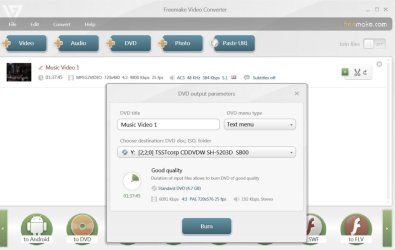
DVD AC3 5.1 to Stereo.jpg

There may be other Video Converters which may do the same with better control on various parameters. You may have to check and try. Try XMedia Recode.
 

My Computer My Computer

At a glance

Windows 7 Ultimate 32bitAMD Phenom II X3 720 ProcessorTranscend DDR2 (PC2 6400) 4 X 1GBIntegrated + ATI Radeon 4550
Computer Manufacturer/Model Number
self-assembled
OS
Windows 7 Ultimate 32bit
CPU
AMD Phenom II X3 720 Processor
Motherboard
Gigabyte GA-MA78GM-S2H Revision 1.0
Memory
Transcend DDR2 (PC2 6400) 4 X 1GB
Graphics Card(s)
Integrated + ATI Radeon 4550
Sound Card
Integrated Realtek ALC 889A
Monitor(s) Displays
DELL 1704 FPT
Screen Resolution
1280 x 1024
Hard Drives
Western Digital Caviar SE16 250 GB x2 in RAID 0
PSU
Coolermaster 400 W
Case
Zebronics Cube
Cooling
stock
Keyboard
Microsoft - wired
Mouse
Microsoft - wired
Internet Speed
ADSL 256-512Kbps
Back
Top