Solved Address Bar missing in IE 11

Mike99

New member
Member
VIP
Local time
9:07 AM
Messages
258
I just noticed there was no address bar in IE11. I only use IE about once a month so I don't when this happened.

Under the View > Toolbars tab there is no address bar listed.

I Googled & what frequently shows up is adding something to a registry key or deleting something. That seems a bit excessive just to get a missing toolbar back, especially since I never fooled around with the registry in the first place (at least not recently).

Is there some other other setting that I missed that turns the address bar off & on?
 

My Computer My Computer

Computer type
PC/Desktop
Computer Manufacturer/Model Number
HP
OS
Windows 7 Ultimate x64
CPU
AMD Athlon x4
Motherboard
HP / Foxconn
Memory
8.00 GB
Graphics Card(s)
GTX 750Ti SC
Monitor(s) Displays
ACER
Hard Drives
1TB Seagate
PSU
380W
Cooling
Stock
Internet Speed
3 Mbps
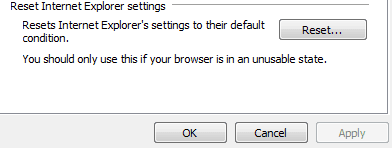
Go to Internet options, click on the advanced tab and the click the Reset button under "Reset Internet Explorer settings".
See if that fixes it.
 

Attachments

  • IE.PNG
    IE.PNG
    2.9 KB · Views: 15

My Computer My Computer

Computer type
PC/Desktop
Computer Manufacturer/Model Number
custom build
OS
Windows 7 Professional 64bit
CPU
Intel i7-5960X
Motherboard
EVGA X99 Classified
Memory
64GB Corsair Dominator 2400MHz
Graphics Card(s)
3 EVGA GTX980's
Sound Card
on board
Monitor(s) Displays
3 Dell E2715H 27"
Screen Resolution
1920x1080 (5760x1080)
Hard Drives
Samsung 950 Pro 1TB M.2 SSD,
Western Digital Black 2TB HDD's x5
Western Digital Black 1TB HDD's x3
PSU
Corsair AX1200i
Case
Corsair 750D
Cooling
Corsair H110i GT
Keyboard
Corsair K70
Mouse
Corsair M45
Internet Speed
250 down/10 up
Antivirus
Microsoft Security Essentials
Browser
IE 11, Google Chrome
I did the reset but still no address bar.
 

My Computer My Computer

Computer type
PC/Desktop
Computer Manufacturer/Model Number
HP
OS
Windows 7 Ultimate x64
CPU
AMD Athlon x4
Motherboard
HP / Foxconn
Memory
8.00 GB
Graphics Card(s)
GTX 750Ti SC
Monitor(s) Displays
ACER
Hard Drives
1TB Seagate
PSU
380W
Cooling
Stock
Internet Speed
3 Mbps
Hi:

Disclaimer: I do not use IE often & (as of the moment) I am working on my Win10 box, so I cannot reproduce your issue.

Yes, after searching the 'net, I agree with @HAVOC that a reset would be a good thing to try.
Otherwise, the simple regedit may be needed (you can back up the registry first, e.g. with ERUNT).

Before doing so:
This one is for XP, but it's from horse's mouth (MS):
https://support.microsoft.com/en-us/kb/962963
-- what happens when you press the F11 key?
-- what happens when you press the ALT key?

Here are some other articles that might help:

Also:
IE 11: Address bar disappeared - Microsoft Community
toolbar - Internet Explorer is missing the address bar - Super User

Please let us know how it goes, so that we can all learn,

MM
 

My Computer My Computer

Computer type
PC/Desktop
Computer Manufacturer/Model Number
Dell Studio XPS 8500
OS
OEM Windows 7 Ult (x64) SP1
CPU
Intel Core-i7 3770 @ 3.4 GHz
Motherboard
"Dell" branded
Memory
16 GB DDR3 SDRAM @ 1333 MHz
Graphics Card(s)
NVidia GeForce GT620 1 GB
Sound Card
THX TruStudio PC
Monitor(s) Displays
Dell U2410 Full HD
Hard Drives
2.0 TB SATA2 @ 7200 RPM
PSU
350W
Keyboard
MS 4000 Ergon - Wired
Mouse
Logitech Anywhere MX
Internet Speed
Cable HSI w/Turbo (router)
Antivirus
KIS-MBAM Premium-MBAE Premium
Browser
Fx (current version); IE
Other Info
And a Win7/64 Pro laptop; And a Win10/64 Pro desktop.
I'm not certain what is happening.
I have a small address bar next to the left & right arrows at the top of the screen. If I type something in there I do go results or hits, but they all are Bing results. The URLs all start with bing.com. This confused me because I do not have the Bing Bar turned under on View > Toolbars.

I found the following & did this:
If you right click on the Main IE bar (that's the one with the forward/and back arrows), see if there is a show tabs on a separate row listed in the context menu. If there is, check that. The result should then produce the Address Bar at the top of your screen.

That gave me a big long address bar which I figured was a normal address bar. But when I type in it the URLs start with bing.com. IOW it duplicates the small address bar & both do display.

Since I'm not a regular user of IE11 I'm thinking I'm working with a "Bing Bar" even though I have that toolbar set to not show up. Guess I don't know what a Bing Bar really is.

All that being said, I'm going to presume everything is working properly.

Thanks for everyone's replies.
 

My Computer My Computer

Computer type
PC/Desktop
Computer Manufacturer/Model Number
HP
OS
Windows 7 Ultimate x64
CPU
AMD Athlon x4
Motherboard
HP / Foxconn
Memory
8.00 GB
Graphics Card(s)
GTX 750Ti SC
Monitor(s) Displays
ACER
Hard Drives
1TB Seagate
PSU
380W
Cooling
Stock
Internet Speed
3 Mbps
Back
Top