
Adjusting RAM voltage to sticker on RAM

I have some new G-skill 1066 Mhz RAM. My motherboard has the voltage at 1.8V. The RAM spec voltage is 2.0-2.1V. I have set this at 1.9V but am wondering if going to 2.0 or 2.1V would be a good idea. I have seem some tutorials and 2 page long papers on overclocking RAM but this is more simple. Is it better to have RAM voltage set to spec or leave it at "normal" or "auto"

Hi,

I have 2.1V rams. OCZ 1066mhz 5-5-5-15. When I left the settings in auto and ran Memtest I had some errors in some tests. Then I posted them in the manufacturers forum they suggested to set the V and timings manually. I did it as they said and no errors in test and the rams work ok. Later I set the V to auto, still working without problems.

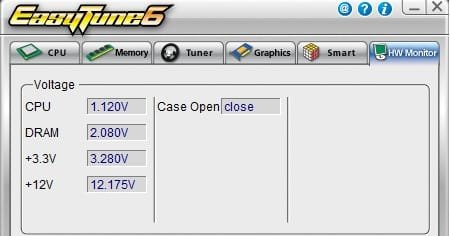
Because you have and Gigabyte board you have ET6 software, you can set your ram voltage in bios to auto set the timings manually (mem profile 'turbo' that is the default ) then check in ET6 the dram voltage.

If it shows 2.080V 2.060 or 2.1. It is working without problems. Later you can run memtest to make sure there are no problems.
 

Attachments
  • et.jpg
    et.jpg
    14.4 KB · Views: 54

My Computer My Computer

At a glance

Windows 7 7232b x64Intel Q8300 @ 2500 MhzOCZ 4x2GB DDR2 1066 MhzPalit 512MB 9800GTX+
OS
Windows 7 7232b x64
CPU
Intel Q8300 @ 2500 Mhz
Motherboard
Gigabyte EP45-DS3R
Memory
OCZ 4x2GB DDR2 1066 Mhz
Graphics Card(s)
Palit 512MB 9800GTX+
Sound Card
Realtek HD
Monitor(s) Displays
Samsung T220
Screen Resolution
1680x1050
Hard Drives
WD 500GB 32MB, Samsung 200GB 8MB
PSU
OCZ 600SXS
Case
CoolerMaster Centurion CAC-T05
Cooling
Arctic Cooling Fans
Other Info
Epson v500
Cool, thanks for the info. I have been looking at the ET6 software. I have not decided whether to use it or not. I suppose it would work OK.....

That's good info the manufacturer told you to set the RAM manually. I have read that about 90% of people are running their RAM under the recommended voltage...but if it works, that's the main thing I guess. I just want it to work.

My build is currently laying on my table waiting for a couple of parts to come in the mail....I can't wait to get it running again. I am really thinking about getting a new CPU. I didn't know what I do now and the Q8200 might not do what I want. I think I will get a Q9550 now. haha
 

My Computer My Computer

At a glance

Windows 7 Professional x64Intel Core i7 8604GB DDR3 Mushkin 1600Mhz @ 7-8-7-20MSI GTS250 1GB DDR3 Twin Frozr
Computer Manufacturer/Model Number
Keeps changing - (Custom)
OS
Windows 7 Professional x64
CPU
Intel Core i7 860
Motherboard
Gigabyte GA-P55-UD4P
Memory
4GB DDR3 Mushkin 1600Mhz @ 7-8-7-20
Graphics Card(s)
MSI GTS250 1GB DDR3 Twin Frozr
Sound Card
Onboard realtek
Monitor(s) Displays
Samsung SyncMaster 24" P2450 + Samsung 20" 2033
Screen Resolution
1920 X 1080 and 1600 X 900 (#2 system 1440 X 900)
Hard Drives
Patriot Inferno 120GB SSD + 3 WD Blue 640GB drives
PSU
Corsair 750 HX Modular
Case
Lancool PC-K62
Cooling
Cooler Master TX3 CPU cooler and 4-140mm and 1-120mm case
Keyboard
Gigabyte USB keyboard
Mouse
Microsoft wireless laser mouse 5000
Internet Speed
7 Mb down 1.5 up
Other Info
System #2: AMD Phenom II X6 1055T (Freezer 7 Pro cooler) - Gigabyte 880GMA-UD2H - WD 500GB Black - 9500GT (1GB) 500W OCZ modular PSU - Antec 200 case. System #3 (LapTop) Core 2 Duo T6670 - 320GB 7200RPM HD - 4GB DDR3 RAM.
Put it this way nate: If g.skill didn't recommend you run at 2.1v, they wouldn't have put it on the sticker ;)

As long as it's stable at whatever volts you use, it's okay :)
 

My Computer My Computer

At a glance

8 Pro x64i7 3770K 4.6GHz16GB G.Skill Trident X 2666mhzx2 EVGA 780 Ti Superclocked SLI
Computer type
PC/Desktop
Computer Manufacturer/Model Number
Systems by SmartEyeball
OS
8 Pro x64
CPU
i7 3770K 4.6GHz
Motherboard
ASUS P8Z77 WS
Memory
16GB G.Skill Trident X 2666mhz
Graphics Card(s)
x2 EVGA 780 Ti Superclocked SLI
Sound Card
SB X-FI Surround 5.1 PRO USB / ATH-AD900 Headphones
Monitor(s) Displays
x3 Dell U2410 / 58" Samsung
Screen Resolution
5760*1200/ 1920*1200
Hard Drives
2x Intel 520 240GB (RAID 0) * 2x WD Caviar Blacks 2TB (RAID 0) * 2TB WD Caviar Black * Sony Optirac DVD
PSU
Silverstone Strider Evolution 1200W
Case
Thermaltake Level 10 GT Snow Edition
Cooling
Noctua NH-D14
Keyboard
Topre Realforce // Ducky Shine MX Black // Filco Ninja TKL
Mouse
Thermaltake Theron (Highly Recommended) + Razer Imperator
Antivirus
MSE
Browser
IE, FF, WaterFox
Other Info
GT Extreme V2 Sim Racing Cockpit + 40" LCD and K/B Mouse stand ▼
Fanatec CSR Elite Wheel + Clubsport V1 Pedals + CSR shifter/7G-H ▼Saitek X52 Pro ▼ TrackIR 5 Pro
Buttkicker v2 Seat Rumbler with Dedicated 5.1 and Sub Woofer attached to frame ▼
=
Bloody Big Grin
I have your mobo's cousin, and it had the same problem...it kept the voltage at 1.8, even though my RAM (g.skill like yours) called for 2.0 - 2.1.

I was getting BSOD's pretty regularly until I boosted the voltage up to 2.0. Since then, I haven't had a single BSOD.

I'm pretty new to tweaking, but I think it helps to have the RAM running at its designed specs.

Noob advice... so take it for what its worth.:)
 

My Computer My Computer

At a glance

windows 7 x64 Home Premiumintel q6600g.skill 8gb ddr2 1066 (pc2 8500)evga geforce 9800 gtx 512 mb
Computer Manufacturer/Model Number
me / #1
OS
windows 7 x64 Home Premium
CPU
intel q6600
Motherboard
gigbyte ga ep45 ud3l
Memory
g.skill 8gb ddr2 1066 (pc2 8500)
Graphics Card(s)
evga geforce 9800 gtx 512 mb
Screen Resolution
1680 x 1050
Hard Drives
wd caviar black 500 gb
wd caviar black 1tb
wd elements 1tb external hd x2
PSU
raidmax 500w
Case
smilodon (yes, t'was the pretty blue lites that got me!)
Back
Top