Administrative Tools - Restore Shortcuts

How to Restore the Default Windows 7 Administrative Tools


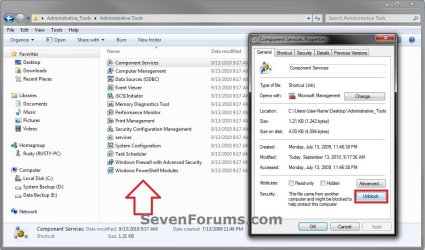
   Information
Administrative Tools is a folder in Control Panel that contains tools for system administrators and advanced users. The tools in the folder might vary depending on which edition of Windows 7 you are using. This will show you how to restore the default Administrative Tools and it's shortcuts in Windows 7.
   Tip
Administrative Tools is located at the hidden system folder below.

%ProgramData%\Microsoft\Windows\Start Menu\Programs\Administrative Tools

If the Admnistrative Tools folder is missing from this location, then you will see this Location is not available error below when you try to open Administrative Tools from any location.
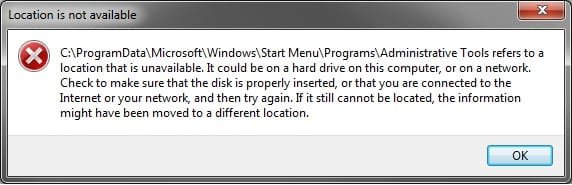
Error.jpg


Some common Administrative Tools in this folder include:

Administrative Tool | Description
Component Services|Configure and administer Component Object Model (COM) components. Component Services is designed for use by developers and administrators.
Computer Management| Manage local or remote computers by using a single, consolidated desktop tool. Using Computer Management, you can perform many tasks, such as monitoring system events, configuring hard disks, and managing system performance.
Data Sources (ODBC)| Use Open Database Connectivity (ODBC) to move data from one type of database (a data source) to another. For more information, see What is ODBC?
Event Viewer| View information about significant events, such as a program starting or stopping, or a security error, which are recorded in event logs.
iSCSI Initiator| Configure advanced connections between storage devices on a network. For more information, see What is Internet Small Computer System Interface (iSCSI)?
Local Security Policy | View and edit Group Policy security settings.
Performance Monitor| View advanced system information about the central processing unit (CPU), memory, hard disk, and network performance.
Print Management| Manage printers and print servers on a network and perform other administrative tasks.
Services | Manage the different services that run in the background on your computer.
System Configuration| Identify problems that might be preventing Windows from running correctly. For more information, see Using System Configuration.
Task Scheduler| Schedule programs or other tasks to run automatically. For more information, see Schedule a task.
Windows Firewall with Advanced Security| Configure advanced firewall settings on both this computer and remote computers on your network.
Windows Memory Diagnostic | Check your computer's memory to see if it's functioning properly.
Windows PowerShell Modules |Lets you organize your Windows PowerShell scripts and functions into independent, self-contained units.
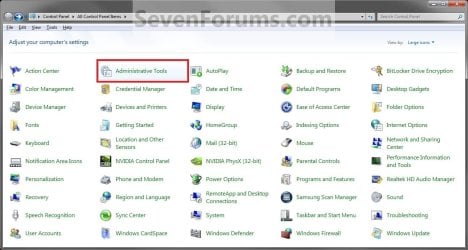
EXAMPLE: Administrative Tools in Control Panel
Control_Panel.jpg
EXAMPLE: Administrative Tools in Start Menu
NOTE: To add or remove the Administrative Tools button from the Start menu, see How to Add or Remove Administrative Tools in Windows 7 Start Menu.
Start_Menu.jpg
Here's How:
1. Click on the Download button below to download, and save the file below to your desktop.
NOTE: This is the same in both the 32-bit and 64-bit Windows 7.
Administrative_Tools.zip


Download


2. Unblock the ZIP file.

3. Open the downloaded ZIP file, and extract (drag and drop) the Administrative Tools folder to your desktop.

4. In Windows Explorer, navigate to the hidden system folder below. (see screenshot below)
NOTE: You can also open the Start Menu and right click on All Programs,click on Open All Users, and open the Programs folder to get to this location below as well.
C:\ProgramData\Microsoft\Windows\Start Menu\Programs
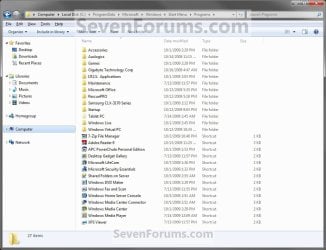
Step1.jpg
5. Drag the extracted Administrative Tools folder from step 3 above into the folder location in step 4, and drop it to an empty area in the main window (not in Navigation Pane). (see screenshot above)

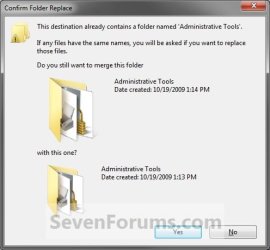
6. If Administrative Tools Folder is in the Programs folder (step 4)
NOTE: If not, then go to step 7 instead.
A) Click on Yes. (see screenshot below)
Step2A.jpg
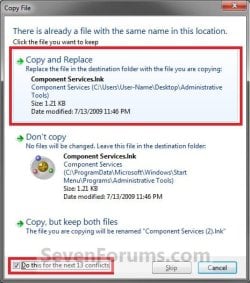
B) Check the Do this for next ## conflicts box at the bottom, and click on the Copy and Replace option. (see screenshot below)
Step2B.jpg
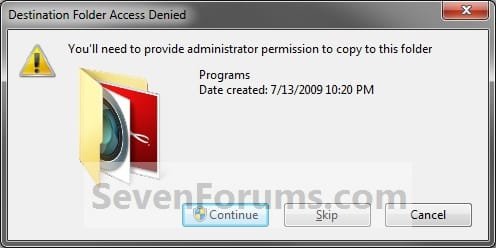
7. Click on Continue. (see screenshot below)
Step2.jpg
8. If prompted by UAC, click on Yes.

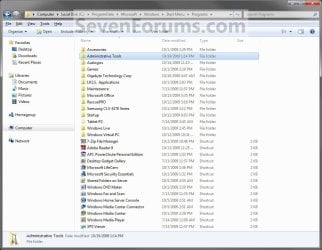
9. The Administrative Tools folder (step 2) has now been restored to the Programs folder (step 4). You should now be able to open Adminsitrative Tools from the Control Panel and Start Menu.
Step3.jpg
That's it,
Shawn


Attachments

Last edited:
You're most welcome Ivsunz. I'm happy to hear that it was able to help. :)
 

My Computer My Computer

Computer type
PC/Desktop
Computer Manufacturer/Model Number
Self built custom
OS
64-bit Windows 11 Pro for Workstations
CPU
Intel i7-8700K OC'd to 5 GHz
Motherboard
ASUS ROG Maximus XI Formula Z390
Memory
64 GB (4x16GB) G.SKILL TridentZ RGB DDR4 3600 MHz
Graphics Card(s)
ASUS ROG-STRIX-GTX1080TI-O11G-GAMING
Sound Card
Integrated
Monitor(s) Displays
2 x Samsung Odyssey G7 27"
Screen Resolution
2560x1440
Hard Drives
1TB Samsung 990 PRO M.2,
4TB Samsung 990 PRO PRO M.2,
TerraMaster F8 SSD Plus NAS
PSU
Seasonic Prime Titanium 850W
Case
Thermaltake Core P3
Cooling
Corsair Hydro H115i
Keyboard
Logitech wireless K800
Mouse
Logitech MX Master 4
Internet Speed
2 Gb/s Download and 100 Mb/s Upload
Antivirus
Malwarebyte Anti-Malware Premium
Browser
Google Chrome
Other Info
Logitech Z625 speaker system,
Logitech BRIO 4K Pro webcam,
HP Color LaserJet Pro MFP M477fdn,
APC SMART-UPS RT 1000 XL - SURT1000XLI,
Galaxy S23 Plus phone
OMG . . . . :D You Fricking Rocked it!!! Thanx for the very PREcise; CONcise and most importantly Spot on help tutorial that I can't remember any other such as easy and quick to follow and to a quick gratification of succession to my problem. My Hat is off to you, well in-knowledged Sir !! Hats Off!:thumbsup: I Bow to your worthiness !
 

My Computer My Computer

Computer type
PC/Desktop
Computer Manufacturer/Model Number
hp
OS
windows 7 home premium 32bit
CPU
amd
Memory
6GB
Browser
ie 8
You're most welcome lilninja, and welcome to Seven Forums. I'm glad it could help. :)
 

My Computer My Computer

Computer type
PC/Desktop
Computer Manufacturer/Model Number
Self built custom
OS
64-bit Windows 11 Pro for Workstations
CPU
Intel i7-8700K OC'd to 5 GHz
Motherboard
ASUS ROG Maximus XI Formula Z390
Memory
64 GB (4x16GB) G.SKILL TridentZ RGB DDR4 3600 MHz
Graphics Card(s)
ASUS ROG-STRIX-GTX1080TI-O11G-GAMING
Sound Card
Integrated
Monitor(s) Displays
2 x Samsung Odyssey G7 27"
Screen Resolution
2560x1440
Hard Drives
1TB Samsung 990 PRO M.2,
4TB Samsung 990 PRO PRO M.2,
TerraMaster F8 SSD Plus NAS
PSU
Seasonic Prime Titanium 850W
Case
Thermaltake Core P3
Cooling
Corsair Hydro H115i
Keyboard
Logitech wireless K800
Mouse
Logitech MX Master 4
Internet Speed
2 Gb/s Download and 100 Mb/s Upload
Antivirus
Malwarebyte Anti-Malware Premium
Browser
Google Chrome
Other Info
Logitech Z625 speaker system,
Logitech BRIO 4K Pro webcam,
HP Color LaserJet Pro MFP M477fdn,
APC SMART-UPS RT 1000 XL - SURT1000XLI,
Galaxy S23 Plus phone
Thank you.
 

My Computer My Computer

Computer type
PC/Desktop
Computer Manufacturer/Model Number
Custom Built
OS
Windows 7 Home Premium 64 bit
CPU
3.20 gigahertz Intel Core i7-3930K
Motherboard
Board: ASUS P9X79 PRO Rev 1.xx
Memory
16.0 GB
Graphics Card(s)
NVIDIA GeForce GTX 680 2GB
Sound Card
NVIDIA High Definition Audio
Monitor(s) Displays
CMO CMC 22 W
Screen Resolution
1680x1050
Hard Drives
ATA SanDisk SDSSDX12 SCSI Disk Device (120.03 GB)
ATA ST2000DM001-1CH1 SCSI Disk Device (2000.40 GB)
Case
Coolermaster HAF XM Case with Window
Cooling
Coolermaster Hyper 212 EVO CPU Cooler
Keyboard
Microsoft
Mouse
Microsoft
You're most welcome Frodi. :)
 

My Computer My Computer

Computer type
PC/Desktop
Computer Manufacturer/Model Number
Self built custom
OS
64-bit Windows 11 Pro for Workstations
CPU
Intel i7-8700K OC'd to 5 GHz
Motherboard
ASUS ROG Maximus XI Formula Z390
Memory
64 GB (4x16GB) G.SKILL TridentZ RGB DDR4 3600 MHz
Graphics Card(s)
ASUS ROG-STRIX-GTX1080TI-O11G-GAMING
Sound Card
Integrated
Monitor(s) Displays
2 x Samsung Odyssey G7 27"
Screen Resolution
2560x1440
Hard Drives
1TB Samsung 990 PRO M.2,
4TB Samsung 990 PRO PRO M.2,
TerraMaster F8 SSD Plus NAS
PSU
Seasonic Prime Titanium 850W
Case
Thermaltake Core P3
Cooling
Corsair Hydro H115i
Keyboard
Logitech wireless K800
Mouse
Logitech MX Master 4
Internet Speed
2 Gb/s Download and 100 Mb/s Upload
Antivirus
Malwarebyte Anti-Malware Premium
Browser
Google Chrome
Other Info
Logitech Z625 speaker system,
Logitech BRIO 4K Pro webcam,
HP Color LaserJet Pro MFP M477fdn,
APC SMART-UPS RT 1000 XL - SURT1000XLI,
Galaxy S23 Plus phone
Restoring Administartive Tools

Please ignore all of the following quotation marks.

Following the tutorial I ended up with a list of shortcuts in a folder called "Administrative Tools" So, so good. I right clicked on the first one and selected Properties.


In the window I saw %windir%\system32\secpol.msc /s

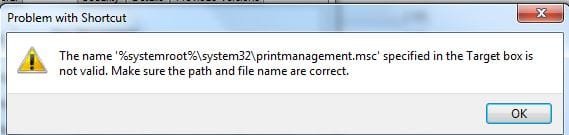
When I clicked on the General tab I got the following error message:

The title was "Problem with Shortcut"

The error message was:

"The name '%windir%\system32\secpol.msc' specified in the Target box is not valid. Make sure the path name and file name are correct."

...................................................................................OK

Needless to say it was no effort to try that a few more times from scratch, but I continued to get that error message. I can live with Administrative Tools on the desktop but I'd rather not. Have you any ideas about where I can go from here?

Thanks,

GerryR
 
Last edited:

My Computer My Computer

Computer Manufacturer/Model Number
Home Made
OS
Windows 7 Home Premium
CPU
Intel I5Core750
Motherboard
Gigabyte P55A-UD3
Memory
6 GB Corsair DDR3 1600
Graphics Card(s)
Zotac GeForce 9600 GT
Sound Card
7:1 on otherboard
Monitor(s) Displays
ViewSonic VG2030m (one of the last 4 by 3 monitors)
Screen Resolution
1400 by 1050 (Native Resolution)
Hard Drives
2 500 GB Western Digital SATA
PSU
Thermaltake TR2 500W
Case
Cooler Master Elite 332
Cooling
Thermaltake SpinQ
Keyboard
400 v1.0
Mouse
Logitech LX-8
Internet Speed
9.82 Mbs download speed 1.87 Mbs Upload speed
Other Info
Monochrome Laser Printer -HP 1020
Ink-Jet color all in one without fax - Canon Pixma MP 170
500GB external portable hard drive - Iomega
Hello Gerry,

No worries. Your Windows 7 Home Premium edition does not have "Local Security Policy" (secpol.msc) included in it. This is why you got that error since that file could not be found at the location specified by the target path.

I just included all of them in the download for people to pick and choose which ones they wanted to restore. You should be able to restore the ones that you do not get this error with though. :)
 

My Computer My Computer

Computer type
PC/Desktop
Computer Manufacturer/Model Number
Self built custom
OS
64-bit Windows 11 Pro for Workstations
CPU
Intel i7-8700K OC'd to 5 GHz
Motherboard
ASUS ROG Maximus XI Formula Z390
Memory
64 GB (4x16GB) G.SKILL TridentZ RGB DDR4 3600 MHz
Graphics Card(s)
ASUS ROG-STRIX-GTX1080TI-O11G-GAMING
Sound Card
Integrated
Monitor(s) Displays
2 x Samsung Odyssey G7 27"
Screen Resolution
2560x1440
Hard Drives
1TB Samsung 990 PRO M.2,
4TB Samsung 990 PRO PRO M.2,
TerraMaster F8 SSD Plus NAS
PSU
Seasonic Prime Titanium 850W
Case
Thermaltake Core P3
Cooling
Corsair Hydro H115i
Keyboard
Logitech wireless K800
Mouse
Logitech MX Master 4
Internet Speed
2 Gb/s Download and 100 Mb/s Upload
Antivirus
Malwarebyte Anti-Malware Premium
Browser
Google Chrome
Other Info
Logitech Z625 speaker system,
Logitech BRIO 4K Pro webcam,
HP Color LaserJet Pro MFP M477fdn,
APC SMART-UPS RT 1000 XL - SURT1000XLI,
Galaxy S23 Plus phone
Administrative Tools

Brink,

Thanks a lot. I just dragged and dropped them onto "All Programs" - the icon was also missing. Between that and GodMode I'm fine. Since you have never, to my knowledge, posted anything about GodMode, I won't either. There's a lot of ways to destroy your O in there. :)

GerryR
 

My Computer My Computer

Computer Manufacturer/Model Number
Home Made
OS
Windows 7 Home Premium
CPU
Intel I5Core750
Motherboard
Gigabyte P55A-UD3
Memory
6 GB Corsair DDR3 1600
Graphics Card(s)
Zotac GeForce 9600 GT
Sound Card
7:1 on otherboard
Monitor(s) Displays
ViewSonic VG2030m (one of the last 4 by 3 monitors)
Screen Resolution
1400 by 1050 (Native Resolution)
Hard Drives
2 500 GB Western Digital SATA
PSU
Thermaltake TR2 500W
Case
Cooler Master Elite 332
Cooling
Thermaltake SpinQ
Keyboard
400 v1.0
Mouse
Logitech LX-8
Internet Speed
9.82 Mbs download speed 1.87 Mbs Upload speed
Other Info
Monochrome Laser Printer -HP 1020
Ink-Jet color all in one without fax - Canon Pixma MP 170
500GB external portable hard drive - Iomega

My Computer My Computer

Computer type
PC/Desktop
Computer Manufacturer/Model Number
Self built custom
OS
64-bit Windows 11 Pro for Workstations
CPU
Intel i7-8700K OC'd to 5 GHz
Motherboard
ASUS ROG Maximus XI Formula Z390
Memory
64 GB (4x16GB) G.SKILL TridentZ RGB DDR4 3600 MHz
Graphics Card(s)
ASUS ROG-STRIX-GTX1080TI-O11G-GAMING
Sound Card
Integrated
Monitor(s) Displays
2 x Samsung Odyssey G7 27"
Screen Resolution
2560x1440
Hard Drives
1TB Samsung 990 PRO M.2,
4TB Samsung 990 PRO PRO M.2,
TerraMaster F8 SSD Plus NAS
PSU
Seasonic Prime Titanium 850W
Case
Thermaltake Core P3
Cooling
Corsair Hydro H115i
Keyboard
Logitech wireless K800
Mouse
Logitech MX Master 4
Internet Speed
2 Gb/s Download and 100 Mb/s Upload
Antivirus
Malwarebyte Anti-Malware Premium
Browser
Google Chrome
Other Info
Logitech Z625 speaker system,
Logitech BRIO 4K Pro webcam,
HP Color LaserJet Pro MFP M477fdn,
APC SMART-UPS RT 1000 XL - SURT1000XLI,
Galaxy S23 Plus phone
Hi Shawn,
I get this message (snip) when I try to unblock Print Management and Security Management Configuration, what can I do? Thanks.
Never mind Shawn, I have failed to read GerryR's post :o, all sorted.
 

Attachments

  • Capture 1500.JPG
    Capture 1500.JPG
    19.6 KB · Views: 945
Last edited:

My Computer My Computer

Computer Manufacturer/Model Number
Acer Aspire 5750
OS
Windows 7 Home Premium 64bit
CPU
Intel Core i3-2310M
Motherboard
Acer OEM
Memory
8GB
Graphics Card(s)
Intel HD3000
Screen Resolution
1366x768
Hard Drives
320GB Toshiba
:thumbsup:
 

My Computer My Computer

Computer type
PC/Desktop
Computer Manufacturer/Model Number
Self built custom
OS
64-bit Windows 11 Pro for Workstations
CPU
Intel i7-8700K OC'd to 5 GHz
Motherboard
ASUS ROG Maximus XI Formula Z390
Memory
64 GB (4x16GB) G.SKILL TridentZ RGB DDR4 3600 MHz
Graphics Card(s)
ASUS ROG-STRIX-GTX1080TI-O11G-GAMING
Sound Card
Integrated
Monitor(s) Displays
2 x Samsung Odyssey G7 27"
Screen Resolution
2560x1440
Hard Drives
1TB Samsung 990 PRO M.2,
4TB Samsung 990 PRO PRO M.2,
TerraMaster F8 SSD Plus NAS
PSU
Seasonic Prime Titanium 850W
Case
Thermaltake Core P3
Cooling
Corsair Hydro H115i
Keyboard
Logitech wireless K800
Mouse
Logitech MX Master 4
Internet Speed
2 Gb/s Download and 100 Mb/s Upload
Antivirus
Malwarebyte Anti-Malware Premium
Browser
Google Chrome
Other Info
Logitech Z625 speaker system,
Logitech BRIO 4K Pro webcam,
HP Color LaserJet Pro MFP M477fdn,
APC SMART-UPS RT 1000 XL - SURT1000XLI,
Galaxy S23 Plus phone
Thanks for this. I thought I was just deleting the shortcuts from my start menu when I deleted the admin tools folder from there. Sadly it stopped them from working via control panel too. All good now though, cheers.
 

My Computer My Computer

Computer type
PC/Desktop
OS
Windows 7 Ultimate
Great news. I'm glad it could help. :)
 

My Computer My Computer

Computer type
PC/Desktop
Computer Manufacturer/Model Number
Self built custom
OS
64-bit Windows 11 Pro for Workstations
CPU
Intel i7-8700K OC'd to 5 GHz
Motherboard
ASUS ROG Maximus XI Formula Z390
Memory
64 GB (4x16GB) G.SKILL TridentZ RGB DDR4 3600 MHz
Graphics Card(s)
ASUS ROG-STRIX-GTX1080TI-O11G-GAMING
Sound Card
Integrated
Monitor(s) Displays
2 x Samsung Odyssey G7 27"
Screen Resolution
2560x1440
Hard Drives
1TB Samsung 990 PRO M.2,
4TB Samsung 990 PRO PRO M.2,
TerraMaster F8 SSD Plus NAS
PSU
Seasonic Prime Titanium 850W
Case
Thermaltake Core P3
Cooling
Corsair Hydro H115i
Keyboard
Logitech wireless K800
Mouse
Logitech MX Master 4
Internet Speed
2 Gb/s Download and 100 Mb/s Upload
Antivirus
Malwarebyte Anti-Malware Premium
Browser
Google Chrome
Other Info
Logitech Z625 speaker system,
Logitech BRIO 4K Pro webcam,
HP Color LaserJet Pro MFP M477fdn,
APC SMART-UPS RT 1000 XL - SURT1000XLI,
Galaxy S23 Plus phone
Back
Top