Adobe previews 64-bit Flash Player 'Square'

I haven't followed this thread much but what is the problem with Minefield exactly? I installed the latest build and it run perfectly fine. :confused:
I think people said something about it crashing on startup. I'm not sure as reading this made me stop myself from updating Minefield. Maybe I should just test it out...

Well, I cannot tell you whether you should or shouldn't but I can tell you that I am uneffected for it.

To those having the startup problems, try reportig the bugs to Mozilla if you haven't already. There may be a chance they have no clue about the bug!

To anyone still having problems with FF crashing on startup, try this, it seems to work

start minefield in safe mode
go into about:config
make sure these 2 line are set to false
javascript.options.methodjit.content
javascript.options.methodjit.chrome
restart minefield

Some have said that 1 line was set true and 1 false, just make sure both are set to false.

This has worked for me
 

My Computer

Computer Manufacturer/Model Number
HP Pavilion e9107c
OS
Windows 7 Home Premium 64 bit
CPU
Intel Core 2 Quad Q8200 @ 2.33 GHz
Memory
8 GB DDR3
Graphics Card(s)
ATI Radeon HD 4350
Monitor(s) Displays
HP 23 in. High Definition (w2338h)
Screen Resolution
1920 x 1080
Hard Drives
750 GB
Keyboard
Logitech Illuminated keyboard
Mouse
Logitech Laser mouse
Excellent. Well done Blongs:D

I thought I'd try a reinstall so I uninstalled Minefield and installed the nightly build for today but that still didn't solve the problem. It seemed that Minefield was trying to restart my last session and crashing.
So I followed your instructions and went into about:config

my "javascript.options.methodjit.content" was set to true so I toggled it to false and everything seems to be ok again.
I'm none the wiser as to why this should have happened in the first place though.
Also signed up for the nightly builds test programme and newsletter. That gives an opportunity to report bugs.

Thanks again for your excellent fix, John
 

My Computer

Computer Manufacturer/Model Number
The Monolith. 3.1
OS
Windows 7 Home Premium 64 bit
CPU
i7 [email protected]
Motherboard
Gigabyte Z77-D3H
Memory
2x4GB Corsair Vegeance DDR3
Graphics Card(s)
XFX GTX 260 Black Edition
Sound Card
none-through large stereo hi fi
Monitor(s) Displays
Croosover 27MDP LED IPS Dell 2408 WFP
Screen Resolution
2560x1440 1920x1200
Hard Drives
1x Samsung 840Pro 128GB SSD
1x Samsung Spinpoint F1 1TB
PSU
Corsair AX 850 Watt
Case
Cooler Master ACTS 840
Cooling
Be Quiet! Dark Rock Pro
Keyboard
Enermax Aurora
Mouse
Logitech Ballmouse
Internet Speed
20MBPS

My Computer

Computer type
PC/Desktop
Computer Manufacturer/Model Number
Black Shadow IV
OS
Win7 x64
CPU
i5-3570K
Motherboard
Asrock Z77 Extreme4
Memory
2x4GB Rip Jaws 8-9-9-24
Graphics Card(s)
Asus R9 280X
Sound Card
X-Fi Extreme Music
Monitor(s) Displays
Dell U2412M
Screen Resolution
1920x1200
Hard Drives
Samsung Evo 250GB /
OCZ Vertex 4 128GB
PSU
Seasonic 660XP2
Case
Fractal Design R4
Cooling
Noctua NH-U12S
As has been mentioned many times in this thread, and on a few others, just stick with the October 1st nightly x64 build.

Try the updates. If they cause you to crash again, just reinstall the October 1st build again. It takes all of 2 minutes.

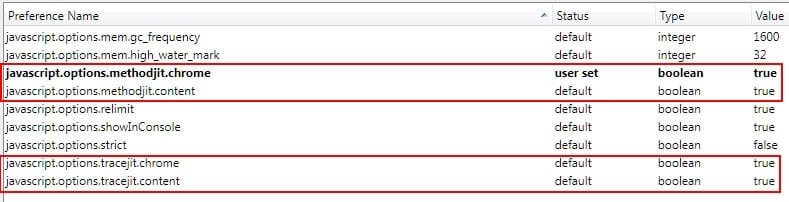
Until I get a new build (I try each nightly as it comes out) that lets me leave all of these settings on "true",
ScreenShot00004.jpg
I'm going to keep reverting back to the October 1st build.
 

My Computer

Computer Manufacturer/Model Number
Toshiba L355D
OS
Windows 7 Ultimate x64 SP1
CPU
Core2 Duo
Motherboard
Intel
Memory
4 GB
Graphics Card(s)
GM965 on-board
Sound Card
RealTek on-board
Monitor(s) Displays
19"+17"(laptop)
Screen Resolution
1440x900 (x 2)
Hard Drives
500GB Ext. 200GB Internal
PSU
N/A
Case
N/A
Cooling
N/A
Not even trying Minefield x64 today. Last 3 days, installed, un-installed, clean install, etc..., etc...
Bug is still there so sticking with x86.

https://bugzilla.mozilla.org/show_bug.cgi?id=601355

As per my previous post try this and you will be ok

start minefield in safe mode
go into about:config
make sure these 2 line are set to false
javascript.options.methodjit.content
javascript.options.methodjit.chrome
restart minefield

Some have said that 1 line was set true and 1 false, just make sure both are set to false.
 

My Computer

Computer Manufacturer/Model Number
HP Pavilion e9107c
OS
Windows 7 Home Premium 64 bit
CPU
Intel Core 2 Quad Q8200 @ 2.33 GHz
Memory
8 GB DDR3
Graphics Card(s)
ATI Radeon HD 4350
Monitor(s) Displays
HP 23 in. High Definition (w2338h)
Screen Resolution
1920 x 1080
Hard Drives
750 GB
Keyboard
Logitech Illuminated keyboard
Mouse
Logitech Laser mouse
Well, I cannot tell you whether you should or shouldn't but I can tell you that I am uneffected for it.

To those having the startup problems, try reportig the bugs to Mozilla if you haven't already. There may be a chance they have no clue about the bug!
Lol, I decided to try it and guess what? I click on the icon in the taskbar only for a window to pop up and say "Minefield has stopped working."
To anyone still having problems with FF crashing on startup, try this, it seems to work

start minefield in safe mode
go into about:config
make sure these 2 line are set to false
javascript.options.methodjit.content
javascript.options.methodjit.chrome
restart minefield

Some have said that 1 line was set true and 1 false, just make sure both are set to false.

This has worked for me
Thanks, this fixed the issue. Once a stable update comes out, I'm gonna revert it back.
 

My Computer

Computer Manufacturer/Model Number
Dell Inspiron 14R N4110
OS
Windows 7 Home Premium x64
CPU
Intel Core i5-2410M Quad Core CPU @ 2.30 GHz
Memory
8 GB Shared Channel DDR3 Memory
Graphics Card(s)
Intel HD Graphics 3000, AMD Radeon HD 6470M
Sound Card
Intel Display Audio, Realtek High Definition Audio
Monitor(s) Displays
14" HD 720p LED Display
Screen Resolution
1366x768
Hard Drives
500 GB 5400 RPM SATA Hard Drive
Mouse
Microsoft USB IntelliMouse Explorer 3.0
As has been mentioned many times in this thread, and on a few others, just stick with the October 1st nightly x64 build.

Try the updates. If they cause you to crash again, just reinstall the October 1st build again. It takes all of 2 minutes.

Until I get a new build (I try each nightly as it comes out) that lets me leave all of these settings on "true",
View attachment 102367
I'm going to keep reverting back to the October 1st build.

Pardon my ignorance but why doe it matter that they are on true?

Blongs' fix worked fine for me.:)
 

My Computer

Computer Manufacturer/Model Number
The Monolith. 3.1
OS
Windows 7 Home Premium 64 bit
CPU
i7 [email protected]
Motherboard
Gigabyte Z77-D3H
Memory
2x4GB Corsair Vegeance DDR3
Graphics Card(s)
XFX GTX 260 Black Edition
Sound Card
none-through large stereo hi fi
Monitor(s) Displays
Croosover 27MDP LED IPS Dell 2408 WFP
Screen Resolution
2560x1440 1920x1200
Hard Drives
1x Samsung 840Pro 128GB SSD
1x Samsung Spinpoint F1 1TB
PSU
Corsair AX 850 Watt
Case
Cooler Master ACTS 840
Cooling
Be Quiet! Dark Rock Pro
Keyboard
Enermax Aurora
Mouse
Logitech Ballmouse
Internet Speed
20MBPS
Well, I cannot tell you whether you should or shouldn't but I can tell you that I am uneffected for it.

To those having the startup problems, try reportig the bugs to Mozilla if you haven't already. There may be a chance they have no clue about the bug!
Lol, I decided to try it and guess what? I click on the icon in the taskbar only for a window to pop up and say "Minefield has stopped working."
To anyone still having problems with FF crashing on startup, try this, it seems to work

start minefield in safe mode
go into about:config
make sure these 2 line are set to false
javascript.options.methodjit.content
javascript.options.methodjit.chrome
restart minefield

Some have said that 1 line was set true and 1 false, just make sure both are set to false.

This has worked for me
Thanks, this fixed the issue. Once a stable update comes out, I'm gonna revert it back.

That is why I won't tell someone if they should use a beta software that is not working for a good percentage of people.

I guess I am just lucky, it could also make a difference that I haven't had an installation of Firefox (minefield) on these two computers prior to 3 days ago (when I first installed both the 32-bit and 64-bit minefield).
 

My Computer

Computer Manufacturer/Model Number
Custom | Whitebox
OS
Windows 7 Ultimate, OS X 10.7, Ubuntu 11.04
CPU
Intel E6750 @ 3.80GHz
Motherboard
Gigabyte GA-EP45-UD3L (Revision 1.1)
Memory
2x2GB & 2x1GB (6GB) OCZ Reaper 1066MHz @ 1080MHz
Graphics Card(s)
EVGA nVidia GTX 260 896mb (216 Core) FTW Edition
Sound Card
Realtek ALC888
Monitor(s) Displays
21" VIZIO TV
Screen Resolution
1680x1050 @ 60Hz
Hard Drives
Western Digital WD6401AALS - 640GB
Hitachi HDP725016GLA380 - 160GB
PSU
Corsair 750W
Case
NZXT Nemesis Elite
Cooling
Thermaltake SpinQ
Keyboard
Logitech Wireless S520
Mouse
Logitech Wireless S520 - Microsoft Wireless Arc Mouse
Internet Speed
Download: 20mbps, Upload: 3mbps
As has been mentioned many times in this thread, and on a few others, just stick with the October 1st nightly x64 build.

Try the updates. If they cause you to crash again, just reinstall the October 1st build again. It takes all of 2 minutes.

Until I get a new build (I try each nightly as it comes out) that lets me leave all of these settings on "true",
View attachment 102367
I'm going to keep reverting back to the October 1st build.

Pardon my ignorance but why doe it matter that they are on true?

Blongs' fix worked fine for me.:)

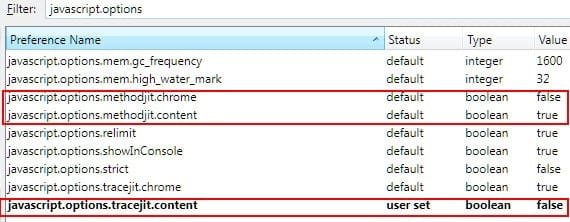
Blongs' fix worked for me as well but I just didn't like setting YaegerMonkey code to "false". I actually have the new builds working with YaegerMonkey "chrome" set to false and YaegerMonkey "content" set to true (not both set to "false") but I had to set TraceMonkey "content" to false (see below - this works in the new nightlies):
ScreenShot00035.jpg

I guess I wasn't comfortable with that so I reverted to the October 1st build wherein I can leave them all set to "true" (see my post earlier).

Don't ask my why, as I have no pertinent reasoning, just a preference. :) Once the nightlies quit crashing with all of them set to "true," I'll quit reverting back to the October 1st build.

BTW, John, I have never thought of you as ignorant. I admire the knowledge you bring to these forums. In this case, perhaps it is I that is being ignorant in regard to my desire to have the settings all be true.
 

My Computer

Computer Manufacturer/Model Number
Toshiba L355D
OS
Windows 7 Ultimate x64 SP1
CPU
Core2 Duo
Motherboard
Intel
Memory
4 GB
Graphics Card(s)
GM965 on-board
Sound Card
RealTek on-board
Monitor(s) Displays
19"+17"(laptop)
Screen Resolution
1440x900 (x 2)
Hard Drives
500GB Ext. 200GB Internal
PSU
N/A
Case
N/A
Cooling
N/A
Just tried the October 5th nightly. It's crashing still. Back on the October 1st build. :(
 

My Computer

Computer Manufacturer/Model Number
Toshiba L355D
OS
Windows 7 Ultimate x64 SP1
CPU
Core2 Duo
Motherboard
Intel
Memory
4 GB
Graphics Card(s)
GM965 on-board
Sound Card
RealTek on-board
Monitor(s) Displays
19"+17"(laptop)
Screen Resolution
1440x900 (x 2)
Hard Drives
500GB Ext. 200GB Internal
PSU
N/A
Case
N/A
Cooling
N/A
Hey Mike. I wasn't being sarcastic:). I genuinely don't know anything at all about YaegerMonkey code or the significance of the true or false commands.
 

My Computer

Computer Manufacturer/Model Number
The Monolith. 3.1
OS
Windows 7 Home Premium 64 bit
CPU
i7 [email protected]
Motherboard
Gigabyte Z77-D3H
Memory
2x4GB Corsair Vegeance DDR3
Graphics Card(s)
XFX GTX 260 Black Edition
Sound Card
none-through large stereo hi fi
Monitor(s) Displays
Croosover 27MDP LED IPS Dell 2408 WFP
Screen Resolution
2560x1440 1920x1200
Hard Drives
1x Samsung 840Pro 128GB SSD
1x Samsung Spinpoint F1 1TB
PSU
Corsair AX 850 Watt
Case
Cooler Master ACTS 840
Cooling
Be Quiet! Dark Rock Pro
Keyboard
Enermax Aurora
Mouse
Logitech Ballmouse
Internet Speed
20MBPS
Just tried the October 5th nightly. It's crashing still. Back on the October 1st build. :(

Oct 1st build working OK for me too.
 

My Computer

Computer Manufacturer/Model Number
24c Built
OS
Win7 x64 Ult
CPU
Intel i7-950
Motherboard
ASUS PT6
Memory
12 GB DDR3
Graphics Card(s)
NVIDIA 9800GT+
Sound Card
none
Monitor(s) Displays
2 Samsung SyncMaster 2343bwx
Screen Resolution
2048X1152
Hard Drives
1st-4 OCZ Vertex Turbos 32GB RAID 0
2nd-2 WD 640GB RAID 1
PSU
Thermaltake Toughpower XT W0229RU 750W
Case
Antec 900
Cooling
case fans
Keyboard
Logitech cordless
Mouse
Logitech cordless
Internet Speed
up to 15 MB/s

My Computer

Computer Manufacturer/Model Number
Custom Built (by me)
OS
Windows 8 CP x64
CPU
Intel(R) Core(TM) i7 CPU 920 @ 2.97GHz
Motherboard
DX58SO
Memory
Corsair 6GB DDR3 (1333Mhz)
Graphics Card(s)
Nvidia GeForce 9800GT (1GB)
Sound Card
Creative Sound Blaster Audigy Value (24bit internal)
Monitor(s) Displays
22" Samsung SyncMaster B2230 (1920*1080)
Screen Resolution
1920*1080
Hard Drives
Seagate Barracuda 500gb
PSU
i ball 450W
Case
i ball (Work Horse)
Keyboard
Microsoft Wireless Keyboard 700 v2.0
Mouse
Microsoft Wireless Mouse 700 v2.0
Internet Speed
1MB
Blongs fix worked and Minefield has been stable. There was another update and it's still mostly fine.
I just noticed a reluctance to close or minimize and had to close from the task bar. Oh dear......
 

My Computer

Computer Manufacturer/Model Number
The Monolith. 3.1
OS
Windows 7 Home Premium 64 bit
CPU
i7 [email protected]
Motherboard
Gigabyte Z77-D3H
Memory
2x4GB Corsair Vegeance DDR3
Graphics Card(s)
XFX GTX 260 Black Edition
Sound Card
none-through large stereo hi fi
Monitor(s) Displays
Croosover 27MDP LED IPS Dell 2408 WFP
Screen Resolution
2560x1440 1920x1200
Hard Drives
1x Samsung 840Pro 128GB SSD
1x Samsung Spinpoint F1 1TB
PSU
Corsair AX 850 Watt
Case
Cooler Master ACTS 840
Cooling
Be Quiet! Dark Rock Pro
Keyboard
Enermax Aurora
Mouse
Logitech Ballmouse
Internet Speed
20MBPS
Hey Mike. I wasn't being sarcastic:). I genuinely don't know anything at all about YaegerMonkey code or the significance of the true or false commands.
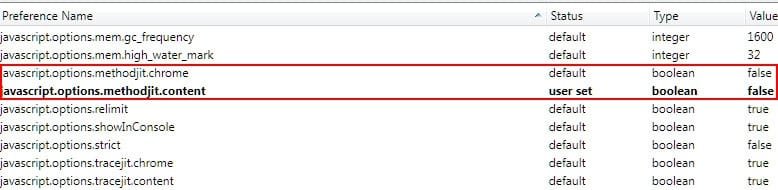
That's OK. I decided to go with the new builds and set both mothodjit (YaegerMonkey) entries to "false" per Blongs' recommendation.
ScreenShot00014.jpg

At least it keeps TraceMomkey code set to "true."

I just couldn't handle not being updated regardless of the settings. :)

I'm keeping an eye on the bug though:

https://bugzilla.mozilla.org/show_bug.cgi?id=601355
 

My Computer

Computer Manufacturer/Model Number
Toshiba L355D
OS
Windows 7 Ultimate x64 SP1
CPU
Core2 Duo
Motherboard
Intel
Memory
4 GB
Graphics Card(s)
GM965 on-board
Sound Card
RealTek on-board
Monitor(s) Displays
19"+17"(laptop)
Screen Resolution
1440x900 (x 2)
Hard Drives
500GB Ext. 200GB Internal
PSU
N/A
Case
N/A
Cooling
N/A
Any sign that ANY of the MineField releases since 10/1/10 do not need BLongs' "config" settings put to "false" to avoid crashing?

Regards,
- - Phil
 

My Computer

Computer Manufacturer/Model Number
HP Dv8t-1000
OS
Windows 7 Ultimate 64-bit
CPU
i7 820QM
Motherboard
Quanta
Memory
6Gb 1333mHz
Graphics Card(s)
Nvidia Geforce GT 230M
Screen Resolution
1920 x 1024 HD
Hard Drives
Samsumg MLC PM800 256gb SSD
Seagate Momentus 500gb 7200rpm 16mb cache
Keyboard
HDX18 Backlit
Internet Speed
90kbs
Any sign that ANY of the MineField releases since 10/1/10 do not need BLongs' "config" settings put to "false" to avoid crashing?

Regards,
- - Phil

Nope, the latest 4.0b8pre still needs "false", I tested at 7am this morning.
 

My Computer

Computer Manufacturer/Model Number
Systemax N2000 Gaming PC
OS
Windows 7 Ultimate x64
CPU
Q6600 @2.4ghz (G0 stepping)
Motherboard
XFX nforce 680i LT
Memory
8 gb OCZ vista essential sli PC-6400
Graphics Card(s)
Dual 9800gt in SLI mode
Sound Card
Integrated 8.1 High Definition Audio
Monitor(s) Displays
Dual Sceptre x246w 24 inch monitors
Screen Resolution
1920 x 1200 each monitor
Hard Drives
500 GB SATA II / 7500 rpm
PSU
Cooler Master Real Power Pro 1250W
Case
N2000 server tower
Cooling
Thermaltake Bigwater 760 is
Keyboard
MS Intelitype 6000 v2.0
Mouse
MS Intelipoint 6000
Internet Speed
Wi-power 1.5GB up / 512k down
Other Info
Windows 7 Ultimate x64, Windows 7 Pro x64, Windows Home Premium X86, Windows XP pro, Windows Home Server x86, Ubuntu 10.4 x86 and x64, Ubuntu server 10.4, SQL Server 2005, MySQL 5.0
Can someone explain to me what is the perceived danger in leaving the config settings set as false permanently?
 

My Computer

Computer Manufacturer/Model Number
The Monolith. 3.1
OS
Windows 7 Home Premium 64 bit
CPU
i7 [email protected]
Motherboard
Gigabyte Z77-D3H
Memory
2x4GB Corsair Vegeance DDR3
Graphics Card(s)
XFX GTX 260 Black Edition
Sound Card
none-through large stereo hi fi
Monitor(s) Displays
Croosover 27MDP LED IPS Dell 2408 WFP
Screen Resolution
2560x1440 1920x1200
Hard Drives
1x Samsung 840Pro 128GB SSD
1x Samsung Spinpoint F1 1TB
PSU
Corsair AX 850 Watt
Case
Cooler Master ACTS 840
Cooling
Be Quiet! Dark Rock Pro
Keyboard
Enermax Aurora
Mouse
Logitech Ballmouse
Internet Speed
20MBPS
There is no "danger" but once JaegerMonkey is implemented bug-free, performance enhancements will finally be realized even more for the Javascript engine.

The "false" setting disables JaegerMonkey.

The TraceMonkey build works with JaegerMonkey enabled. Just don't update through the program - go to the TraceMonkey build link I referenced to check for the latest version.

Additionally, a poster on the Mozillazine site has compiled a new x64 installer with the fix for the JIT bug incorporated. It is a newer build than the JS Preview build as it incorporates the new spinning progress wheel on the tab.
 
Last edited:

My Computer

Computer Manufacturer/Model Number
Toshiba L355D
OS
Windows 7 Ultimate x64 SP1
CPU
Core2 Duo
Motherboard
Intel
Memory
4 GB
Graphics Card(s)
GM965 on-board
Sound Card
RealTek on-board
Monitor(s) Displays
19"+17"(laptop)
Screen Resolution
1440x900 (x 2)
Hard Drives
500GB Ext. 200GB Internal
PSU
N/A
Case
N/A
Cooling
N/A
Thanks Mike. That's a lot clearer to me now. Presumably a build is coming that will not have this problem. J:)
 

My Computer

Computer Manufacturer/Model Number
The Monolith. 3.1
OS
Windows 7 Home Premium 64 bit
CPU
i7 [email protected]
Motherboard
Gigabyte Z77-D3H
Memory
2x4GB Corsair Vegeance DDR3
Graphics Card(s)
XFX GTX 260 Black Edition
Sound Card
none-through large stereo hi fi
Monitor(s) Displays
Croosover 27MDP LED IPS Dell 2408 WFP
Screen Resolution
2560x1440 1920x1200
Hard Drives
1x Samsung 840Pro 128GB SSD
1x Samsung Spinpoint F1 1TB
PSU
Corsair AX 850 Watt
Case
Cooler Master ACTS 840
Cooling
Be Quiet! Dark Rock Pro
Keyboard
Enermax Aurora
Mouse
Logitech Ballmouse
Internet Speed
20MBPS
Back
Top