I think people said something about it crashing on startup. I'm not sure as reading this made me stop myself from updating Minefield. Maybe I should just test it out...I haven't followed this thread much but what is the problem with Minefield exactly? I installed the latest build and it run perfectly fine.
Well, I cannot tell you whether you should or shouldn't but I can tell you that I am uneffected for it.
To those having the startup problems, try reportig the bugs to Mozilla if you haven't already. There may be a chance they have no clue about the bug!
To anyone still having problems with FF crashing on startup, try this, it seems to work
start minefield in safe mode
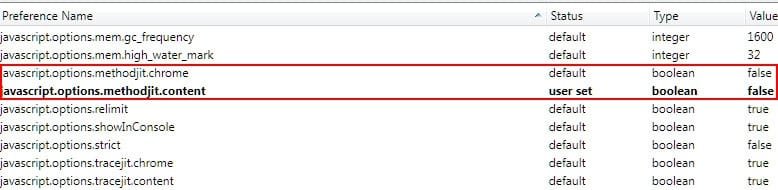
go into about:config
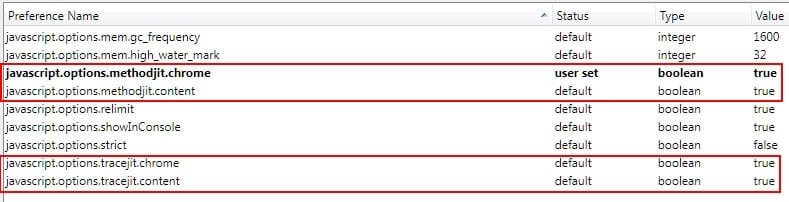
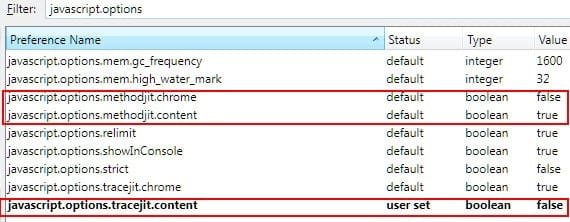
make sure these 2 line are set to false
javascript.options.methodjit.content
javascript.options.methodjit.chrome
restart minefield
Some have said that 1 line was set true and 1 false, just make sure both are set to false.
This has worked for me
My Computer
At a glance
Windows 7 Home Premium 64 bitIntel Core 2 Quad Q8200 @ 2.33 GHz8 GB DDR3ATI Radeon HD 4350
- Computer Manufacturer/Model Number
- HP Pavilion e9107c
- OS
- Windows 7 Home Premium 64 bit
- CPU
- Intel Core 2 Quad Q8200 @ 2.33 GHz
- Memory
- 8 GB DDR3
- Graphics Card(s)
- ATI Radeon HD 4350
- Monitor(s) Displays
- HP 23 in. High Definition (w2338h)
- Screen Resolution
- 1920 x 1080
- Hard Drives
- 750 GB
- Keyboard
- Logitech Illuminated keyboard
- Mouse
- Logitech Laser mouse