
How to Boot to the Advanced Boot Options in Windows 7
Information
This will show you how to boot into the Advanced Boot Options screen to select options to start Windows 7 in advanced troubleshooting modes.
Note
Some options, such as safe mode, start Windows in a limited state, where only the bare essentials are started. If a problem does not reappear when you start in safe mode, you can eliminate the default settings and basic device drivers as possible causes. Other options start Windows with advanced features intended for use by system administrators and IT professionals.
Here's How:1. Turn on or restart the computer.
2. If you Multi Boot with more than One Operating System A) At the Windows Boot Manager screen, select the OS you want to use the Advanced Boot Options for, then press F8. (see screenshot below)
NOTE: On some systems, pressing F5 may also work.

3. If you Only Boot with One Operating System (ex: Windows 7)A) Press and keep tapping the F8 key about every second until you see the screenshot below.
NOTE: If the Windows startup logo appears, you will need to repeat steps 1 and 3 again. If you dual boot, then you will need to select the OS you want to use the Advanced Boot Option for and then press F8. On some systems, tapping F5 may also work.
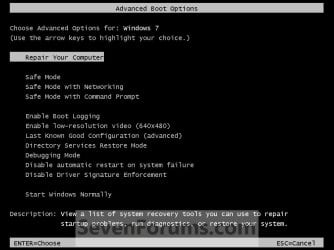
4. Use the arrow keys to select an advanced option to start Windows 7 into and press Enter. (See screenshot above)
NOTE: See the table below for a description of each option.
| Advanced Option | Description |
|---|---|
Repair Your Computer | Shows a list of system recovery options that you can use to repair startup problems, run diagnostics, or restore your system. If Repair your computer isn't listed as an option, then your computer doesn't include preinstalled recovery options, or your network administrator has turned them off. You could also boot from a retail Windows 7 installation disc to see the System Recovery Options. |
Safe Mode | This starts Windows 7 with a minimal set of drivers and services. |
Safe Mode with Networking | This starts Windows 7 in safe mode and includes the network drivers and services needed to access the Internet or other computers on your network. |
Safe Mode with Command Prompt | This starts Windows 7 in safe mode with a command prompt window instead of the usual Windows interface. To exit from here, press Ctrl+Alt+Delete or type Exit and press Enter. |
Enable Boot Logging | Creates a file named ntbtlog.txt, that lists all the drivers that are installed during startup and that might be useful for advanced troubleshooting. |
Enable Low Resolution Video (640 X 480) | Starts Windows 7 using your current video driver and using low resolution and refresh rate settings. You can use this mode to reset your display settings, or to use a television monitor with your computer if needed. |
Last Know Good Configuration (advanced) | Starts Windows 7 with the most recent registry and driver configurations that worked successfully. Every time you turn your computer off and Windows 7 shuts down successfully, important system settings are saved in the registry. You can use those settings to start your computer if a problem occurs. For example, if a new driver for your video card is causing problems, or an incorrect registry setting is preventing Windows 7 from starting correctly, you can restart your computer using Last Known Good Configuration. |
Directory Services Restore Mode | Starts Windows 7 domain controller running Active Directory so that the directory service can be restored. This option is intended for IT professionals and administrators. |
Debugging Mode | Starts Windows 7 in an advanced troubleshooting mode intended for IT professionals and system administrators. |
Disable Automatic Restart on System Failure | Prevents Windows 7 from automatically restarting if an error causes Windows 7 to fail. Choose this option only if Windows 7 is stuck in a loop where Windows 7 fails, attempts to restart, and fails again repeatedly. |
Disable Driver Signature Enforcement | Allows drivers containing improper signatures to be temporarily installed. |
Start Windows Normally | Starts Windows 7 in its normal mode to the logon screen or user desktop. This can be helpful after a improper shutdown. |
That's it,
Shawn Brink
Related Tutorials
- How to Start Windows 7 in Safe Mode
- How to Add "Safe Mode" to Desktop Context Menu in Windows 7 and Windows 8
- How to Boot to the System Recovery Options in Windows 7
- How to Run a Startup Repair in Windows 7
- How to Open a Command Prompt at Startup in Windows 7
- How to Create a Windows 7 System Repair Disc
- How to See Windows 7 Reliability and Problem History with Reliability Monitor
- How to Run Disk Check in Windows 7
- How to Do a Repair Install to Fix Windows 7
- How to Create a System Recovery Shortcut in Windows 7
- How to Recover from an Infinitely Looping Startup Repair Loop without Reinstalling Windows
Last edited:


