Solved Adwcleaner advice required.

gordon99

New member
Local time
3:57 PM
Messages
38
I saw reference to Adwcleaner somewhere and it seemed to have good references so I downloaded and ran it. It produced a long list of items for deletion ( or quarantine, not sure which) though I could have unchecked items to be retained. However, I took a gamble and deleted (or quarantined) all the listed items with no, to date at least, identified ill effects.
Afterwards, I went into "Control Panel - Uninstall a Program" but saw no reference to Adwcleaner. It is, though, listed under "Local Disk C:" and contains three folders. Two of the folders are titled Adwcleaner (SO) and (RO). The third is titled 'Quarantine' which seems to contain all of the supposed 'nasties' in their respective folders.
I have a few of questions which I would be grateful for advice on. Firstly, why is Adwcleaner not listed in Programs. Secondly, should I delete (at my own risk) the quarantined items which I assumed I had deleted after I ran the program. Thirdly, is the program worth retaining. I already have Microsoft Security Essentials, Malwarebytes (free version) and CCleaner all of which I run at intervals. Clearly, I have gone into this somewhat blind.
 

My Computer My Computer

Computer Manufacturer/Model Number
compaq presario CQ56
OS
Windows 7 Home Premium 64bit
AdwCleaner is a stand alone .exe program. It only loads when you ask it to. So it will not be in the Add and Remove programs.


If the programs has deleted or quarantined the nasties for a little while and your system works as it should you can remove all that you find of AdwCleaner.

You should download a new AdwCleaner every time you need to use it. It always needs to updated.

I used AdwCleaner a week or so ago. When I choose to use it again I will get a fresh download, run it and get rid of what it finds and then just remove it.

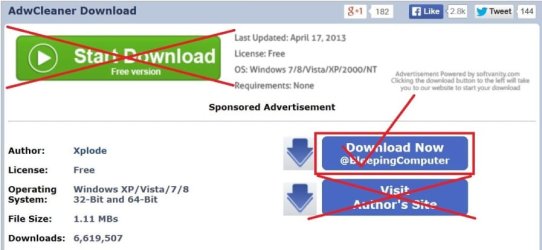
I highly recommend only downloading it from Bleeping Computer.

AdwCleaner Download


adwcleaner-1.JPG
 

My Computer My Computer

Computer type
PC/Desktop
Computer Manufacturer/Model Number
Home made Desktop
OS
Windows 10 Pro. 64/ version 1709 Windows 7 Pro/64
CPU
Intel i7-6800K @ 4.3
Motherboard
ASUS X-99 Deluxe II
Memory
Corsair Platinum 16 gig @2400
Graphics Card(s)
EVGA GTX 1070 OC
Monitor(s) Displays
Asus 27" LED LCD/VE278Q
Screen Resolution
1920-1080 or 1280-720 HDMI
Hard Drives
INTEL SSD 730-240 Gb Sata 3.0/
PSU
EVGA Platium 1200W
Case
Phanteks Luxe Tempered Glass 8 fans/ one radiator
Cooling
XSPC/ Water Cooled CPU
Keyboard
Das 4 Professional
Mouse
Logitech M705/MX Anywhere 2-S
Internet Speed
100 mbits
Antivirus
Microsoft Security Essentials/ Malwarebytes Premium 3.0/ SAS
Browser
I.E. 11 default/Firefox/ ISP Time Warner Cable/Spectrum
Other Info
LG BluRay Burner/
Sound system-KLipsch-THX/
Icy Dock ssd Hot Swap bays.
  • Like
Reactions: whs
ADW Cleaner removal

My thoughts on ADWCleaner:

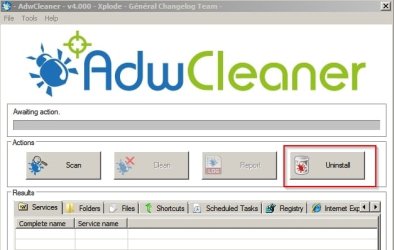
It has it's own uninstall utility.

Just ran ADWCleaner v4.000 and it did indeed check for and download database updates. The screenshot shows the "Uninstall button"

AdwCleaner v4.000.jpg

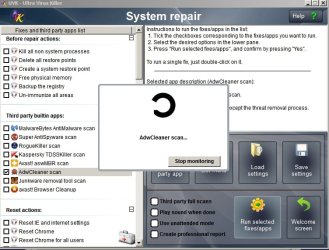
So I closed ADWCleaner and ran UVK instead and running an ADWCleaner scan from within UVK. ADWCleaner updated to the latest version - v4.1005 and it remains installed under the following path:

"C:\Program Files\UVK - Ultra Virus Killer\Third party\adwCleaner.exe"

AdwCleaner UVK.jpg

LaybackBear says that you need to download the new version for each use and I agree. It's also possible to let UVK take care of the updates. As I run regular scans that's my preferred method.

AdwCleaner UVK.jpg
 

My Computer My Computer

Computer type
Laptop
Computer Manufacturer/Model Number
ASUS
OS
Microsoft Windows 7 Home Premium 64-bit 7601 Multiprocessor Free Service Pack 1
CPU
AMD C-60 APU with Radeon(tm) HD Graphics
Motherboard
ASUSTeK COMPUTER INC. X501U
Memory
4.00 GB
Graphics Card(s)
AMD Radeon HD 6290 Graphics
Sound Card
(1) AMD High Definition Audio Device (2) Realtek High Defi
Screen Resolution
1366 x 768 x 32 bits (4294967296 colors) @ 60 Hz
Hard Drives
Hitachi HTS545050A7E380 SATA Disk Device
Antivirus
Comodo CIS & FW, SecureAplus App Whitelisting, Threatfire
Browser
Cyberfox 64bit, Opera 64bit, Airfox
Other Info
Spy-The-Spy, HitmanPro.Alert, Norton Connect Safe, MJRegWatcher, BitDefender TrafficLight, Voodoo Shield, Zemana AntiMalware
Thanks L.B and Cal'r. for your advice and attachments for which I am grateful. It sounds as if AdwCleaner is a useful addition to ones defences and worth retaining so I will try both download methods for my next two runs. Many thanks.
 

My Computer My Computer

Computer Manufacturer/Model Number
compaq presario CQ56
OS
Windows 7 Home Premium 64bit
Just save the .exe in Downloads or wherever. No need to download it each time.
 

My Computer My Computer

Computer Manufacturer/Model Number
HP, Dell, Gateway, Toshiba - 4 laptops and 2 desktops
OS
Vista, Windows7, Mint Mate, Zorin, Windows 8
CPU
from 1.6GHz Duo to i7
Monitor(s) Displays
2x HP w2207
Hard Drives
5x HDD, 7x SSD, 12x Externals
Keyboard
with trackball - no mices
Mouse
Trackball mice
Internet Speed
DSL 6000
Noted with thanks whs.
 

My Computer My Computer

Computer Manufacturer/Model Number
compaq presario CQ56
OS
Windows 7 Home Premium 64bit
I would not hold on to it too long,
Every few weeks or once a month uninstall and download a fresh copy,
It's just like anything it has updates to it definitions but does not update when installed,
Cheers.
 

My Computer My Computer

Computer type
PC/Desktop
Computer Manufacturer/Model Number
Custom assembled by me :}
OS
Win-7-Pro64bit 7-H-Prem-64bit
CPU
i7-5930K 2nd i9-9940x both water blocked VRM's too
Motherboard
ASUS SABERTOOTH X99 2nd ASUS x299 Apex
Memory
Trident-z 3200C14 2nd Trident-z 3600C16
Graphics Card(s)
EVGA 1080ti ftw3 2nd Titan Xp both water blocked
Sound Card
Built-in Realtek
Monitor(s) Displays
1-AOC G2460PG 24"G-Sync 144Hz/ 2nd 1-ASUS VG248QE 24" 144Hz
Screen Resolution
1920 x 1080 144Hz
Hard Drives
2-Samsung M.2 Evo & Evo Plus
2-Samsung 850 EVO 500GB SSD's/ 3-2.5 W.D. Black 1tb-&3-1tb/3-3.5 WD Black 1tb hdd's
PSU
EVGA SuperNOVA 1000-P2 2nd 1200-P2
Case
2-Corsair Obsidian Series 450D Black ATX Mid Tower
Cooling
Custom water loops
Keyboard
Logitech G710+/ 2nd Logitech G910
Mouse
2-RedDragon M901 Perdition 16400 dpi Gaming mouse = wired
Internet Speed
Comcast Ping 19ms 89.31mbps download speed 6.12mbps upload
Antivirus
Malwarebytes Pro/ Superantispyware Pro
Browser
FireFox & Pale moon
Other Info
2nd ASUS X299 Apex/Intel i9-9940x with Custom water loop/7H-Prem-x64/Corsair 450D case/Ram Trident-z 3600C16 4x8gb / Samsung970Evo plus 500gb SSD/Dual ssd EZ swap evo/PSU EVGA SuperNova 1200w-P2 80+Platinum/GPU Titan Xp /8-ML-140 on push-pull on 2-280GTX rads
TZ, Useful information to know, thanks.
 

My Computer My Computer

Computer Manufacturer/Model Number
compaq presario CQ56
OS
Windows 7 Home Premium 64bit
No problem,
Also if you read the install instruction by many security experts around this forum they will instruct to download the scanner to your desktop and run it as administrator and not run it from the downloads folder or another location,
The scanner will find more corruption by doing that simple step :)
Cheers.
 

My Computer My Computer

Computer type
PC/Desktop
Computer Manufacturer/Model Number
Custom assembled by me :}
OS
Win-7-Pro64bit 7-H-Prem-64bit
CPU
i7-5930K 2nd i9-9940x both water blocked VRM's too
Motherboard
ASUS SABERTOOTH X99 2nd ASUS x299 Apex
Memory
Trident-z 3200C14 2nd Trident-z 3600C16
Graphics Card(s)
EVGA 1080ti ftw3 2nd Titan Xp both water blocked
Sound Card
Built-in Realtek
Monitor(s) Displays
1-AOC G2460PG 24"G-Sync 144Hz/ 2nd 1-ASUS VG248QE 24" 144Hz
Screen Resolution
1920 x 1080 144Hz
Hard Drives
2-Samsung M.2 Evo & Evo Plus
2-Samsung 850 EVO 500GB SSD's/ 3-2.5 W.D. Black 1tb-&3-1tb/3-3.5 WD Black 1tb hdd's
PSU
EVGA SuperNOVA 1000-P2 2nd 1200-P2
Case
2-Corsair Obsidian Series 450D Black ATX Mid Tower
Cooling
Custom water loops
Keyboard
Logitech G710+/ 2nd Logitech G910
Mouse
2-RedDragon M901 Perdition 16400 dpi Gaming mouse = wired
Internet Speed
Comcast Ping 19ms 89.31mbps download speed 6.12mbps upload
Antivirus
Malwarebytes Pro/ Superantispyware Pro
Browser
FireFox & Pale moon
Other Info
2nd ASUS X299 Apex/Intel i9-9940x with Custom water loop/7H-Prem-x64/Corsair 450D case/Ram Trident-z 3600C16 4x8gb / Samsung970Evo plus 500gb SSD/Dual ssd EZ swap evo/PSU EVGA SuperNova 1200w-P2 80+Platinum/GPU Titan Xp /8-ML-140 on push-pull on 2-280GTX rads
I personally download AdwCleaner fresh every time I use it. Then I know it has all the new updates and then remove it and the garbage it finds if any when I'm done.
 

My Computer My Computer

Computer type
PC/Desktop
Computer Manufacturer/Model Number
Home made Desktop
OS
Windows 10 Pro. 64/ version 1709 Windows 7 Pro/64
CPU
Intel i7-6800K @ 4.3
Motherboard
ASUS X-99 Deluxe II
Memory
Corsair Platinum 16 gig @2400
Graphics Card(s)
EVGA GTX 1070 OC
Monitor(s) Displays
Asus 27" LED LCD/VE278Q
Screen Resolution
1920-1080 or 1280-720 HDMI
Hard Drives
INTEL SSD 730-240 Gb Sata 3.0/
PSU
EVGA Platium 1200W
Case
Phanteks Luxe Tempered Glass 8 fans/ one radiator
Cooling
XSPC/ Water Cooled CPU
Keyboard
Das 4 Professional
Mouse
Logitech M705/MX Anywhere 2-S
Internet Speed
100 mbits
Antivirus
Microsoft Security Essentials/ Malwarebytes Premium 3.0/ SAS
Browser
I.E. 11 default/Firefox/ ISP Time Warner Cable/Spectrum
Other Info
LG BluRay Burner/
Sound system-KLipsch-THX/
Icy Dock ssd Hot Swap bays.
To summarize:

1. I should download a fresh version of Adwcleaner on each occasion I intend to run the operation so that I have the most recent edition.
2. I should download AdwCleaner in 'Bleeping Computer' or 'UKV Ultra Virus Killer'. I understand from other sources that one needs to take care with UKV if using some of its clean-up contents as misuse through misunderstanding can harm the OS.
3. I should download AdwCleaner to the desktop and run as an administrator in order to obtain maximum effectiveness.

Thank you all for you responses to my enquiry.
 

My Computer My Computer

Computer Manufacturer/Model Number
compaq presario CQ56
OS
Windows 7 Home Premium 64bit
Happy computing Gordon.

We are here to help and open 24/7/365
 

My Computer My Computer

Computer type
PC/Desktop
Computer Manufacturer/Model Number
Home made Desktop
OS
Windows 10 Pro. 64/ version 1709 Windows 7 Pro/64
CPU
Intel i7-6800K @ 4.3
Motherboard
ASUS X-99 Deluxe II
Memory
Corsair Platinum 16 gig @2400
Graphics Card(s)
EVGA GTX 1070 OC
Monitor(s) Displays
Asus 27" LED LCD/VE278Q
Screen Resolution
1920-1080 or 1280-720 HDMI
Hard Drives
INTEL SSD 730-240 Gb Sata 3.0/
PSU
EVGA Platium 1200W
Case
Phanteks Luxe Tempered Glass 8 fans/ one radiator
Cooling
XSPC/ Water Cooled CPU
Keyboard
Das 4 Professional
Mouse
Logitech M705/MX Anywhere 2-S
Internet Speed
100 mbits
Antivirus
Microsoft Security Essentials/ Malwarebytes Premium 3.0/ SAS
Browser
I.E. 11 default/Firefox/ ISP Time Warner Cable/Spectrum
Other Info
LG BluRay Burner/
Sound system-KLipsch-THX/
Icy Dock ssd Hot Swap bays.
Running AdwCleaner

To summarize:

1. I should download a fresh version of Adwcleaner on each occasion I intend to run the operation so that I have the most recent edition.
2. I should download AdwCleaner in 'Bleeping Computer' or 'UKV Ultra Virus Killer'. I understand from other sources that one needs to take care with UKV if using some of its clean-up contents as misuse through misunderstanding can harm the OS.
3. I should download AdwCleaner to the desktop and run as an administrator in order to obtain maximum effectiveness.

Thank you all for you responses to my enquiry.

Well, use the 'Bleeping Computer' method if you like. Download a fresh copy each time you use it if not using multiple times on the same day - after removing the old copy.

Only use the UVK method if you want to auto-update AdwCleaner and if you want to make use of the other built in third party updaters/ scanners like MBAM, SAS & JRT. Personally I add other third party apps to the list and launch them from within UVK as I find it easier.

Note: Don't use UVK for system repair unless you know the required fix. It's never screwed up my system but if you run a fix in the "system repair" section or use the registry cleaner or process/ service manger utilities without understanding the results or making a backup then you're asking for trouble.
 

My Computer My Computer

Computer type
Laptop
Computer Manufacturer/Model Number
ASUS
OS
Microsoft Windows 7 Home Premium 64-bit 7601 Multiprocessor Free Service Pack 1
CPU
AMD C-60 APU with Radeon(tm) HD Graphics
Motherboard
ASUSTeK COMPUTER INC. X501U
Memory
4.00 GB
Graphics Card(s)
AMD Radeon HD 6290 Graphics
Sound Card
(1) AMD High Definition Audio Device (2) Realtek High Defi
Screen Resolution
1366 x 768 x 32 bits (4294967296 colors) @ 60 Hz
Hard Drives
Hitachi HTS545050A7E380 SATA Disk Device
Antivirus
Comodo CIS & FW, SecureAplus App Whitelisting, Threatfire
Browser
Cyberfox 64bit, Opera 64bit, Airfox
Other Info
Spy-The-Spy, HitmanPro.Alert, Norton Connect Safe, MJRegWatcher, BitDefender TrafficLight, Voodoo Shield, Zemana AntiMalware
Back
Top