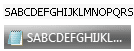
Since I'm setting up Win7 right now, I also have another issue that annoys me:
I love the classic XP font!
In Win7, if I disable all visual effects (System Properties -> Performance -> Adjust for best performance), the font is perfect! However, Aero obviously gets disabled as well. If I switch Aero back on (via Start -> type "aero" -> "find and fix..."), many of the windows remain with the classic font, but others (like the control panel) go back to that "smooth" font.
Is there a way to have the classic font everywhere (with now edge "enhancements")?
I'd really appreciate any help on this - I'm actually considering keeping Aero disabled so I can have my good ol' fonts. :huh:
Edit: I just found the "Window Color and Appearance" window, which was hidden in the Control Panel under Personalization -> Window Color (why there???) -> Advanced appearance settings.
I could set some fonts there back to Tahoma (which is the classic Windows font), but that didn't really change that much:

There is definitely a conflict between the different Windows tool that deal with changing the appearance...I'll experiment more, but I'd love to get some input from you guys!
I love the classic XP font!
In Win7, if I disable all visual effects (System Properties -> Performance -> Adjust for best performance), the font is perfect! However, Aero obviously gets disabled as well. If I switch Aero back on (via Start -> type "aero" -> "find and fix..."), many of the windows remain with the classic font, but others (like the control panel) go back to that "smooth" font.
Is there a way to have the classic font everywhere (with now edge "enhancements")?
I'd really appreciate any help on this - I'm actually considering keeping Aero disabled so I can have my good ol' fonts. :huh:
Edit: I just found the "Window Color and Appearance" window, which was hidden in the Control Panel under Personalization -> Window Color (why there???) -> Advanced appearance settings.
I could set some fonts there back to Tahoma (which is the classic Windows font), but that didn't really change that much:

There is definitely a conflict between the different Windows tool that deal with changing the appearance...I'll experiment more, but I'd love to get some input from you guys!
Last edited:
My Computer
- OS
- Windows 7 RTM x64, Windows XP, Ubuntu 9.04
- CPU
- X2 4850e
- Motherboard
- Jetway HA06
- Memory
- 2*takeMS 2048MB DDR2-800
- Graphics Card(s)
- Radeon 4870
- Sound Card
- Audigy 2 eX
- Monitor(s) Displays
- 24", 17"
- Screen Resolution
- 1920*1200, 1280*1024
- Hard Drives
- 2*500GB, 2*1000GB
...sadly no SSD yet...
- PSU
- bequiet! Straight Power 350W
- Case
- Chieftec BA-02B-B-B
- Keyboard
- Logitech G11
- Mouse
- Logitech M518
- Internet Speed
- DSL8000
- Other Info
- Also:
Toshiba Portégé M400 (T7200, 3GB RAM)