Aero is off

If you want rid of the aero theme then you can have windows classic.

Control Panel > Change the Theme > Windows 7 Basic.
 

My Computer

Computer Manufacturer/Model Number
Desktop
OS
Windows 7 Professional x64
CPU
Intel i5-2500k @ 3.3Ghz
Motherboard
Gigabyte GA-Z77X-UD5H
Memory
4GB DDR3
Graphics Card(s)
Nvidia GTS250 1GB
Monitor(s) Displays
Sony SDM S95A
Screen Resolution
1280x1024
Hard Drives
1x 1TB, 2x 250GB HDDs
PSU
Corsair HX850W
Case
Cooler Master 690 II
Cooling
Thermalright True Spirit 140mm & 3x 120mm & 3x 140mm Fans
Keyboard
Logitech Media Keyboard
Mouse
Microsoft Intellimouse
Internet Speed
8MB
Start Menu -> Right Click "Computer" -> Click "Advanced System Settings" -> "Advanced" Tab -> Click "Performance".

What is enabled in Visual Effects Tab?

I feel this is a good point to start.
 

My Computer

OS
Windows 7 Ultimate
CPU
Intel QX6850 (mildly clocked to 3.6Ghz)
Motherboard
Foxconn BlackOps X48
Memory
Corsair XMS3 DDR3 @ 1600MHZ
Graphics Card(s)
ATi 4870X2
Sound Card
X-Fi Elite Pro (with Breakout Box)
Monitor(s) Displays
General Hyundai 19" Flat Panel
Hard Drives
WD Raptor 150Gb.
Seagate 750Gb HDD for Internal Storage.
Drives partitioned, for backup and storage, page file, etc.
PSU
OCZ 750W PSU
Case
Antec Nine Hundred Gaming Case
Cooling
Prolimatech Megahalems with Dual Fan Setup (140/120) + AS5
Continue to be excluded; /
 

My Computer

OS
Windows 7 UltimatE
CPU
AMD X2 3800+ Dula Core
Motherboard
MSI-NEOv
Memory
2x 1 gb goodram 667
Graphics Card(s)
GF 7600 Gt
Monitor(s) Displays
Hanss-g 17''
Screen Resolution
2048x1024
PSU
no name
Case
other
Cooling
Pentagram alcu freezone 90
Mouse
ie 3.0
Internet Speed
2 mb/s
I fixed it.

This little software "Windows 7 Aero Blur Tweake" is supposed to make your transparency on Aeor CLEAR and not Blurred. I also liked the idea. But the software FAILs. I wish I knew what it does. But how ever when it's done, you cant use Aero any more. It's not just the transparency. It turns off your entire AERO. I managed to fix that by running a troubleshoot for Windows 7 Aero.
Do this :
1.Go to
Control Panel\Appearance and Personalization\Personalization
2. Click on "Troubleshoot problems with transparency and other Aero effects.
3. Next.
This turned on some process by me that fixed the problem and I had my Aero themes back as normal.

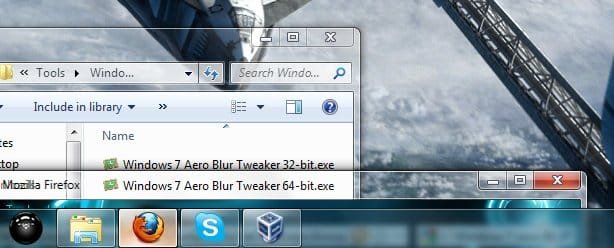
I tried the "Windows 7 Aero Blur Tweake" again after that. Before i run it I switched to Windows Classic Theme. And it worked. However the Glass effect is ONLY for the Windows not for the Task-bar and start menu. And by Glass I mean totally Transparent without no color at all except some wight around the name of the window.
The program could have been any good if it left some color but for me it don't. Plus there is a chance that you ruin your entire Aero so there is no question why . Really crappy work of software. No help, no explanation what it does no nothing.
Better stay off it since the result is even crap.
Here is a screen shot of what this major peace of pain does.
 

Attachments

  • Windows 7 Aero Blur Tweaker.jpg
    Windows 7 Aero Blur Tweaker.jpg
    39.1 KB · Views: 4

My Computer

OS
Windows 7 Ultimate x86
Back
Top