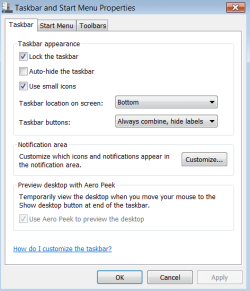
Solved Aero theme problems, can't enable it

emptyspace

New member
Local time
11:29 AM
Messages
4
I am having some problems enabling aero on my laptop. I had it working before, about a month ago, and then I either did a windows update or updated my graphics card driver or both and that's when aero stopped working. I didn't feel like fixing it at the time so I put it off to the side and went on vacation so here I am a month later trying to fix it.

I googled a bunch of fixes but nothing seemed to work. I updated to the latest graphics card driver (Nvidia GTX 460m), 320.18 and did the latest win 7 updates. I also doubled check to make sure the theme I selected was using aero.

Here is a list of the fixes I tried to do and some weird things I noticed.

1. I tried a few different registry edits, below is one of them but I tried and changed a few different things. I have a reg backup too from before I changed things.
Code:
[LIST=1]
[*]Open [B]Registry Editor[/B] (RegEdit).
[*]Navigate to the following registry key: [B]HKEY_CURRENT_USER\Software\Microsoft\Windows\DWM[/B]
 If the DWM registry key is not found, right click on Windows and then select [B]New[/B] -> [B]Key[/B] to create new branch and name it as [B]DWM[/B].
[*]In the right details pane, create a new DWORD (32-bit value) named [B]UseMachineCheck[/B], and set its value to 0.
[*]In the right details pane, create a new [B]DWORD (32-bit) Value[/B] named [B]Blur[/B], and set its value to 0.
[*]In the right details pane, create a new [B]DWORD (32-bit) Value[/B] named [B]Animations[/B], and set its value to 0.
[*]Restart the [B]Desktop Window Manager Session Manager[/B]  in Services in Control Panel (type Services.msc in Start Search), or run  the following commands in a command prompt with administrator  privileges: [B]net stop uxsms[/B]
[B]net start uxsms[/B]
[*]Attempt to enable and apply Windows Aero in Windows 7. Restart the computer if required.
[/LIST]
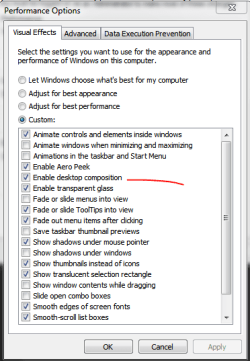
2. I noticed when I go to performance option, there is no mention of aeropeek or other options that should be there

3. I tried installing nvidia drivers ranging from 275.33 - 320.18 with no luck.

4. My system restore points only go back a day even when I check the box that says "Show more restore points" so that is no help

5. When I search aero and then click the "Find and fix problems .... visual effects", windows does a search to find the problem and the problem that it detects is Desktop Window Manger is disabled. So I went into services.msc and found Desktop windows manger and it is already running, startup type is automatic. So I stopped it and started it again by right clicking it and nothing. I tried the command line version, net stop uxsms and net start ucsms, as admin and nothing.

6. Updated Windows Experience Index, everything is above 7.1 except for primary HDD, thats at 5.9.

7. Created a new user but the results are the same

Anyone have some suggestions?
 

Attachments
  • performance_option.PNG
    performance_option.PNG
    28.1 KB · Views: 103
  • task_properties.PNG
    task_properties.PNG
    24.8 KB · Views: 99

My Computer

Computer type
Laptop
Computer Manufacturer/Model Number
Alienware
OS
Win 7 Home Premium x64
CPU
i7
Memory
4gb
Graphics Card(s)
Nvidia GTX 460m
Hello emptyspace, and welcome to Seven Forums.

In addition, here are some more items to double check:
  • Windows needs to be activated.
  • You must be have True Color (32 bit) set instead of High Color (16 bit).
  • The Desktop Window Manager Session Manager and Themes Services need to be set to Start and Automatic.
  • The desktop composition and Animate controls and elements inside windows options enabled in Visual Effects.
Hope this helps, :)
Shawn
 

My Computer

Computer type
PC/Desktop
Computer Manufacturer/Model Number
Self built custom
OS
64-bit Windows 11 Pro for Workstations
CPU
Intel i7-8700K OC'd to 5 GHz
Motherboard
ASUS ROG Maximus XI Formula Z390
Memory
64 GB (4x16GB) G.SKILL TridentZ RGB DDR4 3600 MHz
Graphics Card(s)
ASUS ROG-STRIX-GTX1080TI-O11G-GAMING
Sound Card
Integrated
Monitor(s) Displays
2 x Samsung Odyssey G7 27"
Screen Resolution
2560x1440
Hard Drives
1TB Samsung 990 PRO M.2,
4TB Samsung 990 PRO PRO M.2,
TerraMaster F8 SSD Plus NAS
PSU
Seasonic Prime Titanium 850W
Case
Thermaltake Core P3
Cooling
Corsair Hydro H115i
Keyboard
Logitech wireless K800
Mouse
Logitech MX Master 4
Internet Speed
2 Gb/s Download and 100 Mb/s Upload
Antivirus
Malwarebyte Anti-Malware Premium
Browser
Google Chrome
Other Info
Logitech Z625 speaker system,
Logitech BRIO 4K Pro webcam,
HP Color LaserJet Pro MFP M477fdn,
APC SMART-UPS RT 1000 XL - SURT1000XLI,
Galaxy S23 Plus phone
I tried all those but still no luck. Below is the checklist that I did.


  • Windows is activated
  • It's set for True Color (32 bit)
  • The Desktop Window Manager Session Manager and Themes Services are Started and Automatic.
  • Animate controls and elements inside windows options enabled in Visual Effects.
I noticed that in visual effects, there is nothing in that windows that mentions desktop composite option to be checked off. That option is completely missing.


I really don't want to reinstall the OS and go through that hassle. Any other options I can try?


Thanks for the help
 

My Computer

Computer type
Laptop
Computer Manufacturer/Model Number
Alienware
OS
Win 7 Home Premium x64
CPU
i7
Memory
4gb
Graphics Card(s)
Nvidia GTX 460m

My Computer

Computer type
PC/Desktop
Computer Manufacturer/Model Number
Self built custom
OS
64-bit Windows 11 Pro for Workstations
CPU
Intel i7-8700K OC'd to 5 GHz
Motherboard
ASUS ROG Maximus XI Formula Z390
Memory
64 GB (4x16GB) G.SKILL TridentZ RGB DDR4 3600 MHz
Graphics Card(s)
ASUS ROG-STRIX-GTX1080TI-O11G-GAMING
Sound Card
Integrated
Monitor(s) Displays
2 x Samsung Odyssey G7 27"
Screen Resolution
2560x1440
Hard Drives
1TB Samsung 990 PRO M.2,
4TB Samsung 990 PRO PRO M.2,
TerraMaster F8 SSD Plus NAS
PSU
Seasonic Prime Titanium 850W
Case
Thermaltake Core P3
Cooling
Corsair Hydro H115i
Keyboard
Logitech wireless K800
Mouse
Logitech MX Master 4
Internet Speed
2 Gb/s Download and 100 Mb/s Upload
Antivirus
Malwarebyte Anti-Malware Premium
Browser
Google Chrome
Other Info
Logitech Z625 speaker system,
Logitech BRIO 4K Pro webcam,
HP Color LaserJet Pro MFP M477fdn,
APC SMART-UPS RT 1000 XL - SURT1000XLI,
Galaxy S23 Plus phone
I tried all those but still no luck. Below is the checklist that I did.


  • Windows is activated
  • It's set for True Color (32 bit)
  • The Desktop Window Manager Session Manager and Themes Services are Started and Automatic.
  • Animate controls and elements inside windows options enabled in Visual Effects.
I noticed that in visual effects, there is nothing in that windows that mentions desktop composite option to be checked off. That option is completely missing.


I really don't want to reinstall the OS and go through that hassle. Any other options I can try?


Thanks for the help

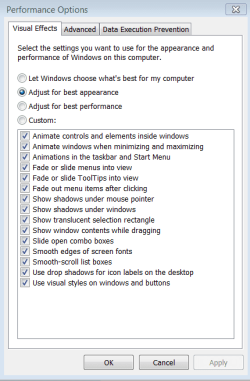
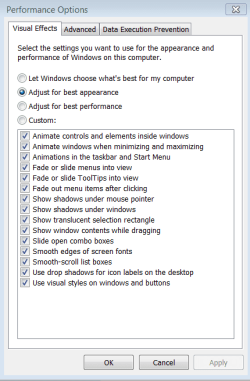
it should say "Enable Desktop Composition"

Click on the custom setting at the top.
 

Attachments

  • dtc.PNG
    dtc.PNG
    38.4 KB · Views: 102

My Computer

Computer type
PC/Desktop
Computer Manufacturer/Model Number
Custom Build
OS
Win 10 Pro 64
CPU
Intel Core i7 960 @3.20 GHz
Motherboard
MSI MS7522
Memory
24.0 GB DDR3
Graphics Card(s)
EVGA GTX 750Ti
Monitor(s) Displays
LG E2341 23 Inch
Screen Resolution
1920x1080
Hard Drives
1TB Western Dgital 1002FAEX-00Y9A0
1TB Hitachi HDS721010CLA322
PSU
700 Watt
Case
Haf 912
Cooling
Fans
Keyboard
Logitech MK710
Mouse
Logitech M705
Internet Speed
Cable
Antivirus
AIS 2015 .10.0.2225
Browser
Firefox 49
Other Info
MalwareBytes Anti-Rootkit utility
Yes, it should say enable desktop composition and enable aero peek and a few other things but it doesn't. Those options are not there.

I am doing a repair install now and I will see how that goes.
 

Attachments

  • performance_option.PNG
    performance_option.PNG
    28.1 KB · Views: 100

My Computer

Computer type
Laptop
Computer Manufacturer/Model Number
Alienware
OS
Win 7 Home Premium x64
CPU
i7
Memory
4gb
Graphics Card(s)
Nvidia GTX 460m
Holy crap, problems galore. Windows kept saying that it could not install for the hardware or something and then that lead to other problems. So the solution was to just use a 3 month old backup image of the HDD. Thanks for the help everyone.
 
Last edited:

My Computer

Computer type
Laptop
Computer Manufacturer/Model Number
Alienware
OS
Win 7 Home Premium x64
CPU
i7
Memory
4gb
Graphics Card(s)
Nvidia GTX 460m
I'm glad you were able to get it sorted. :)
 

My Computer

Computer type
PC/Desktop
Computer Manufacturer/Model Number
Self built custom
OS
64-bit Windows 11 Pro for Workstations
CPU
Intel i7-8700K OC'd to 5 GHz
Motherboard
ASUS ROG Maximus XI Formula Z390
Memory
64 GB (4x16GB) G.SKILL TridentZ RGB DDR4 3600 MHz
Graphics Card(s)
ASUS ROG-STRIX-GTX1080TI-O11G-GAMING
Sound Card
Integrated
Monitor(s) Displays
2 x Samsung Odyssey G7 27"
Screen Resolution
2560x1440
Hard Drives
1TB Samsung 990 PRO M.2,
4TB Samsung 990 PRO PRO M.2,
TerraMaster F8 SSD Plus NAS
PSU
Seasonic Prime Titanium 850W
Case
Thermaltake Core P3
Cooling
Corsair Hydro H115i
Keyboard
Logitech wireless K800
Mouse
Logitech MX Master 4
Internet Speed
2 Gb/s Download and 100 Mb/s Upload
Antivirus
Malwarebyte Anti-Malware Premium
Browser
Google Chrome
Other Info
Logitech Z625 speaker system,
Logitech BRIO 4K Pro webcam,
HP Color LaserJet Pro MFP M477fdn,
APC SMART-UPS RT 1000 XL - SURT1000XLI,
Galaxy S23 Plus phone
I had the same issue out of the blue. It also told me the system could not log onto the system event notification service. I tried all of the fixes for both issues, then found a windows hotfix (KB2590550 v2) that resolved both issues.
 

My Computer

Computer type
PC/Desktop
Computer Manufacturer/Model Number
HP p6210y
OS
Windows 7 Home Premium 64 bit
CPU
AMD Athlon II X4 620
Motherboard
MsN78-LA (Violet)
Memory
6GB
Graphics Card(s)
ATI Radeon HD 5450 (added)
Hard Drives
WDC WD10 EARS-00Y5B1
WDC WD64 00AAKS-65A7B
Antivirus
Panda Cloud Antivirus PRO
Browser
Chrome, Firefox
This solved my windows aero problem!

1. Open a program called Services. (click the windows flag in the bottom left corner, then type Services in the search field and open the first program on the list)

2. Scroll down the list that appears and right click on a field that says "Themes". Click on properties. On the "General tab" you can see an option that says "Startup type". Click on it and choose "Automatic". Then click the button that says "Start". Then hit Apply...... BIG STEP!!! DON'T FORGET TO "APPLY"!!!!

3. Go back to the big list again and look for a field that says "Desktop Windows Manager Session Manager". Then right-click and choose properties. Then change the "Startup type" to "Automatic" and click the "Start"-button. Then click APPLY!!!

Don't forget to "Apply" after changing the settings!

4. You can now close the windows and change your themes, if not you should try restarting your pc.


I hope this solved your themes-problem!

Gosta
 

My Computer

Computer type
PC/Desktop
Computer Manufacturer/Model Number
Custom Build;D
OS
Windows 7 Home Premium 64bit
CPU
Intel Core i5 4670k
Motherboard
Gigabyte GA-B85M-D3H
Memory
Crucial BallistixSport 8GB DDR3
Graphics Card(s)
EVGA GTX 780 OC 3gb
Hard Drives
Seagate Desktop HDD 1TB 7200RPM
Antivirus
Norton 360
Browser
Google Chrome
Stuck on Classic lost Win 7 Aero

Many good suggestion in previous post...But, before doing anything make sure that your Themes Services didn't turn off accidentally or because of an newly added program.
Process:
Press Ctrl Alt & Delete at the same time to activate Start Task Mgr or run from the start button.
Then when the drop down appears, double click on Services Button at the bottom right.
It will open the Services Screen.
Locate: Themes high light the line (if disabled)
double click the line and it will open another drop down window.
In the center button or block you can choose the "start up" type of service: i.e. Automatic, etc.
On the left hand panel I would suggest that you stop the service and then restart the service.
It should now be reset to go.
Now right click mouse on open area of desktop and select personalize.
If all the colors and selections appear which should include Aero, you can reselect your new themes.
Good Luck.
 

My Computer

Computer type
PC/Desktop
Computer Manufacturer/Model Number
HP pavillion
OS
Win 7 x64
CPU
AMD II x4 630 2.80 Ghz
Memory
6gb
Hard Drives
2 tb
Antivirus
avg
Hello emptyspace, and welcome to Seven Forums.


In addition, here are some more items to double check:
  • Windows needs to be activated.
  • You must be have True Color (32 bit) set instead of High Color (16 bit).
  • The Desktop Window Manager Session Manager and Themes Services need to be set to Start and Automatic.
  • The desktop composition and Animate controls and elements inside windows options enabled in Visual Effects.
Hope this helps, :)
Shawn

Thanks so much for this! This fixed my problem after a day of literally trying everything to fix this stupid issue. For all those with multiple monitors, remember to check the color setting for EACH of your screens, I have 4 monitors and only one was set to 16-bit which bricked my aero.
 

My Computer

Computer type
PC/Desktop
Computer Manufacturer/Model Number
Acer
OS
Windows 7 Home Premium x64
CPU
Intel Core i7-2600 (non-K)
Motherboard
Acer proprietary (Phoenix BIOS)
Memory
8192MB (4x 2048MB)
Graphics Card(s)
Zotac GTX 750 Ti OC
Hard Drives
128GB Samsung 830 SSD
500GB Western Digital Black HDD
Antivirus
Microsoft Security Essentials
Browser
Google Chrome
Oh my god thank you!!!

It fixed my problem, I've been busy for DAYS searching the solution. I've visited every website I could find, I tried EVERY solution. But only this one worked. Thank you, you're the best :D:D:D:D:D:D:D
 

My Computer

Computer type
PC/Desktop
OS
Windows 7 64 Home Premium
Back
Top