Solved Aero without glass

robertcz

New member
Local time
11:42 AM
Messages
7
Forgive me, I am a noob and this is my first post:

I have Aero. I like the features it gives me, especially like the Win-tab navigation functions. I can live with some of the other things it forced me to do.
But I have an issue with vision' being very sensitive to reflection. And it seems that whatever I do to Aero, the taskbar buttons have that very distracting pseudo-reflection look.

Is there any way of using Aero without that shading/reflection effect? Ideally, I would prefer a theme that looks like Classic (some call it Windows 98, but I have been using it in XP and so for me it "is" Windows) but runs under the Aero rendering engine?

Please save me! I tried using Aero all weekend, but just could not focus on my work due to the problem with the "reflections" and other annoying eye-candy. Eventually, last night I gave up and switched back to Windows Classic, which is annoying because I like all the shortcut keys that work in Aero but not in classic.

Rob
 

My Computer

Computer Manufacturer/Model Number
PC4You
OS
Windows 7 Ultimate x64
CPU
i7 quadcore
Memory
8GB
Monitor(s) Displays
Dell 24" and BenQ 21"
Hard Drives
heaps, all 2TB.
Cooling
just fans
Yep, go to Personalization, Window Color, and uncheck Enable Transparency.

Hope that helps!
 

My Computer

Computer Manufacturer/Model Number
ASUS
OS
Windows 7 Ultimate x64
CPU
AMD Athlon 240 II @ 2.8-4.004 ghz
Motherboard
M4A78LT-M LE
Memory
SuperTalent 4gb DDR3
Graphics Card(s)
ATI Radeon 3000HD
Screen Resolution
1440*900
Case
Re-modded Dell Dimension 4550
Cooling
Vantec 92mm Tornado x2
Other Info
It looks pretty.
Thanks, that doesn't solve it. Transparency goes, but that white shading that streaks across the top-left one-third of each taskbar button is still there.

Thanks for the comment.

Meanwhile, I have been over at DeviantArt and suspect that it is visual styles, not themes, that I am looking to chance. It will involve patching my OS, but I am willing to give it a go. Am going to try this style: Classic AE 2.1 by ~Saarineames on deviantART

Cheers,
Rob
 

My Computer

Computer Manufacturer/Model Number
PC4You
OS
Windows 7 Ultimate x64
CPU
i7 quadcore
Memory
8GB
Monitor(s) Displays
Dell 24" and BenQ 21"
Hard Drives
heaps, all 2TB.
Cooling
just fans
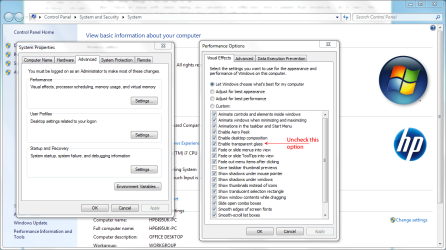
You can configure your Aero settings easily.

Go back and switch to full Aero settings and save them.

Press the Win+Pause keyboard combo then click Advanced System Settings.

In the System Properties box click the Advanced tab and click Settings in the Performance section.

From here, you can configure your settings as you like.

Perf.PNG
 

My Computer

Computer Manufacturer/Model Number
HP Pavilion Elite 495UK
OS
Windows 7 Ultimate SP1 64-Bit
CPU
Intel Core i7 870 @ 2.93GHz
Motherboard
MSI 2A9C (CPU1)
Memory
8Gb Dual-Channel DDR3 @ 664MHz
Graphics Card(s)
nVidia GeForce GTX 460 1024MB dedicated RAM
Sound Card
Realtek HD Audio
Monitor(s) Displays
HP2310i
Screen Resolution
1920 x 1080
Hard Drives
1x1954GB Hitachi HDS22020ALA 330 (RAID), 1x1954GB Hitachi External for backup and storage
PSU
460W
Case
HP Elite
Cooling
Air cooled
Keyboard
Logitech K750 solar-powered keyboard
Mouse
Logitech Wireless M180 mouse
Internet Speed
2Mb
Other Info
Pure Avanti Flow Internet Radio with iPod Dock, 64Gb iPod, HP USB Speakers, Sony MDR-V500 Headphones, Sony Vaio F-Series Laptop
Thanks, I'll try that. But I think that just removes the transparency, not the pseudo-reflectivity. Will try at home tonight :)
 

My Computer

Computer Manufacturer/Model Number
PC4You
OS
Windows 7 Ultimate x64
CPU
i7 quadcore
Memory
8GB
Monitor(s) Displays
Dell 24" and BenQ 21"
Hard Drives
heaps, all 2TB.
Cooling
just fans
Thanks, that doesn't solve it. Transparency goes, but that white shading that streaks across the top-left one-third of each taskbar button is still there.

Thanks for the comment.

Meanwhile, I have been over at DeviantArt and suspect that it is visual styles, not themes, that I am looking to chance. It will involve patching my OS, but I am willing to give it a go. Am going to try this style: Classic AE 2.1 by ~Saarineames on deviantART

Cheers,
Rob
That theme looks interesting. If disabling transparency doesn't help, you can increase the color intensity by sliding the color adjuster to the far right, and there's a couple of other options to adjust the color. It seems to take the white streak away.
 

My Computer

Computer Manufacturer/Model Number
ASUS
OS
Windows 7 Ultimate x64
CPU
AMD Athlon 240 II @ 2.8-4.004 ghz
Motherboard
M4A78LT-M LE
Memory
SuperTalent 4gb DDR3
Graphics Card(s)
ATI Radeon 3000HD
Screen Resolution
1440*900
Case
Re-modded Dell Dimension 4550
Cooling
Vantec 92mm Tornado x2
Other Info
It looks pretty.
Thanks, that doesn't solve it. Transparency goes, but that white shading that streaks across the top-left one-third of each taskbar button is still there.

Thanks for the comment.

Meanwhile, I have been over at DeviantArt and suspect that it is visual styles, not themes, that I am looking to chance. It will involve patching my OS, but I am willing to give it a go. Am going to try this style: Classic AE 2.1 by ~Saarineames on deviantART

Cheers,
Rob
That theme looks interesting. If disabling transparency doesn't help, you can increase the color intensity by sliding the color adjuster to the far right, and there's a couple of other options to adjust the color. It seems to take the white streak away.

Oh, maybe I didn't tweak enough. I tweaked and tweaked, and it wouldn't disappear. Maybe I was tweaking too many things at once - I'll give it a bash at home today :)

It's amazing how visual styles can so easily detract from work. I want my OS to be nice, but in the background. I find the standard Aero themes too "in my face".

Cheers,
Thanks for your advice!
 

My Computer

Computer Manufacturer/Model Number
PC4You
OS
Windows 7 Ultimate x64
CPU
i7 quadcore
Memory
8GB
Monitor(s) Displays
Dell 24" and BenQ 21"
Hard Drives
heaps, all 2TB.
Cooling
just fans
You're very welcome.

In the meantime, we can leave this thread open so you can post back and let us know the outcome or get more help.
 

My Computer

Computer Manufacturer/Model Number
HP Pavilion Elite 495UK
OS
Windows 7 Ultimate SP1 64-Bit
CPU
Intel Core i7 870 @ 2.93GHz
Motherboard
MSI 2A9C (CPU1)
Memory
8Gb Dual-Channel DDR3 @ 664MHz
Graphics Card(s)
nVidia GeForce GTX 460 1024MB dedicated RAM
Sound Card
Realtek HD Audio
Monitor(s) Displays
HP2310i
Screen Resolution
1920 x 1080
Hard Drives
1x1954GB Hitachi HDS22020ALA 330 (RAID), 1x1954GB Hitachi External for backup and storage
PSU
460W
Case
HP Elite
Cooling
Air cooled
Keyboard
Logitech K750 solar-powered keyboard
Mouse
Logitech Wireless M180 mouse
Internet Speed
2Mb
Other Info
Pure Avanti Flow Internet Radio with iPod Dock, 64Gb iPod, HP USB Speakers, Sony MDR-V500 Headphones, Sony Vaio F-Series Laptop
Last edited:

My Computer

Computer Manufacturer/Model Number
HP Pavillion dv5t (generation 1)
OS
Vista 64 bit and 32 bit (SP2)
CPU
Intel(R) Core(TM)2 Duo Processor T9400 (2.53 GHz
Memory
4GB DDR2 System Memory (2 Dimm)
Graphics Card(s)
512 MB NVIDIA GeForce 9600M GT
Monitor(s) Displays
15.4" diagonal WSXGA+ High-Definition HP BrightView Widescre
Screen Resolution
1680 x 1050
Hard Drives
320GB 5400RPM SATA Hard Drive with HP ProtectSmart Hard Drive Protection
Keyboard
Built-in HP
Mouse
Built in - Synaptics TouchPad V6.5 on PS/2 Port
Internet Speed
Max
Other Info
~ Intel Next-Gen Wireless-N Mini-card w/Bluetooth ~ Blu-Ray ROM DVD+/-R/RW ~ Integ. HDTV Hybrid Tuner ~ 12 Cell Battery ~ MS Office (Home Premium) 2007 ~
Welcome to the Seven Forums
I use Windows Style Builder and can change the look of the taskbar buttons and maybe a couple of other areas for you.
You will need to do 1 of these 2 ways of Enabling custom themes for it to work.
http://www.sevenforums.com/tutorials/34579-enabling-custom-themes-windows-7-a.html
Or
http://www.sevenforums.com/tutorials/28377-theme-how-apply-custom-themes.html?filter
Here is the look of the taskbar buttons with no shine
task.png

Let me know and I will post it in a zip here.
Jerry
 

My Computer

Computer type
Laptop
Computer Manufacturer/Model Number
Sager NP9170
OS
Win 7 Pro x64 / Win 10 Pro
CPU
Intel(R) Core(TM) i7-3630QM CPU @ 2.40GHz
Motherboard
CLEVO P170EM
Memory
12 GB
Graphics Card(s)
(1) Intel(R) HD Graphics 4000 (2) NVIDIA GeForce GTX 675M
Sound Card
(1) Realtek High Definition Audio (2) Intel(R) Display Aud
Monitor(s) Displays
17.3
Screen Resolution
1920x1080
Hard Drives
(1) Samsung 860 EVO 500GB(OS) (1) Samsung 860 EVO 500GB(Data)
Keyboard
Backlite
Antivirus
MSE, Malwarebytes Pro
Browser
Firefox
Other Info
DESKTOP: Custom-built.
OS: Win 10 Pro x64.
CASE: Rosewill R5.
CPU: Intel I5 4670K CPU @ 3.40GHz.
CPU COOLER: Cool Master Hyper 212 EVO.
MOTHERBOARD: Asus Z87-A.
MEMORY: Kingston HyperX 2x4 GB.
GPU: Nvidia Geforce 650 TI.
PSU: Corsair TX750.
DRIVES: (1) Samsung 840 120 GB SSD (2) Western Digital blue 500 GB 7200 RPM.
uxStyle

Thanks Bongo, the UxStyle thing seems better (prefer not to patch) but is it safe?

Haven't replied because doing system backups and then going to reimage my system partition before playing around with any of this.

Cheers guys,
(leave the thread open and I'll report back in a day or two).

Rob
 

My Computer

Computer Manufacturer/Model Number
PC4You
OS
Windows 7 Ultimate x64
CPU
i7 quadcore
Memory
8GB
Monitor(s) Displays
Dell 24" and BenQ 21"
Hard Drives
heaps, all 2TB.
Cooling
just fans
Ok guys, thanks for all of your help. I am reporting back.
I took the UxStyle approach, which doesn't involve any patching of my OS files, just the installation of the UxStyle service to allow unsigned themes to work.

I did not need to reboot, as I had to turn UAC down as much as possible already to have simple things running (I'm a programmer, for part of my job, and so UAC gets in the way; anyway, who are M$ kidding, Windows is never used as a mutli-user system - at least not simultaneously).

1) Now, installing UxStyle was a bit funny. First time I tried to install it (bl clickign on UxStyle_Core_Jul13_x64.msi - my system is Windows 7 64-bit), it stopped part way through with an error indicating that some files on my system had been tampered with. Although it asked me to work out how to restore them, I didn't, and just re-ran UxStyle_Core_Jul13_x64.msi again. This time it worked.
There doesn't seem to be any performance hit. While googling it, the security sites said it was safe, and didn't find any references to phishing etc with it. (Mind you' I've only had it running for half an hour, so your milage may vary).

2) After doing that, installed the Classic AE 2.1c (Charcoal) style (find that on DeviantArt). Major disappointment. I mean, the style looked great, but I have a toolbar in my taskbar to mimic the old Quicklaunch (I'm 46, habits have a tendency to stick). Since I stretch my taskbar over two rows rather than one, the icons on the (pseudo-)Quicklaunch toolbar in the taskbar usually wrap around to the second row. Unfortunately, this does not happen in that style, so the toolbar had >> at the right side, and a second row empty. If I stretched it, that would waste screen real estate. HOWEVER, this problem seems to be limited to that Style (Classic AE). After that, I installed a few others, and none of them had the problem. As part of that process, I discovered a style called 7clean V.1.1.1, by JongHyunPark (from DeviantArt). This is a fantastic, unobtrusive almost Mac-like style (sort of Apple, but done right!). It's beautiful/fantastic. I even was tempted to move the taskbar to the top of the screen.

What a lovely Aero style!!!! I am very happy. Thanks for encouraging me, guys.

Rob

(feel free to close off the thread).
 

My Computer

Computer Manufacturer/Model Number
PC4You
OS
Windows 7 Ultimate x64
CPU
i7 quadcore
Memory
8GB
Monitor(s) Displays
Dell 24" and BenQ 21"
Hard Drives
heaps, all 2TB.
Cooling
just fans
Hello Rob. Pleased to hear you've solved your problem. Thanks for the update too.

I've reported the thread as solved. For future reference you can do the same in any new thread by clicking the red Report Post link at the top-right of the message box and type Solved in the text box that appears.
 

My Computer

Computer Manufacturer/Model Number
HP Pavilion Elite 495UK
OS
Windows 7 Ultimate SP1 64-Bit
CPU
Intel Core i7 870 @ 2.93GHz
Motherboard
MSI 2A9C (CPU1)
Memory
8Gb Dual-Channel DDR3 @ 664MHz
Graphics Card(s)
nVidia GeForce GTX 460 1024MB dedicated RAM
Sound Card
Realtek HD Audio
Monitor(s) Displays
HP2310i
Screen Resolution
1920 x 1080
Hard Drives
1x1954GB Hitachi HDS22020ALA 330 (RAID), 1x1954GB Hitachi External for backup and storage
PSU
460W
Case
HP Elite
Cooling
Air cooled
Keyboard
Logitech K750 solar-powered keyboard
Mouse
Logitech Wireless M180 mouse
Internet Speed
2Mb
Other Info
Pure Avanti Flow Internet Radio with iPod Dock, 64Gb iPod, HP USB Speakers, Sony MDR-V500 Headphones, Sony Vaio F-Series Laptop
Thanks for the info and for your help :)
 

My Computer

Computer Manufacturer/Model Number
PC4You
OS
Windows 7 Ultimate x64
CPU
i7 quadcore
Memory
8GB
Monitor(s) Displays
Dell 24" and BenQ 21"
Hard Drives
heaps, all 2TB.
Cooling
just fans
As the thread starter you can use the "mark this thread as solved" button to mark the thread closed
 

My Computers

System One System Two

  • Computer type
    PC/Desktop
    Computer Manufacturer/Model Number
    ChillBlast - Custom to my design
    OS
    Windows 11 Pro x64 [Latest Release and Release Preview]
    CPU
    Ryzen 9 5950X, 3.8 - 5.2 MHz
    Motherboard
    Asus Prime X570-Pro
    Memory
    64GB [2 x 32GB] DDR4 3200MHz
    Graphics Card(s)
    4GB NVIDIA GEFORCE GTX 1650 Ti
    Sound Card
    On-board SPDIF to 5.1 System + HDMI [5.1 system]
    Monitor(s) Displays
    32" UHD 32 Bit HDR Monitor + 43" UHD 4K 32Bit HDR TV
    Screen Resolution
    2 x 3840 x 2160 @60Hz
    Hard Drives
    1TB M2 SSD OS, 500GB Fast Access SSD, 2 x 8TB Data + Various Externals from 1TB to 4TB, 10TB NAS
    PSU
    NZXT C750 80 PLUS Gold 750W Modular PSU
    Case
    Workstation Case [Matt Black]
    Cooling
    NZXT Kraken X63 280mm CPU Cooler +2x Quiet Case fans
    Keyboard
    Logitech Wireless MX Keys & K400 + others
    Mouse
    Logitech Wireless MX Master 3S
    Internet Speed
    920 MB Down 50 MB Up
    Antivirus
    BitDefender Total Security Pro
    Browser
    Chrome (always run latest Non-Beta)
    Other Info
    Also run ...
    Laptop - Quad 8GB - Windows 10 Pro x64
    Nexus 7 Android tablet x2
    Samsung 10.2" tablet
    Blackview TAB 8 4G Android Tablet c/w Keyboard
    Wacom Intuos Pro Medium Pen Pad
    Wacom Intuos Pro Small Pen Pad
    Wacom Expresskeys Remote
    Loopdeck+ Graphics Controller
    Shuttle Pro v2 Control
  • Computer type
    Laptop
    System Manufacturer/Model Number
    Dell XPS 17 10750H
    OS
    Windows 11 Pro x64 Latest RP
    CPU
    Intel I7 10750H 5.0GHz
    Motherboard
    Dell XPS
    Memory
    32GB [2x16GB] DDR4 2933 MHz
    Graphics Card(s)
    nVidia GTX1650Ti 4 GB GDDR6
    Sound Card
    Stock [Realtek] 4 Speaker
    Monitor(s) Displays
    17" IPS UHD+ Infinity Edge Touchscreen
    Screen Resolution
    3840 x 2400
    Hard Drives
    2TB M2 NVMe, 4TB External + various 500GB & 1TB External NVMe (also have access to spinner HDD from
    PSU
    Stock
    Case
    Stock XPS Aluminium & Carbon Fibre
    Cooling
    Stock - Active Fan Control
    Keyboard
    Backlit + Various Logitech
    Mouse
    Stock Track Pad + Logitech MX Trackball
    Internet Speed
    72 MB Down 18MB Up
    Browser
    Chrome
    Other Info
    Also run ...
    Laptop - Quad 8GB - Windows 10 Pro x64
    Nexus 7 Android tablet x2
    10.2" tablet
    Sony Z3 Android Smartphone
    Wacom Intuos Pro Medium Pen Pad
    Wacom Intuos Pro Small Pen Pad
    Wacom Expresskeys Remote
    Loopdeck+ Graphics Controller
    Shuttle Pro v2 Control Pad
    10TB NAS

My Computer

Computer Manufacturer/Model Number
HP Pavilion Elite 495UK
OS
Windows 7 Ultimate SP1 64-Bit
CPU
Intel Core i7 870 @ 2.93GHz
Motherboard
MSI 2A9C (CPU1)
Memory
8Gb Dual-Channel DDR3 @ 664MHz
Graphics Card(s)
nVidia GeForce GTX 460 1024MB dedicated RAM
Sound Card
Realtek HD Audio
Monitor(s) Displays
HP2310i
Screen Resolution
1920 x 1080
Hard Drives
1x1954GB Hitachi HDS22020ALA 330 (RAID), 1x1954GB Hitachi External for backup and storage
PSU
460W
Case
HP Elite
Cooling
Air cooled
Keyboard
Logitech K750 solar-powered keyboard
Mouse
Logitech Wireless M180 mouse
Internet Speed
2Mb
Other Info
Pure Avanti Flow Internet Radio with iPod Dock, 64Gb iPod, HP USB Speakers, Sony MDR-V500 Headphones, Sony Vaio F-Series Laptop
Good to hear you got it going Rob.
Jerry
 

My Computer

Computer type
Laptop
Computer Manufacturer/Model Number
Sager NP9170
OS
Win 7 Pro x64 / Win 10 Pro
CPU
Intel(R) Core(TM) i7-3630QM CPU @ 2.40GHz
Motherboard
CLEVO P170EM
Memory
12 GB
Graphics Card(s)
(1) Intel(R) HD Graphics 4000 (2) NVIDIA GeForce GTX 675M
Sound Card
(1) Realtek High Definition Audio (2) Intel(R) Display Aud
Monitor(s) Displays
17.3
Screen Resolution
1920x1080
Hard Drives
(1) Samsung 860 EVO 500GB(OS) (1) Samsung 860 EVO 500GB(Data)
Keyboard
Backlite
Antivirus
MSE, Malwarebytes Pro
Browser
Firefox
Other Info
DESKTOP: Custom-built.
OS: Win 10 Pro x64.
CASE: Rosewill R5.
CPU: Intel I5 4670K CPU @ 3.40GHz.
CPU COOLER: Cool Master Hyper 212 EVO.
MOTHERBOARD: Asus Z87-A.
MEMORY: Kingston HyperX 2x4 GB.
GPU: Nvidia Geforce 650 TI.
PSU: Corsair TX750.
DRIVES: (1) Samsung 840 120 GB SSD (2) Western Digital blue 500 GB 7200 RPM.
Back
Top