After Installing 64-bit Cant connect to router

Jamieleemiller

New member
Local time
8:46 PM
Messages
8
So im fairly useless with computer, so i thought i would try find some people who know what there doing to help :)

So i had 32-Bit installed and i got told 78LMTthat because my pc has 8g RAM 64 bit would be better seeing as RAM is being wasted, so i installed 64-bit and all was going good up until i tryed connecting to a network, it just does not find anything its as if my router just does not exist anymore, the ethernet cable is still plugged in and nothing else has changed.

After a full day of just looking at my pc hoping it would magically work again, i installed some drivers which came with the pc and it managed to get me to connect to 'Local area connection' but still no sign of anything else.

As i said im fairly useless when it comes to this stuff some hopefully someone can aid me.

PC MODEL; GA-78LMT-S2P
 

My Computer My Computer

Computer type
PC/Desktop
OS
32 bit
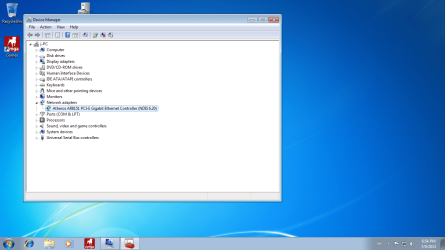
Can you open the Device Manager ? See if there is any :warn: symbols listed . Take a PrntScrn

Click on the :orb: start button

Inside
2nqbqes.png
type device manager press [ENTER] key

Upload a File
Click on the Go Advanced button under the Message box . Scroll down to Additional Options then click on Manage Attachments in the Attach Files sections . Click the Browse button locate the file then click on the Open button . In the Upload File from your Computer section click on the Upload button . Wait until it finishes uploading then close the window . Then click Submit Reply .
 

My Computer My Computer

Computer Manufacturer/Model Number
Custom Built
OS
Windows 7 Ultimate 32-Bit & Windows 7 Ultimate 64-Bit
CPU
Intel Core i7 CPU 950 @ 3.07GHz
Motherboard
ASUS P6T DELUXE V2
Memory
OCZ 6GB (3 x 2GB) 240-Pin DDR3 SDRAM DDR3 1600 OCZ3X1600R2
Graphics Card(s)
ATI Radeon HD 5700 Series
Sound Card
OnBoard
Hard Drives
WD6400AACS-00M3B0 (640GB SATA )
PSU
CORSAIR 850w
Case
NZXT LEXA
Cooling
Intel Stock Heatsink Fan
Keyboard
Microsoft Wireless Laser Keyboard 7000
Mouse
Microsoft Wireless Laser Mouse 7000
Im using a laptop atm because i cant get online with the computer, sorry for being an idiot but how would i get the picture from my desktop to be able to show you?
 

My Computer My Computer

Computer type
PC/Desktop
OS
32 bit
Ok . Use the snipping Tool inside Windows 7

Open up Device Manager .

Then use the Snipping tool . How to link is below

How to Use the Snipping Tool in Vista

Save the file to a USB flash drive then upload it using your laptop . Plug the USB flash to your laptop
 

My Computer My Computer

Computer Manufacturer/Model Number
Custom Built
OS
Windows 7 Ultimate 32-Bit & Windows 7 Ultimate 64-Bit
CPU
Intel Core i7 CPU 950 @ 3.07GHz
Motherboard
ASUS P6T DELUXE V2
Memory
OCZ 6GB (3 x 2GB) 240-Pin DDR3 SDRAM DDR3 1600 OCZ3X1600R2
Graphics Card(s)
ATI Radeon HD 5700 Series
Sound Card
OnBoard
Hard Drives
WD6400AACS-00M3B0 (640GB SATA )
PSU
CORSAIR 850w
Case
NZXT LEXA
Cooling
Intel Stock Heatsink Fan
Keyboard
Microsoft Wireless Laser Keyboard 7000
Mouse
Microsoft Wireless Laser Mouse 7000
Device Manager Print screen.png

earlier in the day that device was (Ethernet Controller)(!)
 

My Computer My Computer

Computer type
PC/Desktop
OS
32 bit
Not seeing any missing drivers . When you try to open up a browser what error message do you get ? The icon on the sys tray ( near the time ) shows it is connected . From the Computer to the router is the Ethernet cable plugged into the first Ethernet port on the router ?
 

My Computer My Computer

Computer Manufacturer/Model Number
Custom Built
OS
Windows 7 Ultimate 32-Bit & Windows 7 Ultimate 64-Bit
CPU
Intel Core i7 CPU 950 @ 3.07GHz
Motherboard
ASUS P6T DELUXE V2
Memory
OCZ 6GB (3 x 2GB) 240-Pin DDR3 SDRAM DDR3 1600 OCZ3X1600R2
Graphics Card(s)
ATI Radeon HD 5700 Series
Sound Card
OnBoard
Hard Drives
WD6400AACS-00M3B0 (640GB SATA )
PSU
CORSAIR 850w
Case
NZXT LEXA
Cooling
Intel Stock Heatsink Fan
Keyboard
Microsoft Wireless Laser Keyboard 7000
Mouse
Microsoft Wireless Laser Mouse 7000
Yeah it just says 'no internet access' and instead of my router name it says 'Local Area Connection'
 

My Computer My Computer

Computer type
PC/Desktop
OS
32 bit
Try this


Copy and paste the code below into Notepad. To open Notepad, click on :orb: . Inside
2nqbqes.png
type notepad and then press <ENTER> button .

Code:
@Echo off
pushd\windows\system32\drivers\etc
attrib -h -s -r hosts
echo 127.0.0.1 localhost>HOSTS
attrib +r +h +s hosts
popd
ipconfig /release
ipconfig /renew
ipconfig /flushdns
netsh winsock reset all
netsh int ip reset all
cls
echo Script finished.
pause
del %0

In Notepad, click File and then Save. Type reset.bat inside file name section . Change Save as Type to All Files, and then save the file to your desktop. After the file is saved, right click on the RESET.bat choose
mawket.jpg
. Once it's finished running, restart your computer. Check to see if your Internet connection is restored.
 

My Computer My Computer

Computer Manufacturer/Model Number
Custom Built
OS
Windows 7 Ultimate 32-Bit & Windows 7 Ultimate 64-Bit
CPU
Intel Core i7 CPU 950 @ 3.07GHz
Motherboard
ASUS P6T DELUXE V2
Memory
OCZ 6GB (3 x 2GB) 240-Pin DDR3 SDRAM DDR3 1600 OCZ3X1600R2
Graphics Card(s)
ATI Radeon HD 5700 Series
Sound Card
OnBoard
Hard Drives
WD6400AACS-00M3B0 (640GB SATA )
PSU
CORSAIR 850w
Case
NZXT LEXA
Cooling
Intel Stock Heatsink Fan
Keyboard
Microsoft Wireless Laser Keyboard 7000
Mouse
Microsoft Wireless Laser Mouse 7000
It didn't seem to work, Thanks for the help though, means alot this is just really confusing me, how it went from being perfect to not working
 

My Computer My Computer

Computer type
PC/Desktop
OS
32 bit
When you were installing Windows 7 x64-bit did you have the Ethernet cable plugged into the PC ? Also how did you install Windows 7
 

My Computer My Computer

Computer Manufacturer/Model Number
Custom Built
OS
Windows 7 Ultimate 32-Bit & Windows 7 Ultimate 64-Bit
CPU
Intel Core i7 CPU 950 @ 3.07GHz
Motherboard
ASUS P6T DELUXE V2
Memory
OCZ 6GB (3 x 2GB) 240-Pin DDR3 SDRAM DDR3 1600 OCZ3X1600R2
Graphics Card(s)
ATI Radeon HD 5700 Series
Sound Card
OnBoard
Hard Drives
WD6400AACS-00M3B0 (640GB SATA )
PSU
CORSAIR 850w
Case
NZXT LEXA
Cooling
Intel Stock Heatsink Fan
Keyboard
Microsoft Wireless Laser Keyboard 7000
Mouse
Microsoft Wireless Laser Mouse 7000
just seems that i have nothing at all on computer Driver wise, i didn't have a backup disc,i totally wiped it so do u know how i can fix this? and yes i did it with the Ethernet cable in and i just tapped f8 will the the computer was booting up and it booted by the disc
 

My Computer My Computer

Computer type
PC/Desktop
OS
32 bit
Did you turn off the router and modem and turn it back on after 10 seconds
 

My Computer My Computer

Computer Manufacturer/Model Number
Custom Built
OS
Windows 7 Ultimate 32-Bit & Windows 7 Ultimate 64-Bit
CPU
Intel Core i7 CPU 950 @ 3.07GHz
Motherboard
ASUS P6T DELUXE V2
Memory
OCZ 6GB (3 x 2GB) 240-Pin DDR3 SDRAM DDR3 1600 OCZ3X1600R2
Graphics Card(s)
ATI Radeon HD 5700 Series
Sound Card
OnBoard
Hard Drives
WD6400AACS-00M3B0 (640GB SATA )
PSU
CORSAIR 850w
Case
NZXT LEXA
Cooling
Intel Stock Heatsink Fan
Keyboard
Microsoft Wireless Laser Keyboard 7000
Mouse
Microsoft Wireless Laser Mouse 7000
Yeah, I installed my 'Atheros AR81Family PCI-E GigaBit/Fast Ethernet Controller Driver' again but im still only connected to 'Public network' or 'Local Area Connection' And when i try to connect to my router it just has no options as if my ethernet port is broke or something, which i highly doubt as i have not moved the pc at all its just been cds.

totally lost, Cheers for the help though
 

My Computer My Computer

Computer type
PC/Desktop
OS
32 bit
Choose Home
 

My Computer My Computer

Computer Manufacturer/Model Number
Custom Built
OS
Windows 7 Ultimate 32-Bit & Windows 7 Ultimate 64-Bit
CPU
Intel Core i7 CPU 950 @ 3.07GHz
Motherboard
ASUS P6T DELUXE V2
Memory
OCZ 6GB (3 x 2GB) 240-Pin DDR3 SDRAM DDR3 1600 OCZ3X1600R2
Graphics Card(s)
ATI Radeon HD 5700 Series
Sound Card
OnBoard
Hard Drives
WD6400AACS-00M3B0 (640GB SATA )
PSU
CORSAIR 850w
Case
NZXT LEXA
Cooling
Intel Stock Heatsink Fan
Keyboard
Microsoft Wireless Laser Keyboard 7000
Mouse
Microsoft Wireless Laser Mouse 7000
Back
Top