AHCI : Enable in Windows 7 / Vista

AHCI : Enable in Vista and Windows 7 after OS install


   Information
AHCI Advanced Host Controller Interface makes NCQ Native Command Queing along with hot-plugging or hot swapping through SATA Serial-ATA host controllers possible; Vista was the first to offer this feature. The issue with AHCI is it needs to be enabled in the BIOS prior to OS installation; doing so after you have installed the OS will disable the PC. The reason why is Windows disables the AHCI drivers not needed durring installation.

This tutorial will show you how to enable AHCI after you have installed the OS if you didn't already have AHCI enable in the BIOS when you installed the OS.

   Warning
Changing values in the Windows registry can disable your machine; if you're not sure how to do this please post a question in this tutorial and someone will be glad to help you.
   Note
This method will also work for Windows Vista though the default DWORD string value in Vista will be "4" where it will be "3" in Windows 7.

As a precaution it would be a good idea to create a "System Restore Point" before you start this, the tutorial can be found at the link below.

System Restore Point - Create


Let's get started!
1) In the Windows start menu search box type regedit, right click the entry, click Run as Administrator, enter your user credentials for the UAC prompt, then click yes to open regedit.

Start_Regedit.jpg
UAC_Regedit.jpg

2) In regedit navigate to HKEY_LOCAL_MACHINE\SYSTEM\CurrentControlSet\services.

3) In the left pane, click on msahci, in the right pane double click on Start to modify it.
RegEdit1.jpg
RegEdit2.jpg
4) In the window that opens change the value to 0 (zero), and click OK.
RegEdit3.jpg
5) In the left pane, click on iaStorV (if there), in the right pane double click on Start to modify it. Repeat step 4, and go to step 6 below.

NOTE: From: Error message occurs after you change the SATA mode of the boot drive

6) Close Registry Editor.
7) Now you'll need to restart the PC and go into the BIOS and enable AHCI. When Windows boots up, it will finish installing the AHCI drivers.

AHCI Driver.jpg
AHCI Driver2.jpg

8) You will need one final restart to finish the process after the drivers are installed.

Restart.jpg
   Note
For those with nForce boards, have a look at the Information post below.

The method was worked out by Everlong and credit for that goes to him, thanks mate!


Enjoy! :)


Last edited by a moderator:
I thinking something.
It is a problem that one of my HDD and one of my dvd-rw is PATA?
Anyone run AHCI with PATA drives? Will AHCI mode with PATA drives?
 

My Computer My Computer

At a glance

Windows 7
OS
Windows 7
I thinking something.
It is a problem that one of my HDD and one of my dvd-rw is PATA?
Anyone run AHCI with PATA drives? Will AHCI mode with PATA drives?


Hello again matrixgaby.


In my current system I have PATA optical drives and SATA HDDs.

Your OS boot HDD must be (non RAID) SATA.
 

My Computer My Computer

At a glance

W 7 64-bit UltimateIntel Q9550 Yorkfield8GB Dominator 8500C5DATI : XFX 5870
Computer Manufacturer/Model Number
* BFK Customs *
OS
W 7 64-bit Ultimate
CPU
Intel Q9550 Yorkfield
Motherboard
ASUS P5Q Pro
Memory
8GB Dominator 8500C5D
Graphics Card(s)
ATI : XFX 5870
Sound Card
Realtek HD Audio 7-1
Monitor(s) Displays
1x 47" LCD HDMI & 3x 26" LCD HDMI
Screen Resolution
1920x1080P & 1920x1200
Hard Drives
1x 80GB Intel X25-M G2 SSD : 1x 500GB & 1x 640GB WD Caviar Black(s)
PSU
Corsair 620HX
Case
Cooler Master RC-690
Cooling
Tuniq Tower 120, 2x 140mm and 3x 120mm case fans
Keyboard
Microsoft 500
Mouse
Razer Diamondback 3G
Internet Speed
14 Mb/s
Other Info
1x Koutech 3Gb/s SATA HDD Hot Swap Rack
I thinking something.
It is a problem that one of my HDD and one of my dvd-rw is PATA?
Anyone run AHCI with PATA drives? Will AHCI mode with PATA drives?


Hello again matrixgaby.


In my current system I have PATA optical drives and SATA HDDs.

Your OS boot HDD must be (non RAID) SATA.
Hmmm... Well, it was just a thought. I'm only running SATA devices in my tower (4x HDD, 1x DVD-RW), so I wasn't sure if it would make much difference.
 

My Computer My Computer

At a glance

Win 10 x64 Pro x64 / Ubuntu 15.10 x64Intel i7-4960X4x8GB Corsair Dominator Platinum @2400MHz 10-...2x MSI GTX780Ti 3GB (SLI)
Computer type
PC/Desktop
OS
Win 10 x64 Pro x64 / Ubuntu 15.10 x64
CPU
Intel i7-4960X
Motherboard
Asus Rampage IV Black Edition
Memory
4x8GB Corsair Dominator Platinum @2400MHz 10-12-12-31
Graphics Card(s)
2x MSI GTX780Ti 3GB (SLI)
Sound Card
Onboard SupremeFX (Cirrus Logic CS4398)
Monitor(s) Displays
3x LG Cinema 27" IPS LED (27MP65)
Screen Resolution
[1920x1080]x3
Hard Drives
Crucial M500 120GB, Crucial M500 480GB, Toshiba DT01ACA200 2TB
PSU
CoolerMaster V1000
Case
Corsair Obsidian 750D
Cooling
ThermalTake Water 3.0 Extreme, 4xSP120, 3xAF120
Keyboard
Moshi Luna
Mouse
Logitech G700s / Roccat Tyon
Internet Speed
4Mb uncapped ADSL (Afrihost)
Antivirus
MS Security Essentials
Browser
Chrome... Duh. (:
My boot device is SATA non-RAID.
I will try to unplug the PATA devices, enable AHCI and see what's happening.
Also, please excuse if I make spelling mistakes, I'm not an english native speaker.

Later edit:
I remove the PATA HDD from my system and put a 500 GB Samsung F3 SATA. After that I was able to enable AHCI and boot properly.
It appears that if you have an PATA HDD in the PC, you can't enable AHCI.
 
Last edited:

My Computer My Computer

At a glance

Windows 7
OS
Windows 7
Hi,

I have an X25-M that I'm having trouble using with AHCI (Gigabyte EX58-UD3R). I managed to install the driver in Windows XP which worked perfectly. I'm now using Windows 7, and although AHCI mode seems to be enabled in the OS - whenever I boot the system/board with AHCI enabled it just says

"Port-00: No device detected"

So at that point, I can't even enter the Bios settings so I'm forced to do a CMOS reset. Also, I'm a bit confused in Device Manager. What I have listed right now are:

ATA Channel 0
ATA Channel 0
ATA Channel 0
ATA Channel 0
ATA Channel 1
ATA Channel 1
ATA Channel 1
ATA Channel 1
Intel(R) ICH10 Family 2 port Serial ATA Storage Controller 2 - 3A26
Intel(R) ICH10 Family 2 port Serial ATA Storage Controller 1 - 3A20
Standard Dual Channel PCI IDE Controller

I downloaded the iaAHCI driver for ICH10R (I think that's compatible with my MB) however if I try to update the driver (via 'Have Disk') with the .inf it always gives me a BSOD. Tried updating the following:

Standard Dual Channel PCI IDE Controller
Intel(R) ICH10 Family 2 port Serial ATA Storage Controller 2 - 3A26

When I had Windows XP installed, the only drives that were visible in Device Manager was my main AHCI drive. It actually didn't display my other drives. They were still visible and accessible in explorer though.

I'm all out of ideas so...
 

My Computer My Computer

At a glance

Windows 7 Ultimate 64-Bit Editioni7 2.8 Quad4870 1GB
Computer Manufacturer/Model Number
Personal Build
OS
Windows 7 Ultimate 64-Bit Edition
CPU
i7 2.8 Quad
Motherboard
EX58-UD3R
Graphics Card(s)
4870 1GB
Monitor(s) Displays
Apple 24" LED Cinema Display (via Atlona adaptor)
Hard Drives
Intel X25-M 160Gb
3x 640AAKS
Hello Stabby, welcome to Seven Forums!


I actually have Windows 7 installed on the same SSD as you with AHCI enabled.

How many HDD/SSDs are installed in the system?
 

My Computer My Computer

At a glance

W 7 64-bit UltimateIntel Q9550 Yorkfield8GB Dominator 8500C5DATI : XFX 5870
Computer Manufacturer/Model Number
* BFK Customs *
OS
W 7 64-bit Ultimate
CPU
Intel Q9550 Yorkfield
Motherboard
ASUS P5Q Pro
Memory
8GB Dominator 8500C5D
Graphics Card(s)
ATI : XFX 5870
Sound Card
Realtek HD Audio 7-1
Monitor(s) Displays
1x 47" LCD HDMI & 3x 26" LCD HDMI
Screen Resolution
1920x1080P & 1920x1200
Hard Drives
1x 80GB Intel X25-M G2 SSD : 1x 500GB & 1x 640GB WD Caviar Black(s)
PSU
Corsair 620HX
Case
Cooler Master RC-690
Cooling
Tuniq Tower 120, 2x 140mm and 3x 120mm case fans
Keyboard
Microsoft 500
Mouse
Razer Diamondback 3G
Internet Speed
14 Mb/s
Other Info
1x Koutech 3Gb/s SATA HDD Hot Swap Rack
Thanks Kid :D

I only have the one SSD. I have another three SataII HDD's installed (all the same make, WD640AAKS). I never really bothered to select which Sata ports to plug them into, I just shoved them all in without any particular order :huh:

I thought that the order could be one of the problems, but then I start scratching my head because it seemed to boot okay in XP (and I hate having to take out all the drives again!)
 

My Computer My Computer

At a glance

Windows 7 Ultimate 64-Bit Editioni7 2.8 Quad4870 1GB
Computer Manufacturer/Model Number
Personal Build
OS
Windows 7 Ultimate 64-Bit Edition
CPU
i7 2.8 Quad
Motherboard
EX58-UD3R
Graphics Card(s)
4870 1GB
Monitor(s) Displays
Apple 24" LED Cinema Display (via Atlona adaptor)
Hard Drives
Intel X25-M 160Gb
3x 640AAKS
Welcome to Seven Forums Stabby.

You don't need to take the HDDs out, just un-plug the SATA cables.

The best way to install Win7 on a SSD is to un-plug all other HDDs, leave the DVD plugged in (port4 or 5) if you need it (install from USB drive?), be sure to plug the SSD into port0.
Be sure your SATA AHCI is setup correctly in BIOS, enabled for all ports, since you have all SATAIIs HDDs.

It's best to have the SSD completely wiped, no formatting, no partitioning, just as it was out of the box. Win7 will detect the SSD and align the partition, disable the minimum processes.
You will need to confirm all of the required SSD tweaks are done.
 

My Computer My Computer

At a glance

Windows 7 Ult x64 - SP1/ Windows 8 Pro x64Intel Core i5-3570K 4.6GHz8GB (2X4GB) DDR3 1600 Corsair Vengeance CL8 1.5vSapphire HD 7770 Vapor-X OC 1GB DDR5
Computer type
PC/Desktop
Computer Manufacturer/Model Number
76~2.0
OS
Windows 7 Ult x64 - SP1/ Windows 8 Pro x64
CPU
Intel Core i5-3570K 4.6GHz
Motherboard
Gigabyte GA-Z77X UD3H, f18
Memory
8GB (2X4GB) DDR3 1600 Corsair Vengeance CL8 1.5v
Graphics Card(s)
Sapphire HD 7770 Vapor-X OC 1GB DDR5
Sound Card
Onboard VIA VT2021
Monitor(s) Displays
22" LCD Dell
Screen Resolution
1680x1050
Hard Drives
Samsung 840Pro 128GB SSD,
Seagate Barracuda 500GB SATA2 7200rpm 32MB cache, Seagate Barracuda 1TB SATA2 7200rpm 32MB cache,
PSU
Corsair HX650W
Case
Cooler Master Storm Scout
Cooling
Corsair H80 2x12cm Noctua NF P12 , 2x14cm case fans
Keyboard
Logitech Wave
Mouse
CM Sentinel
Internet Speed
Dismal
Antivirus
Avast
Browser
Opera Next
Other Info
Haswell laptop: HP Envy 17t-j, i7-4700MQ, GeForce 740M 2GB DDR3, 17.3" Full HD 1920x1080, 16GB RAM, Samsung 840 Pro 128GB, 1TB Hitachi 7200 HDD,
Desktop: eSATA ports,
External eSATA Seagate 500GB SATA2 7200rpm,
External WD USB 500GB
Welcome to Seven Forums Stabby.

You don't need to take the HDDs out, just un-plug the SATA cables.

The best way to install Win7 on a SSD is to un-plug all other HDDs, leave the DVD plugged in (port4 or 5) if you need it (install from USB drive?), be sure to plug the SSD into port0.
Be sure your SATA AHCI is setup correctly in BIOS, enabled for all ports, since you have all SATAIIs HDDs.

It's best to have the SSD completely wiped, no formatting, no partitioning, just as it was out of the box. Win7 will detect the SSD and align the partition, disable the minimum processes.
You will need to confirm all of the required SSD tweaks are done.

Thanks Dave for the help.
 

My Computer My Computer

At a glance

W 7 64-bit UltimateIntel Q9550 Yorkfield8GB Dominator 8500C5DATI : XFX 5870
Computer Manufacturer/Model Number
* BFK Customs *
OS
W 7 64-bit Ultimate
CPU
Intel Q9550 Yorkfield
Motherboard
ASUS P5Q Pro
Memory
8GB Dominator 8500C5D
Graphics Card(s)
ATI : XFX 5870
Sound Card
Realtek HD Audio 7-1
Monitor(s) Displays
1x 47" LCD HDMI & 3x 26" LCD HDMI
Screen Resolution
1920x1080P & 1920x1200
Hard Drives
1x 80GB Intel X25-M G2 SSD : 1x 500GB & 1x 640GB WD Caviar Black(s)
PSU
Corsair 620HX
Case
Cooler Master RC-690
Cooling
Tuniq Tower 120, 2x 140mm and 3x 120mm case fans
Keyboard
Microsoft 500
Mouse
Razer Diamondback 3G
Internet Speed
14 Mb/s
Other Info
1x Koutech 3Gb/s SATA HDD Hot Swap Rack
Thanks Dave,

I didn't think SSD's needed tweaking for Win7 as they align to 101mb? I'll try plugging it into Port-0 as you say, makes sense.
 

My Computer My Computer

At a glance

Windows 7 Ultimate 64-Bit Editioni7 2.8 Quad4870 1GB
Computer Manufacturer/Model Number
Personal Build
OS
Windows 7 Ultimate 64-Bit Edition
CPU
i7 2.8 Quad
Motherboard
EX58-UD3R
Graphics Card(s)
4870 1GB
Monitor(s) Displays
Apple 24" LED Cinema Display (via Atlona adaptor)
Hard Drives
Intel X25-M 160Gb
3x 640AAKS
Your welcome.

You can find a lot of opinions on the tweaks for a SSD.

Main ones Win7 will take care of, turn off defrag, is important and worth checking.

Some people will move the default download folder location to a support HDD.

Let us know how it goes.
 

My Computer My Computer

At a glance

Windows 7 Ult x64 - SP1/ Windows 8 Pro x64Intel Core i5-3570K 4.6GHz8GB (2X4GB) DDR3 1600 Corsair Vengeance CL8 1.5vSapphire HD 7770 Vapor-X OC 1GB DDR5
Computer type
PC/Desktop
Computer Manufacturer/Model Number
76~2.0
OS
Windows 7 Ult x64 - SP1/ Windows 8 Pro x64
CPU
Intel Core i5-3570K 4.6GHz
Motherboard
Gigabyte GA-Z77X UD3H, f18
Memory
8GB (2X4GB) DDR3 1600 Corsair Vengeance CL8 1.5v
Graphics Card(s)
Sapphire HD 7770 Vapor-X OC 1GB DDR5
Sound Card
Onboard VIA VT2021
Monitor(s) Displays
22" LCD Dell
Screen Resolution
1680x1050
Hard Drives
Samsung 840Pro 128GB SSD,
Seagate Barracuda 500GB SATA2 7200rpm 32MB cache, Seagate Barracuda 1TB SATA2 7200rpm 32MB cache,
PSU
Corsair HX650W
Case
Cooler Master Storm Scout
Cooling
Corsair H80 2x12cm Noctua NF P12 , 2x14cm case fans
Keyboard
Logitech Wave
Mouse
CM Sentinel
Internet Speed
Dismal
Antivirus
Avast
Browser
Opera Next
Other Info
Haswell laptop: HP Envy 17t-j, i7-4700MQ, GeForce 740M 2GB DDR3, 17.3" Full HD 1920x1080, 16GB RAM, Samsung 840 Pro 128GB, 1TB Hitachi 7200 HDD,
Desktop: eSATA ports,
External eSATA Seagate 500GB SATA2 7200rpm,
External WD USB 500GB
Your welcome.

You can find a lot of opinions on the tweaks for a SSD.

Main ones Win7 will take care of, turn off defrag, is important and worth checking.

Some people will move the default download folder location to a support HDD.

Let us know how it goes.


I don't install or download ANYTHING to the SSD this go round.
 

My Computer My Computer

At a glance

W 7 64-bit UltimateIntel Q9550 Yorkfield8GB Dominator 8500C5DATI : XFX 5870
Computer Manufacturer/Model Number
* BFK Customs *
OS
W 7 64-bit Ultimate
CPU
Intel Q9550 Yorkfield
Motherboard
ASUS P5Q Pro
Memory
8GB Dominator 8500C5D
Graphics Card(s)
ATI : XFX 5870
Sound Card
Realtek HD Audio 7-1
Monitor(s) Displays
1x 47" LCD HDMI & 3x 26" LCD HDMI
Screen Resolution
1920x1080P & 1920x1200
Hard Drives
1x 80GB Intel X25-M G2 SSD : 1x 500GB & 1x 640GB WD Caviar Black(s)
PSU
Corsair 620HX
Case
Cooler Master RC-690
Cooling
Tuniq Tower 120, 2x 140mm and 3x 120mm case fans
Keyboard
Microsoft 500
Mouse
Razer Diamondback 3G
Internet Speed
14 Mb/s
Other Info
1x Koutech 3Gb/s SATA HDD Hot Swap Rack
I don't install or download ANYTHING to the SSD this go round.

Does your software run faster than pre-SSD, when installed on your HDD?
I have 'most' of my software on the SSD.

What do you do with or set these to?

Page file

System Restore

Shadow copy

SSD 'Enable write caching on the device'

SSD 'turn off Windows write-cache buffer flushing on the device'

User profiles and document folders
 

My Computer My Computer

At a glance

Windows 7 Ult x64 - SP1/ Windows 8 Pro x64Intel Core i5-3570K 4.6GHz8GB (2X4GB) DDR3 1600 Corsair Vengeance CL8 1.5vSapphire HD 7770 Vapor-X OC 1GB DDR5
Computer type
PC/Desktop
Computer Manufacturer/Model Number
76~2.0
OS
Windows 7 Ult x64 - SP1/ Windows 8 Pro x64
CPU
Intel Core i5-3570K 4.6GHz
Motherboard
Gigabyte GA-Z77X UD3H, f18
Memory
8GB (2X4GB) DDR3 1600 Corsair Vengeance CL8 1.5v
Graphics Card(s)
Sapphire HD 7770 Vapor-X OC 1GB DDR5
Sound Card
Onboard VIA VT2021
Monitor(s) Displays
22" LCD Dell
Screen Resolution
1680x1050
Hard Drives
Samsung 840Pro 128GB SSD,
Seagate Barracuda 500GB SATA2 7200rpm 32MB cache, Seagate Barracuda 1TB SATA2 7200rpm 32MB cache,
PSU
Corsair HX650W
Case
Cooler Master Storm Scout
Cooling
Corsair H80 2x12cm Noctua NF P12 , 2x14cm case fans
Keyboard
Logitech Wave
Mouse
CM Sentinel
Internet Speed
Dismal
Antivirus
Avast
Browser
Opera Next
Other Info
Haswell laptop: HP Envy 17t-j, i7-4700MQ, GeForce 740M 2GB DDR3, 17.3" Full HD 1920x1080, 16GB RAM, Samsung 840 Pro 128GB, 1TB Hitachi 7200 HDD,
Desktop: eSATA ports,
External eSATA Seagate 500GB SATA2 7200rpm,
External WD USB 500GB
Does your software run faster than pre-SSD, when installed on your HDD?
I have 'most' of my software on the SSD.
Hello Dave.

I'm not seeing much difference one way or the other.

I allowed Avast, MBAM and Office 2010 to install to the SSD; I ran an Avast and MBAM scans last night and I was surprised at how fast they scanned all my stuff.
What do you do with or set these to?

Page file

System Restore

Shadow copy

SSD 'Enable write caching on the device'

SSD 'turn off Windows write-cache buffer flushing on the device'

User profiles and document folders

These are all still at default, I haven't fooled around with any of that yet.
 

My Computer My Computer

At a glance

W 7 64-bit UltimateIntel Q9550 Yorkfield8GB Dominator 8500C5DATI : XFX 5870
Computer Manufacturer/Model Number
* BFK Customs *
OS
W 7 64-bit Ultimate
CPU
Intel Q9550 Yorkfield
Motherboard
ASUS P5Q Pro
Memory
8GB Dominator 8500C5D
Graphics Card(s)
ATI : XFX 5870
Sound Card
Realtek HD Audio 7-1
Monitor(s) Displays
1x 47" LCD HDMI & 3x 26" LCD HDMI
Screen Resolution
1920x1080P & 1920x1200
Hard Drives
1x 80GB Intel X25-M G2 SSD : 1x 500GB & 1x 640GB WD Caviar Black(s)
PSU
Corsair 620HX
Case
Cooler Master RC-690
Cooling
Tuniq Tower 120, 2x 140mm and 3x 120mm case fans
Keyboard
Microsoft 500
Mouse
Razer Diamondback 3G
Internet Speed
14 Mb/s
Other Info
1x Koutech 3Gb/s SATA HDD Hot Swap Rack
Thanks Ted,

Was wondering the affect when running software on a HDD, didn't think it would be much of a difference.

Kept the page file, just made it a little smaller, got plenty of RAM, haven't noticed any difference there either.

Read a claim that system restore was causing a problem for Trim to function, so disabled it. Gave a huge amount of space back, which is important with my little SSD, always do my backups so will be ok. Will turn it back on after a while for a comparison.

Write caching on, buffer flushing off.

User files and download files are moved to the HDD. A lot of sites say it's not necessary, but not a big deal to set it up.
 
Last edited:

My Computer My Computer

At a glance

Windows 7 Ult x64 - SP1/ Windows 8 Pro x64Intel Core i5-3570K 4.6GHz8GB (2X4GB) DDR3 1600 Corsair Vengeance CL8 1.5vSapphire HD 7770 Vapor-X OC 1GB DDR5
Computer type
PC/Desktop
Computer Manufacturer/Model Number
76~2.0
OS
Windows 7 Ult x64 - SP1/ Windows 8 Pro x64
CPU
Intel Core i5-3570K 4.6GHz
Motherboard
Gigabyte GA-Z77X UD3H, f18
Memory
8GB (2X4GB) DDR3 1600 Corsair Vengeance CL8 1.5v
Graphics Card(s)
Sapphire HD 7770 Vapor-X OC 1GB DDR5
Sound Card
Onboard VIA VT2021
Monitor(s) Displays
22" LCD Dell
Screen Resolution
1680x1050
Hard Drives
Samsung 840Pro 128GB SSD,
Seagate Barracuda 500GB SATA2 7200rpm 32MB cache, Seagate Barracuda 1TB SATA2 7200rpm 32MB cache,
PSU
Corsair HX650W
Case
Cooler Master Storm Scout
Cooling
Corsair H80 2x12cm Noctua NF P12 , 2x14cm case fans
Keyboard
Logitech Wave
Mouse
CM Sentinel
Internet Speed
Dismal
Antivirus
Avast
Browser
Opera Next
Other Info
Haswell laptop: HP Envy 17t-j, i7-4700MQ, GeForce 740M 2GB DDR3, 17.3" Full HD 1920x1080, 16GB RAM, Samsung 840 Pro 128GB, 1TB Hitachi 7200 HDD,
Desktop: eSATA ports,
External eSATA Seagate 500GB SATA2 7200rpm,
External WD USB 500GB
Howdy Dave.


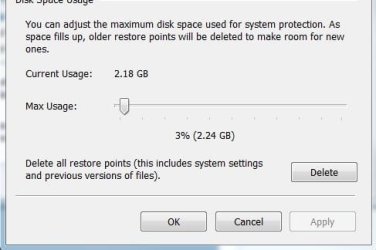
This is what I have System Restore set at, sometime I use it as a "backup" if you know what I mean.
SR.JPG
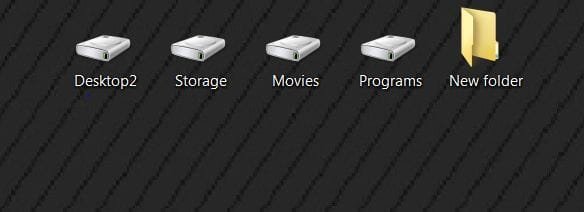
I keep these on the secondary monitor, everything goes to one of those, even stuff I used to "swap" on and off the desktop.
Disc.JPG
 

My Computer My Computer

At a glance

W 7 64-bit UltimateIntel Q9550 Yorkfield8GB Dominator 8500C5DATI : XFX 5870
Computer Manufacturer/Model Number
* BFK Customs *
OS
W 7 64-bit Ultimate
CPU
Intel Q9550 Yorkfield
Motherboard
ASUS P5Q Pro
Memory
8GB Dominator 8500C5D
Graphics Card(s)
ATI : XFX 5870
Sound Card
Realtek HD Audio 7-1
Monitor(s) Displays
1x 47" LCD HDMI & 3x 26" LCD HDMI
Screen Resolution
1920x1080P & 1920x1200
Hard Drives
1x 80GB Intel X25-M G2 SSD : 1x 500GB & 1x 640GB WD Caviar Black(s)
PSU
Corsair 620HX
Case
Cooler Master RC-690
Cooling
Tuniq Tower 120, 2x 140mm and 3x 120mm case fans
Keyboard
Microsoft 500
Mouse
Razer Diamondback 3G
Internet Speed
14 Mb/s
Other Info
1x Koutech 3Gb/s SATA HDD Hot Swap Rack
Working flawlessly here...

Thanks for the tip Ted..

+ rep to you :)
 

My Computer My Computer

At a glance

Windows7 Enterprise SP1 x64 (Technet)
OS
Windows7 Enterprise SP1 x64 (Technet)
Working flawlessly here...

Thanks for the tip Ted..

+ rep to you :)


Hello LFB, thanks, I'm glad it was a help to you.
 

My Computer My Computer

At a glance

W 7 64-bit UltimateIntel Q9550 Yorkfield8GB Dominator 8500C5DATI : XFX 5870
Computer Manufacturer/Model Number
* BFK Customs *
OS
W 7 64-bit Ultimate
CPU
Intel Q9550 Yorkfield
Motherboard
ASUS P5Q Pro
Memory
8GB Dominator 8500C5D
Graphics Card(s)
ATI : XFX 5870
Sound Card
Realtek HD Audio 7-1
Monitor(s) Displays
1x 47" LCD HDMI & 3x 26" LCD HDMI
Screen Resolution
1920x1080P & 1920x1200
Hard Drives
1x 80GB Intel X25-M G2 SSD : 1x 500GB & 1x 640GB WD Caviar Black(s)
PSU
Corsair 620HX
Case
Cooler Master RC-690
Cooling
Tuniq Tower 120, 2x 140mm and 3x 120mm case fans
Keyboard
Microsoft 500
Mouse
Razer Diamondback 3G
Internet Speed
14 Mb/s
Other Info
1x Koutech 3Gb/s SATA HDD Hot Swap Rack
Howdy Dave.


This is what I have System Restore set at, sometime I use it as a "backup" if you know what I mean.
View attachment 76639
I keep these on the secondary monitor, everything goes to one of those, even stuff I used to "swap" on and off the desktop.
View attachment 76640

Hi Ted,

I usually leave System Restore fairly large, normally have lots of free space available, but did turn it down low for the SSD.

I'll turn it back on in a month or two, see if there is any truth to the claim that it causes a problem with Trim.
 

My Computer My Computer

At a glance

Windows 7 Ult x64 - SP1/ Windows 8 Pro x64Intel Core i5-3570K 4.6GHz8GB (2X4GB) DDR3 1600 Corsair Vengeance CL8 1.5vSapphire HD 7770 Vapor-X OC 1GB DDR5
Computer type
PC/Desktop
Computer Manufacturer/Model Number
76~2.0
OS
Windows 7 Ult x64 - SP1/ Windows 8 Pro x64
CPU
Intel Core i5-3570K 4.6GHz
Motherboard
Gigabyte GA-Z77X UD3H, f18
Memory
8GB (2X4GB) DDR3 1600 Corsair Vengeance CL8 1.5v
Graphics Card(s)
Sapphire HD 7770 Vapor-X OC 1GB DDR5
Sound Card
Onboard VIA VT2021
Monitor(s) Displays
22" LCD Dell
Screen Resolution
1680x1050
Hard Drives
Samsung 840Pro 128GB SSD,
Seagate Barracuda 500GB SATA2 7200rpm 32MB cache, Seagate Barracuda 1TB SATA2 7200rpm 32MB cache,
PSU
Corsair HX650W
Case
Cooler Master Storm Scout
Cooling
Corsair H80 2x12cm Noctua NF P12 , 2x14cm case fans
Keyboard
Logitech Wave
Mouse
CM Sentinel
Internet Speed
Dismal
Antivirus
Avast
Browser
Opera Next
Other Info
Haswell laptop: HP Envy 17t-j, i7-4700MQ, GeForce 740M 2GB DDR3, 17.3" Full HD 1920x1080, 16GB RAM, Samsung 840 Pro 128GB, 1TB Hitachi 7200 HDD,
Desktop: eSATA ports,
External eSATA Seagate 500GB SATA2 7200rpm,
External WD USB 500GB
ok I've read this entire thread and still cannot get it to work. I changed the registry value. Downloaded the drivers from dell (only had ones for vista 64bit) there is no exe file to automatically install the drivers. So I went to device manager and tried to update the drivers manually and it said the latest drivers were installed. If I choose let me decide then select have disk and point it to the driver folder it then says it installed sucessfully. So i restart my computer and change the bios settings and I get a bluescreen when windows starts loading. Then I have to do a system restore.

When in device manager and I point it to the right folder there are 2 different files I can choose from. One is iaAHCI.inf and the other is iaStor.inf. After I choose either one it then lists several different models which are like Intel ICH7, ICH9, ICH8 etc... So wich file should I choose and then how do I tell which model I need to pick?

Thanks
 

My Computer My Computer

At a glance

Windows 7 Professional x64 6.1 Build 7600Intel Core 2 Quad Q9400 2.66Ghz8GB DDR3 PC3-10700H (1333Mhz)Visiontek ATI Radeon HD4850
Computer Manufacturer/Model Number
Dell XPS 430
OS
Windows 7 Professional x64 6.1 Build 7600
CPU
Intel Core 2 Quad Q9400 2.66Ghz
Motherboard
Dell Inc. 0G254H
Memory
8GB DDR3 PC3-10700H (1333Mhz)
Graphics Card(s)
Visiontek ATI Radeon HD4850
Sound Card
Intel® 7.1 channel High Definition Audio
Monitor(s) Displays
Asus VH222H 22"
Screen Resolution
1920x1080
Hard Drives
OS: Kingston SSDNow V Series SNV425-S2BD/64GB

Data: Western Digital Caviar Blue 320GB, 7200 RPM
PSU
Dell 425watt PSU
Case
Dell XPS 430
Cooling
Stock
Keyboard
Microsoft Wireless Keyboard 1000
Mouse
Microsoft Wireless Optical Mouse 2000
Internet Speed
20Mb/s Down 5Mb/s Up
Other Info
Logitech X-540 5.1 Channel Surround Sound System
Back
Top