AHCI : Enable in Windows 7 / Vista

AHCI : Enable in Vista and Windows 7 after OS install


   Information
AHCI Advanced Host Controller Interface makes NCQ Native Command Queing along with hot-plugging or hot swapping through SATA Serial-ATA host controllers possible; Vista was the first to offer this feature. The issue with AHCI is it needs to be enabled in the BIOS prior to OS installation; doing so after you have installed the OS will disable the PC. The reason why is Windows disables the AHCI drivers not needed durring installation.

This tutorial will show you how to enable AHCI after you have installed the OS if you didn't already have AHCI enable in the BIOS when you installed the OS.

   Warning
Changing values in the Windows registry can disable your machine; if you're not sure how to do this please post a question in this tutorial and someone will be glad to help you.
   Note
This method will also work for Windows Vista though the default DWORD string value in Vista will be "4" where it will be "3" in Windows 7.

As a precaution it would be a good idea to create a "System Restore Point" before you start this, the tutorial can be found at the link below.

System Restore Point - Create


Let's get started!
1) In the Windows start menu search box type regedit, right click the entry, click Run as Administrator, enter your user credentials for the UAC prompt, then click yes to open regedit.

Start_Regedit.jpg
UAC_Regedit.jpg

2) In regedit navigate to HKEY_LOCAL_MACHINE\SYSTEM\CurrentControlSet\services.

3) In the left pane, click on msahci, in the right pane double click on Start to modify it.
RegEdit1.jpg
RegEdit2.jpg
4) In the window that opens change the value to 0 (zero), and click OK.
RegEdit3.jpg
5) In the left pane, click on iaStorV (if there), in the right pane double click on Start to modify it. Repeat step 4, and go to step 6 below.

NOTE: From: Error message occurs after you change the SATA mode of the boot drive

6) Close Registry Editor.
7) Now you'll need to restart the PC and go into the BIOS and enable AHCI. When Windows boots up, it will finish installing the AHCI drivers.

AHCI Driver.jpg
AHCI Driver2.jpg

8) You will need one final restart to finish the process after the drivers are installed.

Restart.jpg
   Note
For those with nForce boards, have a look at the Information post below.

The method was worked out by Everlong and credit for that goes to him, thanks mate!


Enjoy! :)


Last edited by a moderator:
Due to problems that I'm still dealing with in W7, I have not yet gotten XP reinstalled, but when I do, there is a driver for a floppy that I think is for the Marvel controller on my MB. I imagine that it include AHCI, but I won't know until I get to that point. If it is, then XP will be running ACHI, but W7 won't, because the drive that it is installed on is not capable of it. This leaves me wondering if I still need to enable AHCI in W7, so that any access/writes done from there would be utilizing AHCI properly?
 

My Computer My Computer

At a glance

W7x64 Pro, SuSe 12.1/** W7 x64 Pro, XP MCEPhenom II 1090T w/Noctua NH-D14 /**4400+ X2 w...2 x 2GB Patriot PGS34g1600LLKA/**4x1GB Corsai...EVGA GTX460 SC/**EVGA 8800GTS
Computer Manufacturer/Model Number
DIY
OS
W7x64 Pro, SuSe 12.1/** W7 x64 Pro, XP MCE
CPU
Phenom II 1090T w/Noctua NH-D14 /**4400+ X2 w/CM Hyper TX 3
Motherboard
ASRock 890FX Deluxe 4/**A8N-SLI
Memory
2 x 2GB Patriot PGS34g1600LLKA/**4x1GB Corsair VS
Graphics Card(s)
EVGA GTX460 SC/**EVGA 8800GTS
Sound Card
Asus Xonar D2X/**Xonar D1
Monitor(s) Displays
Acer X233H, Dell E152FPc /**LG M237-WD
Screen Resolution
1920x1080 & 1024x768/**1980x1080
Hard Drives
WDC 2TB, 1.5TB, 1TB, 500GB,Seagate 500GB , Maxtor 80GB /**500GB Seagate & WDC 1TB Black
PSU
CM RS600 w/ APC BX1000G/**Antec 500 TP w/ APC BX1000
Case
HAF922/**Antec 1040IIB
Cooling
3x200mm, 1x140 and 1x120mm/**5x80mm fans
Keyboard
Logitech Media USB/**Saitek Eclipse
Mouse
Cordless Trackman Wheel/**Ditto
Internet Speed
3.3Mbps
Other Info
SB 560 5.1 w/ Sennheiser RS140/**Creative T20 speakers, Dvico FusionHDTV7 Gold RT, Cisco E3000, HP 5510V AIO, Linksys E3000, Belkin F5U237 hub and **F5D8055 adapter
(** = 2nd rig)
Dear Bare Foot Kid,

Background Story:
My friend recently got an 2TB external with an Esata connection but his computer kept messing up with it. So we decided to do a reformat and enable the ACHI before format like it is recommended (he was already planning a reformat, this was just an added bonus).

After setting AHCI on We got to the Windows install screen and deleted the 2 partitions (reserve and normal) and ran the format. However windows gave us an error saying:
"Windows cannot be installed to this disk. This computer's hardware may not support booting to this disk. Ensure that the disk's controller is enabled in the computer's BIOS menu."

We tried several things to get around it including unplugging all other hard drives from the computer and using your guide to get a clean reformat (http://www.sevenforums.com/tutorials/91339-ssd-hdd-optimize-windows-reinstallation.html). Nothing worked so we gave up and put the computer back into IDE and installed Windows 7 fine.

However, we still wanted to get AHCI working so we used this guide to try to turn it on. First, we did all the Windows updates that were popping up and downloaded and installed the latest bios and chipset for his motherboard (A780GM-A V1.1). Then we followed this guide and restarted. It got past the motherboard information but then gave a black screen stating that no OS could be found.

We then restarted and went to the bios and looked to see what it was booting from. It appeared that the hard drive was not showing up. So we went to the boot menu and found the hard drive and booted from there which found the OS and started windows fine, automatically downloading the AHCI drivers.

To make it find the hard drive to boot from, we went back to the bios and looked under the advance CMOS settings but still couldn't see what hard drive was showing up in the 1st/2nd/ect boot order. So we went to the hard drives option and set his to the first one and looked again under the boot order. It showed up so we selected it and started up windows fine.

Result:
We plug the Esata in and it instantly detects the external drive. This was not occurring before the reformat. We moved a file from the external to his desktop and it shows ~120MB/s speed and finishes in a several seconds.

Problem:
Then we tried to move a file from the desktop to the external. It reports a 400MB/s speed and the bar fills up to ~75% (it is a 600MB file) but stops. This was one of the problems that was occurring before the reformat. The file stops transferring and the computer starts to lag a bunch till it freezes completely. Hitting "cancel" causes the file transfer to sit forever attempting to cancel, with no results. Opening task manager sometimes shows multiple explorer.exe's running. All can be ended except one and the file transfer won't stop, sitting there frozen. Attempting to restart the computer results in the computer sitting on the "logging off" screen indefinitely, requiring a hard reboot. Only after restarting, which takes 1-2 mins longer than normal, can we do anything on windows again.

Do you have any idea what my be causing the file to be unable to transfer to the external? We also tried mine which is the exact same as yours and the same problem. Mine also worked fine on my computer with Esata. Now we are about to try finding AHCI drivers specific for his motherboard and see if that fixes the problem.
 

My Computer My Computer

At a glance

Windows 7 Pro x64
OS
Windows 7 Pro x64
I ,used this earlier via Essenbe and I have to say this is a awesome tool

Barefoot kid you are a Genius no doubt .....+1
 

My Computer My Computer

At a glance

Windows 10 Home Premium 64bit sp1Intel I7-6700K @ 4.6 Ghz 1.344 volts everyday OC32GB G-Skill TridentZ 3200mhz 16-18-18-38 DDR4Sli Gigabyte Windforce GTX 980 G1
Computer type
PC/Desktop
Computer Manufacturer/Model Number
CoreI7-6700K MrFingerIII Special Builds
OS
Windows 10 Home Premium 64bit sp1
CPU
Intel I7-6700K @ 4.6 Ghz 1.344 volts everyday OC
Motherboard
Asrock Fatality K6 Z170 Socket 1151
Memory
32GB G-Skill TridentZ 3200mhz 16-18-18-38 DDR4
Graphics Card(s)
Sli Gigabyte Windforce GTX 980 G1
Sound Card
AC97 Creative Rage Tactic 3D Headphones Bluetooth
Monitor(s) Displays
27" Asus ROG Swift PG278Q G-Sync 48" Vizio Smart HD TV
Screen Resolution
2560x1440p 27"- 48" Currently Gaming at 2560x1440p Res 2K
Hard Drives
250GB Samsung Evo840SSD Seagate baracuda 500 GB WD Mybook 500Gb 1TB Seagate Barracuda
PSU
HX1050w Corsair Silver 80plus certified crosfire/sli
Case
Enthod Pro Full Tower
Cooling
Corsair H110i GT 280 mm High Performance WaterBlock
Keyboard
Logitech wireless keyboard
Mouse
Logitech wireless mouse
Internet Speed
Cox Cable 100+ mb
Antivirus
WebRoot Spysweeper with Antivirus
Browser
IE-10, Chrome, Opera
Other Info
My Other Rig is a AMD FX8320E @4.6Ghz 16GB Ballistic Sport Ram
Mobo Asrock Fatality 990FX 120GB OCZ SSD 1TB Seagate Barracuda Corsair H75 Cooling PSU Corsair CX750
GPU GTX Gigabyte 970G1
Do you have any idea what my be causing the file to be unable to transfer to the external? We also tried mine which is the exact same as yours and the same problem. Mine also worked fine on my computer with Esata. Now we are about to try finding AHCI drivers specific for his motherboard and see if that fixes the problem.
Hello Eliteofdelete, welcome to Seven Forums!

Unfortunately I have no suggestions for you, it could be any number of things, to include an issue with the file itself and I have no way to pin it down, I doubt seriously it's the AHCI drivers; I would be curious though if you find the issue.

I ,used this earlier via Essenbe and I have to say this is a awesome tool

Barefoot kid you are a Genius no doubt .....+1

Hello Tommy, I'm pleased it was a help to you and thank you for the kind words.
 

My Computer My Computer

At a glance

W 7 64-bit UltimateIntel Q9550 Yorkfield8GB Dominator 8500C5DATI : XFX 5870
Computer Manufacturer/Model Number
* BFK Customs *
OS
W 7 64-bit Ultimate
CPU
Intel Q9550 Yorkfield
Motherboard
ASUS P5Q Pro
Memory
8GB Dominator 8500C5D
Graphics Card(s)
ATI : XFX 5870
Sound Card
Realtek HD Audio 7-1
Monitor(s) Displays
1x 47" LCD HDMI & 3x 26" LCD HDMI
Screen Resolution
1920x1080P & 1920x1200
Hard Drives
1x 80GB Intel X25-M G2 SSD : 1x 500GB & 1x 640GB WD Caviar Black(s)
PSU
Corsair 620HX
Case
Cooler Master RC-690
Cooling
Tuniq Tower 120, 2x 140mm and 3x 120mm case fans
Keyboard
Microsoft 500
Mouse
Razer Diamondback 3G
Internet Speed
14 Mb/s
Other Info
1x Koutech 3Gb/s SATA HDD Hot Swap Rack
Thanks Bare Foot Kid,

Sadly, I do not think we will be finding the problem. Updating the drivers only fixed it to show the correct transfer speed but it still froze at the ~75%. The restarting while the transfer was frozen was creating corrupted files that couldn't be deleted so we had to do a disk repair which thankfully fixed it.

I know it isn't the file being transferred as it does it for everything going to the external with Esata. We have decided we will just be using USB to put files onto it and Esata to take them off.

Thanks for all your help tho, your guides are amazing. :)
 
Last edited:

My Computer My Computer

At a glance

Windows 7 Pro x64
OS
Windows 7 Pro x64
Thanks Bare Foot Kid,

Sadly, I do not think we will be finding the problem. Updating the drivers only fixed it to show the correct transfer speed but it still froze at the ~75%. The restarting while the transfer was frozen was creating corrupted files which couldn't be deleted so we had to do a disk repair which thankfully fixed it.

I know it isn't the file being transferred as it does it for everything going to the external with Esata. We have decided we will just be using USB to put files onto it and Esata.

Thanks for all your help tho, your guides are amazing. :)

Hello again, too bad mate but if you find the issue be sure to post back here with an update and thank you for the kind words my friend. :party:
 

My Computer My Computer

At a glance

W 7 64-bit UltimateIntel Q9550 Yorkfield8GB Dominator 8500C5DATI : XFX 5870
Computer Manufacturer/Model Number
* BFK Customs *
OS
W 7 64-bit Ultimate
CPU
Intel Q9550 Yorkfield
Motherboard
ASUS P5Q Pro
Memory
8GB Dominator 8500C5D
Graphics Card(s)
ATI : XFX 5870
Sound Card
Realtek HD Audio 7-1
Monitor(s) Displays
1x 47" LCD HDMI & 3x 26" LCD HDMI
Screen Resolution
1920x1080P & 1920x1200
Hard Drives
1x 80GB Intel X25-M G2 SSD : 1x 500GB & 1x 640GB WD Caviar Black(s)
PSU
Corsair 620HX
Case
Cooler Master RC-690
Cooling
Tuniq Tower 120, 2x 140mm and 3x 120mm case fans
Keyboard
Microsoft 500
Mouse
Razer Diamondback 3G
Internet Speed
14 Mb/s
Other Info
1x Koutech 3Gb/s SATA HDD Hot Swap Rack
I tried this once before a while back only to find out my bios did not support AHCI. I have since replaced that motherboard and know the new bios does support AHCI.

Before I try this I wanted to ask if my 3 SATA drives must also be compatible. And, if so, how I can find out easily?
 

My Computer My Computer

At a glance

Microsoft Windows 7 Home Premium 64-bit 7601 ...Intel(R) Core(TM) i7 CPU 860 @ 2.80GHz8.00 GBNVIDIA GeForce GTX 670
Computer type
PC/Desktop
Computer Manufacturer/Model Number
Custom
OS
Microsoft Windows 7 Home Premium 64-bit 7601 Multiprocessor Free Service Pack 1
CPU
Intel(R) Core(TM) i7 CPU 860 @ 2.80GHz
Motherboard
ASRock P55 Pro
Memory
8.00 GB
Graphics Card(s)
NVIDIA GeForce GTX 670
Sound Card
(1) High Definition Audio Device (2) Logitech G930 Headset
Screen Resolution
1920 x 1080 x 32 bits (4294967296 colors) @ 60 Hz
Hard Drives
(1) Hitachi HDS5C3020ALA632 ATA Device (2) Samsung SSD 850 EVO 500GB ATA Device (3) EPSON Stylus Storage USB Device (4) (5) Generic- MS/MS-Pro USB Device (6) Generic- SD/MMC USB Device (7) Generic- SM/xD-Picture USB Device
I tried this once before a while back only to find out my bios did not support AHCI. I have since replaced that motherboard and know the new bios does support AHCI.

Before I try this I wanted to ask if my 3 SATA drives must also be compatible. And, if so, how I can find out easily?

Being SATA drives, they will be compatible. As per the AHCI Wiki page:
The Advanced Host Controller Interface (AHCI) is a technical standard defined by the Intel Corporation that specifies the operation of Serial ATA (SATA) host bus adapters in a non-implementation-specific manner.

Essentially that it means the 'compatibility' side of AHCI comes from how the 'SATA Controller' accessed the SATA drives. The drives will still spin up and read / write as instructed, but they will simply be instructed differently by the controller.
 

My Computer My Computer

At a glance

Win 10 x64 Pro x64 / Ubuntu 15.10 x64Intel i7-4960X4x8GB Corsair Dominator Platinum @2400MHz 10-...2x MSI GTX780Ti 3GB (SLI)
Computer type
PC/Desktop
OS
Win 10 x64 Pro x64 / Ubuntu 15.10 x64
CPU
Intel i7-4960X
Motherboard
Asus Rampage IV Black Edition
Memory
4x8GB Corsair Dominator Platinum @2400MHz 10-12-12-31
Graphics Card(s)
2x MSI GTX780Ti 3GB (SLI)
Sound Card
Onboard SupremeFX (Cirrus Logic CS4398)
Monitor(s) Displays
3x LG Cinema 27" IPS LED (27MP65)
Screen Resolution
[1920x1080]x3
Hard Drives
Crucial M500 120GB, Crucial M500 480GB, Toshiba DT01ACA200 2TB
PSU
CoolerMaster V1000
Case
Corsair Obsidian 750D
Cooling
ThermalTake Water 3.0 Extreme, 4xSP120, 3xAF120
Keyboard
Moshi Luna
Mouse
Logitech G700s / Roccat Tyon
Internet Speed
4Mb uncapped ADSL (Afrihost)
Antivirus
MS Security Essentials
Browser
Chrome... Duh. (:
Thank you ZaLiTH.

I read the same things, but wanted to be sure. I will give it a shot.
 

My Computer My Computer

At a glance

Microsoft Windows 7 Home Premium 64-bit 7601 ...Intel(R) Core(TM) i7 CPU 860 @ 2.80GHz8.00 GBNVIDIA GeForce GTX 670
Computer type
PC/Desktop
Computer Manufacturer/Model Number
Custom
OS
Microsoft Windows 7 Home Premium 64-bit 7601 Multiprocessor Free Service Pack 1
CPU
Intel(R) Core(TM) i7 CPU 860 @ 2.80GHz
Motherboard
ASRock P55 Pro
Memory
8.00 GB
Graphics Card(s)
NVIDIA GeForce GTX 670
Sound Card
(1) High Definition Audio Device (2) Logitech G930 Headset
Screen Resolution
1920 x 1080 x 32 bits (4294967296 colors) @ 60 Hz
Hard Drives
(1) Hitachi HDS5C3020ALA632 ATA Device (2) Samsung SSD 850 EVO 500GB ATA Device (3) EPSON Stylus Storage USB Device (4) (5) Generic- MS/MS-Pro USB Device (6) Generic- SD/MMC USB Device (7) Generic- SM/xD-Picture USB Device
Ok, I knew I'd have a hiccup attempting this. During install of my OS a few weeks ago I tried to enable AHCI but kept failing boot so I just stuck with IDE and all has been working well. Figured why not give it a try now that everything is running smoothly. I added a restore point, modded the reg then enabled AHCI in the bios. Upon reboot BIOS starts listing the HD's then as the rest of that particular page is rendering I notice the primary drive listing disappears. Towards the end of BIOS initialization I'm greeted with a notification that no OS is available to boot.

After double checking that I hadn't inadvertently change something I shoulden't have in the BIOS I decided to do a "System Restore" via "System Recovery" off the retail disk. Unfortunately when I get to the System Recovery's option of choosing which OS the apply the restore point to I have no OS to choose from. For some reason it's not detected.

Any suggestions?


Hey mate that happened to me too, a few weeks ago, I found out the problem was the option UNDER the option to enable AHCI was causing the operating system to not be recognized, I didnt realize that until I did a new install! Not really game to try it again!.
 

My Computer My Computer

At a glance

Windows 8.1 Proi5 3550 Ivy Bridge8gb 1600 GSkill 9-9-9-24 xmpGigabyte GTX 760 OC
Computer type
PC/Desktop
Computer Manufacturer/Model Number
Home Build
OS
Windows 8.1 Pro
CPU
i5 3550 Ivy Bridge
Motherboard
Gigabyte Z77MX-D3H
Memory
8gb 1600 GSkill 9-9-9-24 xmp
Graphics Card(s)
Gigabyte GTX 760 OC
Sound Card
VIA VT2021 onboard
Monitor(s) Displays
BenQ GL2760H 27inch hdmi; LG Flatron E2351 23inch dvi
Screen Resolution
1920x1080
Hard Drives
1x Samsung 850 Evo 120GB
1x 4TB WD Green HDD
1x 3TB WD Green HDD
2x 2TB Seagate HDD
1x 1TB Seagate External HDD
PSU
Cooler Master V750
Case
Coolermaster HAF 912 Advanced
Cooling
Standard
Keyboard
Logitech K120 USB
Mouse
Razor Abyssus USB
Internet Speed
Broadband
Antivirus
MSE + Malwarebytes
Browser
Palemoon
Other Info
It's been the worst day since yesterday (thanks Flogging Molly) so apt!
Only in my World!

Everything went like the instructions, but for whatever other reason a video issue cropped up. This is an HTPC. I did the REGEDIT change no problem. Did a restart and hit Delete key to enter bios and screen went blank. No image. I know it is unrelated to the registry change, but you can see this could pose a problem.

I tried both DVI (with DVI to HDMI adapter) and HDMI ports on the ATI 5970 card using HDMI to TV, but neither would produce a picture. I finally powered down and installed my desktop monitor with DVI connection. Everything worked fine now. Go figure. I went in and changed the bios to AHCI and rebooted. Installed drivers and everything looked good. I disconnected the monitor and reconnected the TV. No picture. again trying all ports. Nothing. Finally reconnected the monitor and it worked fine. Set bios back to IDE and did a system restore to get WIndows back to where it was before the change. Reconnected TV, rebooted and all is good only no AHCI.

I realize there should be no connection between the AHCI and the video issue, but can someone point me in the right direction? This makes no sense to me.
 

My Computer My Computer

At a glance

Microsoft Windows 7 Home Premium 64-bit 7601 ...Intel(R) Core(TM) i7 CPU 860 @ 2.80GHz8.00 GBNVIDIA GeForce GTX 670
Computer type
PC/Desktop
Computer Manufacturer/Model Number
Custom
OS
Microsoft Windows 7 Home Premium 64-bit 7601 Multiprocessor Free Service Pack 1
CPU
Intel(R) Core(TM) i7 CPU 860 @ 2.80GHz
Motherboard
ASRock P55 Pro
Memory
8.00 GB
Graphics Card(s)
NVIDIA GeForce GTX 670
Sound Card
(1) High Definition Audio Device (2) Logitech G930 Headset
Screen Resolution
1920 x 1080 x 32 bits (4294967296 colors) @ 60 Hz
Hard Drives
(1) Hitachi HDS5C3020ALA632 ATA Device (2) Samsung SSD 850 EVO 500GB ATA Device (3) EPSON Stylus Storage USB Device (4) (5) Generic- MS/MS-Pro USB Device (6) Generic- SD/MMC USB Device (7) Generic- SM/xD-Picture USB Device
Thanks BFK, great tutorial, my computer has had a real boost in performance.

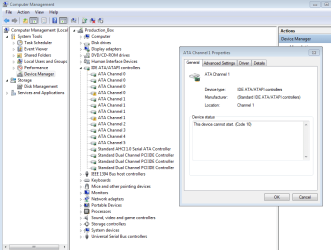
One thing you may be able to help out with though and it's a problem I have in device manager, seems there is a problem with ATA Channel controllers, it doesn't seem to be effecting the machine though.

What do you think that might be, the warning is that the device can't start.

Cheers and thanks for the increase in performance.

James
 

Attachments

  • Comp manage 27082011.PNG
    Comp manage 27082011.PNG
    27.9 KB · Views: 226

My Computer My Computer

At a glance

Win pro 64biti7-980XCorsair Dominator CMP12GX3M3A1600C9 9-9-9-24 X2Asus Geforce GTX 560 Ti
Computer type
PC/Desktop
OS
Win pro 64bit
CPU
i7-980X
Motherboard
X58A-UD3R
Memory
Corsair Dominator CMP12GX3M3A1600C9 9-9-9-24 X2
Graphics Card(s)
Asus Geforce GTX 560 Ti
Sound Card
none
Monitor(s) Displays
Eizo x 2
Screen Resolution
1200x1600
Hard Drives
Revo 240gb,
Samsung 840 pro OS
Samsung 840 Scratch
WD 1TB x 3.
PSU
Siverstone
Case
Corsair 700d
Cooling
Noctua 140
Thanks BFK, great tutorial, my computer has had a real boost in performance.

One thing you may be able to help out with though and it's a problem I have in device manager, seems there is a problem with ATA Channel controllers, it doesn't seem to be effecting the machine though.

What do you think that might be, the warning is that the device can't start.

Cheers and thanks for the increase in performance.

James

You could try uninstall the device and restart your computer. Windows will try reinstall any missing drivers for devices listed here, but it won't do anything automatically for faulty drivers.

If it's a driver-related problem, that's probably the safest way to sort it out. If it requires custom device drivers, you'll be prompted for the correct driver at start up, otherwise Windows will use a driver from it's supported list.
 

My Computer My Computer

At a glance

Win 10 x64 Pro x64 / Ubuntu 15.10 x64Intel i7-4960X4x8GB Corsair Dominator Platinum @2400MHz 10-...2x MSI GTX780Ti 3GB (SLI)
Computer type
PC/Desktop
OS
Win 10 x64 Pro x64 / Ubuntu 15.10 x64
CPU
Intel i7-4960X
Motherboard
Asus Rampage IV Black Edition
Memory
4x8GB Corsair Dominator Platinum @2400MHz 10-12-12-31
Graphics Card(s)
2x MSI GTX780Ti 3GB (SLI)
Sound Card
Onboard SupremeFX (Cirrus Logic CS4398)
Monitor(s) Displays
3x LG Cinema 27" IPS LED (27MP65)
Screen Resolution
[1920x1080]x3
Hard Drives
Crucial M500 120GB, Crucial M500 480GB, Toshiba DT01ACA200 2TB
PSU
CoolerMaster V1000
Case
Corsair Obsidian 750D
Cooling
ThermalTake Water 3.0 Extreme, 4xSP120, 3xAF120
Keyboard
Moshi Luna
Mouse
Logitech G700s / Roccat Tyon
Internet Speed
4Mb uncapped ADSL (Afrihost)
Antivirus
MS Security Essentials
Browser
Chrome... Duh. (:
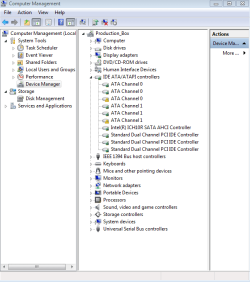
Thanks for your help ZaLiTH, I uninstalled those two drivers, restarted and Windows tried to install drivers but failed, now I have the warning again but this time I have lost alot of ATA channels.
 

Attachments

  • Comp manage 2 27082011.PNG
    Comp manage 2 27082011.PNG
    21.1 KB · Views: 191

My Computer My Computer

At a glance

Win pro 64biti7-980XCorsair Dominator CMP12GX3M3A1600C9 9-9-9-24 X2Asus Geforce GTX 560 Ti
Computer type
PC/Desktop
OS
Win pro 64bit
CPU
i7-980X
Motherboard
X58A-UD3R
Memory
Corsair Dominator CMP12GX3M3A1600C9 9-9-9-24 X2
Graphics Card(s)
Asus Geforce GTX 560 Ti
Sound Card
none
Monitor(s) Displays
Eizo x 2
Screen Resolution
1200x1600
Hard Drives
Revo 240gb,
Samsung 840 pro OS
Samsung 840 Scratch
WD 1TB x 3.
PSU
Siverstone
Case
Corsair 700d
Cooling
Noctua 140
Thanks for your help ZaLiTH, I uninstalled those two drivers, restarted and Windows tried to install drivers but failed, now I have the warning again but this time I have lost alot of ATA channels.

Hmmm... That is somewhat strange. I'd suggest you try re-install the drivers manually then; either use your motherboard driver CD or download the latest drivers from Gigabyte's website.

Just found a thread on Toms Hardware forum regarding AHCI on your motherboard.. While his/her original problem is different to yours, there is one post that may help you somewhat. There a few driver versions listed in this post that you may want to try. I'd say use the listed versions as a reference and try find drivers that are at least that version or newer.

I probably should have asked this first, but can you access all your drives in Windows, or are they not listed in Computer?
 

My Computer My Computer

At a glance

Win 10 x64 Pro x64 / Ubuntu 15.10 x64Intel i7-4960X4x8GB Corsair Dominator Platinum @2400MHz 10-...2x MSI GTX780Ti 3GB (SLI)
Computer type
PC/Desktop
OS
Win 10 x64 Pro x64 / Ubuntu 15.10 x64
CPU
Intel i7-4960X
Motherboard
Asus Rampage IV Black Edition
Memory
4x8GB Corsair Dominator Platinum @2400MHz 10-12-12-31
Graphics Card(s)
2x MSI GTX780Ti 3GB (SLI)
Sound Card
Onboard SupremeFX (Cirrus Logic CS4398)
Monitor(s) Displays
3x LG Cinema 27" IPS LED (27MP65)
Screen Resolution
[1920x1080]x3
Hard Drives
Crucial M500 120GB, Crucial M500 480GB, Toshiba DT01ACA200 2TB
PSU
CoolerMaster V1000
Case
Corsair Obsidian 750D
Cooling
ThermalTake Water 3.0 Extreme, 4xSP120, 3xAF120
Keyboard
Moshi Luna
Mouse
Logitech G700s / Roccat Tyon
Internet Speed
4Mb uncapped ADSL (Afrihost)
Antivirus
MS Security Essentials
Browser
Chrome... Duh. (:
thanks,

yes I can access all my drives, in fact after doing the AHCI thing and instaling the Intel istor driver my machine is screaming along, running smooth, never been better.

Just these pesky warnings.

If I reinstall the Gygabyte drivers will they wipe the new achi and Intel storage drivers or send the bios back to IDE

Cheers again thanks for your help

James
 

My Computer My Computer

At a glance

Win pro 64biti7-980XCorsair Dominator CMP12GX3M3A1600C9 9-9-9-24 X2Asus Geforce GTX 560 Ti
Computer type
PC/Desktop
OS
Win pro 64bit
CPU
i7-980X
Motherboard
X58A-UD3R
Memory
Corsair Dominator CMP12GX3M3A1600C9 9-9-9-24 X2
Graphics Card(s)
Asus Geforce GTX 560 Ti
Sound Card
none
Monitor(s) Displays
Eizo x 2
Screen Resolution
1200x1600
Hard Drives
Revo 240gb,
Samsung 840 pro OS
Samsung 840 Scratch
WD 1TB x 3.
PSU
Siverstone
Case
Corsair 700d
Cooling
Noctua 140
thanks,

yes I can access all my drives, in fact after doing the AHCI thing and instaling the Intel istor driver my machine is screaming along, running smooth, never been better.

Just these pesky warnings.
Ok, that's good news then. That means the warnings aren't because of a physical problem (such as faulty hardware or loose connections), it'll be software-related.

If I reinstall the Gygabyte drivers will they wipe the new achi and Intel storage drivers or send the bios back to IDE

Cheers again thanks for your help

James
When drivers are installed to Windows, they're kept in the driver cache even if new drivers are installed, only one driver can be active and assigned to hardware at a time though.

By installing the drivers from Gigabyte, it will assign those drivers to the ATA controller instead of the driver being used currently (in your case, the Intel drivers).

So if, for example, the drivers from Gigabyte don't contain a driver for device XYZ, and you have an Intel driver currently installed for device XYZ, then that will stay there after installing the Gigabyte driver pack.

It won't change anything in your BIOS though, that's completely separate. Think of it this way: the options you set in the BIOS determin how Windows detects the hardware, while the drivers determine how Windows accesses that same hardware.
 

My Computer My Computer

At a glance

Win 10 x64 Pro x64 / Ubuntu 15.10 x64Intel i7-4960X4x8GB Corsair Dominator Platinum @2400MHz 10-...2x MSI GTX780Ti 3GB (SLI)
Computer type
PC/Desktop
OS
Win 10 x64 Pro x64 / Ubuntu 15.10 x64
CPU
Intel i7-4960X
Motherboard
Asus Rampage IV Black Edition
Memory
4x8GB Corsair Dominator Platinum @2400MHz 10-12-12-31
Graphics Card(s)
2x MSI GTX780Ti 3GB (SLI)
Sound Card
Onboard SupremeFX (Cirrus Logic CS4398)
Monitor(s) Displays
3x LG Cinema 27" IPS LED (27MP65)
Screen Resolution
[1920x1080]x3
Hard Drives
Crucial M500 120GB, Crucial M500 480GB, Toshiba DT01ACA200 2TB
PSU
CoolerMaster V1000
Case
Corsair Obsidian 750D
Cooling
ThermalTake Water 3.0 Extreme, 4xSP120, 3xAF120
Keyboard
Moshi Luna
Mouse
Logitech G700s / Roccat Tyon
Internet Speed
4Mb uncapped ADSL (Afrihost)
Antivirus
MS Security Essentials
Browser
Chrome... Duh. (:
thanks,

yes I can access all my drives, in fact after doing the AHCI thing and instaling the Intel istor driver my machine is screaming along, running smooth, never been better.

Just these pesky warnings.
Ok, that's good news then. That means the warnings aren't because of a physical problem (such as faulty hardware or loose connections), it'll be software-related.

If I reinstall the Gygabyte drivers will they wipe the new achi and Intel storage drivers or send the bios back to IDE

Cheers again thanks for your help

James
When drivers are installed to Windows, they're kept in the driver cache even if new drivers are installed, only one driver can be active and assigned to hardware at a time though.

By installing the drivers from Gigabyte, it will assign those drivers to the ATA controller instead of the driver being used currently (in your case, the Intel drivers).

So if, for example, the drivers from Gigabyte don't contain a driver for device XYZ, and you have an Intel driver currently installed for device XYZ, then that will stay there after installing the Gigabyte driver pack.

It won't change anything in your BIOS though, that's completely separate. Think of it this way: the options you set in the BIOS determin how Windows detects the hardware, while the drivers determine how Windows accesses that same hardware.


Thanks so much for your help, I updated the gigabyte drivers and the warnings have gone.

Thanks again

James
 

My Computer My Computer

At a glance

Win pro 64biti7-980XCorsair Dominator CMP12GX3M3A1600C9 9-9-9-24 X2Asus Geforce GTX 560 Ti
Computer type
PC/Desktop
OS
Win pro 64bit
CPU
i7-980X
Motherboard
X58A-UD3R
Memory
Corsair Dominator CMP12GX3M3A1600C9 9-9-9-24 X2
Graphics Card(s)
Asus Geforce GTX 560 Ti
Sound Card
none
Monitor(s) Displays
Eizo x 2
Screen Resolution
1200x1600
Hard Drives
Revo 240gb,
Samsung 840 pro OS
Samsung 840 Scratch
WD 1TB x 3.
PSU
Siverstone
Case
Corsair 700d
Cooling
Noctua 140
Flawless victory! AHCI is mine.

Thank you very much.
 

My Computer My Computer

At a glance

Windows 7 64 bit Professional EditionIntel Core i5 2300 Quad Core ProcessorG.SKILL Ripjaws X F3-12800CL9D-8GBXL 8GBXFX Radeon HD 6850
OS
Windows 7 64 bit Professional Edition
CPU
Intel Core i5 2300 Quad Core Processor
Motherboard
Gigabyte Z68A-D3-B3
Memory
G.SKILL Ripjaws X F3-12800CL9D-8GBXL 8GB
Graphics Card(s)
XFX Radeon HD 6850
Monitor(s) Displays
Dell U2311H
Screen Resolution
1920x1080
Hard Drives
Intel 80 GB SSD
WD Velociraptor 450 GB
PSU
Corsair Professional HX650W 650W ATX 12V 52A 24PIN ATX Modul
Case
Coolermaster Elite 370 Black Mid Tower ATX
Cooling
Corsair Cooling Air Series A70
Hello Sam, good you got it going.
 

My Computer My Computer

At a glance

W 7 64-bit UltimateIntel Q9550 Yorkfield8GB Dominator 8500C5DATI : XFX 5870
Computer Manufacturer/Model Number
* BFK Customs *
OS
W 7 64-bit Ultimate
CPU
Intel Q9550 Yorkfield
Motherboard
ASUS P5Q Pro
Memory
8GB Dominator 8500C5D
Graphics Card(s)
ATI : XFX 5870
Sound Card
Realtek HD Audio 7-1
Monitor(s) Displays
1x 47" LCD HDMI & 3x 26" LCD HDMI
Screen Resolution
1920x1080P & 1920x1200
Hard Drives
1x 80GB Intel X25-M G2 SSD : 1x 500GB & 1x 640GB WD Caviar Black(s)
PSU
Corsair 620HX
Case
Cooler Master RC-690
Cooling
Tuniq Tower 120, 2x 140mm and 3x 120mm case fans
Keyboard
Microsoft 500
Mouse
Razer Diamondback 3G
Internet Speed
14 Mb/s
Other Info
1x Koutech 3Gb/s SATA HDD Hot Swap Rack
Back
Top