AHCI : Enable in Windows 7 / Vista

AHCI : Enable in Vista and Windows 7 after OS install


   Information
AHCI Advanced Host Controller Interface makes NCQ Native Command Queing along with hot-plugging or hot swapping through SATA Serial-ATA host controllers possible; Vista was the first to offer this feature. The issue with AHCI is it needs to be enabled in the BIOS prior to OS installation; doing so after you have installed the OS will disable the PC. The reason why is Windows disables the AHCI drivers not needed durring installation.

This tutorial will show you how to enable AHCI after you have installed the OS if you didn't already have AHCI enable in the BIOS when you installed the OS.

   Warning
Changing values in the Windows registry can disable your machine; if you're not sure how to do this please post a question in this tutorial and someone will be glad to help you.
   Note
This method will also work for Windows Vista though the default DWORD string value in Vista will be "4" where it will be "3" in Windows 7.

As a precaution it would be a good idea to create a "System Restore Point" before you start this, the tutorial can be found at the link below.

System Restore Point - Create


Let's get started!
1) In the Windows start menu search box type regedit, right click the entry, click Run as Administrator, enter your user credentials for the UAC prompt, then click yes to open regedit.

Start_Regedit.jpg
UAC_Regedit.jpg

2) In regedit navigate to HKEY_LOCAL_MACHINE\SYSTEM\CurrentControlSet\services.

3) In the left pane, click on msahci, in the right pane double click on Start to modify it.
RegEdit1.jpg
RegEdit2.jpg
4) In the window that opens change the value to 0 (zero), and click OK.
RegEdit3.jpg
5) In the left pane, click on iaStorV (if there), in the right pane double click on Start to modify it. Repeat step 4, and go to step 6 below.

NOTE: From: Error message occurs after you change the SATA mode of the boot drive

6) Close Registry Editor.
7) Now you'll need to restart the PC and go into the BIOS and enable AHCI. When Windows boots up, it will finish installing the AHCI drivers.

AHCI Driver.jpg
AHCI Driver2.jpg

8) You will need one final restart to finish the process after the drivers are installed.

Restart.jpg
   Note
For those with nForce boards, have a look at the Information post below.

The method was worked out by Everlong and credit for that goes to him, thanks mate!


Enjoy! :)


Last edited by a moderator:
Chamjiee,

I'm afraid that I do not have enough experience with Windows Server 2012 R2 to better help.

Personally, I'd change it back to what you had before to avoid it rebooting. Otherwise, you may need to reinstall Windows Server 2012 R2 with AHCI selected in BIOS first to have it AHCI. :(

I think I will have to do so. Until then hope op mentions these caveats

Well, the tutorial was not written for Windows Server 2012 R2 though. :(
 
Last edited:

My Computer My Computer

At a glance

64-bit Windows 11 Pro for WorkstationsIntel i7-8700K OC'd to 5 GHz64 GB (4x16GB) G.SKILL TridentZ RGB DDR4 3600...ASUS ROG-STRIX-GTX1080TI-O11G-GAMING
Computer type
PC/Desktop
Computer Manufacturer/Model Number
Self built custom
OS
64-bit Windows 11 Pro for Workstations
CPU
Intel i7-8700K OC'd to 5 GHz
Motherboard
ASUS ROG Maximus XI Formula Z390
Memory
64 GB (4x16GB) G.SKILL TridentZ RGB DDR4 3600 MHz
Graphics Card(s)
ASUS ROG-STRIX-GTX1080TI-O11G-GAMING
Sound Card
Integrated
Monitor(s) Displays
2 x Samsung Odyssey G7 27"
Screen Resolution
2560x1440
Hard Drives
1TB Samsung 990 PRO M.2,
4TB Samsung 990 PRO PRO M.2,
TerraMaster F8 SSD Plus NAS
PSU
Seasonic Prime Titanium 850W
Case
Thermaltake Core P3
Cooling
Corsair Hydro H115i
Keyboard
Logitech wireless K800
Mouse
Logitech MX Master 4
Internet Speed
2 Gb/s Download and 100 Mb/s Upload
Antivirus
Malwarebyte Anti-Malware Premium
Browser
Google Chrome
Other Info
Logitech Z625 speaker system,
Logitech BRIO 4K Pro webcam,
HP Color LaserJet Pro MFP M477fdn,
APC SMART-UPS RT 1000 XL - SURT1000XLI,
Galaxy S23 Plus phone
Well, the tutorial was not written for Windows Server 2012 R2 though. :(

Ya one could be dual booting it with windows 7 like me. So at least a warning that if you are dual booting with server 2012r2 then be warned..
 

My Computer My Computer

At a glance

Windows 7 Ultimate x64 SP1 Dual Boot with Win...E65508GBATI Radeon 2400 Pro
Computer type
PC/Desktop
Computer Manufacturer/Model Number
Dell Optiplex 755
OS
Windows 7 Ultimate x64 SP1 Dual Boot with Windows Serve 2012 R2
CPU
E6550
Motherboard
Q35
Memory
8GB
Graphics Card(s)
ATI Radeon 2400 Pro
Sound Card
Intel HD Audio Stereo
Monitor(s) Displays
1
Screen Resolution
1280 x 1024
Hard Drives
250GB SATAIII
PSU
Stock 280 Watt
Case
Stock Desktop Case
Cooling
Stock
Keyboard
Microsoft Ergonomic keyboard usb
Mouse
Microsoft Mouse
Internet Speed
1Mbps Down/ 256 Kbps up
Antivirus
None
Browser
Opera
Hi.
I´m sorry, but I haven´t read all pages.
But I do follow yours instructions and I appreciate a lot.

Unfortutetly, I haven´t had success and my computer keeps rebooting and blinking a bluescreen impossible to read.
I found a page from Microsoft that solve my problem:
Error message occurs after you change the SATA mode of the boot drive
Modifying two registry keys instead of only one:

HKEY_LOCAL_MACHINE\System\CurrentControlSet\Services\Msahci
HKEY_LOCAL_MACHINE\System\CurrentControlSet\Services\IastorV

from "3" to "0"

I just want to share this in a forum that already helped me so many times.

Thanks guys,
 

My Computer My Computer

At a glance

WINdows 7 Professional 64b
Computer type
PC/Desktop
OS
WINdows 7 Professional 64b
Thank you Paulista, and welcome to Seven Forums.

The tutorial has been updated to include this. :)
 

My Computer My Computer

At a glance

64-bit Windows 11 Pro for WorkstationsIntel i7-8700K OC'd to 5 GHz64 GB (4x16GB) G.SKILL TridentZ RGB DDR4 3600...ASUS ROG-STRIX-GTX1080TI-O11G-GAMING
Computer type
PC/Desktop
Computer Manufacturer/Model Number
Self built custom
OS
64-bit Windows 11 Pro for Workstations
CPU
Intel i7-8700K OC'd to 5 GHz
Motherboard
ASUS ROG Maximus XI Formula Z390
Memory
64 GB (4x16GB) G.SKILL TridentZ RGB DDR4 3600 MHz
Graphics Card(s)
ASUS ROG-STRIX-GTX1080TI-O11G-GAMING
Sound Card
Integrated
Monitor(s) Displays
2 x Samsung Odyssey G7 27"
Screen Resolution
2560x1440
Hard Drives
1TB Samsung 990 PRO M.2,
4TB Samsung 990 PRO PRO M.2,
TerraMaster F8 SSD Plus NAS
PSU
Seasonic Prime Titanium 850W
Case
Thermaltake Core P3
Cooling
Corsair Hydro H115i
Keyboard
Logitech wireless K800
Mouse
Logitech MX Master 4
Internet Speed
2 Gb/s Download and 100 Mb/s Upload
Antivirus
Malwarebyte Anti-Malware Premium
Browser
Google Chrome
Other Info
Logitech Z625 speaker system,
Logitech BRIO 4K Pro webcam,
HP Color LaserJet Pro MFP M477fdn,
APC SMART-UPS RT 1000 XL - SURT1000XLI,
Galaxy S23 Plus phone
Brink,
You might also note that the choice of whether to use MSAHCI vs. IAStor is not clear-cut. Since I changed it to install a Samsung SSD with an Apricorn Solo X2, I used MSAHCI. Some folks say that the Intel driver is better (but they don't say how well it works with non-Intel drives, if at all).

PS. The Solo X2 took my boot-drive sequential write speed from 68 to 507 MB/s. I was using a 7200 RPM drive. Read speed went up to 523 MB/s. Random reads went up to 47571 MB/s. I use it ONLY for my system files and user/appdata, but NOT My Documents/Pictures/Music (moved them to another HD drive).
 

My Computer My Computer

At a glance

Windows 7 Pro 64-bitCore I7-940 at 3.25 GHz12GBATI 6700
Computer type
PC/Desktop
Computer Manufacturer/Model Number
Home built
OS
Windows 7 Pro 64-bit
CPU
Core I7-940 at 3.25 GHz
Motherboard
MSI Eclipse
Memory
12GB
Graphics Card(s)
ATI 6700
Sound Card
SB
Monitor(s) Displays
LG E2241
Screen Resolution
1920x1080
Hard Drives
Apricorn SOLO X2 PCIE2 adapter + Samsung 840 PRO 256GB drive
Seagate External (firewire)
WD 750GB external
WD 500 GB internal(7200 RPM)
WD 80GB internal (pagefile) (7200 RPM)
Case
Antec Sonata III
Antivirus
McAfee
For those generally having issues, I thought that I'd briefly describe my situation.

I've had issues with the computer freezing and the cursor changing. Freezes for a few seconds then goes back, then increasing in frequency then usually I have to reboot which cures it for a hour or so.

It was something to do with my SATA configuration. Tried everything, including advice in this thread, but what finally resolved it was installing the Intel Rapid Storage Technology enterprise software (best to Google it as I downloaded it via the Dell website).

Once installed, I rebooted and finally my system installed the correct drivers for both my hard drives and I've had no issues since.

Best of Luck!
 

My Computer My Computer

At a glance

windows 7 ultimate x64
Computer type
PC/Desktop
OS
windows 7 ultimate x64
Thanks to Barefoot Kid for originally posting this thread more than 3 years ago and to Brink and all who have helped afterwards. Glad its still alive.

I just recently made the switch to AHCI after forgetting to reset my bios after a reinstall of Win 7 a couple of weeks ago. All went well or so it seems. :confused:

I only have one sata2 wd 500gb HDD and one sata DVD drive.
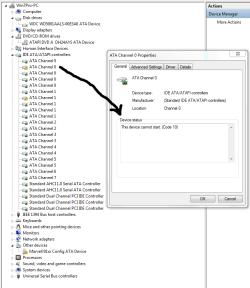
The bios screen now shows that the AHCI bios driver is loading and finding devices. So thats good. But in the windows Device Manager. I have a couple of yellow ! marks on some of the ATA channels. If I look at their properties it says "This device cannot start. (Code 10)" (see picture).

Device Manager2.PNG

What concerns me is that there are 5 channel 0's, 5 channel 1's, 2 channel 2's, etc. Why so many channels? Why is the yellow! sign only on two of them?
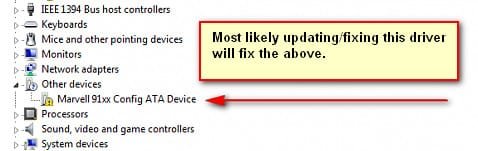
I know why there's a yellow ! sign next to the Marvel 91xx device. Its because I don't have a RAID and never installed a device driver for that controller.

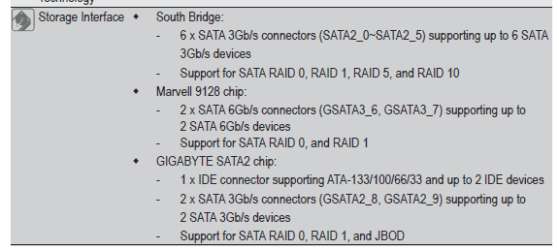
Here is a pic of my Gigabyte MB page with the SATA connector layout.

sata ports specs.PNG
sata ports.PNG

My computer seems to work fine, but why the yellow !'s?

Maybe after going to AHCI I need to install the Marvell drivers even tho I'm not using those connectors?

I'm stumped... any thoughts would be appreciated.
 

My Computer My Computer

At a glance

Win Pro x64i7 95016 gigRadeon HD5570
Computer type
PC/Desktop
Computer Manufacturer/Model Number
Gigabyte custom build
OS
Win Pro x64
CPU
i7 950
Motherboard
Gigabyte GA-X58a-UD3R
Memory
16 gig
Graphics Card(s)
Radeon HD5570
Hard Drives
500GB WD Black
Antivirus
-
Browser
Firefox
Fixing the Marvell driver will probably fix the other yellow ! errors.
 

Attachments

  • AHCI-7Forums1.jpg
    AHCI-7Forums1.jpg
    14.1 KB · Views: 1,394

My Computer My Computer

At a glance

Windows 7 Enterprise (x64); Windows Server 20...16GB
Computer type
PC/Desktop
Computer Manufacturer/Model Number
Dell OP7010
OS
Windows 7 Enterprise (x64); Windows Server 2008 R2 (x64)
Memory
16GB
Monitor(s) Displays
4 Dell 24" LCD
Screen Resolution
1280x1024
Keyboard
Dell
Mouse
Dell Optical
Internet Speed
40meg
I followed this tutorial, and the microsoft fixit, but I'm still getting a BSOD on start if I switch to AHCI. Boots fine in IDE mode. Any other thing I need to take care of?
 

My Computer My Computer

At a glance

Windows 7 Enterprise x64
Computer type
PC/Desktop
OS
Windows 7 Enterprise x64
Hello Kalpik, and welcome to Seven Forums.

Sorry, but I have to ask to verify. Is this for a SATA hard drive?

If so, do you have the latest BIOS firmware version on your motherboard?
 

My Computer My Computer

At a glance

64-bit Windows 11 Pro for WorkstationsIntel i7-8700K OC'd to 5 GHz64 GB (4x16GB) G.SKILL TridentZ RGB DDR4 3600...ASUS ROG-STRIX-GTX1080TI-O11G-GAMING
Computer type
PC/Desktop
Computer Manufacturer/Model Number
Self built custom
OS
64-bit Windows 11 Pro for Workstations
CPU
Intel i7-8700K OC'd to 5 GHz
Motherboard
ASUS ROG Maximus XI Formula Z390
Memory
64 GB (4x16GB) G.SKILL TridentZ RGB DDR4 3600 MHz
Graphics Card(s)
ASUS ROG-STRIX-GTX1080TI-O11G-GAMING
Sound Card
Integrated
Monitor(s) Displays
2 x Samsung Odyssey G7 27"
Screen Resolution
2560x1440
Hard Drives
1TB Samsung 990 PRO M.2,
4TB Samsung 990 PRO PRO M.2,
TerraMaster F8 SSD Plus NAS
PSU
Seasonic Prime Titanium 850W
Case
Thermaltake Core P3
Cooling
Corsair Hydro H115i
Keyboard
Logitech wireless K800
Mouse
Logitech MX Master 4
Internet Speed
2 Gb/s Download and 100 Mb/s Upload
Antivirus
Malwarebyte Anti-Malware Premium
Browser
Google Chrome
Other Info
Logitech Z625 speaker system,
Logitech BRIO 4K Pro webcam,
HP Color LaserJet Pro MFP M477fdn,
APC SMART-UPS RT 1000 XL - SURT1000XLI,
Galaxy S23 Plus phone
Hello Kalpik, and welcome to Seven Forums.

Sorry, but I have to ask to verify. Is this for a SATA hard drive?

If so, do you have the latest BIOS firmware version on your motherboard?
Hi Brink!

Thanks for your reply! I solved it myself by enabling iaStor too (not iaStorV). Now it boots fine :)
 

My Computer My Computer

At a glance

Windows 7 Enterprise x64
Computer type
PC/Desktop
OS
Windows 7 Enterprise x64
Great news. :)
 

My Computer My Computer

At a glance

64-bit Windows 11 Pro for WorkstationsIntel i7-8700K OC'd to 5 GHz64 GB (4x16GB) G.SKILL TridentZ RGB DDR4 3600...ASUS ROG-STRIX-GTX1080TI-O11G-GAMING
Computer type
PC/Desktop
Computer Manufacturer/Model Number
Self built custom
OS
64-bit Windows 11 Pro for Workstations
CPU
Intel i7-8700K OC'd to 5 GHz
Motherboard
ASUS ROG Maximus XI Formula Z390
Memory
64 GB (4x16GB) G.SKILL TridentZ RGB DDR4 3600 MHz
Graphics Card(s)
ASUS ROG-STRIX-GTX1080TI-O11G-GAMING
Sound Card
Integrated
Monitor(s) Displays
2 x Samsung Odyssey G7 27"
Screen Resolution
2560x1440
Hard Drives
1TB Samsung 990 PRO M.2,
4TB Samsung 990 PRO PRO M.2,
TerraMaster F8 SSD Plus NAS
PSU
Seasonic Prime Titanium 850W
Case
Thermaltake Core P3
Cooling
Corsair Hydro H115i
Keyboard
Logitech wireless K800
Mouse
Logitech MX Master 4
Internet Speed
2 Gb/s Download and 100 Mb/s Upload
Antivirus
Malwarebyte Anti-Malware Premium
Browser
Google Chrome
Other Info
Logitech Z625 speaker system,
Logitech BRIO 4K Pro webcam,
HP Color LaserJet Pro MFP M477fdn,
APC SMART-UPS RT 1000 XL - SURT1000XLI,
Galaxy S23 Plus phone
Just registered to say thanks for this tutorial. Wasn't aware that NCQ depended on controller mode until today.

Been trying to get my 2 TB Seagate 7200.14 to act normally (folks, don't buy Seagate 7200.14 or 7200.15 drives, they're garbage), and was hoping maybe turning on the NCQ would help somewhat with the performance drain that drive has on the system. Haven't had a chance to find out if it helps yet, but my boot drive is a WD Black which was built for NCQ operation, so either way I want NCQ on.

For those unaware: The problem with the Seagate 7200.14 (aka Barracuda V) and 7200.15 drives is the firmware. It's written to discourage using them in RAID setups, so it fakes death by sending fake HALT commands to the controller now and then, which causes all kinds of problems. Seagate won't admit to this behaviour, but command logs show the proof. I've flashed the drive's firmware, which has resulted in the drive merely stalling the system when it has to go through a hard reset, instead of before where it would lock up and disappear from the system, causing all kinds of wonderful errors.
If your drive controller is not RAID capable you supposedly won't have any issues whatsoever with these drives. If, however, your controller IS RAID capable (which most high performance computers are), then the controller will go into a panic whenever the drive sends those fake death notices. Only solution is to not use those drives with RAID-capable controllers (whether running RAID or not), but sadly I can't afford to replace it with a nice WD yet, since 2 TB drives are still a tad expensive.

EDIT: Had a driver crash (buffer overflow) which led to more "fun" Windows stupidity, which led to me reinstalling... now Windows flat out refuses to use the correct SATA driver, and as far as I can tell, refuses to even run in AHCI mode. Redid the registry as before, deleted the device in device manager, rebooted. I still get "AMD SATA controller" and "Standard Dual Channel PCI IDE controller". Attempting to force update the driver fails, Windows insists it's using the right one.

EDIT 2: Switched the BIOS back to "IDE", which gave me 3 dual channel controllers in device manager and 6 ATA channels listed. Then rebooted and switched to "AHCI" once again. Now I'm back to having it listed as "Standard Dual Channel" and only 2 ATA channels are listed. I still have access to all my drives, but it's still stuck on the MS drivers, and seems no matter how many times I reinstall the AMD driver it will not use it. Wtf gives with that? Makes no sense.

EDIT 3: Appears I had forgotten to install the E-SATA driver. Now I've got AMD SATA controller under IDE ATA/ATAPI controllers, and JMicron under Storage controllers. No other drive controllers listed. For some reason I can't find the E-sata in the BIOS to disable it. Everything else is listed but that.
 
Last edited:

My Computer My Computer

At a glance

Windows 7 Home Premium x64AMD FX-8350 4-4.3 GHz16 GB DDR3-1600 (Kingston HyperX Genesis 4x4 GB)Asus Geforce GTX960 Strix 2 GB DC2OC (1418 MHz)
Computer type
PC/Desktop
Computer Manufacturer/Model Number
home made
OS
Windows 7 Home Premium x64
CPU
AMD FX-8350 4-4.3 GHz
Motherboard
MSI 990FXA-GD80
Memory
16 GB DDR3-1600 (Kingston HyperX Genesis 4x4 GB)
Graphics Card(s)
Asus Geforce GTX960 Strix 2 GB DC2OC (1418 MHz)
Sound Card
on-board Realtek HD 7.1 THX
Monitor(s) Displays
Asus VE248 - 24" 1080p LED
Screen Resolution
1920x1080 @ 32 bit / 60 Hz
Hard Drives
WD Caviar Black 640 GB - 32 MB 7200 rpm SATA2
WD Black 4 TB - 64 MB 7200 rpm SATA3
Seagate Barracuda 7200.14 2 TB
PSU
CoolerMaster Silent Pro M2 620 W
Case
Fractal Design Define R4
Cooling
CoolerMaster Hyper 212 Evo
Keyboard
Corsair K70 Lux RGB (Nordic / K045)
Mouse
Logitech Performance MX
Internet Speed
50/50 Mbit fibre
Antivirus
Avast Free
Browser
Firefox
Please help

Really great tutorial..
I am running windows 8.1 with windows 7 and I want to enable AHCI .
I am thinking that if I enable AIHC in windows 8.1 and reboot and set AHCI in Bios also then I will not be able to boot into windows 7.
So can you please tell what to do in order to boot both operating system in AHCI mode..
TIA. :)
 

My Computer My Computer

At a glance

windows 8.1 Pro x64Intel Core i5 -2400s CPU @ 2.50GHz4 GB ddr3Nvidia Geforce 210 1GB
Computer type
PC/Desktop
Computer Manufacturer/Model Number
lenovo
OS
windows 8.1 Pro x64
CPU
Intel Core i5 -2400s CPU @ 2.50GHz
Motherboard
Zotac
Memory
4 GB ddr3
Graphics Card(s)
Nvidia Geforce 210 1GB
Hard Drives
Toshiba 500 GB SATA
Antivirus
Microsoft Windows Defender, Malware bytes anti malware
Browser
Google Chrome
Hello Bibhu, and welcome to Seven Forums.

That would be correct. You would need to do steps 1 to 6 in the tutorial in both Windows 8.1 and Windows 7 first, then restart to BIOS to finish. :)
 

My Computer My Computer

At a glance

64-bit Windows 11 Pro for WorkstationsIntel i7-8700K OC'd to 5 GHz64 GB (4x16GB) G.SKILL TridentZ RGB DDR4 3600...ASUS ROG-STRIX-GTX1080TI-O11G-GAMING
Computer type
PC/Desktop
Computer Manufacturer/Model Number
Self built custom
OS
64-bit Windows 11 Pro for Workstations
CPU
Intel i7-8700K OC'd to 5 GHz
Motherboard
ASUS ROG Maximus XI Formula Z390
Memory
64 GB (4x16GB) G.SKILL TridentZ RGB DDR4 3600 MHz
Graphics Card(s)
ASUS ROG-STRIX-GTX1080TI-O11G-GAMING
Sound Card
Integrated
Monitor(s) Displays
2 x Samsung Odyssey G7 27"
Screen Resolution
2560x1440
Hard Drives
1TB Samsung 990 PRO M.2,
4TB Samsung 990 PRO PRO M.2,
TerraMaster F8 SSD Plus NAS
PSU
Seasonic Prime Titanium 850W
Case
Thermaltake Core P3
Cooling
Corsair Hydro H115i
Keyboard
Logitech wireless K800
Mouse
Logitech MX Master 4
Internet Speed
2 Gb/s Download and 100 Mb/s Upload
Antivirus
Malwarebyte Anti-Malware Premium
Browser
Google Chrome
Other Info
Logitech Z625 speaker system,
Logitech BRIO 4K Pro webcam,
HP Color LaserJet Pro MFP M477fdn,
APC SMART-UPS RT 1000 XL - SURT1000XLI,
Galaxy S23 Plus phone
I did as you suggested and when all is said and done, all I get is a non-flashing cursor in the top left quadrant of the screen right before Windows should load. My choices are sata 1-4: ide, raid, achi. If I choose achi, it won't load. I have an Asus M4A89GTD Pro/USB3. I hope I have given enough information.
 

My Computer My Computer

At a glance

Windows 7x64 Home Premium service pack 1AMD Phenom II X6 1090TCorsair CMV4GX3M1A1333C9 4x4GBSapphire HD5570
Computer type
PC/Desktop
Computer Manufacturer/Model Number
custom
OS
Windows 7x64 Home Premium service pack 1
CPU
AMD Phenom II X6 1090T
Motherboard
Asus M4A89GTD Pro/USB3
Memory
Corsair CMV4GX3M1A1333C9 4x4GB
Graphics Card(s)
Sapphire HD5570
Monitor(s) Displays
LG W2252TQ
Screen Resolution
1920 x 1080
Hard Drives
Samsung 840 EVO 500mb (ACHI)
WD WD50 500mb
PSU
Corsair TX650W
Case
Antec
Keyboard
i-rocks KR-6820E
Mouse
Gearhead MPT3300BLK
Antivirus
AVG
Browser
Chrome
I don't know which post you are referring to, but you MUST change to AHCI in Windows, and re-boot, BEFORE you shutdown (again) and go into BIOS turn it on there. Your SSD should not be installed until AFTER you successfully get the AHCI changed in BIOS. There are TWO registry keys for setting AHCI. you only need to set ONE of them. I used this one: HKEY_LOCAL_MACHINE\System\CurrentControlSet\services\msahci
I am using an Apricorn SOLO X2 PCIE2 adapter+Samsung 840 PRO 256GB drive.
 

My Computer My Computer

At a glance

Windows 7 Pro 64-bitCore I7-940 at 3.25 GHz12GBATI 6700
Computer type
PC/Desktop
Computer Manufacturer/Model Number
Home built
OS
Windows 7 Pro 64-bit
CPU
Core I7-940 at 3.25 GHz
Motherboard
MSI Eclipse
Memory
12GB
Graphics Card(s)
ATI 6700
Sound Card
SB
Monitor(s) Displays
LG E2241
Screen Resolution
1920x1080
Hard Drives
Apricorn SOLO X2 PCIE2 adapter + Samsung 840 PRO 256GB drive
Seagate External (firewire)
WD 750GB external
WD 500 GB internal(7200 RPM)
WD 80GB internal (pagefile) (7200 RPM)
Case
Antec Sonata III
Antivirus
McAfee
Thanks, DocDJ. I apologize for the confusion-story of my life. I just kept plugging along. The key for me was changing iaStorV to zero. I thought I had already done it, so I didn't check it again. I went back and it was at "3" again. Changed it to zero as well, went through the routine and all is well. Thanks so much for your help.
 

My Computer My Computer

At a glance

Windows 7x64 Home Premium service pack 1AMD Phenom II X6 1090TCorsair CMV4GX3M1A1333C9 4x4GBSapphire HD5570
Computer type
PC/Desktop
Computer Manufacturer/Model Number
custom
OS
Windows 7x64 Home Premium service pack 1
CPU
AMD Phenom II X6 1090T
Motherboard
Asus M4A89GTD Pro/USB3
Memory
Corsair CMV4GX3M1A1333C9 4x4GB
Graphics Card(s)
Sapphire HD5570
Monitor(s) Displays
LG W2252TQ
Screen Resolution
1920 x 1080
Hard Drives
Samsung 840 EVO 500mb (ACHI)
WD WD50 500mb
PSU
Corsair TX650W
Case
Antec
Keyboard
i-rocks KR-6820E
Mouse
Gearhead MPT3300BLK
Antivirus
AVG
Browser
Chrome
Dancinbear: you're welcome. I used the windows default key because it is supposed to work for all SSD's.
 

My Computer My Computer

At a glance

Windows 7 Pro 64-bitCore I7-940 at 3.25 GHz12GBATI 6700
Computer type
PC/Desktop
Computer Manufacturer/Model Number
Home built
OS
Windows 7 Pro 64-bit
CPU
Core I7-940 at 3.25 GHz
Motherboard
MSI Eclipse
Memory
12GB
Graphics Card(s)
ATI 6700
Sound Card
SB
Monitor(s) Displays
LG E2241
Screen Resolution
1920x1080
Hard Drives
Apricorn SOLO X2 PCIE2 adapter + Samsung 840 PRO 256GB drive
Seagate External (firewire)
WD 750GB external
WD 500 GB internal(7200 RPM)
WD 80GB internal (pagefile) (7200 RPM)
Case
Antec Sonata III
Antivirus
McAfee
Hello to everyone and thanks for great forums. First post although I always visited the news around here. I don't remember what procedure I followed when I installed Windows but I hope I did it right. I see from my Device Manager window that drives are displayed as ATA and this makes me so confused. I took a screenshot showing the hard drives but I was not able to attach to my replay, could you please give me any advice? Thanks in advance.
 

My Computer My Computer

At a glance

Windows 7 Ultimate x64Intel i5-6600K 3.50GHzCorsair DDR4 2x8GBMSI GeForce GTX1070 Gaming X
Computer type
PC/Desktop
Computer Manufacturer/Model Number
Custom build
OS
Windows 7 Ultimate x64
CPU
Intel i5-6600K 3.50GHz
Motherboard
Asus Pro Z170 Gaming
Memory
Corsair DDR4 2x8GB
Graphics Card(s)
MSI GeForce GTX1070 Gaming X
Sound Card
On board Realtek
Monitor(s) Displays
Dell SP2309W
Screen Resolution
1920x1080
Hard Drives
OS Samsung 850 EVO 500GB SATA III SSD
2x Hitachi Deskstar 1GB SATA data drives
1x Western Digital Caviar Black 1TB SATA data drive
PSU
Corsair HX650W
Case
CoolerMaster CM 690 III
Cooling
Coolermaster Hyper 212 EVO 1x200mm 1x140mm 2x120mm case fan
Keyboard
Logitech usb keyboard
Mouse
Logitech G500 $27 bargain :)
Internet Speed
ADSL2
Antivirus
Microsoft Security Essential, MalwareBytes
Browser
SRWare Iron, Internet Explorer
Other Info
Very happy with this buid.
I struggled a lot to find all compatible parts since I wanted an Intel 1151 based motherboard so to be able to install Windows 7.
I chose this case because it has amazing air flow, it's sturdy and looks good.
The case included 1x 200mm front and 1x 120mm back fans, I added 1x 200mm on the top and 1x120 bottom fans and modded the panels with black stockings for women s
Back
Top