AHCI : Enable in Windows 7 / Vista

AHCI : Enable in Vista and Windows 7 after OS install


   Information
AHCI Advanced Host Controller Interface makes NCQ Native Command Queing along with hot-plugging or hot swapping through SATA Serial-ATA host controllers possible; Vista was the first to offer this feature. The issue with AHCI is it needs to be enabled in the BIOS prior to OS installation; doing so after you have installed the OS will disable the PC. The reason why is Windows disables the AHCI drivers not needed durring installation.

This tutorial will show you how to enable AHCI after you have installed the OS if you didn't already have AHCI enable in the BIOS when you installed the OS.

   Warning
Changing values in the Windows registry can disable your machine; if you're not sure how to do this please post a question in this tutorial and someone will be glad to help you.
   Note
This method will also work for Windows Vista though the default DWORD string value in Vista will be "4" where it will be "3" in Windows 7.

As a precaution it would be a good idea to create a "System Restore Point" before you start this, the tutorial can be found at the link below.

System Restore Point - Create


Let's get started!
1) In the Windows start menu search box type regedit, right click the entry, click Run as Administrator, enter your user credentials for the UAC prompt, then click yes to open regedit.

Start_Regedit.jpg
UAC_Regedit.jpg

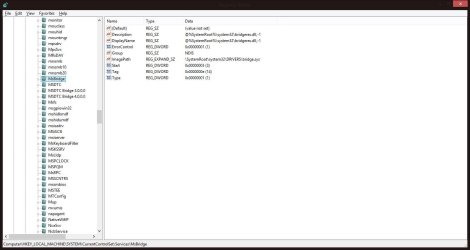
2) In regedit navigate to HKEY_LOCAL_MACHINE\SYSTEM\CurrentControlSet\services.

3) In the left pane, click on msahci, in the right pane double click on Start to modify it.
RegEdit1.jpg
RegEdit2.jpg
4) In the window that opens change the value to 0 (zero), and click OK.
RegEdit3.jpg
5) In the left pane, click on iaStorV (if there), in the right pane double click on Start to modify it. Repeat step 4, and go to step 6 below.

NOTE: From: Error message occurs after you change the SATA mode of the boot drive

6) Close Registry Editor.
7) Now you'll need to restart the PC and go into the BIOS and enable AHCI. When Windows boots up, it will finish installing the AHCI drivers.

AHCI Driver.jpg
AHCI Driver2.jpg

8) You will need one final restart to finish the process after the drivers are installed.

Restart.jpg
   Note
For those with nForce boards, have a look at the Information post below.

The method was worked out by Everlong and credit for that goes to him, thanks mate!


Enjoy! :)


Last edited by a moderator:
One more bump in the hope that someone may answer.:D
 

My Computer My Computer

At a glance

Win 7 x64Intel i716GBRadeon HD4670
Computer type
PC/Desktop
Computer Manufacturer/Model Number
custom build
OS
Win 7 x64
CPU
Intel i7
Motherboard
Asus P6TD-Deluxe
Memory
16GB
Graphics Card(s)
Radeon HD4670
Monitor(s) Displays
HP LP2475w
Hard Drives
2x WDC WD7501AALD
Browser
IE
Hello,
I have already applied the AHCI in windows registry. Does it matters that in my registry HKEY_LOCAL_MACHINE\SYSTEM\CurrentControlSet\services
the value msahci was initially set to 0 (zero). Actually, I only changed the iaStorV from 3 to 0.

When I went to the BIOS, I was unable to find the setting to implement the change. I was unable to find AHCI in my BIOS settings.

I have to mention that I have just finished migrating my win7 o/s to the new SSD using Paragon Hard Disk Manager 15 Premium.

My BIOS are (copied from SIW 2015):
Code:
Property    Value
 
[U]BIOS Properties[/U]
BIOS Vendor    American Megatrends Inc.
Serial Number    
BIOS Version    0606
Firmware Version    [unknown]
BIOS Date    06/27/2011
BIOS Size    8192 KB
BIOS Starting Segment    F000h
BIOS Release Version    4.6
DMI Version    2.6
[U]Characteristics[/U]
supports ISA    No
supports MCA    No
supports EISA    No
supports PCI    Yes
supports PC Card (PCMCIA)    No
supports Plug-and-Play    No
supports APM    No
upgradeable (Flash) BIOS    Yes
allows BIOS shadowing    Yes
supports VL-VESA    No
ESCD support is available    No
supports booting from CD-ROM    Yes
supports selectable boot    Yes
BIOS ROM is socketed    Yes
supports booting from PC Card (PCMCIA)    No
supports Enhanced Disk Drive specification    Yes
supports INT 13 for Japanese NEC 9800 1.2M floppy (3.5-inch, 1024-byte sectors, 360rpm)    No
supports INT 13 for Japanese Toshiba 1.2M floppy (3.5-inch, 360rpm)    No
supports INT 13 5.25-inch/360K floppy services    No
supports INT 13 5.25-inch/1.2M floppy services    Yes
supports INT 13 3.5-inch/720K floppy services    Yes
supports INT 13 3.5-inch/2.88M floppy services    Yes
supports INT 05 print-screen    Yes
supports INT 09 and 8042 keyboard services    Yes
supports INT 14 serial services    Yes
supports INT 17 printer services    Yes
supports INT 10 CGA/Mono video services    No
NEC PC-98    No
supports ACPI    Yes
supports legacy USB    Yes
supports AGP    No
supports booting from I2O device    No
supports booting from LS-120    No
supports booting from ATAPI ZIP drive    No
supports booting from IEEE 1394 device    No
Smart Battery supported    No
BIOS Boot Specification supported    Yes
Function key-initiated Network Service boot supported    No
Enable Targeted Content Distribution    Yes
[U]ACPI[/U]
APIC    ALASKA A M I
FACP    ALASKA A M I
HPET    ALASKA A M I
MCFG    ALASKA A M I
SSDT    AMICPU PROC

My Storage Devices are:
Code:
Property    Value
 
[U]Disk 0[/U]
Manufacturer    Samsung
Model    Samsung SSD 850 PRO 128GB
Size    127 GB
Firmware Version    EXM02B6Q
Serial Number    S1SMNSAG105231H
Rotational Speed    Solid State Device (SSD)
Form Factor    Not Available
Interface    Serial ATA
Standard    ACS-2 | ATA8-ACS version 4c
Advanced Format Supported    No
Transfer Mode (Current / Max)    SATA-600 / SATA-600
Features    S.M.A.R.T., 48bit LBA, NCQ, TRIM
Power Cycle Count    199
Temperature    39 C (102 F)
Drive Letter(s)    C:
Queue Depth    32
Removable    No
Cache Enabled (Read / Write)    Yes / Yes
SMART Support    Yes
 
[U]Disk 1[/U]
Manufacturer    Seagate
Model    ST1000DM003-1ER162
Size    1000 GB
Firmware Version    CC45
Serial Number    Z4Y53JW7
Rotational Speed    7200 RPM
Form Factor    3.5 inch
Interface    Serial ATA
Standard    ACS-2 | ACS-3 Revision 3b
Advanced Format Supported    512 emulation (512e)
Transfer Mode (Current / Max)    SATA-600 / SATA-600
Features    S.M.A.R.T., APM, 48bit LBA, NCQ
Power Cycle Count    202
Temperature    33 C (91 F)
Queue Depth    32
Removable    No
Cache Enabled (Read / Write)    Yes / Yes
SMART Support    Yes
 
[U]Disk 2[/U]
Manufacturer    Seagate
Model    ST3300622AS
Size    300 GB
Firmware Version    3.AAE
Serial Number    5NF1RAD6
Rotational Speed    Not Available
Form Factor    Not Available
Interface    Serial ATA
Standard    ATA/ATAPI-7 | ----
Advanced Format Supported    No
Transfer Mode (Current / Max)    SATA-300 / SATA-300
Features    S.M.A.R.T., 48bit LBA, NCQ
Power Cycle Count    5771
Temperature    42 C (107 F)
Drive Letter(s)    D: E: F: H: I:
Controller Buffer Size on Drive    16384 KB
Queue Depth    32
Removable    No
Cache Enabled (Read / Write)    Yes / Yes
SMART Support    Yes
 
[U]DVD Writer 0[/U]
Manufacturer    [unknown]
Model    ASUS DRW-24B1ST
Size    0 Bytes
Firmware Version    1.01
Serial Number    
Rotational Speed    Not Available
Form Factor    Not Available
Interface    Serial ATA
Standard    ATA8-ACS | ----
Advanced Format Supported    Not Available
Transfer Mode (Current / Max)    SATA-150 / SATA-150
Power Cycle Count    [unknown]
Drive Letter(s)    G:
Removable    Yes
Supported CD Formats    CD-ROM, CD-R, CD-RW or CD+RW
Supported DVD Formats    DVD-ROM, DVD-RAM, DVD-R, DVD-RW, DVD-R DL, DVD+R, DVD+RW, DVD+R DL
Supported Blu-ray Formats    None
Supported HD-DVD Formats    None
Supported MO Formats    None
Capabilities
CD Reader    CD ROM, CD R, CD RW
CD Writer    CD R, CD RW
DVD Reader    DVD ROM, DVD R, DVD RW
DVD Writer    DVD R, DVD RW
SMART Support    No
[/QUOTE]
 
My [B]Logical Disks[/B] are:
[QUOTE]Property    Value
 
[U]C:\[/U]
Type    Local Disk
Description    Not Available
Bus Type    SATA
Total Size    105 GB
Used Space    37 GB
Free Space    68 GB
% Free    65 %
Characteristics
MS-DOS Device Name    \Device\HarddiskVolume2
Location    Disk 0
Bytes Per Sector    512
Sectors Per Cluster    8
Cluster Size    4096 Bytes (4 KBytes)
File System    NTFS 3.1
Volume Label    
Volume Serial    0040-F860
Maximum Filename Length    255 chars
The file system preserves the case of file names when it places a name on disk    Yes
The file system supports case-sensitive file names    Yes
The file system supports file-based compression    Yes
The file system supports named streams    Yes
The file system preserves and enforces access control lists (ACL)    Yes
The specified volume is read-only    No
The volume supports a single sequential write    No
The file system supports the Encrypted File System (EFS)    Yes
The file system supports object identifiers    Yes
The file system supports re-parse points    Yes
The file system supports sparse files    Yes
The volume supports transactions    Yes
The file system supports Unicode in file names as they appear on disk    Yes
The specified volume is a compressed volume    No
The file system supports disk quotas    Yes
Device ID    \\?\Volume{ee116683-99b5-11e2-8e97-806e6f6e6963}\
Automount    Yes
Boot Volume    Yes
Dirty Bit Set    No
Indexing Enabled    Yes
PageFile Present    Yes
Quotas    Disabled
System Volume    No
[U]D:\[/U]
Type    Local Disk
Description    Not Available
Bus Type    SATA
Total Size    122 GB
Used Space    53 GB
Free Space    69 GB
% Free    57 %
Characteristics
MS-DOS Device Name    \Device\HarddiskVolume4
Location    Disk 2
Bytes Per Sector    512
Sectors Per Cluster    8
Cluster Size    4096 Bytes (4 KBytes)
File System    NTFS 3.1
Volume Label    
Volume Serial    2722-CD90
Maximum Filename Length    255 chars
The file system preserves the case of file names when it places a name on disk    Yes
The file system supports case-sensitive file names    Yes
The file system supports file-based compression    Yes
The file system supports named streams    Yes
The file system preserves and enforces access control lists (ACL)    Yes
The specified volume is read-only    No
The volume supports a single sequential write    No
The file system supports the Encrypted File System (EFS)    Yes
The file system supports object identifiers    Yes
The file system supports re-parse points    Yes
The file system supports sparse files    Yes
The volume supports transactions    Yes
The file system supports Unicode in file names as they appear on disk    Yes
The specified volume is a compressed volume    No
The file system supports disk quotas    Yes
Device ID    \\?\Volume{ff85f9ae-b8d0-11e4-aeda-0026832fd4c8}\
Automount    Yes
Boot Volume    No
Dirty Bit Set    No
Indexing Enabled    Yes
PageFile Present    No
Quotas    Disabled
System Volume    No
[U]E:\[/U]
Type    Local Disk
Description    Not Available
Bus Type    SATA
Total Size    20 GB
Used Space    6285 MB
Free Space    14 GB
% Free    70 %
Characteristics
MS-DOS Device Name    \Device\HarddiskVolume5
Location    Disk 2
Bytes Per Sector    512
Sectors Per Cluster    8
Cluster Size    4096 Bytes (4 KBytes)
File System    NTFS 3.1
Volume Label    
Volume Serial    5F22-C7C0
Maximum Filename Length    255 chars
The file system preserves the case of file names when it places a name on disk    Yes
The file system supports case-sensitive file names    Yes
The file system supports file-based compression    Yes
The file system supports named streams    Yes
The file system preserves and enforces access control lists (ACL)    Yes
The specified volume is read-only    No
The volume supports a single sequential write    No
The file system supports the Encrypted File System (EFS)    Yes
The file system supports object identifiers    Yes
The file system supports re-parse points    Yes
The file system supports sparse files    Yes
The volume supports transactions    Yes
The file system supports Unicode in file names as they appear on disk    Yes
The specified volume is a compressed volume    No
The file system supports disk quotas    Yes
Device ID    \\?\Volume{b82b51d6-0e1c-11e5-b6a5-806e6f6e6963}\
Automount    Yes
Boot Volume    No
Dirty Bit Set    No
Indexing Enabled    Yes
PageFile Present    No
Quotas    Disabled
System Volume    No
[U]F:\[/U]
Type    Local Disk
Description    Not Available
Bus Type    SATA
Total Size    64 GB
Used Space    15 GB
Free Space    48 GB
% Free    76 %
Characteristics
MS-DOS Device Name    \Device\HarddiskVolume6
Location    Disk 2
Bytes Per Sector    512
Sectors Per Cluster    8
Cluster Size    4096 Bytes (4 KBytes)
File System    NTFS 3.1
Volume Label    
Volume Serial    9203-A430
Maximum Filename Length    255 chars
The file system preserves the case of file names when it places a name on disk    Yes
The file system supports case-sensitive file names    Yes
The file system supports file-based compression    Yes
The file system supports named streams    Yes
The file system preserves and enforces access control lists (ACL)    Yes
The specified volume is read-only    No
The volume supports a single sequential write    No
The file system supports the Encrypted File System (EFS)    Yes
The file system supports object identifiers    Yes
The file system supports re-parse points    Yes
The file system supports sparse files    Yes
The volume supports transactions    Yes
The file system supports Unicode in file names as they appear on disk    Yes
The specified volume is a compressed volume    No
The file system supports disk quotas    Yes
Device ID    \\?\Volume{b82b51d3-0e1c-11e5-b6a5-806e6f6e6963}\
Automount    Yes
Boot Volume    No
Dirty Bit Set    No
Indexing Enabled    Yes
PageFile Present    No
Quotas    Disabled
System Volume    No
[U]G:\   (Jan 01 2005)[/U]
Type    DVD
Description    Not Available
Bus Type    ATAPI
Total Size    4488 MB
Used Space    1360 MB
Free Space    3127 MB
% Free    70 %
Characteristics
MS-DOS Device Name    \Device\CdRom0
Bytes Per Sector    2048
Sectors Per Cluster    1
Cluster Size    2048 Bytes (2 KBytes)
File System    UDF
Volume Label    Jan 01 2005
Volume Serial    8AB4-B816
Maximum Filename Length    254 chars
The file system preserves the case of file names when it places a name on disk    Yes
The file system supports case-sensitive file names    Yes
The file system supports file-based compression    No
The file system supports named streams    Yes
The file system preserves and enforces access control lists (ACL)    No
The specified volume is read-only    No
The volume supports a single sequential write    Yes
The file system supports the Encrypted File System (EFS)    No
The file system supports object identifiers    No
The file system supports re-parse points    No
The file system supports sparse files    No
The volume supports transactions    No
The file system supports Unicode in file names as they appear on disk    Yes
The specified volume is a compressed volume    No
The file system supports disk quotas    No
Device ID    \\?\Volume{ee152f06-0772-11e5-ad8f-806e6f6e6963}\
Automount    Yes
Boot Volume    No
Dirty Bit Set    No
PageFile Present    No
System Volume    No
[U]H:\   (WinXP)[/U]
Type    Local Disk
Description    Not Available
Bus Type    SATA
Total Size    13 GB
Used Space    4899 MB
Free Space    9430 MB
% Free    66 %
Characteristics
MS-DOS Device Name    \Device\HarddiskVolume3
Location    Disk 2
Bytes Per Sector    512
Sectors Per Cluster    8
Cluster Size    4096 Bytes (4 KBytes)
File System    NTFS 3.1
Volume Label    WinXP
Volume Serial    E56E-82B0
Maximum Filename Length    255 chars
The file system preserves the case of file names when it places a name on disk    Yes
The file system supports case-sensitive file names    Yes
The file system supports file-based compression    Yes
The file system supports named streams    Yes
The file system preserves and enforces access control lists (ACL)    Yes
The specified volume is read-only    No
The volume supports a single sequential write    No
The file system supports the Encrypted File System (EFS)    Yes
The file system supports object identifiers    Yes
The file system supports re-parse points    Yes
The file system supports sparse files    Yes
The volume supports transactions    Yes
The file system supports Unicode in file names as they appear on disk    Yes
The specified volume is a compressed volume    No
The file system supports disk quotas    Yes
Device ID    \\?\Volume{b82b51d9-0e1c-11e5-b6a5-806e6f6e6963}\
Automount    Yes
Boot Volume    No
Dirty Bit Set    No
Indexing Enabled    Yes
PageFile Present    No
Quotas    Disabled
System Volume    No
[U]I:\[/U]
Type    Local Disk
Description    Not Available
Bus Type    SATA
Total Size    58 GB
Used Space    38 GB
Free Space    19 GB
% Free    34 %
Characteristics
MS-DOS Device Name    \Device\HarddiskVolume7
Location    Disk 2
Bytes Per Sector    512
Sectors Per Cluster    8
Cluster Size    4096 Bytes (4 KBytes)
File System    NTFS 3.1
Volume Label    
Volume Serial    0040-F860
Maximum Filename Length    255 chars
The file system preserves the case of file names when it places a name on disk    Yes
The file system supports case-sensitive file names    Yes
The file system supports file-based compression    Yes
The file system supports named streams    Yes
The file system preserves and enforces access control lists (ACL)    Yes
The specified volume is read-only    No
The volume supports a single sequential write    No
The file system supports the Encrypted File System (EFS)    Yes
The file system supports object identifiers    Yes
The file system supports re-parse points    Yes
The file system supports sparse files    Yes
The volume supports transactions    Yes
The file system supports Unicode in file names as they appear on disk    Yes
The specified volume is a compressed volume    No
The file system supports disk quotas    Yes
[U]Device ID    \\?\Volume{3b9574bf-0e16-11e5-b538-806e6f6e6963}\[/U]
Automount    Yes
Boot Volume    No
Dirty Bit Set    No
Indexing Enabled    Yes
PageFile Present    No
Quotas    Disabled
System Volume    No
[U]\\?\Volume{3b9574bd-0e16-11e5-b538-806e6f6e6963}\   (WinXP)[/U]
Type    Local Disk
Description    Not Available
Bus Type    [unknown]
Total Size    13 GB
Used Space    4897 MB
Free Space    9433 MB
% Free    66 %
Characteristics
Volume Label    WinXP
[U]Device ID    \\?\Volume{3b9574bd-0e16-11e5-b538-806e6f6e6963}\[/U]
Automount    Yes
Boot Volume    No
Cluster Size    4096 Bytes (4 KBytes)
Dirty Bit Set    No
File System    NTFS
Indexing Enabled    Yes
PageFile Present    No
Volume Serial    331B-2470
The specified volume is a compressed volume    No
The file system supports disk quotas    Yes
The file system supports file-based compression    Yes
Quotas    Disabled
System Volume    Yes

How could I verify if AHCI is enable/disable on my PC?
 
Last edited by a moderator:

My Computer My Computer

At a glance

Windows 7 Home Premium 32bitIntel Core i5-2500K4 GB (2x2) DDR3-1333 RamASUS nVidia GeForce GT630 2 GB DDR3 128 bit
Computer type
PC/Desktop
Computer Manufacturer/Model Number
custom build
OS
Windows 7 Home Premium 32bit
CPU
Intel Core i5-2500K
Motherboard
Asus P8Z68-V
Memory
4 GB (2x2) DDR3-1333 Ram
Graphics Card(s)
ASUS nVidia GeForce GT630 2 GB DDR3 128 bit
Hard Drives
300GB Seagate Barracuda 7200.9 16MB SATA-II NCQ
Antivirus
AVG free
Browser
Chrome
thanks for this ;)
the regedit/bios fix was easy and fast and easy guide to understand

thx again :)
 

My Computer My Computer

At a glance

win 7 ultimate x644790k32gbradeon asus r9 290x
Computer type
PC/Desktop
Computer Manufacturer/Model Number
custom
OS
win 7 ultimate x64
CPU
4790k
Motherboard
mAximus 7 ranger
Memory
32gb
Graphics Card(s)
radeon asus r9 290x
Hard Drives
6 of them 1 is ssd
Antivirus
avast free
Browser
firefox
Thx man. Very good and easy
 

My Computer My Computer

At a glance

1064
OS
1064
Enable AHCI after OS install - possible issues?

Some background: Recently something caused my Windows Vista PC to not be bootable (Windows would not start). No hardware changes were made, and the only updates were routine MS Windows Updates. I had a Complete PC Backup, which I used to restore the system, but it remained unbootable. The Dell Recovery partition was still available, so I restored from that, but the system remained unbootable. I ran some hardware tests and could find nothing wrong the HDD or memory. I then reinstalled Vista, and the system was then bootable.
Before this problem occurred, I was able to start up an external drive which was connected via esata (after Vista was already running), and Vista would recognize it. After reinstalling Vista, the only way to get Vista to recognize the external drive was to have it turned on before starting the system. Apparently AHCI was working before, but it's definitely not now - now when I start up, there is a message about AHCI not being enabled in the BIOS. There is nothing in the BIOS configuration related to AHCI. I never paid much attention to the BIOS before, but I ASSUME there was something in the BIOS config about AHCI, even though I never noticed it.

My questions: if I follow the instructions in "AHCI: Enable in Windows 7 after OS install", it appears that I must on the next startup go into the BIOS and enable AHCI. Is that correct?

If for some reason there is no BIOS option to configure/enable AHCI, I may then have a mismatch between Vista (registry) and the BIOS. Is this possible? If so, I may not be able to start windows to put the registry back to the non-AHCI settings, and in the end I may need to reinstall Windows if for whatever reason I get into a persistent non-bootable state again (as in the previous failure). Is this something to be concerned about?

One last note - when the non-bootable problem noted at the beginning began, I was not able to even use the USB keyboard to get into the recovery options. Somehow the USB controller in the BIOS was set to not enabled! I have no idea how that could occur; I did not make such a change. I was able to use the keyboard to the extent that I could enable USB in the BIOS, and the keyboard worked normally after that.
 

My Computer My Computer

At a glance

Windows Vista Ultimate 32bit3 GB
Computer type
PC/Desktop
Computer Manufacturer/Model Number
Dell XPS 420
OS
Windows Vista Ultimate 32bit
Memory
3 GB
Hard Drives
Two Hitachi HDDs
Antivirus
McAfee
Browser
Firefox
Your guess is correct. In the registry, set AHCI on using either of the methods (my system had 2 so I turned it on for both (since I didn't know which controller would be used). Then I rebooted my system and did NOT turn on AHCI in the BIOS, just to be sure my system was still OK. Then I booted AGAIN and set AHCI on in BIOS.

The AHCI setting is in a sub setting for disk access method (where you tell it SATA or IDE or RAID) and on some BIOS'es it's a subset of the SATA or RAID subset.

If you don't properly set the AHCI setting on the OS BEFORE doing it in BIOS, it won't boot, so just go back to the BIOS, turn AHCI off again and re-boot.

I have since upgraded to Windows 10 and my AHCI settings are still working OK with my Apricorn SSD adapter and my 2 SSD's.
 

My Computer My Computer

At a glance

Windows 7 Pro 64-bitCore I7-940 at 3.25 GHz12GBATI 6700
Computer type
PC/Desktop
Computer Manufacturer/Model Number
Home built
OS
Windows 7 Pro 64-bit
CPU
Core I7-940 at 3.25 GHz
Motherboard
MSI Eclipse
Memory
12GB
Graphics Card(s)
ATI 6700
Sound Card
SB
Monitor(s) Displays
LG E2241
Screen Resolution
1920x1080
Hard Drives
Apricorn SOLO X2 PCIE2 adapter + Samsung 840 PRO 256GB drive
Seagate External (firewire)
WD 750GB external
WD 500 GB internal(7200 RPM)
WD 80GB internal (pagefile) (7200 RPM)
Case
Antec Sonata III
Antivirus
McAfee
DocDJ,

Thanks for the reply. Here's the latest in this saga:(:
I updated the registry as instructed then restarted and got into the BIOS config. Unfortunately there is no AHCI option anywhere (same as before), just two options: (1) RAID autodetect/ATA and (2) RAID. Strangely, neither one is selected (neither is highlighted). I selected the RAID autodetect/ATA option and allowed Windows to start. This results in the eSATA drive not being recognized, even if it's turned on before startup. Then I tried changing to RAID. When it got into Windows it showed RAID controller and RAID drivers were being installed. The RAID controller completed successfully, the RAID driver for the 2nd internal drive was successful, but the install of the RAID driver for the 1st internal drive (with C:, the OS) hung the system for a very long time - had to power off to get out. On restart, Windows would not start. I had to change back to RAID autodetect/ATA, and then Windows would start, but the eSATA drive is still not detected.
There was an error message in one of the above steps saying the eSATA will not work with ATA (apparently the BIOS setting RAID autodetect/ATA results in ATA), and that either AHCI or RAID must be specified. So I'm stuck - there is no AHCI option and RAID hangs the system.
I suppose I could try to change BIOS to RAID again and see if all the drivers are installed, but I'd rather not since I expect the problems noted above will recur (and Windows won't start).

The basic problem is that there are actually 3 relevant BIOS configs: (1) RAID autodetect/ATA specified (highlighted), (2) RAID specified(highlighted), and (3)"Neither of those selected" (my terminology, for when neither (1) nor (2) are highlighted). I am quite sure that at the beginning it was (3) "Neither of those selected", but I don't know how to get back to that state. Right now it's either (1) or (2), nothing else. I notice that there is a Maintenance group in the BIOS config, and inside there is an option to reset to the way it came "from the factory". I tried that, but that resulted in BIOS config (2) RAID, which is NOT the way it came from the factory (I remember this distinctly), and this results in Windows not starting. After some Googling, I found some Dell info about CMOS reset, to clear NVRAM (the BIOS data). Aside from CMOS reset, are there any alternatives for possibly getting back to where I was at the beginning, at least to where I could get the eSATA drive to be recognized by Windows?

By the way - if that message was correct - that eSATA won't be recognized at all unless there is AHCI or RAID, then it means AHCI was working to some extent previously, because the eSATA drive would be recognized if it was turned on before booting. It's just that it was not hot swapable - it would not be recognized if it was turned on after Windows started. Earlier (before the original mess that I described previously occurred), the eSATA drive WAS hot swapable.

Your feedback will be much appreciated.
 

My Computer My Computer

At a glance

Windows Vista Ultimate 32bit3 GB
Computer type
PC/Desktop
Computer Manufacturer/Model Number
Dell XPS 420
OS
Windows Vista Ultimate 32bit
Memory
3 GB
Hard Drives
Two Hitachi HDDs
Antivirus
McAfee
Browser
Firefox
As far as I know, AHCI is NOT needed for an eSATA (external SATA) drive. I was using 2, without AHCI, before I reconfigured my whole system for SSD's on the PCIe bus. Doing a CMOS reset WILL put your BIOS back to factory original, so if you have any settings, you'll have to re-do them. If your C: is plugged into a RAID port and is not really a RAID drive, move it to a non-RAID port. If your C: IS a RAID drive (2 or more drives in striped or mirrored config) then you MUST use the RAID option in BIOS. How old is that PC?
 

My Computer My Computer

At a glance

Windows 7 Pro 64-bitCore I7-940 at 3.25 GHz12GBATI 6700
Computer type
PC/Desktop
Computer Manufacturer/Model Number
Home built
OS
Windows 7 Pro 64-bit
CPU
Core I7-940 at 3.25 GHz
Motherboard
MSI Eclipse
Memory
12GB
Graphics Card(s)
ATI 6700
Sound Card
SB
Monitor(s) Displays
LG E2241
Screen Resolution
1920x1080
Hard Drives
Apricorn SOLO X2 PCIE2 adapter + Samsung 840 PRO 256GB drive
Seagate External (firewire)
WD 750GB external
WD 500 GB internal(7200 RPM)
WD 80GB internal (pagefile) (7200 RPM)
Case
Antec Sonata III
Antivirus
McAfee
DocDJ - thanks very much for the feedback!

I get your point about AHCI not being needed for eSATA, so that message (from the BIOS, about requiring AHCI or RAID for eSATA to work) was very misleading, especially when AHCI is not an option.
I have not used any variations of RAID at all. One internal drive has the OS and the other has my own data. I've never had any problems with the second internal drive. The external drive does work (slowly) with USB(2.0) but is not recognized if connected via eSATA.
It's unfortunate that the BIOS in this PC is very poorly implemented, specifically AHCI can not be configured, but it must have been implemented behind the scenes "from the factory" since the eSATA drive was hot swapable when I first got it. And selecting RAID, which apparently also activates AHCI, causes it to be unbootable, at least in my recent attempt.

I may try configuring RAID in the BIOS again, and maybe this time all the necessary drivers will be installed, and AHCI will work. It is strange that on the first attempt with BIOS set to RAID, most of the drivers (ID'd as coming from Hitachi) were successfully installed, but the one for the "C;" drive wasn't (hung the PC). All these drives, including the external, are Hitachi. Worst case I'll have to go back to Auto RAID/ATA, and then open the box and reset CMOS.

This PC was purchased in 2008 - pretty old, two cores, but still reasonably good performance for routine tasks, Photoshop may be the heaviest load. I'm looking to buy a new PC soon, with Windows 10. It looks most of them have USB3.0 and not eSATA.
 

My Computer My Computer

At a glance

Windows Vista Ultimate 32bit3 GB
Computer type
PC/Desktop
Computer Manufacturer/Model Number
Dell XPS 420
OS
Windows Vista Ultimate 32bit
Memory
3 GB
Hard Drives
Two Hitachi HDDs
Antivirus
McAfee
Browser
Firefox
My eSATA drive is also an Hitachi and performs well. Never tried hot-swapping. Remember that you MUST set the registry keys for AHCI BEFORE you set AHCI in the BIOS. Then reboot the system once more BEFORE setting AHCI in the BIOS, just to be sure all is OK. I hope it works this time.
 

My Computer My Computer

At a glance

Windows 7 Pro 64-bitCore I7-940 at 3.25 GHz12GBATI 6700
Computer type
PC/Desktop
Computer Manufacturer/Model Number
Home built
OS
Windows 7 Pro 64-bit
CPU
Core I7-940 at 3.25 GHz
Motherboard
MSI Eclipse
Memory
12GB
Graphics Card(s)
ATI 6700
Sound Card
SB
Monitor(s) Displays
LG E2241
Screen Resolution
1920x1080
Hard Drives
Apricorn SOLO X2 PCIE2 adapter + Samsung 840 PRO 256GB drive
Seagate External (firewire)
WD 750GB external
WD 500 GB internal(7200 RPM)
WD 80GB internal (pagefile) (7200 RPM)
Case
Antec Sonata III
Antivirus
McAfee
DocDJ,
I did follow the correct registry edit and BIOS sequence, except for the problem with AHCI not being an available option in the BIOS. When the eSATA drive (port) is displayed in the BIOS, it says that in order for eSATA to work, the BIOS must be set to AHCI or RAID (even though AHCI is not available).

Here's the latest:
Instead of resetting the CMOS, I tried changing the BIOS to RAID (again). The eSATA drive was on before starting Windows, and Windows detected it (appears in Computer...). Next I tried hot swap (this is actually hot turn on, I haven't yet tried turning it off while Windows is running, sounds risky since I see no way to tell Windows to "remove" it as can be done with USB): turn off the PC, turn off the eSATA drive, start the PC, Windows starts ok, then turn on the eSATA drive. This time the eSATA drive is detected - shows up in Computer, but within 3 sec it disappears :confused:. Using device manager to scan for new h/w, the eSATA drive becomes available again and stays available. This scenario was repeated twice, with the same results. On the next try, hot swap worked as it should - after turning on the eSATA drive it became available and stayed that way, no need to scan for new h/w. Thought I was home free.

The next day I tried hot swap and immediately got BSOD. Right after that I tried hot swap again, and this time it worked as desired. I hope the system will settle down and continue to work properly. If problems continue I'll just avoid hot swapping, or if time permits I may eventually try reset of CMOS.

Thanks again for your feedback and tips.
 

My Computer My Computer

At a glance

Windows Vista Ultimate 32bit3 GB
Computer type
PC/Desktop
Computer Manufacturer/Model Number
Dell XPS 420
OS
Windows Vista Ultimate 32bit
Memory
3 GB
Hard Drives
Two Hitachi HDDs
Antivirus
McAfee
Browser
Firefox
At this point, I can't offer any more help based on actual 1st-hand knowledge, other that that I suspect a possible cable problem or a bad controller either on the mobo or inside the drive. Suggestions:
  • try a different cable
  • try another eSATA port
  • try a different drive
Best of luck. Please post any good or bad results.
 

My Computer My Computer

At a glance

Windows 7 Pro 64-bitCore I7-940 at 3.25 GHz12GBATI 6700
Computer type
PC/Desktop
Computer Manufacturer/Model Number
Home built
OS
Windows 7 Pro 64-bit
CPU
Core I7-940 at 3.25 GHz
Motherboard
MSI Eclipse
Memory
12GB
Graphics Card(s)
ATI 6700
Sound Card
SB
Monitor(s) Displays
LG E2241
Screen Resolution
1920x1080
Hard Drives
Apricorn SOLO X2 PCIE2 adapter + Samsung 840 PRO 256GB drive
Seagate External (firewire)
WD 750GB external
WD 500 GB internal(7200 RPM)
WD 80GB internal (pagefile) (7200 RPM)
Case
Antec Sonata III
Antivirus
McAfee
I wanted to do the same on my win 8.1 installed. I set AHCI mode in BIOS before install, but windows says it is still IDE (samsung 850 evo SSD), I looked in the registry and I do not have "msahci" there.

I looked at iaStorV, but the start value is 0, then I looked in StartOverride and REG_DWORD is 3, do I change it too 0 to get AHCI mode?

EDIT: I just found an old post from Brink in 2013 that told me to use iaStorv.

EDIT 2: Did the change from 3 to 0, but Samsung Magician still says IDE mode, even though BIOS says AHCI mode.
 

Attachments

  • Clipboard01.jpg
    Clipboard01.jpg
    67.2 KB · Views: 416
Last edited:

My Computer My Computer

At a glance

Windows 8.1 Proi5 3550 Ivy Bridge8gb 1600 GSkill 9-9-9-24 xmpGigabyte GTX 760 OC
Computer type
PC/Desktop
Computer Manufacturer/Model Number
Home Build
OS
Windows 8.1 Pro
CPU
i5 3550 Ivy Bridge
Motherboard
Gigabyte Z77MX-D3H
Memory
8gb 1600 GSkill 9-9-9-24 xmp
Graphics Card(s)
Gigabyte GTX 760 OC
Sound Card
VIA VT2021 onboard
Monitor(s) Displays
BenQ GL2760H 27inch hdmi; LG Flatron E2351 23inch dvi
Screen Resolution
1920x1080
Hard Drives
1x Samsung 850 Evo 120GB
1x 4TB WD Green HDD
1x 3TB WD Green HDD
2x 2TB Seagate HDD
1x 1TB Seagate External HDD
PSU
Cooler Master V750
Case
Coolermaster HAF 912 Advanced
Cooling
Standard
Keyboard
Logitech K120 USB
Mouse
Razor Abyssus USB
Internet Speed
Broadband
Antivirus
MSE + Malwarebytes
Browser
Palemoon
Other Info
It's been the worst day since yesterday (thanks Flogging Molly) so apt!
I have a variation on a theme, I have an installed Win 7 Ultimate running in IDE with a Samsung 500gb EVO and found the tutorial to be helpful. I thought I would try finding the setting in BIOS before updating the registry but found that it is near impossible to get into the bios as the computer boots too fast. I am wondering if I apply the changes to the registry as per the tutorial and then use Gigabyte TouchBios to change the SATA mode to AHCI and then reboot if that will work? Any advice appreciated.
 

My Computer My Computer

At a glance

Windows 7 Ultimate 64Intel 2700K16gb CorsairATI Radeon
Computer type
PC/Desktop
Computer Manufacturer/Model Number
Custom
OS
Windows 7 Ultimate 64
CPU
Intel 2700K
Motherboard
Gigabyte xpz68ud4
Memory
16gb Corsair
Graphics Card(s)
ATI Radeon
Hard Drives
Samsung 500gb 850EVO
Hello Andy, and welcome to Seven Forums. :)

As long as both get changed, it should be fine.
 

My Computer My Computer

At a glance

64-bit Windows 11 Pro for WorkstationsIntel i7-8700K OC'd to 5 GHz64 GB (4x16GB) G.SKILL TridentZ RGB DDR4 3600...ASUS ROG-STRIX-GTX1080TI-O11G-GAMING
Computer type
PC/Desktop
Computer Manufacturer/Model Number
Self built custom
OS
64-bit Windows 11 Pro for Workstations
CPU
Intel i7-8700K OC'd to 5 GHz
Motherboard
ASUS ROG Maximus XI Formula Z390
Memory
64 GB (4x16GB) G.SKILL TridentZ RGB DDR4 3600 MHz
Graphics Card(s)
ASUS ROG-STRIX-GTX1080TI-O11G-GAMING
Sound Card
Integrated
Monitor(s) Displays
2 x Samsung Odyssey G7 27"
Screen Resolution
2560x1440
Hard Drives
1TB Samsung 990 PRO M.2,
4TB Samsung 990 PRO PRO M.2,
TerraMaster F8 SSD Plus NAS
PSU
Seasonic Prime Titanium 850W
Case
Thermaltake Core P3
Cooling
Corsair Hydro H115i
Keyboard
Logitech wireless K800
Mouse
Logitech MX Master 4
Internet Speed
2 Gb/s Download and 100 Mb/s Upload
Antivirus
Malwarebyte Anti-Malware Premium
Browser
Google Chrome
Other Info
Logitech Z625 speaker system,
Logitech BRIO 4K Pro webcam,
HP Color LaserJet Pro MFP M477fdn,
APC SMART-UPS RT 1000 XL - SURT1000XLI,
Galaxy S23 Plus phone
Thanks Brink. Will give it a shot.
 

My Computer My Computer

At a glance

Windows 7 Ultimate 64Intel 2700K16gb CorsairATI Radeon
Computer type
PC/Desktop
Computer Manufacturer/Model Number
Custom
OS
Windows 7 Ultimate 64
CPU
Intel 2700K
Motherboard
Gigabyte xpz68ud4
Memory
16gb Corsair
Graphics Card(s)
ATI Radeon
Hard Drives
Samsung 500gb 850EVO
Just be sure you maintain the sequence of changes.
 

My Computer My Computer

At a glance

Windows 7 Pro 64-bitCore I7-940 at 3.25 GHz12GBATI 6700
Computer type
PC/Desktop
Computer Manufacturer/Model Number
Home built
OS
Windows 7 Pro 64-bit
CPU
Core I7-940 at 3.25 GHz
Motherboard
MSI Eclipse
Memory
12GB
Graphics Card(s)
ATI 6700
Sound Card
SB
Monitor(s) Displays
LG E2241
Screen Resolution
1920x1080
Hard Drives
Apricorn SOLO X2 PCIE2 adapter + Samsung 840 PRO 256GB drive
Seagate External (firewire)
WD 750GB external
WD 500 GB internal(7200 RPM)
WD 80GB internal (pagefile) (7200 RPM)
Case
Antec Sonata III
Antivirus
McAfee
I've tried all these fixes but it still fails

I've tried these fixes but when I change my bios from raid to ahci I get a flash of the deadly blue screen and then directed to Windows repair. I have an Alienware m17xr4 with an Intel core i7 3630qm board, Windows 7 runs well, but after migrating my os to a Samsung 850 Pro I wanted the speed promised with ahci. I've tried using my restore point in Windows recovery on startup but no good, do I really need to reinstall Windows and all the Alienware drivers then all my programs to get it to accept the change to ahci
 

My Computer My Computer

At a glance

Windows 7 64bit12gb
Computer type
Laptop
Computer Manufacturer/Model Number
Alienware M17XR4
OS
Windows 7 64bit
Memory
12gb
Hard Drives
Samsung SSD Pro
Switched from RAID to AHCI no joy Windows 7

I've updated my board driver Intel core i7 3630QM which installed correctly, I've used the fixes described in threads here, but after changing bios to AHCI, the dreaded blue screen then a reboot to Repair startup, Alienware M17 XR4, no joy, now back to RAID with a slight diversion to startup repair.

I've even completed a clean install on my Samsung Pro 850 SSD using Windows 7 disk, still refuses to start.

What am I doing wrong
 

My Computer My Computer

At a glance

Windows 7 64bit12gb
Computer type
Laptop
Computer Manufacturer/Model Number
Alienware M17XR4
OS
Windows 7 64bit
Memory
12gb
Hard Drives
Samsung SSD Pro
Can this process be reversed safely (if no restore point available) ?

I ask because now Diskeeper can't read the SMART status of my external drive, before it could + quite hoebstly I see no improvement in performance.

Answered my own question, yes it can......so ignore this post.
 
Last edited:

My Computer My Computer

At a glance

Win 7 Ult SP1/Win 10 Pro (all x64)Intel® Core™ i7-975 Extreme O/C to 4.02 GHz, ...24GB Corsair Vengeance DDR3 SDRAM at 1600MHz ...1792 MB NVIDIA® GeForce® GTX 295 Dual Core
Computer type
PC/Desktop
Computer Manufacturer/Model Number
Alienware® ALX X58
OS
Win 7 Ult SP1/Win 10 Pro (all x64)
CPU
Intel® Core™ i7-975 Extreme O/C to 4.02 GHz, 8MB Cache
Motherboard
Asus® P6T Deluxe V2 X58 LGA1366
Memory
24GB Corsair Vengeance DDR3 SDRAM at 1600MHz - 6 x 4096MB
Graphics Card(s)
1792 MB NVIDIA® GeForce® GTX 295 Dual Core
Sound Card
Onboard Soundmax® High-Definition 7.1 Performance Audio
Monitor(s) Displays
Samsung XL2370 LED backlit 23" W/S 2ms response time
Screen Resolution
1920 X 1080
Hard Drives
2 x 500gb SATA II
1 x 1TB SATA II
1 external eSATA LaCie 3TB
(Non-RAID)
PSU
Alienware® 1200 Watt Multi-GPU
Case
Alienware® P2 ALX Chassis with AlienIce™ 3.0 Video Cooling
Cooling
Alienware® High-Perf. Liquid Cooling + Acoustic Dampening
Keyboard
Microsoft® Wireless Entertainment 8000 + Logitech® G15 Wired
Mouse
Microsoft® Wireless Laser 8000 + Logitech® G9 Wired
Internet Speed
1Gb/s
Antivirus
McAfee LiveSafe
Browser
Firefox - latest
Other Info
Using non-RAID on purpose as I find RAID to be too temperamental.
Now set to AHCI
Back
Top