AHCI : Enable in Windows 7 / Vista

AHCI : Enable in Vista and Windows 7 after OS install


   Information
AHCI Advanced Host Controller Interface makes NCQ Native Command Queing along with hot-plugging or hot swapping through SATA Serial-ATA host controllers possible; Vista was the first to offer this feature. The issue with AHCI is it needs to be enabled in the BIOS prior to OS installation; doing so after you have installed the OS will disable the PC. The reason why is Windows disables the AHCI drivers not needed durring installation.

This tutorial will show you how to enable AHCI after you have installed the OS if you didn't already have AHCI enable in the BIOS when you installed the OS.

   Warning
Changing values in the Windows registry can disable your machine; if you're not sure how to do this please post a question in this tutorial and someone will be glad to help you.
   Note
This method will also work for Windows Vista though the default DWORD string value in Vista will be "4" where it will be "3" in Windows 7.

As a precaution it would be a good idea to create a "System Restore Point" before you start this, the tutorial can be found at the link below.

System Restore Point - Create


Let's get started!
1) In the Windows start menu search box type regedit, right click the entry, click Run as Administrator, enter your user credentials for the UAC prompt, then click yes to open regedit.

Start_Regedit.jpg
UAC_Regedit.jpg

2) In regedit navigate to HKEY_LOCAL_MACHINE\SYSTEM\CurrentControlSet\services.

3) In the left pane, click on msahci, in the right pane double click on Start to modify it.
RegEdit1.jpg
RegEdit2.jpg
4) In the window that opens change the value to 0 (zero), and click OK.
RegEdit3.jpg
5) In the left pane, click on iaStorV (if there), in the right pane double click on Start to modify it. Repeat step 4, and go to step 6 below.

NOTE: From: Error message occurs after you change the SATA mode of the boot drive

6) Close Registry Editor.
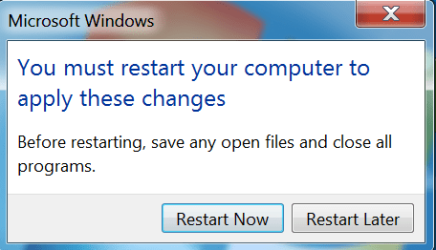
7) Now you'll need to restart the PC and go into the BIOS and enable AHCI. When Windows boots up, it will finish installing the AHCI drivers.

AHCI Driver.jpg
AHCI Driver2.jpg

8) You will need one final restart to finish the process after the drivers are installed.

Restart.jpg
   Note
For those with nForce boards, have a look at the Information post below.

The method was worked out by Everlong and credit for that goes to him, thanks mate!


Enjoy! :)


Last edited by a moderator:
I only disconnected from the HD and directly to the DVD drive. No wholesale cabling maneuvers. ;)
 

My Computer My Computer

At a glance

Windows 10 64Intel i5 3570K (4.13GHz w/cool & quiet))4x-4Gb Crucial Ballistix Sport PC3-12800 (1600)GeForce GTX 1060 6GB
Computer type
PC/Desktop
Computer Manufacturer/Model Number
Self Assembly
OS
Windows 10 64
CPU
Intel i5 3570K (4.13GHz w/cool & quiet))
Motherboard
ASUS P8Z77-V LK
Memory
4x-4Gb Crucial Ballistix Sport PC3-12800 (1600)
Graphics Card(s)
GeForce GTX 1060 6GB
Sound Card
Realtek ALC892 (onboard)
Monitor(s) Displays
TCL 50" 4K
Screen Resolution
3840x2160
Hard Drives
Crucial MX500, Intel 330; Adata 480; Sea ST8000MD
PSU
Antec HCG-520M
Cooling
CPU - Coolermaster Hyper 212 P, Case - 2-120mm Scythe
Keyboard
Logitecl compact
Mouse
Logitec M705
Internet Speed
Gigabit
Other Info
1 RX-C525 Rosewill trayless hot-swap mobile rack
I only disconnected from the HD and directly to the DVD drive. No wholesale cabling maneuvers. ;)

In the BIOS see if the HDD the OS is on is the first in the boot order.
 

My Computer My Computer

At a glance

W 7 64-bit UltimateIntel Q9550 Yorkfield8GB Dominator 8500C5DATI : XFX 5870
Computer Manufacturer/Model Number
* BFK Customs *
OS
W 7 64-bit Ultimate
CPU
Intel Q9550 Yorkfield
Motherboard
ASUS P5Q Pro
Memory
8GB Dominator 8500C5D
Graphics Card(s)
ATI : XFX 5870
Sound Card
Realtek HD Audio 7-1
Monitor(s) Displays
1x 47" LCD HDMI & 3x 26" LCD HDMI
Screen Resolution
1920x1080P & 1920x1200
Hard Drives
1x 80GB Intel X25-M G2 SSD : 1x 500GB & 1x 640GB WD Caviar Black(s)
PSU
Corsair 620HX
Case
Cooler Master RC-690
Cooling
Tuniq Tower 120, 2x 140mm and 3x 120mm case fans
Keyboard
Microsoft 500
Mouse
Razer Diamondback 3G
Internet Speed
14 Mb/s
Other Info
1x Koutech 3Gb/s SATA HDD Hot Swap Rack
In the BIOS see if the HDD the OS is on is the first in the boot order.
I read your mind, was just getting ready to add that at the initial moments of boot it does display all drives in the positions at which they have been since setting this comp up a couple weeks ago.

Hold for an edit...
 

My Computer My Computer

At a glance

Windows 10 64Intel i5 3570K (4.13GHz w/cool & quiet))4x-4Gb Crucial Ballistix Sport PC3-12800 (1600)GeForce GTX 1060 6GB
Computer type
PC/Desktop
Computer Manufacturer/Model Number
Self Assembly
OS
Windows 10 64
CPU
Intel i5 3570K (4.13GHz w/cool & quiet))
Motherboard
ASUS P8Z77-V LK
Memory
4x-4Gb Crucial Ballistix Sport PC3-12800 (1600)
Graphics Card(s)
GeForce GTX 1060 6GB
Sound Card
Realtek ALC892 (onboard)
Monitor(s) Displays
TCL 50" 4K
Screen Resolution
3840x2160
Hard Drives
Crucial MX500, Intel 330; Adata 480; Sea ST8000MD
PSU
Antec HCG-520M
Cooling
CPU - Coolermaster Hyper 212 P, Case - 2-120mm Scythe
Keyboard
Logitecl compact
Mouse
Logitec M705
Internet Speed
Gigabit
Other Info
1 RX-C525 Rosewill trayless hot-swap mobile rack
In the BIOS see if the HDD the OS is on is the first in the boot order.
I read your mind, was just getting ready to add that at the initial moments of boot it does display all drives in the positions at which they have been since setting this comp up a couple weeks ago.

Hold for an edit...


Check it first hand; I'm running out of suggestions. :confused:
 

My Computer My Computer

At a glance

W 7 64-bit UltimateIntel Q9550 Yorkfield8GB Dominator 8500C5DATI : XFX 5870
Computer Manufacturer/Model Number
* BFK Customs *
OS
W 7 64-bit Ultimate
CPU
Intel Q9550 Yorkfield
Motherboard
ASUS P5Q Pro
Memory
8GB Dominator 8500C5D
Graphics Card(s)
ATI : XFX 5870
Sound Card
Realtek HD Audio 7-1
Monitor(s) Displays
1x 47" LCD HDMI & 3x 26" LCD HDMI
Screen Resolution
1920x1080P & 1920x1200
Hard Drives
1x 80GB Intel X25-M G2 SSD : 1x 500GB & 1x 640GB WD Caviar Black(s)
PSU
Corsair 620HX
Case
Cooler Master RC-690
Cooling
Tuniq Tower 120, 2x 140mm and 3x 120mm case fans
Keyboard
Microsoft 500
Mouse
Razer Diamondback 3G
Internet Speed
14 Mb/s
Other Info
1x Koutech 3Gb/s SATA HDD Hot Swap Rack
Happily I can say I am now typing this from the computer we "were" working on. Unfortunately your "So others (and I) can learn..." in your sig will not benefit. I have no Idea what I did to get her back from the dead. All I did do was delve back into BIOS, open and view all the pertinent parameters (no changes made), close and save. Upon the next reboot it opened smoothly all the way to Windows 7. I took a moment to revert back to my restore point and then physically checked the reg was back to normal (which it is) so for now all is well. Think I'll just skip AHCI for now. :p

The thing I really wanted to check was hard disk boot priority in BIOS (which was OK) because the boot screen has always displayed my primary OS drive as being attached to IDE Channel 2 Master. On IDE Channels 0 & 1 (master and slave) only the Slave 0 is being utilized and this is by a PATA drive. Not sure it really matters but that is for a different thread anyhow.

Thanks again for your support!
 

My Computer My Computer

At a glance

Windows 10 64Intel i5 3570K (4.13GHz w/cool & quiet))4x-4Gb Crucial Ballistix Sport PC3-12800 (1600)GeForce GTX 1060 6GB
Computer type
PC/Desktop
Computer Manufacturer/Model Number
Self Assembly
OS
Windows 10 64
CPU
Intel i5 3570K (4.13GHz w/cool & quiet))
Motherboard
ASUS P8Z77-V LK
Memory
4x-4Gb Crucial Ballistix Sport PC3-12800 (1600)
Graphics Card(s)
GeForce GTX 1060 6GB
Sound Card
Realtek ALC892 (onboard)
Monitor(s) Displays
TCL 50" 4K
Screen Resolution
3840x2160
Hard Drives
Crucial MX500, Intel 330; Adata 480; Sea ST8000MD
PSU
Antec HCG-520M
Cooling
CPU - Coolermaster Hyper 212 P, Case - 2-120mm Scythe
Keyboard
Logitecl compact
Mouse
Logitec M705
Internet Speed
Gigabit
Other Info
1 RX-C525 Rosewill trayless hot-swap mobile rack
Happily I can say I am now typing this from the computer we "were" working on. Unfortunately your "So others (and I) can learn..." in your sig will not benefit. I have no Idea what I did to get her back from the dead. All I did do was delve back into BIOS, open and view all the pertinent parameters (no changes made), close and save. Upon the next reboot it opened smoothly all the way to Windows 7. I took a moment to revert back to my restore point and then physically checked the reg was back to normal (which it is) so for now all is well. Think I'll just skip AHCI for now. :p

The thing I really wanted to check was the boot order in BIOS (which was OK) because the boot screen has always displayed my primary OS drive as being attached to IDE Channel 2 Master. On IDE Channels 0 & 1 (master and slave) only the Slave 0 is being utilized and this is by a PATA drive. Not sure it really matters but that is for a different thread anyhow.

Thanks again for your support!

Are you saying that your HDDs are not SATA?
 

My Computer My Computer

At a glance

W 7 64-bit UltimateIntel Q9550 Yorkfield8GB Dominator 8500C5DATI : XFX 5870
Computer Manufacturer/Model Number
* BFK Customs *
OS
W 7 64-bit Ultimate
CPU
Intel Q9550 Yorkfield
Motherboard
ASUS P5Q Pro
Memory
8GB Dominator 8500C5D
Graphics Card(s)
ATI : XFX 5870
Sound Card
Realtek HD Audio 7-1
Monitor(s) Displays
1x 47" LCD HDMI & 3x 26" LCD HDMI
Screen Resolution
1920x1080P & 1920x1200
Hard Drives
1x 80GB Intel X25-M G2 SSD : 1x 500GB & 1x 640GB WD Caviar Black(s)
PSU
Corsair 620HX
Case
Cooler Master RC-690
Cooling
Tuniq Tower 120, 2x 140mm and 3x 120mm case fans
Keyboard
Microsoft 500
Mouse
Razer Diamondback 3G
Internet Speed
14 Mb/s
Other Info
1x Koutech 3Gb/s SATA HDD Hot Swap Rack
Are you saying that your HDDs are not SATA?
HDD's - 2 are SATA one is PATA. The PATA is temporary in that I'm still organizing over to the SATA data storage drive. Optical is USB.
 

My Computer My Computer

At a glance

Windows 10 64Intel i5 3570K (4.13GHz w/cool & quiet))4x-4Gb Crucial Ballistix Sport PC3-12800 (1600)GeForce GTX 1060 6GB
Computer type
PC/Desktop
Computer Manufacturer/Model Number
Self Assembly
OS
Windows 10 64
CPU
Intel i5 3570K (4.13GHz w/cool & quiet))
Motherboard
ASUS P8Z77-V LK
Memory
4x-4Gb Crucial Ballistix Sport PC3-12800 (1600)
Graphics Card(s)
GeForce GTX 1060 6GB
Sound Card
Realtek ALC892 (onboard)
Monitor(s) Displays
TCL 50" 4K
Screen Resolution
3840x2160
Hard Drives
Crucial MX500, Intel 330; Adata 480; Sea ST8000MD
PSU
Antec HCG-520M
Cooling
CPU - Coolermaster Hyper 212 P, Case - 2-120mm Scythe
Keyboard
Logitecl compact
Mouse
Logitec M705
Internet Speed
Gigabit
Other Info
1 RX-C525 Rosewill trayless hot-swap mobile rack

My Computer My Computer

At a glance

W 7 64-bit UltimateIntel Q9550 Yorkfield8GB Dominator 8500C5DATI : XFX 5870
Computer Manufacturer/Model Number
* BFK Customs *
OS
W 7 64-bit Ultimate
CPU
Intel Q9550 Yorkfield
Motherboard
ASUS P5Q Pro
Memory
8GB Dominator 8500C5D
Graphics Card(s)
ATI : XFX 5870
Sound Card
Realtek HD Audio 7-1
Monitor(s) Displays
1x 47" LCD HDMI & 3x 26" LCD HDMI
Screen Resolution
1920x1080P & 1920x1200
Hard Drives
1x 80GB Intel X25-M G2 SSD : 1x 500GB & 1x 640GB WD Caviar Black(s)
PSU
Corsair 620HX
Case
Cooler Master RC-690
Cooling
Tuniq Tower 120, 2x 140mm and 3x 120mm case fans
Keyboard
Microsoft 500
Mouse
Razer Diamondback 3G
Internet Speed
14 Mb/s
Other Info
1x Koutech 3Gb/s SATA HDD Hot Swap Rack
Clarification

How do I know if this worked? I didn't get the window showing the drivers updating. I only got the message that driver updating was complete.
 

My Computer My Computer

At a glance

Windows 7Intel i58 GigEVGA Pci express
OS
Windows 7
CPU
Intel i5
Motherboard
ASRock P55 Extreme
Memory
8 Gig
Graphics Card(s)
EVGA Pci express
Monitor(s) Displays
Double Sight Dual monitor
Hard Drives
Western Digital 650 gig
PSU
Seasonic 650W
Case
Lian Li
Cooling
stock CPU fan
How do I know if this worked? I didn't get the window showing the drivers updating. I only got the message that driver updating was complete.

Hello dsosb, welcome to Seven Forums!


If you got this it is complete.

Restart.PNG
 

My Computer My Computer

At a glance

W 7 64-bit UltimateIntel Q9550 Yorkfield8GB Dominator 8500C5DATI : XFX 5870
Computer Manufacturer/Model Number
* BFK Customs *
OS
W 7 64-bit Ultimate
CPU
Intel Q9550 Yorkfield
Motherboard
ASUS P5Q Pro
Memory
8GB Dominator 8500C5D
Graphics Card(s)
ATI : XFX 5870
Sound Card
Realtek HD Audio 7-1
Monitor(s) Displays
1x 47" LCD HDMI & 3x 26" LCD HDMI
Screen Resolution
1920x1080P & 1920x1200
Hard Drives
1x 80GB Intel X25-M G2 SSD : 1x 500GB & 1x 640GB WD Caviar Black(s)
PSU
Corsair 620HX
Case
Cooler Master RC-690
Cooling
Tuniq Tower 120, 2x 140mm and 3x 120mm case fans
Keyboard
Microsoft 500
Mouse
Razer Diamondback 3G
Internet Speed
14 Mb/s
Other Info
1x Koutech 3Gb/s SATA HDD Hot Swap Rack

My Computer My Computer

At a glance

Windows 7Intel i58 GigEVGA Pci express
OS
Windows 7
CPU
Intel i5
Motherboard
ASRock P55 Extreme
Memory
8 Gig
Graphics Card(s)
EVGA Pci express
Monitor(s) Displays
Double Sight Dual monitor
Hard Drives
Western Digital 650 gig
PSU
Seasonic 650W
Case
Lian Li
Cooling
stock CPU fan
You're welcome, I'm glad it worked for you!
 

My Computer My Computer

At a glance

W 7 64-bit UltimateIntel Q9550 Yorkfield8GB Dominator 8500C5DATI : XFX 5870
Computer Manufacturer/Model Number
* BFK Customs *
OS
W 7 64-bit Ultimate
CPU
Intel Q9550 Yorkfield
Motherboard
ASUS P5Q Pro
Memory
8GB Dominator 8500C5D
Graphics Card(s)
ATI : XFX 5870
Sound Card
Realtek HD Audio 7-1
Monitor(s) Displays
1x 47" LCD HDMI & 3x 26" LCD HDMI
Screen Resolution
1920x1080P & 1920x1200
Hard Drives
1x 80GB Intel X25-M G2 SSD : 1x 500GB & 1x 640GB WD Caviar Black(s)
PSU
Corsair 620HX
Case
Cooler Master RC-690
Cooling
Tuniq Tower 120, 2x 140mm and 3x 120mm case fans
Keyboard
Microsoft 500
Mouse
Razer Diamondback 3G
Internet Speed
14 Mb/s
Other Info
1x Koutech 3Gb/s SATA HDD Hot Swap Rack
- cool, Bare Foot..
- had a scare when my Bloodrage BIOS hicupped, but staggering the drive initialisation via the BIOS AHCI settings cured that..

- repo pointage coming your way..:geek:
 

My Computer My Computer

At a glance

Windows10 Pro - 64Bit vs.10547i7-965 Extreme Edition (8 Cores) at 3.3GHz (n...12G Corsair Dominator DDR3 - tripled2xAMD SapphireNITRO R9 380(4G) crossfire
Computer type
PC/Desktop
Computer Manufacturer/Model Number
benchtec, built to personal specs
OS
Windows10 Pro - 64Bit vs.10547
CPU
i7-965 Extreme Edition (8 Cores) at 3.3GHz (no OC)
Motherboard
BloodRageX58 (Socket1366)
Memory
12G Corsair Dominator DDR3 - tripled
Graphics Card(s)
2xAMD SapphireNITRO R9 380(4G) crossfire
Sound Card
Sonar(SB)X-Fi onboard
Monitor(s) Displays
SyncMaster P2050 20"
Screen Resolution
1600x900 (widescreen)
Hard Drives
480G\OCZSolid3SSD, 64G\OCZVertex3SSD,60G\OCZVertex2SSD, 1TB\spinpointF1SATAHDD
PSU
1200w Power Station Gold
Case
ANTEC 900/2 all blue lights, etc..
Cooling
Noctua SE1366 NH-U12P - a tight fit, but a monster cooler!!
Keyboard
Logitech G19 (wired)
Mouse
Logitech G9 Laser (wired)
Internet Speed
150mb unlimited
Browser
IE11(RP)
Other Info
Xbox One, Nokia735 Windows10 mobile, LG HD/DVD/Blu-Ray r/w, CyberlinkPowerDVD15, LogitechZ5500-SS(5.1), LogitechG35Phones-SS(7.1),MSOffice 2007,CorelDrawX7,Painter2016, Wacom Intuos Pro-SE
Thanks mate, I'm glad it worked for you.
 

My Computer My Computer

At a glance

W 7 64-bit UltimateIntel Q9550 Yorkfield8GB Dominator 8500C5DATI : XFX 5870
Computer Manufacturer/Model Number
* BFK Customs *
OS
W 7 64-bit Ultimate
CPU
Intel Q9550 Yorkfield
Motherboard
ASUS P5Q Pro
Memory
8GB Dominator 8500C5D
Graphics Card(s)
ATI : XFX 5870
Sound Card
Realtek HD Audio 7-1
Monitor(s) Displays
1x 47" LCD HDMI & 3x 26" LCD HDMI
Screen Resolution
1920x1080P & 1920x1200
Hard Drives
1x 80GB Intel X25-M G2 SSD : 1x 500GB & 1x 640GB WD Caviar Black(s)
PSU
Corsair 620HX
Case
Cooler Master RC-690
Cooling
Tuniq Tower 120, 2x 140mm and 3x 120mm case fans
Keyboard
Microsoft 500
Mouse
Razer Diamondback 3G
Internet Speed
14 Mb/s
Other Info
1x Koutech 3Gb/s SATA HDD Hot Swap Rack
Happily I can say I am now typing this from the computer we "were" working on. Unfortunately your "So others (and I) can learn..." in your sig will not benefit. I have no Idea what I did to get her back from the dead. All I did do was delve back into BIOS, open and view all the pertinent parameters (no changes made), close and save. Upon the next reboot it opened smoothly all the way to Windows 7. I took a moment to revert back to my restore point and then physically checked the reg was back to normal (which it is) so for now all is well. Think I'll just skip AHCI for now. :p

I had pretty much same issues golem had trying to turn on AHCI. I only have 1 HD (Sata), 1 DvD drive (Sata) and a 9in1 reader connected via onboard USB port. no IDE drives not anything else.

It would see the HD when booting up then give me error no bootable partition in table :confused:

I set it back to IDE mode in BIOS but it was still giving same error. Couldn't figure out how to get the LKGC screen up for my gigabyte ud4 board so just booted into BIOS while googling for a way from other computer; probably a good 15 minutes.

Never did find a way to get to the LKGC screen, but booted to the Boot Menu and selected to boot from the HD from there and windows decided it'd play nice.

Once into windows I restored to my preAHCI restore point and figure I'll just skip enabling this for now.
 

My Computer My Computer

At a glance

Win7 Pro x64i5-750 w/ CM Hyper 212 Plus4Gig - G.SKILL Ripjaws - DDR3HIS Radeon HD 5850
Computer Manufacturer/Model Number
Buy prebuilt? LoL
OS
Win7 Pro x64
CPU
i5-750 w/ CM Hyper 212 Plus
Motherboard
GIGABYTE GA-P55M-UD4
Memory
4Gig - G.SKILL Ripjaws - DDR3
Graphics Card(s)
HIS Radeon HD 5850
Monitor(s) Displays
46" Sony Bravia / Dell UltraSharp 2408WFP
Screen Resolution
1920x1080 / 1920x1200
Hard Drives
WD Black - 1TB
PSU
CORSAIR 750TX
Case
Antec P183
Hello Iam918.


I have no knowledge of why some are having these similar issues but I'll keep looking into it, if you learn anything new please keep us informed.
 

My Computer My Computer

At a glance

W 7 64-bit UltimateIntel Q9550 Yorkfield8GB Dominator 8500C5DATI : XFX 5870
Computer Manufacturer/Model Number
* BFK Customs *
OS
W 7 64-bit Ultimate
CPU
Intel Q9550 Yorkfield
Motherboard
ASUS P5Q Pro
Memory
8GB Dominator 8500C5D
Graphics Card(s)
ATI : XFX 5870
Sound Card
Realtek HD Audio 7-1
Monitor(s) Displays
1x 47" LCD HDMI & 3x 26" LCD HDMI
Screen Resolution
1920x1080P & 1920x1200
Hard Drives
1x 80GB Intel X25-M G2 SSD : 1x 500GB & 1x 640GB WD Caviar Black(s)
PSU
Corsair 620HX
Case
Cooler Master RC-690
Cooling
Tuniq Tower 120, 2x 140mm and 3x 120mm case fans
Keyboard
Microsoft 500
Mouse
Razer Diamondback 3G
Internet Speed
14 Mb/s
Other Info
1x Koutech 3Gb/s SATA HDD Hot Swap Rack
BFK - searched high and low how to do this, and found all the non-working confusing ones (including needing .sys files). I can't believe how simple this is, and thought to myself, surely it can't be this easy... it worked like a charm. Thanks for sharing your expertise. First post here, and you get it.
 

My Computer My Computer

At a glance

windows 7 ultimate x64
OS
windows 7 ultimate x64
Hello erkme73, welcome to Seven Forums!


I'm glad this has been a help to you!
 

My Computer My Computer

At a glance

W 7 64-bit UltimateIntel Q9550 Yorkfield8GB Dominator 8500C5DATI : XFX 5870
Computer Manufacturer/Model Number
* BFK Customs *
OS
W 7 64-bit Ultimate
CPU
Intel Q9550 Yorkfield
Motherboard
ASUS P5Q Pro
Memory
8GB Dominator 8500C5D
Graphics Card(s)
ATI : XFX 5870
Sound Card
Realtek HD Audio 7-1
Monitor(s) Displays
1x 47" LCD HDMI & 3x 26" LCD HDMI
Screen Resolution
1920x1080P & 1920x1200
Hard Drives
1x 80GB Intel X25-M G2 SSD : 1x 500GB & 1x 640GB WD Caviar Black(s)
PSU
Corsair 620HX
Case
Cooler Master RC-690
Cooling
Tuniq Tower 120, 2x 140mm and 3x 120mm case fans
Keyboard
Microsoft 500
Mouse
Razer Diamondback 3G
Internet Speed
14 Mb/s
Other Info
1x Koutech 3Gb/s SATA HDD Hot Swap Rack
Welcome to Seven Forums erkme73.

Gary
 

My Computer My Computer

At a glance

Vista Ult 64 bit Seven Ult RTM x64Intel Core2 Quad Q6600 2.40 gigahertzCrucial Ballistix 4x2GB PC2 6400NVIDIA GeForce 8600 GTS 256 MB
Computer Manufacturer/Model Number
Dell XPS420
OS
Vista Ult 64 bit Seven Ult RTM x64
CPU
Intel Core2 Quad Q6600 2.40 gigahertz
Memory
Crucial Ballistix 4x2GB PC2 6400
Graphics Card(s)
NVIDIA GeForce 8600 GTS 256 MB
Sound Card
Creative SB X-Fi audio
Monitor(s) Displays
HP w2207 + HPvs15
Screen Resolution
1680x1050 + 1024x768
Hard Drives
2-WD5000AAKS-500 GB
WD5000AAV-500 GB external
Keyboard
Microsoft Comfort Curve
Mouse
MX Revolution
Other Info
Wacom Intuos 2 Graphics Tablet
Experience Index=5.5
Great tut, this will be a very useful link.

Managed to switch my other computer from IDE to AHCI by loading the drivers, reboot to BIOS change the settings to AHCI, and it booted as AHCI enabled.
This evidently won't work on all MOBOs.
 

My Computer My Computer

At a glance

Windows 7 Ult x64 - SP1/ Windows 8 Pro x64Intel Core i5-3570K 4.6GHz8GB (2X4GB) DDR3 1600 Corsair Vengeance CL8 1.5vSapphire HD 7770 Vapor-X OC 1GB DDR5
Computer type
PC/Desktop
Computer Manufacturer/Model Number
76~2.0
OS
Windows 7 Ult x64 - SP1/ Windows 8 Pro x64
CPU
Intel Core i5-3570K 4.6GHz
Motherboard
Gigabyte GA-Z77X UD3H, f18
Memory
8GB (2X4GB) DDR3 1600 Corsair Vengeance CL8 1.5v
Graphics Card(s)
Sapphire HD 7770 Vapor-X OC 1GB DDR5
Sound Card
Onboard VIA VT2021
Monitor(s) Displays
22" LCD Dell
Screen Resolution
1680x1050
Hard Drives
Samsung 840Pro 128GB SSD,
Seagate Barracuda 500GB SATA2 7200rpm 32MB cache, Seagate Barracuda 1TB SATA2 7200rpm 32MB cache,
PSU
Corsair HX650W
Case
Cooler Master Storm Scout
Cooling
Corsair H80 2x12cm Noctua NF P12 , 2x14cm case fans
Keyboard
Logitech Wave
Mouse
CM Sentinel
Internet Speed
Dismal
Antivirus
Avast
Browser
Opera Next
Other Info
Haswell laptop: HP Envy 17t-j, i7-4700MQ, GeForce 740M 2GB DDR3, 17.3" Full HD 1920x1080, 16GB RAM, Samsung 840 Pro 128GB, 1TB Hitachi 7200 HDD,
Desktop: eSATA ports,
External eSATA Seagate 500GB SATA2 7200rpm,
External WD USB 500GB
Back
Top