
Akasa InterConnect Internal Smart Card Reader

eliodeangelis

New member
Local time
1:50 PM
Messages
9
I'm using Win 7 64bit and I can't get it to see the [FONT=&quot]Akasa InterConnect Internal Smart Card Reader. If this isn't compatible with Win 7 64bit, does anyone please know of an Internal Card Reader that can read HDSC cards?
Thanks.

[/FONT]
 

My Computer

Computer Manufacturer/Model Number
Self-Built
OS
Windows 7
CPU
AMD Phenom II x4 955 3.20 Ghz
Motherboard
Gigabyte AM3 AMD 790X DDR3 ATX A L
Memory
OCZ Technology DDR3 4gb (2X2) Platinum 2000Mhz
Graphics Card(s)
2x MSI RADEON RX3850 512MB DUAL DVI PCIE DDR3 690/1.6 Over C
I don't know about the Akasa model, but this is what I have on my system. It works perfectly in all of my installed OSes, and can read/write SDHC cards.
Capture.PNG

Sweex - My Digital Life
 

My Computer

Computer type
PC/Desktop
Computer Manufacturer/Model Number
Dwarf Dwf/11/2012 r09/2013
OS
Windows 8.1 Pro RTM x64
CPU
Intel Core-i5-3570K 4-core @ 3.4GHz (Ivy Bridge) (OC 4.4GHz)
Motherboard
ASRock Z77 Extreme4-M
Memory
4 x 4GB DDR3-1600 Corsair Vengeance CMZ8GX3M2A1600C9B (16GB)
Graphics Card(s)
MSI GeForce GTX770 Gaming OC 2GB
Sound Card
Realtek High Definition on board solution (ALC 898)
Monitor(s) Displays
ViewSonic VA1912w Widescreen (VGA)
Screen Resolution
1440x900
Hard Drives
OCZ Agility 3 SSD 120GB SATA III x2 (RAID 0)
Samsung HD501LJ 500GB SATA II x2
Hitachi HDS721010CLA332 1TB SATA II
Iomega 1.5TB Ext USB 2.0
WD 2.0TB Ext USB 3.0
PSU
XFX Pro Series 850W Semi-Modular
Case
Gigabyte IF233
Cooling
1 x 120mm Front Inlet 1 x 120mm Rear Exhaust
Keyboard
Microsoft Comfort Curve Keyboard 3000 (USB)
Mouse
Microsoft Comfort Mouse 3000 for Business (USB)
Internet Speed
NetGear DG834Gv3 ADSL Modem/Router (Ethernet) ~4.0 Mb/s (O2)
Antivirus
Avast! 8.0.1497
Browser
IE 11
Other Info
Optical Drive: HL-DT-ST BD-RE BH10LS30 SATA Bluray
Lexmark S305 Printer/Scanner/Copier (USB)
WEI Score: 8.1/8.1/8.5/8.5/8.25
Asus Eee PC 1011PX Netbook (Windows 7 x86 Starter)
Thanks Dwarf, but have you used it with a 64bit OS?
 

My Computer

Computer Manufacturer/Model Number
Self-Built
OS
Windows 7
CPU
AMD Phenom II x4 955 3.20 Ghz
Motherboard
Gigabyte AM3 AMD 790X DDR3 ATX A L
Memory
OCZ Technology DDR3 4gb (2X2) Platinum 2000Mhz
Graphics Card(s)
2x MSI RADEON RX3850 512MB DUAL DVI PCIE DDR3 690/1.6 Over C
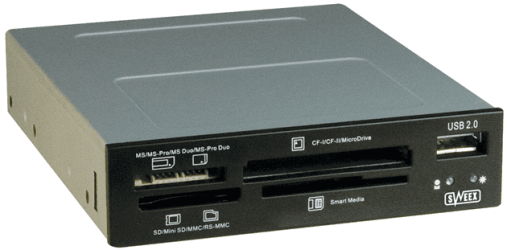
It works with ALL of my OSes, both 32-bit and 64-bit. :)
 

My Computer

Computer type
PC/Desktop
Computer Manufacturer/Model Number
Dwarf Dwf/11/2012 r09/2013
OS
Windows 8.1 Pro RTM x64
CPU
Intel Core-i5-3570K 4-core @ 3.4GHz (Ivy Bridge) (OC 4.4GHz)
Motherboard
ASRock Z77 Extreme4-M
Memory
4 x 4GB DDR3-1600 Corsair Vengeance CMZ8GX3M2A1600C9B (16GB)
Graphics Card(s)
MSI GeForce GTX770 Gaming OC 2GB
Sound Card
Realtek High Definition on board solution (ALC 898)
Monitor(s) Displays
ViewSonic VA1912w Widescreen (VGA)
Screen Resolution
1440x900
Hard Drives
OCZ Agility 3 SSD 120GB SATA III x2 (RAID 0)
Samsung HD501LJ 500GB SATA II x2
Hitachi HDS721010CLA332 1TB SATA II
Iomega 1.5TB Ext USB 2.0
WD 2.0TB Ext USB 3.0
PSU
XFX Pro Series 850W Semi-Modular
Case
Gigabyte IF233
Cooling
1 x 120mm Front Inlet 1 x 120mm Rear Exhaust
Keyboard
Microsoft Comfort Curve Keyboard 3000 (USB)
Mouse
Microsoft Comfort Mouse 3000 for Business (USB)
Internet Speed
NetGear DG834Gv3 ADSL Modem/Router (Ethernet) ~4.0 Mb/s (O2)
Antivirus
Avast! 8.0.1497
Browser
IE 11
Other Info
Optical Drive: HL-DT-ST BD-RE BH10LS30 SATA Bluray
Lexmark S305 Printer/Scanner/Copier (USB)
WEI Score: 8.1/8.1/8.5/8.5/8.25
Asus Eee PC 1011PX Netbook (Windows 7 x86 Starter)
Same issue for me with this one, anyone know if it got resolved.

I'm dual booting between Windows 7 x64 and Vista x64, Vista works fine, Windows 7 doesn't so I'm pretty sure it's not the connections.

Maybe USB drivers?

Although my external USB multi reader works.


Any ideas will be helpful.

Steve
 

My Computer

OS
Windows 7 x64
Akasa

Hi Steve,
[FONT=&quot]1. download the file from the link attached below.
2. Unzip the file
3. Go to AK-ICR-05>Auto Play>Docs>Card Reader>Smart Card>Realtek Vista folder
4. Install the driver by running the setup.exe file[/FONT]


[FONT=&quot][/FONT]
[FONT=&quot]http://www.akasa.com.tw/download/software/AK-ICR-05_driver.zip[/FONT]
 

My Computer

Computer Manufacturer/Model Number
Self-Built
OS
Windows 7
CPU
AMD Phenom II x4 955 3.20 Ghz
Motherboard
Gigabyte AM3 AMD 790X DDR3 ATX A L
Memory
OCZ Technology DDR3 4gb (2X2) Platinum 2000Mhz
Graphics Card(s)
2x MSI RADEON RX3850 512MB DUAL DVI PCIE DDR3 690/1.6 Over C
Cracked it.

I noticed there was a device showing up as ehome infrared receiver (which I'm pretty sure I don't have) the list of compatible devices also showed USB Composite device (I installed the above drivers so not sure if they created this or not). Once I clicked everything is fine.

Cheers for all your help

Steve
 

My Computer

OS
Windows 7 x64
Many thanks Elio - just the job - my Akasa card reader was also deemed to be an eHome IR device, and after downloading the driver exactly as you wrote, and clicking on the alternative USB Hub option, magically it all worked.
 

My Computer

OS
Windows 7 Pro
Two years on but never mind...This thread helped me out.

My Akasa card reader wasn't recognised by Win7x64 and, like others, I had this mysterious eHome IR device in Device Manager. Instead of downloading the Akasa driver, all I did was right click on the entry in Device Manager and asked Win7 to install a driver - and it did and it works!
 

My Computer

OS
7x64
Back
Top