
Alert says file pathway doesn't exist, but it does?

flycaster

New member
Member
VIP
Local time
8:16 PM
Messages
472
Location
Boynton Beach, FL
I have been successfully using the Shortcuts button from the customized dropdown. However, I am having one problem with a specific app, WinRAR. I have the app's shortcut successfully loaded into the button's dropdown. When executed I get an error message that says proper pathway can't be found...Doesn't exist! And yet, as you can see below, Windows Explorer shows that WinRAR does exits in C:\Program Files (x86)\FF Shortcuts
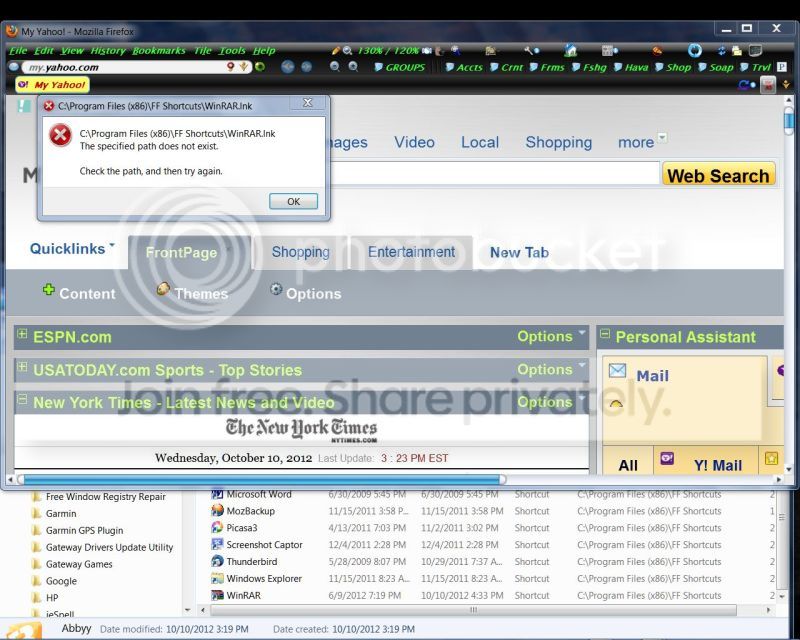
Winrar.jpg
 

My Computer My Computer

Computer Manufacturer/Model Number
Gateway DX4720-03/HP Pavilion dv6
OS
Windows 7 HP 64-bit
Memory
4GB/4GB
Antivirus
Avast Pro
Browser
Firefox, the latest
Alert says file pathway doesn't exist, but it does

Did it ever work? If yes, do you have the file iconcache.db? If yes,try this
  • Close all programs
  • Rename file - recommend iconcache.db.old
  • Turn off computer (hard - press and hold on/off button until it goes off)
  • Turn on computer - Is file there? If not, reboot normally
File should be there


Hope this helped
 

My Computer My Computer

Computer Manufacturer/Model Number
Toshiba Satellite L305 S5919
OS
Vista 32-bit Home Basic 6.0 Build 6002 SP2
CPU
Genuine Intel® Celeron 585 @ 2.16GHz, 1MB L2, 667MHz
Motherboard
Mobile Intel® GL40 Express Chipset
Memory
2GB PC6400 DDR2 SDRAM max 4GB
Graphics Card(s)
Mobile Intel® Graphics Media Accelerator 4500M
Sound Card
Built-in stereo speakers
Monitor(s) Displays
15.4” diagonal widescreen TruBrite® TFT LCD display at 1280x
Hard Drives
160GB (5400 RPM); Serial ATA hard disk drive
DVD SuperMulti (+/-R double layer) drive supporting 11 formats
PSU
75W (19V x 3.95A) 100-240V AC Adapter
Case
Matte Silver
Cooling
Fans that keep operating temp 41° to 95° F
Followed your instructions and it worked. Thanks.
 

My Computer My Computer

Computer Manufacturer/Model Number
Gateway DX4720-03/HP Pavilion dv6
OS
Windows 7 HP 64-bit
Memory
4GB/4GB
Antivirus
Avast Pro
Browser
Firefox, the latest
FC,

Awesome! Glad it worked. There's a lot of info out there on this but here's a pretty good article.

How to refresh Windows icon cache and repair Windows desktop icons | WinAbility Software

Why I asked you to turn off the machine the way I did is in the article too. The article describes another method but Windows doesn't care if you turn it off (think of a power outage). As long as you've closed the programs YOU care about, it should be ok. I've known about this for a long time but have only needed to do it a few times.

You can also delete the .old file but they should be different in size.

Have a good day. :D
 

My Computer My Computer

Computer Manufacturer/Model Number
Toshiba Satellite L305 S5919
OS
Vista 32-bit Home Basic 6.0 Build 6002 SP2
CPU
Genuine Intel® Celeron 585 @ 2.16GHz, 1MB L2, 667MHz
Motherboard
Mobile Intel® GL40 Express Chipset
Memory
2GB PC6400 DDR2 SDRAM max 4GB
Graphics Card(s)
Mobile Intel® Graphics Media Accelerator 4500M
Sound Card
Built-in stereo speakers
Monitor(s) Displays
15.4” diagonal widescreen TruBrite® TFT LCD display at 1280x
Hard Drives
160GB (5400 RPM); Serial ATA hard disk drive
DVD SuperMulti (+/-R double layer) drive supporting 11 formats
PSU
75W (19V x 3.95A) 100-240V AC Adapter
Case
Matte Silver
Cooling
Fans that keep operating temp 41° to 95° F
Back
Top