Solved Installer Doesn't Locate SN750 M.2 SSD, but it DOES after installation

casey7

New member
Local time
1:37 PM
Messages
15
hello everyone, i am another person who has been fed up with the direction windows has headed and would like to return to a simple, pure OS.


Installation can detect my hard drive just fine, however it cannot find my NVME ssd which definitely is correctly installed as i've used it for installations before.


I have followed SIW2's Update your Win 7 installation media guide with the addition of simplix update pack and the additional "Large pack of drivers both x64 and x86" and the ISO works correctly for all I can tell, it just will not detect my SN750 500gb m.2 SSD, but it can detect it.


my only guess to the problem is that when I check windows' installed updates, I did not locate the nvme-specific drivers included in SIW2's signature, but I don't know if the updated win 7 installation media just only applies it to installation or if i need to add those myself as well because his tool doesn't (but i don't think theres any reason he wouldn't include it?)


I honestly don't know what to do from here and I thought I would ask for some advice first before trying to do anything, i've spent weeks trying to get windows 7 installed all the way and i'm determined to have no compromises in functionality yet.


attached images but in link form because i am unfamiliar with protocols here:


Diskpart CMD not showing my SSD (at the time i unplugged my hard drive as a trouble shooting measure, but instead of forcing it to detect SSD it just detects only my USB)


What Windows disk management program shows after installing to hard drive
I apologize if this is a frequently asked question or problem, i did try to search but the best i could find is the "Installed a NVMe SSD, but Win7 doesn't detect it." thread.

thank you in advance if anyone can help!

- - - Updated - - -

i just found out that this is the wrong sub-fourm to place this question in. i apologize
 

My Computers My Computers

  • At a glance

    Windows 7 Professional x64i5-84001x Crucial 2666 8gb ddr4, 1x I FORGOT 2333 8g...EVGA GTX 980 Ti (in use), RX580 4GB (not in use)
    Computer type
    PC/Desktop
    Computer Manufacturer/Model Number
    CyberpowerPC
    OS
    Windows 7 Professional x64
    CPU
    i5-8400
    Motherboard
    MSI B360M Bazooka
    Memory
    1x Crucial 2666 8gb ddr4, 1x I FORGOT 2333 8gb ddr4
    Graphics Card(s)
    EVGA GTX 980 Ti (in use), RX580 4GB (not in use)
    Hard Drives
    1. WD SN750 500GB NVME m.2 drive
    2. some 1TB hard drive, kind of forgot name but its also from western digital and i think its the blue kind?? 7200rpm
    Antivirus
    N/A
    Browser
    Firefox (latest or an older version), Google Chrome 48.0.2
  • Computer type
    PC/Desktop
    Antivirus
    no
If the modified Win 7 installation files can't find the NVMe it's because it did not find the proper driver.
You can:
- During installation add the driver (problem is that you probably don't know witch one is)
- Install on a SATA drive and then device manager will claim for the NVMe driver. Point to a folder with all NVMe drivers. If it finds the driver it will install on the SATA drive. Then use Macrium Reflect 8 Free or Diskgenius to clone the SATA drive into the NVMe drive.

Have a look Installed a NVMe SSD, but Win7 doesn't detect it.
 
Last edited:

My Computers My Computers

  • At a glance

    Windows 7 HP 64i5 6600K - 800MHz to 4200MHz4+4G GSkill DDR4 3000IG - Intel 530
    Computer type
    PC/Desktop
    Computer Manufacturer/Model Number
    custom build
    OS
    Windows 7 HP 64
    CPU
    i5 6600K - 800MHz to 4200MHz
    Motherboard
    GA-Z170-HD3P
    Memory
    4+4G GSkill DDR4 3000
    Graphics Card(s)
    IG - Intel 530
    Monitor(s) Displays
    Samsung 226BW
    Screen Resolution
    1680x1050
    Hard Drives
    (1) -1 SM951 – 128GB M.2 AHCI PCIe SSD drive for Windows 7 and Lubuntu
    (2) -1 WD SATA 3 - 1T for Data
    (3) -1 WD SATA 3 - 1T for backup
    PSU
    Thermaltake 450W TR2 gold
    Keyboard
    Old and good Chicony mechanical keyboard
    Mouse
    Logitech mX performance - 9 buttons (had to disable some)
    Internet Speed
    500Mb/s
    Browser
    Firefox 64
    Other Info
    TinyWall firewall
  • At a glance

    Windows 7 Proi7-4500U 800MHz to 3.0GHz(4+4)G DDR3 1600IG intel 4400 + NVIDIA GeForce GT 745M
    Computer type
    Laptop
    System Manufacturer/Model Number
    Asus Q550LF
    OS
    Windows 7 Pro
    CPU
    i7-4500U 800MHz to 3.0GHz
    Motherboard
    Asus Q550LF
    Memory
    (4+4)G DDR3 1600
    Graphics Card(s)
    IG intel 4400 + NVIDIA GeForce GT 745M
    Sound Card
    Realtek
    Monitor(s) Displays
    LG Display LP156WF4-SPH1
    Screen Resolution
    1920 x 1080
    Hard Drives
    BX500 120G SSD for Windows and programs +
    1T HDD for data
    Internet Speed
    500 Mb/s
    Browser
    Firefox
    Other Info
    TinyWall firewall
hello, the issue with the SN750 is that there are NO drivers for it, and i believe the OEM drivers SIW2 includes in his update pack should work, but they do not.

i have looked at that thread and have not found a solution to my issue, as i tried the hotfix nvme updates and they did not work in installer.
 

My Computers My Computers

  • At a glance

    Windows 7 Professional x64i5-84001x Crucial 2666 8gb ddr4, 1x I FORGOT 2333 8g...EVGA GTX 980 Ti (in use), RX580 4GB (not in use)
    Computer type
    PC/Desktop
    Computer Manufacturer/Model Number
    CyberpowerPC
    OS
    Windows 7 Professional x64
    CPU
    i5-8400
    Motherboard
    MSI B360M Bazooka
    Memory
    1x Crucial 2666 8gb ddr4, 1x I FORGOT 2333 8gb ddr4
    Graphics Card(s)
    EVGA GTX 980 Ti (in use), RX580 4GB (not in use)
    Hard Drives
    1. WD SN750 500GB NVME m.2 drive
    2. some 1TB hard drive, kind of forgot name but its also from western digital and i think its the blue kind?? 7200rpm
    Antivirus
    N/A
    Browser
    Firefox (latest or an older version), Google Chrome 48.0.2
  • Computer type
    PC/Desktop
    Antivirus
    no

My Computer My Computer

At a glance

W7 home premium 32bit/W7HP 64bit/w10 tp insid...E5300 dual core3gbNvidia Geforce 7100 Nforce 630i
Computer type
PC/Desktop
Computer Manufacturer/Model Number
medionl/Aspire 6930G/acer x55a
OS
W7 home premium 32bit/W7HP 64bit/w10 tp insider ring
CPU
E5300 dual core
Motherboard
medion MS7366
Memory
3gb
Graphics Card(s)
Nvidia Geforce 7100 Nforce 630i
Monitor(s) Displays
avixc
Internet Speed
n (isp resticted to 72)
Antivirus
mse/pands
Browser
palemoon
Other Info
Belkin Fd7050 n USB using Railink RT2870 drivers, more upto date
You can borrow my boot media and check if it sees the nvme

17514x64v30.iso


extract the iso to usb using View attachment Usb7ice.zip

but it DOES after installation

The most likely explanation is that the nvme updates integrated properly into install.wim image. But either there was problem with integration of the nvme updates into boot.wim ( image 2), OR the updated setup files didnt copy correctly from boot.wim ( image 2) sources folder to the distribution sources folder.
 
Last edited:

My Computers My Computers

  • At a glance

    7 X64i5 84002x8gb 3200mhz
    Computer type
    PC/Desktop
    OS
    7 X64
    CPU
    i5 8400
    Motherboard
    gigabyte b365m ds3h
    Memory
    2x8gb 3200mhz
    Hard Drives
    various
    PSU
    pure power 11 400w cm
    Case
    Coolermaster
    Cooling
    cryorig m9i
  • At a glance

    7x64g54008gb ddr4 2400
    Computer type
    PC/Desktop
    OS
    7x64
    CPU
    g5400
    Motherboard
    ga b365m ds3h
    Memory
    8gb ddr4 2400
    PSU
    xfx pro 450w
hello SIW2, i have used your boot.wim in my 7up, and it did thankfully detect the ssd this time but then i got the 0x7b bsod which is really weird because i know i personally integrated the hotfixes (put updates into update folder) and 7up did detect them so im not sure why im still encountering this
 

My Computers My Computers

  • At a glance

    Windows 7 Professional x64i5-84001x Crucial 2666 8gb ddr4, 1x I FORGOT 2333 8g...EVGA GTX 980 Ti (in use), RX580 4GB (not in use)
    Computer type
    PC/Desktop
    Computer Manufacturer/Model Number
    CyberpowerPC
    OS
    Windows 7 Professional x64
    CPU
    i5-8400
    Motherboard
    MSI B360M Bazooka
    Memory
    1x Crucial 2666 8gb ddr4, 1x I FORGOT 2333 8gb ddr4
    Graphics Card(s)
    EVGA GTX 980 Ti (in use), RX580 4GB (not in use)
    Hard Drives
    1. WD SN750 500GB NVME m.2 drive
    2. some 1TB hard drive, kind of forgot name but its also from western digital and i think its the blue kind?? 7200rpm
    Antivirus
    N/A
    Browser
    Firefox (latest or an older version), Google Chrome 48.0.2
  • Computer type
    PC/Desktop
    Antivirus
    no
when did you get the bsod?

did you manage to apply the install image to the nvme ?

If so, how ?

Was it when attempting the first booot into the applied image that you got the bsod?

we dont know unless you tell us.
 

My Computers My Computers

  • At a glance

    7 X64i5 84002x8gb 3200mhz
    Computer type
    PC/Desktop
    OS
    7 X64
    CPU
    i5 8400
    Motherboard
    gigabyte b365m ds3h
    Memory
    2x8gb 3200mhz
    Hard Drives
    various
    PSU
    pure power 11 400w cm
    Case
    Coolermaster
    Cooling
    cryorig m9i
  • At a glance

    7x64g54008gb ddr4 2400
    Computer type
    PC/Desktop
    OS
    7x64
    CPU
    g5400
    Motherboard
    ga b365m ds3h
    Memory
    8gb ddr4 2400
    PSU
    xfx pro 450w
hi sorry for not clarifying, i get bsod after the installer runs and on the first restart (aka it never even finishes installation fully)

i dont know if it fully installed but it did unpack files for installation, installed updates and features, and bsods when needing to boot into it to finish installation

i applied image to install by using the windows installation setup
 

My Computers My Computers

  • At a glance

    Windows 7 Professional x64i5-84001x Crucial 2666 8gb ddr4, 1x I FORGOT 2333 8g...EVGA GTX 980 Ti (in use), RX580 4GB (not in use)
    Computer type
    PC/Desktop
    Computer Manufacturer/Model Number
    CyberpowerPC
    OS
    Windows 7 Professional x64
    CPU
    i5-8400
    Motherboard
    MSI B360M Bazooka
    Memory
    1x Crucial 2666 8gb ddr4, 1x I FORGOT 2333 8gb ddr4
    Graphics Card(s)
    EVGA GTX 980 Ti (in use), RX580 4GB (not in use)
    Hard Drives
    1. WD SN750 500GB NVME m.2 drive
    2. some 1TB hard drive, kind of forgot name but its also from western digital and i think its the blue kind?? 7200rpm
    Antivirus
    N/A
    Browser
    Firefox (latest or an older version), Google Chrome 48.0.2
  • Computer type
    PC/Desktop
    Antivirus
    no
boot up the media again.

Format the windows partition. Apply the image from an untouched install.wim using winntsetup.

(winntsetup shorcut should be under the start menu\install folder )

While still in winpe, use dism++ to integrate only the two nvme updates into the image you just applied.

( dism++ shortcut should be on the desktop.)

Then try booting into it.

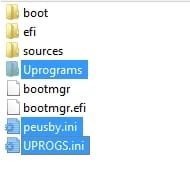
It will be easier if you copy these highlighted in blue from the 17514x64v30.iso and the two nvme updates onto your usb stick first. That is because winntsetup and dism++ run off the usb stick, and if you have the two nvme updates on there it is easy to browse to them.

copy-from-v30.jpg

screenshots here show how to use dism++

But you dont need to mount the image because dism++ will find the applied image and list it in the top pane.

Click on the windows image you just applied to highlight it in blue.

click open session

click updates, then click add and browse to the updates
 

My Computers My Computers

  • At a glance

    7 X64i5 84002x8gb 3200mhz
    Computer type
    PC/Desktop
    OS
    7 X64
    CPU
    i5 8400
    Motherboard
    gigabyte b365m ds3h
    Memory
    2x8gb 3200mhz
    Hard Drives
    various
    PSU
    pure power 11 400w cm
    Case
    Coolermaster
    Cooling
    cryorig m9i
  • At a glance

    7x64g54008gb ddr4 2400
    Computer type
    PC/Desktop
    OS
    7x64
    CPU
    g5400
    Motherboard
    ga b365m ds3h
    Memory
    8gb ddr4 2400
    PSU
    xfx pro 450w
hello SIW2, i booted into the media again with your boot.wim from before, used device manager to format my ssd, used winntsetup to apply a vanilla install.wim to the ssd (selecting the same SSD for both boot and installation), then using dism++ to apply the 2 hotfix updates to it.

upon booting to the ssd after that, i get the same BSOD (i even took a image of it!)

it is possible i did something wrong but i dont think so as i followed your instructions word for word, however on winntsetup the "EFI PART" was red instead of green. i dont know if that could point toward the issue or if that was a quirk of winnt.
 

My Computers My Computers

  • At a glance

    Windows 7 Professional x64i5-84001x Crucial 2666 8gb ddr4, 1x I FORGOT 2333 8g...EVGA GTX 980 Ti (in use), RX580 4GB (not in use)
    Computer type
    PC/Desktop
    Computer Manufacturer/Model Number
    CyberpowerPC
    OS
    Windows 7 Professional x64
    CPU
    i5-8400
    Motherboard
    MSI B360M Bazooka
    Memory
    1x Crucial 2666 8gb ddr4, 1x I FORGOT 2333 8gb ddr4
    Graphics Card(s)
    EVGA GTX 980 Ti (in use), RX580 4GB (not in use)
    Hard Drives
    1. WD SN750 500GB NVME m.2 drive
    2. some 1TB hard drive, kind of forgot name but its also from western digital and i think its the blue kind?? 7200rpm
    Antivirus
    N/A
    Browser
    Firefox (latest or an older version), Google Chrome 48.0.2
  • Computer type
    PC/Desktop
    Antivirus
    no
on winntsetup the "EFI PART" was red instead of green.

If it is not green, you should click search button and browse to the efi partition.

I dont think it mattered in your case becuase the boot files on the efi part created by your earlier installation seem to point at the windows partition.

There is a different issue in your case.

Does win7 work fine on a sata ssd or a mechanical hd on that same machine?
 

My Computers My Computers

  • At a glance

    7 X64i5 84002x8gb 3200mhz
    Computer type
    PC/Desktop
    OS
    7 X64
    CPU
    i5 8400
    Motherboard
    gigabyte b365m ds3h
    Memory
    2x8gb 3200mhz
    Hard Drives
    various
    PSU
    pure power 11 400w cm
    Case
    Coolermaster
    Cooling
    cryorig m9i
  • At a glance

    7x64g54008gb ddr4 2400
    Computer type
    PC/Desktop
    OS
    7x64
    CPU
    g5400
    Motherboard
    ga b365m ds3h
    Memory
    8gb ddr4 2400
    PSU
    xfx pro 450w
i dont have a sata ssd to try but im am using windows 7 right now on a mechanical drive!
 

My Computers My Computers

  • At a glance

    Windows 7 Professional x64i5-84001x Crucial 2666 8gb ddr4, 1x I FORGOT 2333 8g...EVGA GTX 980 Ti (in use), RX580 4GB (not in use)
    Computer type
    PC/Desktop
    Computer Manufacturer/Model Number
    CyberpowerPC
    OS
    Windows 7 Professional x64
    CPU
    i5-8400
    Motherboard
    MSI B360M Bazooka
    Memory
    1x Crucial 2666 8gb ddr4, 1x I FORGOT 2333 8gb ddr4
    Graphics Card(s)
    EVGA GTX 980 Ti (in use), RX580 4GB (not in use)
    Hard Drives
    1. WD SN750 500GB NVME m.2 drive
    2. some 1TB hard drive, kind of forgot name but its also from western digital and i think its the blue kind?? 7200rpm
    Antivirus
    N/A
    Browser
    Firefox (latest or an older version), Google Chrome 48.0.2
  • Computer type
    PC/Desktop
    Antivirus
    no
Did you try installing something else to your new nvme, win10 for example ?

checking if there is problem with your new nvme

I have come across a bsod recently.

diskgenius warned of damaged efi partition and offered to fix it, and it worked fine after fixing, no more bsod.

Worth having a look at the nvme disk with diskgenius just in case

https://www.diskgenius.com/download.php
 

My Computers My Computers

  • At a glance

    7 X64i5 84002x8gb 3200mhz
    Computer type
    PC/Desktop
    OS
    7 X64
    CPU
    i5 8400
    Motherboard
    gigabyte b365m ds3h
    Memory
    2x8gb 3200mhz
    Hard Drives
    various
    PSU
    pure power 11 400w cm
    Case
    Coolermaster
    Cooling
    cryorig m9i
  • At a glance

    7x64g54008gb ddr4 2400
    Computer type
    PC/Desktop
    OS
    7x64
    CPU
    g5400
    Motherboard
    ga b365m ds3h
    Memory
    8gb ddr4 2400
    PSU
    xfx pro 450w
i can install windows 8.1/10/11 onto it just fine, i have been using the ssd for about a year now, but ill try diskgenius!


diskgenius did not find anything wrong

- - - Updated - - -

what should i do next?
 
Last edited:

My Computers My Computers

  • At a glance

    Windows 7 Professional x64i5-84001x Crucial 2666 8gb ddr4, 1x I FORGOT 2333 8g...EVGA GTX 980 Ti (in use), RX580 4GB (not in use)
    Computer type
    PC/Desktop
    Computer Manufacturer/Model Number
    CyberpowerPC
    OS
    Windows 7 Professional x64
    CPU
    i5-8400
    Motherboard
    MSI B360M Bazooka
    Memory
    1x Crucial 2666 8gb ddr4, 1x I FORGOT 2333 8gb ddr4
    Graphics Card(s)
    EVGA GTX 980 Ti (in use), RX580 4GB (not in use)
    Hard Drives
    1. WD SN750 500GB NVME m.2 drive
    2. some 1TB hard drive, kind of forgot name but its also from western digital and i think its the blue kind?? 7200rpm
    Antivirus
    N/A
    Browser
    Firefox (latest or an older version), Google Chrome 48.0.2
  • Computer type
    PC/Desktop
    Antivirus
    no
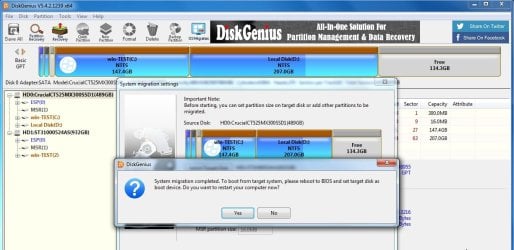
If your win7 on the mechanical hd has the nvme updates and can see the nvme disk - you could try migrating the os from there onto the nvme.

The mechanical disk will have to be gpt partition style to do it this way.

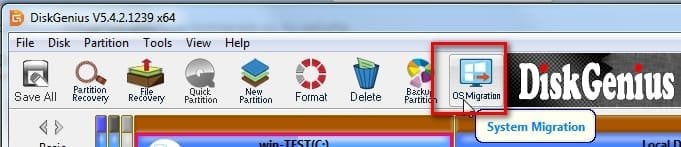
Click os migration in diskgenius top pane , select the target disk (the nvme) , select "hot migration"

it is quite obvious, screenshots here

select os migration

os-migate.jpg

select target disk

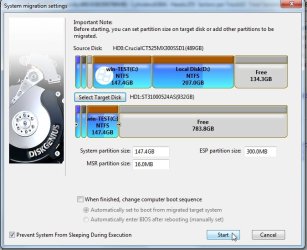
osmigrate5.jpg

accept the existing partition sizes, or optionally change them


osmigrate7.jpg

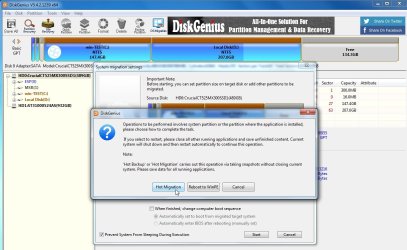
click "hot migration"

osmigrate8.jpg

osmigrate10.jpg
 

My Computers My Computers

  • At a glance

    7 X64i5 84002x8gb 3200mhz
    Computer type
    PC/Desktop
    OS
    7 X64
    CPU
    i5 8400
    Motherboard
    gigabyte b365m ds3h
    Memory
    2x8gb 3200mhz
    Hard Drives
    various
    PSU
    pure power 11 400w cm
    Case
    Coolermaster
    Cooling
    cryorig m9i
  • At a glance

    7x64g54008gb ddr4 2400
    Computer type
    PC/Desktop
    OS
    7x64
    CPU
    g5400
    Motherboard
    ga b365m ds3h
    Memory
    8gb ddr4 2400
    PSU
    xfx pro 450w
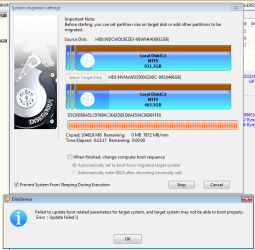
unknown.png
it has failed, i dont really know why.
 

My Computers My Computers

  • At a glance

    Windows 7 Professional x64i5-84001x Crucial 2666 8gb ddr4, 1x I FORGOT 2333 8g...EVGA GTX 980 Ti (in use), RX580 4GB (not in use)
    Computer type
    PC/Desktop
    Computer Manufacturer/Model Number
    CyberpowerPC
    OS
    Windows 7 Professional x64
    CPU
    i5-8400
    Motherboard
    MSI B360M Bazooka
    Memory
    1x Crucial 2666 8gb ddr4, 1x I FORGOT 2333 8gb ddr4
    Graphics Card(s)
    EVGA GTX 980 Ti (in use), RX580 4GB (not in use)
    Hard Drives
    1. WD SN750 500GB NVME m.2 drive
    2. some 1TB hard drive, kind of forgot name but its also from western digital and i think its the blue kind?? 7200rpm
    Antivirus
    N/A
    Browser
    Firefox (latest or an older version), Google Chrome 48.0.2
  • Computer type
    PC/Desktop
    Antivirus
    no
Neither do I. It happens when using win7 bcdboot.exe across modes (e.g. bios>efi) , but it shouldnt happen in the same mode.

You can try and update the boot parameters manually

there is no /f uefi switch in win7 bcdboot.exe , so use the one below

View attachment bcdboot-10586.zip

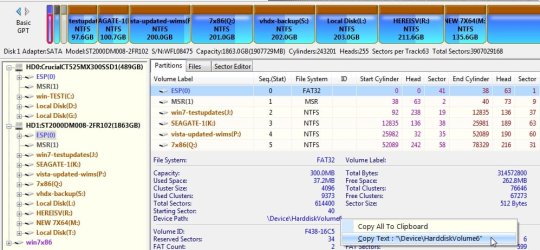
copy the device path of the esp partition

device-pathjpg.jpg

admin cmd prompt:
bcdboot winpartitionletter:\windows /s device path /f uefi

example:

bcdboot m:\windows /s \Device\HarddiskVolume6 /f uefi

that creates the boot critical files and the boot menu entry for windows on partition m on the esp partition \Device\HarddiskVolume6
 
Last edited:

My Computers My Computers

  • At a glance

    7 X64i5 84002x8gb 3200mhz
    Computer type
    PC/Desktop
    OS
    7 X64
    CPU
    i5 8400
    Motherboard
    gigabyte b365m ds3h
    Memory
    2x8gb 3200mhz
    Hard Drives
    various
    PSU
    pure power 11 400w cm
    Case
    Coolermaster
    Cooling
    cryorig m9i
  • At a glance

    7x64g54008gb ddr4 2400
    Computer type
    PC/Desktop
    OS
    7x64
    CPU
    g5400
    Motherboard
    ga b365m ds3h
    Memory
    8gb ddr4 2400
    PSU
    xfx pro 450w
hello, i redid the migration while in PE and this time it completed it successfully but still didnt make a entry to boot into, so i will use your tutorial to add one myself :)
 

My Computers My Computers

  • At a glance

    Windows 7 Professional x64i5-84001x Crucial 2666 8gb ddr4, 1x I FORGOT 2333 8g...EVGA GTX 980 Ti (in use), RX580 4GB (not in use)
    Computer type
    PC/Desktop
    Computer Manufacturer/Model Number
    CyberpowerPC
    OS
    Windows 7 Professional x64
    CPU
    i5-8400
    Motherboard
    MSI B360M Bazooka
    Memory
    1x Crucial 2666 8gb ddr4, 1x I FORGOT 2333 8gb ddr4
    Graphics Card(s)
    EVGA GTX 980 Ti (in use), RX580 4GB (not in use)
    Hard Drives
    1. WD SN750 500GB NVME m.2 drive
    2. some 1TB hard drive, kind of forgot name but its also from western digital and i think its the blue kind?? 7200rpm
    Antivirus
    N/A
    Browser
    Firefox (latest or an older version), Google Chrome 48.0.2
  • Computer type
    PC/Desktop
    Antivirus
    no
i will use your tutorial to add one myself

hopefully that will do it.

I dont know why you have had that difficulty. I havent got the same hardware to test it here, closest thing I have is a 365 motherboard. Never had any problems with win7 on it.
 

My Computers My Computers

  • At a glance

    7 X64i5 84002x8gb 3200mhz
    Computer type
    PC/Desktop
    OS
    7 X64
    CPU
    i5 8400
    Motherboard
    gigabyte b365m ds3h
    Memory
    2x8gb 3200mhz
    Hard Drives
    various
    PSU
    pure power 11 400w cm
    Case
    Coolermaster
    Cooling
    cryorig m9i
  • At a glance

    7x64g54008gb ddr4 2400
    Computer type
    PC/Desktop
    OS
    7x64
    CPU
    g5400
    Motherboard
    ga b365m ds3h
    Memory
    8gb ddr4 2400
    PSU
    xfx pro 450w
hi SIW2,

great news! it worked! it was hard to tell if it booted into the SSD but i was able to figure it out

my only issue is the user profile it loads into seems to be the one from the hard drive instead of the SSD, so everything points toward the hard drive. I would like to have my hard drive clean a nd im afraid of breaking the SSD installation, i am not sure what to do.

one idea is to swap the drive letters so when it points to C which is the hard drive, it actually points to the SSD then, leaving the hard drive unused. i am currently in the winPE but i dont actually know how to swap drive letters or if this is the correct solution, please advise and thank you very much.

as for why it bsod' before, my only guess is that maybe because installation wasn't finished yet that it wouldnt load the updates in therefore it couldn't apply the hotfix, but i honestly don't know. im just happy to have win7 on modern hardware finally.
 

My Computers My Computers

  • At a glance

    Windows 7 Professional x64i5-84001x Crucial 2666 8gb ddr4, 1x I FORGOT 2333 8g...EVGA GTX 980 Ti (in use), RX580 4GB (not in use)
    Computer type
    PC/Desktop
    Computer Manufacturer/Model Number
    CyberpowerPC
    OS
    Windows 7 Professional x64
    CPU
    i5-8400
    Motherboard
    MSI B360M Bazooka
    Memory
    1x Crucial 2666 8gb ddr4, 1x I FORGOT 2333 8gb ddr4
    Graphics Card(s)
    EVGA GTX 980 Ti (in use), RX580 4GB (not in use)
    Hard Drives
    1. WD SN750 500GB NVME m.2 drive
    2. some 1TB hard drive, kind of forgot name but its also from western digital and i think its the blue kind?? 7200rpm
    Antivirus
    N/A
    Browser
    Firefox (latest or an older version), Google Chrome 48.0.2
  • Computer type
    PC/Desktop
    Antivirus
    no
Back
Top