Solved Installer Doesn't Locate SN750 M.2 SSD, but it DOES after installation

nt6repair is on my sig.

Boot into win7 on your mechanical hd

Run nt6repair as admin

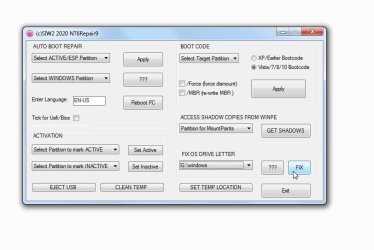
use the fix os drive letter section. Select the windows partition on the nvme in the dropdown. It wont be c:\windows because that is the mechanical disk you are booted into. Select the other one. Click Fix.
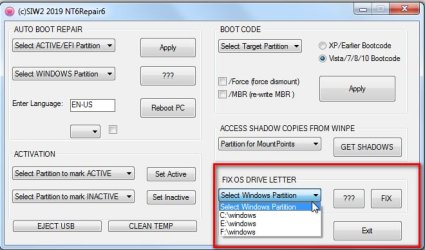
nt6repair6-FIXOSLETTER.jpg
 

My Computers My Computers

  • At a glance

    7 X64i5 84002x8gb 3200mhz
    Computer type
    PC/Desktop
    OS
    7 X64
    CPU
    i5 8400
    Motherboard
    gigabyte b365m ds3h
    Memory
    2x8gb 3200mhz
    Hard Drives
    various
    PSU
    pure power 11 400w cm
    Case
    Coolermaster
    Cooling
    cryorig m9i
  • At a glance

    7x64g54008gb ddr4 2400
    Computer type
    PC/Desktop
    OS
    7x64
    CPU
    g5400
    Motherboard
    ga b365m ds3h
    Memory
    8gb ddr4 2400
    PSU
    xfx pro 450w
image.png

uhhhhhh
 

My Computers My Computers

  • At a glance

    Windows 7 Professional x64i5-84001x Crucial 2666 8gb ddr4, 1x I FORGOT 2333 8g...EVGA GTX 980 Ti (in use), RX580 4GB (not in use)
    Computer type
    PC/Desktop
    Computer Manufacturer/Model Number
    CyberpowerPC
    OS
    Windows 7 Professional x64
    CPU
    i5-8400
    Motherboard
    MSI B360M Bazooka
    Memory
    1x Crucial 2666 8gb ddr4, 1x I FORGOT 2333 8gb ddr4
    Graphics Card(s)
    EVGA GTX 980 Ti (in use), RX580 4GB (not in use)
    Hard Drives
    1. WD SN750 500GB NVME m.2 drive
    2. some 1TB hard drive, kind of forgot name but its also from western digital and i think its the blue kind?? 7200rpm
    Antivirus
    N/A
    Browser
    Firefox (latest or an older version), Google Chrome 48.0.2
  • Computer type
    PC/Desktop
    Antivirus
    no
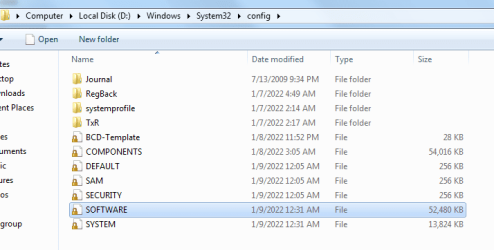
Have a look and see if the d:\windows\system32\config\software is there

It loads the software hive first to find the assigned os letter ( it usually c but not necessarily, so it always checks )
 

My Computers My Computers

  • At a glance

    7 X64i5 84002x8gb 3200mhz
    Computer type
    PC/Desktop
    OS
    7 X64
    CPU
    i5 8400
    Motherboard
    gigabyte b365m ds3h
    Memory
    2x8gb 3200mhz
    Hard Drives
    various
    PSU
    pure power 11 400w cm
    Case
    Coolermaster
    Cooling
    cryorig m9i
  • At a glance

    7x64g54008gb ddr4 2400
    Computer type
    PC/Desktop
    OS
    7x64
    CPU
    g5400
    Motherboard
    ga b365m ds3h
    Memory
    8gb ddr4 2400
    PSU
    xfx pro 450w
image.png

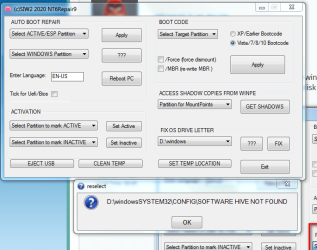
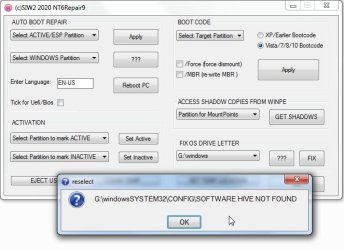
it is! it seems like theres a error in the coding of the program that it is missing a \ so it tries to find D:\WindowsSystem32\config instead of D:\Windows\System32\config
 

My Computers My Computers

  • At a glance

    Windows 7 Professional x64i5-84001x Crucial 2666 8gb ddr4, 1x I FORGOT 2333 8g...EVGA GTX 980 Ti (in use), RX580 4GB (not in use)
    Computer type
    PC/Desktop
    Computer Manufacturer/Model Number
    CyberpowerPC
    OS
    Windows 7 Professional x64
    CPU
    i5-8400
    Motherboard
    MSI B360M Bazooka
    Memory
    1x Crucial 2666 8gb ddr4, 1x I FORGOT 2333 8gb ddr4
    Graphics Card(s)
    EVGA GTX 980 Ti (in use), RX580 4GB (not in use)
    Hard Drives
    1. WD SN750 500GB NVME m.2 drive
    2. some 1TB hard drive, kind of forgot name but its also from western digital and i think its the blue kind?? 7200rpm
    Antivirus
    N/A
    Browser
    Firefox (latest or an older version), Google Chrome 48.0.2
  • Computer type
    PC/Desktop
    Antivirus
    no
No that is just the message .
I forgot to put the line in here , doesnt affect the function
IFEX $%List12%\SYSTEM32\CONFIG\SOFTWARE,!TEAM MESS %List12%\SYSTEM32\CONFIG\SOFTWARE HIVE NOT FOUND @reselect#Ok|EXIT _SUB

Seems to be working ok for me

2022-01-09_070603.jpg

2022-01-09_070641.jpg

If I rename the software hive so it wont be found , I get the same message
2022-01-09_071449.jpg
 

My Computers My Computers

  • At a glance

    7 X64i5 84002x8gb 3200mhz
    Computer type
    PC/Desktop
    OS
    7 X64
    CPU
    i5 8400
    Motherboard
    gigabyte b365m ds3h
    Memory
    2x8gb 3200mhz
    Hard Drives
    various
    PSU
    pure power 11 400w cm
    Case
    Coolermaster
    Cooling
    cryorig m9i
  • At a glance

    7x64g54008gb ddr4 2400
    Computer type
    PC/Desktop
    OS
    7x64
    CPU
    g5400
    Motherboard
    ga b365m ds3h
    Memory
    8gb ddr4 2400
    PSU
    xfx pro 450w
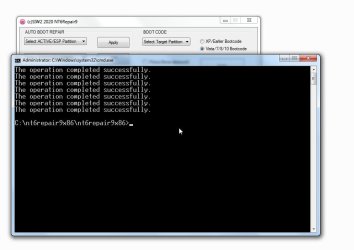
ah i think this was my mistake, i forgot to run as administrator. after rerunning it as admin its fixed
 

My Computers My Computers

  • At a glance

    Windows 7 Professional x64i5-84001x Crucial 2666 8gb ddr4, 1x I FORGOT 2333 8g...EVGA GTX 980 Ti (in use), RX580 4GB (not in use)
    Computer type
    PC/Desktop
    Computer Manufacturer/Model Number
    CyberpowerPC
    OS
    Windows 7 Professional x64
    CPU
    i5-8400
    Motherboard
    MSI B360M Bazooka
    Memory
    1x Crucial 2666 8gb ddr4, 1x I FORGOT 2333 8gb ddr4
    Graphics Card(s)
    EVGA GTX 980 Ti (in use), RX580 4GB (not in use)
    Hard Drives
    1. WD SN750 500GB NVME m.2 drive
    2. some 1TB hard drive, kind of forgot name but its also from western digital and i think its the blue kind?? 7200rpm
    Antivirus
    N/A
    Browser
    Firefox (latest or an older version), Google Chrome 48.0.2
  • Computer type
    PC/Desktop
    Antivirus
    no
ah.

- - - Updated - - -

hopefully windows will load correctly when you boot into the nvme.
 

My Computers My Computers

  • At a glance

    7 X64i5 84002x8gb 3200mhz
    Computer type
    PC/Desktop
    OS
    7 X64
    CPU
    i5 8400
    Motherboard
    gigabyte b365m ds3h
    Memory
    2x8gb 3200mhz
    Hard Drives
    various
    PSU
    pure power 11 400w cm
    Case
    Coolermaster
    Cooling
    cryorig m9i
  • At a glance

    7x64g54008gb ddr4 2400
    Computer type
    PC/Desktop
    OS
    7x64
    CPU
    g5400
    Motherboard
    ga b365m ds3h
    Memory
    8gb ddr4 2400
    PSU
    xfx pro 450w
it seems like thats fixed! now SSD is C drive after booting into it, and everything else seems correct as well.

one last question before i mark as solved, is this normal for windows 7?

image.png
as well as windows giving me a option to eject the NVMe ssd
 

My Computers My Computers

  • At a glance

    Windows 7 Professional x64i5-84001x Crucial 2666 8gb ddr4, 1x I FORGOT 2333 8g...EVGA GTX 980 Ti (in use), RX580 4GB (not in use)
    Computer type
    PC/Desktop
    Computer Manufacturer/Model Number
    CyberpowerPC
    OS
    Windows 7 Professional x64
    CPU
    i5-8400
    Motherboard
    MSI B360M Bazooka
    Memory
    1x Crucial 2666 8gb ddr4, 1x I FORGOT 2333 8gb ddr4
    Graphics Card(s)
    EVGA GTX 980 Ti (in use), RX580 4GB (not in use)
    Hard Drives
    1. WD SN750 500GB NVME m.2 drive
    2. some 1TB hard drive, kind of forgot name but its also from western digital and i think its the blue kind?? 7200rpm
    Antivirus
    N/A
    Browser
    Firefox (latest or an older version), Google Chrome 48.0.2
  • Computer type
    PC/Desktop
    Antivirus
    no
1. You probably want the io inf files to get rid of the yellow bangs. Browse to them from device manager.
View attachment Intel-Serial-IO-Driver for Win7 b1.zip

2.
as well as windows giving me a option to eject the NVMe ssd

That will be something to do with your bios settings. It wont let you eject while it is in use, so it doesnt matter.
 

My Computers My Computers

  • At a glance

    7 X64i5 84002x8gb 3200mhz
    Computer type
    PC/Desktop
    OS
    7 X64
    CPU
    i5 8400
    Motherboard
    gigabyte b365m ds3h
    Memory
    2x8gb 3200mhz
    Hard Drives
    various
    PSU
    pure power 11 400w cm
    Case
    Coolermaster
    Cooling
    cryorig m9i
  • At a glance

    7x64g54008gb ddr4 2400
    Computer type
    PC/Desktop
    OS
    7x64
    CPU
    g5400
    Motherboard
    ga b365m ds3h
    Memory
    8gb ddr4 2400
    PSU
    xfx pro 450w
Back
Top