
All CPU Meter stuck @ 3200MHz

Nid

New member
Local time
11:11 AM
Messages
30
Hello all,

Just did a mild OC'ed on my AMD Phenom II X6 1090T. Just got started so I starts with a small amount (3.3 GHz vs 3.2 stock).

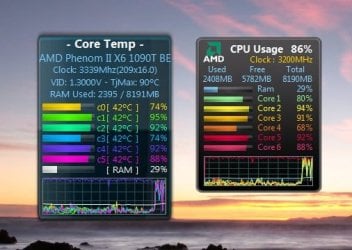
At any rate I have been using All CPU Meter since my AMD Phenom II X4 965BE (never OC'ed tho). Now comparing side by side with Core Temp. You can see Core Temp is display close to my target clock speed vs All CPU Meter stuck @ 3.2.

Once in a while when AMD Turbo kicks in Core Temp will jumped up to about 3.7GHz but All CPU Meter still stuck at 3.2GHz.

When AMD C&Q kicks in Core Temp will droped to about 850MHz where All CPU Meter will droped to about 800MHz.

I have been uninstalled and reinstalled All CPU Meter about 10 times - no joy.

Any suggestion?

Thanks,
Nid
 

Attachments
  • stuck.jpg
    stuck.jpg
    34.6 KB · Views: 138

My Computer My Computer

Computer Manufacturer/Model Number
Homebrew
OS
Windows 7 Pro 64bit
CPU
AMD Phenom II X6 1090T at 4013MHz
Motherboard
ASUS M4A87TD/USB 3.0
Memory
8GB A-DATA 1600
Graphics Card(s)
GTX460
Sound Card
On-board
Monitor(s) Displays
ACER H233H and ACER X203H
Hard Drives
2x Crucial C300-64GB RAID 0
2x WD 1TB BLACK RAID 0
1x WD 1TB BLACK
1x WD 1TB GREEN
PSU
750 WATTS
Case
Antec Three Hundred
Cooling
Zalman CNPS10X Performa (Push/Pull)
Keyboard
M$
Mouse
M$
Internet Speed
Verizon FiOS 20/20
Hello all,

Just did a mild OC'ed on my AMD Phenom II X6 1090T. Just got started so I starts with a small amount (3.3 GHz vs 3.2 stock).

At any rate I have been using All CPU Meter since my AMD Phenom II X4 965BE (never OC'ed tho). Now comparing side by side with Core Temp. You can see Core Temp is display close to my target clock speed vs All CPU Meter stuck @ 3.2.

Once in a while when AMD Turbo kicks in Core Temp will jumped up to about 3.7GHz but All CPU Meter still stuck at 3.2GHz.

When AMD C&Q kicks in Core Temp will droped to about 850MHz where All CPU Meter will droped to about 800MHz.

I have been uninstalled and reinstalled All CPU Meter about 10 times - no joy.

Any suggestion?

Thanks,
Nid


Different apps monitor differently. There will always be a small difference between the two. Why is that a problem?


Ken
 

My Computer My Computer

Computer Manufacturer/Model Number
HP Pavillion dv-7 1005 Tx
OS
Win 8 Release candidate 8400
CPU
[email protected]
Memory
4 gigs
Graphics Card(s)
Nvidia 9600M
Sound Card
HD built-in
Monitor(s) Displays
17" Wxga
Screen Resolution
1440x900
Cooling
none
Internet Speed
45Mb down 5Mb up
Different apps monitor differently. There will always be a small difference between the two. Why is that a problem?


Ken


Reason I asked because when I had AMD Phenom II X4 965BE running stock clock @ 3.4GHz Core Temp and All CPU Meter agreed with each other.

Now, I am running X6 OC'ed slightly to 3.3GHz.. all of the sudden Core Temp and All CPU Meter aren't agree with each other any more.

Even when I was trying to find my maximum values, I clocked it all the way up to 3.7. Core Temp followed up to 3.7GHz while All CPU Meter standing still @3.2 ???

Why not 3201MHz or 3202MHz? Think about it.

I can see 10Mhz or even up to 50MHz. That I will buy "small difference" but 500MHz that is something isn't right.

CPU-Z also, AMD Overdrive also agreed with Core Temp, they all displayed within 5~10MHz from each other. But All CPU Meter always stuck at 3.2GHz.

Sorry if I bothered you.
 

My Computer My Computer

Computer Manufacturer/Model Number
Homebrew
OS
Windows 7 Pro 64bit
CPU
AMD Phenom II X6 1090T at 4013MHz
Motherboard
ASUS M4A87TD/USB 3.0
Memory
8GB A-DATA 1600
Graphics Card(s)
GTX460
Sound Card
On-board
Monitor(s) Displays
ACER H233H and ACER X203H
Hard Drives
2x Crucial C300-64GB RAID 0
2x WD 1TB BLACK RAID 0
1x WD 1TB BLACK
1x WD 1TB GREEN
PSU
750 WATTS
Case
Antec Three Hundred
Cooling
Zalman CNPS10X Performa (Push/Pull)
Keyboard
M$
Mouse
M$
Internet Speed
Verizon FiOS 20/20
Different apps monitor differently. There will always be a small difference between the two. Why is that a problem?


Ken


Reason I asked because when I had AMD Phenom II X4 965BE running stock clock @ 3.4GHz Core Temp and All CPU Meter agreed with each other.

Now, I am running X6 OC'ed slightly to 3.3GHz.. all of the sudden Core Temp and All CPU Meter aren't agree with each other any more.

Even when I was trying to find my maximum values, I clocked it all the way up to 3.7. Core Temp followed up to 3.7GHz while All CPU Meter standing still @3.2 ???

Why not 3201MHz or 3202MHz? Think about it.

I can see 10Mhz or even up to 50MHz. That I will buy "small difference" but 500MHz that is something isn't right.

CPU-Z also, AMD Overdrive also agreed with Core Temp, they all displayed within 5~10MHz from each other. But All CPU Meter always stuck at 3.2GHz.

Sorry if I bothered you.

No bother. I had the same problem and spent about two weeks trying to figure it out. I went to the developers and finally found out it is in the way the app monitors the voltage and where.

Sorry if I sounded snarky, but because I went through the same I was curious. I finally gave up and took the average of the two. when the rig settled down I know I was in the right ballpark
 

My Computer My Computer

Computer Manufacturer/Model Number
HP Pavillion dv-7 1005 Tx
OS
Win 8 Release candidate 8400
CPU
[email protected]
Memory
4 gigs
Graphics Card(s)
Nvidia 9600M
Sound Card
HD built-in
Monitor(s) Displays
17" Wxga
Screen Resolution
1440x900
Cooling
none
Internet Speed
45Mb down 5Mb up
Mine did the same until I went into the BIOS and noticed I had left the multiplier set to auto. When I set it to a manual value the CPU meter read it accurately.
What does your System properties rate it as?
 

My Computer My Computer

Computer Manufacturer/Model Number
tw33k
OS
Windows 7 Ultimate (x64) SP1
CPU
Intel 3770k 4.6GHz
Motherboard
ASUS Maximus V Formula
Memory
8GB (2x 4GB) Crucial Ballistix
Graphics Card(s)
Sapphire 7950 (1060/1600)
Sound Card
On Board Realtek HD Audio
Monitor(s) Displays
27" Acer B273HU (via HDMI)
Screen Resolution
2048 x 1152
Hard Drives
Crucial M4 128GB
2TB WD Black
1TB Samsung F3 SATA
1TB WD Elite External
2TB WD USB 3.0
PSU
Corsair AX750 Gold
Case
Corsair Obsidian 800DW
Cooling
Corsair H100 (2x AP-121/2x UK-3000 push/pull)
Keyboard
Microsoft Wireless 5000
Mouse
Microsoft Wireless 5000
Internet Speed
5mb/s
Other Info
Logitech z-2300 2.1 speakers
Lamptron FC-5 v2
No bother. I had the same problem and spent about two weeks trying to figure it out. I went to the developers and finally found out it is in the way the app monitors the voltage and where.

Sorry if I sounded snarky, but because I went through the same I was curious. I finally gave up and took the average of the two. when the rig settled down I know I was in the right ballpark

Not sure how or where the All CPU Meter got the data from. Obviously it can't get the data from a different sensor than the other program did such as CPU-Z, Core Temp and AMD overdrive. All CPU Meter to me is just a "display" whatever is BIOS or Windows is reporting. I could be wrong tho.

I will have to look where config file is saved perhaps it got corrupted. Even uninstalled and reinstalled it still got stuck at 3200MHz. Something to do this weekend I guess.
 

My Computer My Computer

Computer Manufacturer/Model Number
Homebrew
OS
Windows 7 Pro 64bit
CPU
AMD Phenom II X6 1090T at 4013MHz
Motherboard
ASUS M4A87TD/USB 3.0
Memory
8GB A-DATA 1600
Graphics Card(s)
GTX460
Sound Card
On-board
Monitor(s) Displays
ACER H233H and ACER X203H
Hard Drives
2x Crucial C300-64GB RAID 0
2x WD 1TB BLACK RAID 0
1x WD 1TB BLACK
1x WD 1TB GREEN
PSU
750 WATTS
Case
Antec Three Hundred
Cooling
Zalman CNPS10X Performa (Push/Pull)
Keyboard
M$
Mouse
M$
Internet Speed
Verizon FiOS 20/20
Mine did the same until I went into the BIOS and noticed I had left the multiplier set to auto. When I set it to a manual value the CPU meter read it accurately.
What does your System properties rate it as?


What do you mean by System properties rate it as? WEI?

I OC'ed my system so multiplier is no longer in AUTO mode, but I will double check it when I get home. I don't think so but won't hurt to look.

The other program such as those I mentioned above reported correct frequency with 200-500KHz not MHz of each other depending which program refreshed first, regardless they were within 500Hz but All CPU Meter always pegged at 3200MHz never 3199MHz or 3201MHz.

Anyone know where all of the gadget programs or files are locate on my HDD?
 

My Computer My Computer

Computer Manufacturer/Model Number
Homebrew
OS
Windows 7 Pro 64bit
CPU
AMD Phenom II X6 1090T at 4013MHz
Motherboard
ASUS M4A87TD/USB 3.0
Memory
8GB A-DATA 1600
Graphics Card(s)
GTX460
Sound Card
On-board
Monitor(s) Displays
ACER H233H and ACER X203H
Hard Drives
2x Crucial C300-64GB RAID 0
2x WD 1TB BLACK RAID 0
1x WD 1TB BLACK
1x WD 1TB GREEN
PSU
750 WATTS
Case
Antec Three Hundred
Cooling
Zalman CNPS10X Performa (Push/Pull)
Keyboard
M$
Mouse
M$
Internet Speed
Verizon FiOS 20/20
I checked the BIOS the multiplier is already on "Manual" so no joy.

I checked my other Computer with AMD Phenom II X4 965BE, All CPU Meter works like it should be and it agreed with all other CPU speed monitoring programs I threw at it.

Another thing I notice on my X6 1090T PC is that All CPU Meter is only displaying 800, 1600, 2400 and 3200MHz. :huh:

I am beginning to think it is a compatibility issue with X6 1090T CPU. I didn't do anything differently just took X4 965BE out and installed X6 1090T CPU. :sarc:

I have a spare HDD, I will do a fresh install Win 7 this weekend and install nothing else my All CPU Meter and see how it goes. After that if it still doesn't work then so be it.
 

My Computer My Computer

Computer Manufacturer/Model Number
Homebrew
OS
Windows 7 Pro 64bit
CPU
AMD Phenom II X6 1090T at 4013MHz
Motherboard
ASUS M4A87TD/USB 3.0
Memory
8GB A-DATA 1600
Graphics Card(s)
GTX460
Sound Card
On-board
Monitor(s) Displays
ACER H233H and ACER X203H
Hard Drives
2x Crucial C300-64GB RAID 0
2x WD 1TB BLACK RAID 0
1x WD 1TB BLACK
1x WD 1TB GREEN
PSU
750 WATTS
Case
Antec Three Hundred
Cooling
Zalman CNPS10X Performa (Push/Pull)
Keyboard
M$
Mouse
M$
Internet Speed
Verizon FiOS 20/20
I guess I can say the problem has been resolved.

Not the only the All CPU Meter is displaying wrong CPU speed. Windows 7 view basic information about my computer is also wrong.

At any rate, I have to disabled "Cool 'n' Quiet" feature in BIOS setting to get the Windows 7 and All CPU Meter showing a correct speed.

However right now I am running my Phenom II X6 1090T @3916MHz, so C 'n' Q is outweighed All CPU Meter - I decided to get "C 'n' Q" back on for now.

I am just using other gadgets to monitor my CPU speed.

Thanks all.
 

My Computer My Computer

Computer Manufacturer/Model Number
Homebrew
OS
Windows 7 Pro 64bit
CPU
AMD Phenom II X6 1090T at 4013MHz
Motherboard
ASUS M4A87TD/USB 3.0
Memory
8GB A-DATA 1600
Graphics Card(s)
GTX460
Sound Card
On-board
Monitor(s) Displays
ACER H233H and ACER X203H
Hard Drives
2x Crucial C300-64GB RAID 0
2x WD 1TB BLACK RAID 0
1x WD 1TB BLACK
1x WD 1TB GREEN
PSU
750 WATTS
Case
Antec Three Hundred
Cooling
Zalman CNPS10X Performa (Push/Pull)
Keyboard
M$
Mouse
M$
Internet Speed
Verizon FiOS 20/20
Back
Top