All ram not showing up?

kirkland

New member
Local time
8:54 AM
Messages
42
Hi new to the forum, My Toshiba l505-s5984 has 8gigs of ram (I upgraded:geek:) anyways I know the 32 bit won't see 8 gigs without changing or messing with pae :confused:? what ever that is but my laptop is only seeing 2.87gb usable I have been reading a lot of forums and from what I read the 32 bit is supposed to see at least 4 gb right? can somebody please help:cry:.


PS. I would love it if my laptop would be able to see 8gb of ram I can not afford to get the 64 bit OS but if not 4 gigs is fine
 

My Computer My Computer

OS
32 bit 7 home premium
The only way for you to see more usable RAM it to upgrade to the 64 bit OS. This is the unfortunate downfall of the 32 bit OS. There's no way around that.

As far as your laptop seeing only 2.87gb as opposed to the full 3gb is do to your onboard graphics. Where some of the RAM is being allocated to the onboard graphics.
 

My Computer My Computer

Computer Manufacturer/Model Number
Custom built
OS
Windows 7 Ultimate 64 bit
CPU
AMD Phenom II X4 965 Black Edition
Motherboard
Gigabyte GA-MA790X-DS4
Memory
GSkill 4 X 2 GB PC 8500
Graphics Card(s)
XFX Radeon HD 6790 D
Sound Card
On board RealTek HD
Monitor(s) Displays
Dual monitors:Samsung SyncMaster S20B300
Screen Resolution
1600 X 900
Hard Drives
Seagate Barracuda 1TB (primary)
Seagate Barracuda 2 X 320 GB
PSU
Ultra X4 750 watt fully modular
Case
Thermaltake Overseer RX 1 full tower
Cooling
Core-Contact 92 mm CPU Cooler
Keyboard
Logitech G510
Mouse
Razor DeathAdder
Internet Speed
50/5 Mbps UL/DL
Other Info
Optical: Super Muliti DVD burner w/lightscribe, Hauppauge WinTV HVR-1800
why can others use pae on a 32 bit os and make 8gb show?
 

My Computer My Computer

OS
32 bit 7 home premium
2.8 GBs usable is plenty, don`t worry about it. Even if you install 64 bit , it might stay exactly the same. You don`t have to buy 64 bit , you can download it and install it on another partition to see if there is a change. If you don`t know what you`re doing and have never done an install b4, do research now.

What do you mean UPGRADED ? It supposed to come with W7 HP 64 Bit.

Although everything I come up with just says: Comes with W7 HP

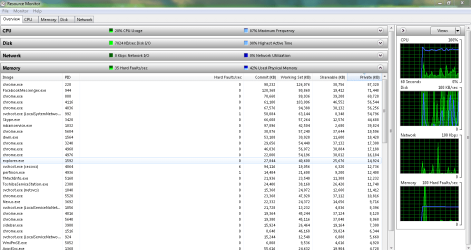
Go to Task Manager>performance>Resource Monitor>Memory to see what`s what.
 

My Computer My Computer

Computer type
PC/Desktop
Computer Manufacturer/Model Number
Skylake Special #666
OS
Windows 10 Pro x64
CPU
Intel Core i7 6700K
Motherboard
Asus Sabertooth Z170 Mark 1
Memory
GSkill TridentZ RGB 16GB 3600 16-16-16-36
Graphics Card(s)
EVGA GTX 980 Ti SC x2
Sound Card
Realtek High Definition
Monitor(s) Displays
AOC G2460PG
Screen Resolution
1920 x 1080 144Hz
Hard Drives
Samsung 860 Pro 256GB, Seagate Barracuda 4TB x2
PSU
EVGA 1000 P2, EVGA White Custom Braided Cables
Case
Corsair Vengeance C70 Gunmetal Black
Cooling
Corsair H100i v2, Corsair ML120 x2, Thermal Grizzly Kryonaut
Keyboard
Logitech G910 Orion Spectrum
Mouse
Logitech G700s
Internet Speed
Verizon Fios Quantum Gateway 75/75
Antivirus
Windows Defender, Malwarebytes Free 3.8.3
Browser
Chrome
Other Info
Corsair SP120 x4, LG Blu-ray Drive, Durabrand HT-395 100 Watt Dolby Digital Amp, Corsair H2100 Wireless 7.1 Headset
the computer only came with 3gbs how and where do i dnload 64bit?
 

My Computer My Computer

OS
32 bit 7 home premium
2.8 GBs usable is plenty, don`t worry about it. Even if you install 64 bit , it might stay exactly the same. You don`t have to buy 64 bit , you can download it and install it on another partition to see if there is a change. If you don`t know what you`re doing and have never done an install b4, do research now.

What do you mean UPGRADED ? It supposed to come with W7 HP 64 Bit.

Although everything I come up with just says: Comes with W7 HP

Go to Task Manager>performance>Resource Monitor>Memory to see what`s what.

i found a 64bit but win it is complety done with instlation and reboot the computer locks up it my be a bad 64 bi but you check it outhttp://www.mydigitallife.info/download-windows-7-iso-official-32-bit-and-64-bit-direct-download-links/ where can else can you dnload it?
 

My Computer My Computer

OS
32 bit 7 home premium

My Computer My Computer

Computer type
Laptop
the computer only came with 3gbs how and where do i dnload 64bit?

We can find you a suitable .ISO file, however, you will not be able to activate the .ISO file as you do not have a product key for a 64-bit operating system, therefore you will need to buy a Windows 7 64-bit operating system from a retailer.

my key worked on the bad copy.
 

My Computer My Computer

OS
32 bit 7 home premium
Is the product key for the same version of the Windows .ISO file?

You seem to want to completely reinstall Windows 7, but with a 64-bit version instead of a 32-bit version; use this tutorial for a perfect installation process:

http://www.sevenforums.com/tutorials/219487-clean-reinstall-factory-oem-windows-7-a.html

Read each instruction and step carefully to avoid any complications.

Have you formatted your hard-drive already? Is the 32-bit version of Windows gone?
 

My Computer My Computer

Computer type
Laptop
Don`t use your key , that`s probably why it locked up ( who knows ) you are just doing this as a test. You do not have to activate it.

You did all that in this small amount of time ? Amazing !!! You didn`t even ask for help, wow !

Did you make another partition ? How did you do it ?

Did you burn the iso at 4x speed or less ? What iso program did you use ? IMGburn ?

That is the best site, all those iso`s are perfect.
 

My Computer My Computer

Computer type
PC/Desktop
Computer Manufacturer/Model Number
Skylake Special #666
OS
Windows 10 Pro x64
CPU
Intel Core i7 6700K
Motherboard
Asus Sabertooth Z170 Mark 1
Memory
GSkill TridentZ RGB 16GB 3600 16-16-16-36
Graphics Card(s)
EVGA GTX 980 Ti SC x2
Sound Card
Realtek High Definition
Monitor(s) Displays
AOC G2460PG
Screen Resolution
1920 x 1080 144Hz
Hard Drives
Samsung 860 Pro 256GB, Seagate Barracuda 4TB x2
PSU
EVGA 1000 P2, EVGA White Custom Braided Cables
Case
Corsair Vengeance C70 Gunmetal Black
Cooling
Corsair H100i v2, Corsair ML120 x2, Thermal Grizzly Kryonaut
Keyboard
Logitech G910 Orion Spectrum
Mouse
Logitech G700s
Internet Speed
Verizon Fios Quantum Gateway 75/75
Antivirus
Windows Defender, Malwarebytes Free 3.8.3
Browser
Chrome
Other Info
Corsair SP120 x4, LG Blu-ray Drive, Durabrand HT-395 100 Watt Dolby Digital Amp, Corsair H2100 Wireless 7.1 Headset
Is the product key for the same version of the Windows .ISO file?

You seem to want to completely reinstall Windows 7, but with a 64-bit version instead of a 32-bit version; use this tutorial for a perfect installation process:

http://www.sevenforums.com/tutorials/219487-clean-reinstall-factory-oem-windows-7-a.html

Read each instruction and step carefully to avoid any complications.

Have you formatted your hard-drive already? Is the 32-bit version of Windows gone?

When i bought i burt off the os two disc to restore to factory
 

My Computer My Computer

OS
32 bit 7 home premium
Is the product key for the same version of the Windows .ISO file?

You seem to want to completely reinstall Windows 7, but with a 64-bit version instead of a 32-bit version; use this tutorial for a perfect installation process:

http://www.sevenforums.com/tutorials/219487-clean-reinstall-factory-oem-windows-7-a.html

Read each instruction and step carefully to avoid any complications.

Have you formatted your hard-drive already? Is the 32-bit version of Windows gone?

Yes i have done a clean install
 

My Computer My Computer

OS
32 bit 7 home premium
Create a new Windows 7 DVD by using the above tutorial, you may have burned the .ISO file too quickly, and therefore the data may have not written to the disc as well as it could have been done.

Also, since you have said you have installed a 64-bit operating system, what is the amount of installed memory being displayed?
 

My Computer My Computer

Computer type
Laptop
Create a new Windows 7 DVD by using the above tutorial, you may have burned the .ISO file too quickly, and therefore the data may have not written to the disc as well as it could have been done.

Also, since you have said you have installed a 64-bit operating system, what is the amount of installed memory being displayed?

8gbs and it makes this lastop scream it only shows 7.86 usable
 

My Computer My Computer

OS
32 bit 7 home premium
Create a new Windows 7 DVD by using the above tutorial, you may have burned the .ISO file too quickly, and therefore the data may have not written to the disc as well as it could have been done.

Also, since you have said you have installed a 64-bit operating system, what is the amount of installed memory being displayed?

8gbs and it makes this lastop scream it only shows 7.86 usable

i use power iso software it took awile to burn
 

My Computer My Computer

OS
32 bit 7 home premium
Screenshot the Memory tab please, but thanks for the screenshot anyway.

Once, we have the screenshot of the Memory tab, we will be able to see if the graphics card is using your memory or not; which is a normal process for certain graphics cards.
 

My Computer My Computer

Computer type
Laptop

My Computer My Computer

Computer type
PC/Desktop
Computer Manufacturer/Model Number
Skylake Special #666
OS
Windows 10 Pro x64
CPU
Intel Core i7 6700K
Motherboard
Asus Sabertooth Z170 Mark 1
Memory
GSkill TridentZ RGB 16GB 3600 16-16-16-36
Graphics Card(s)
EVGA GTX 980 Ti SC x2
Sound Card
Realtek High Definition
Monitor(s) Displays
AOC G2460PG
Screen Resolution
1920 x 1080 144Hz
Hard Drives
Samsung 860 Pro 256GB, Seagate Barracuda 4TB x2
PSU
EVGA 1000 P2, EVGA White Custom Braided Cables
Case
Corsair Vengeance C70 Gunmetal Black
Cooling
Corsair H100i v2, Corsair ML120 x2, Thermal Grizzly Kryonaut
Keyboard
Logitech G910 Orion Spectrum
Mouse
Logitech G700s
Internet Speed
Verizon Fios Quantum Gateway 75/75
Antivirus
Windows Defender, Malwarebytes Free 3.8.3
Browser
Chrome
Other Info
Corsair SP120 x4, LG Blu-ray Drive, Durabrand HT-395 100 Watt Dolby Digital Amp, Corsair H2100 Wireless 7.1 Headset
8gbs and it makes this lastop scream it only shows 7.86 usable[/QUOTE]

Totally normal, what does it say as installed in computer properties ?

8.00 GB ( 7.86 usable ) ? Totally normal.
 

My Computer My Computer

Computer type
PC/Desktop
Computer Manufacturer/Model Number
Skylake Special #666
OS
Windows 10 Pro x64
CPU
Intel Core i7 6700K
Motherboard
Asus Sabertooth Z170 Mark 1
Memory
GSkill TridentZ RGB 16GB 3600 16-16-16-36
Graphics Card(s)
EVGA GTX 980 Ti SC x2
Sound Card
Realtek High Definition
Monitor(s) Displays
AOC G2460PG
Screen Resolution
1920 x 1080 144Hz
Hard Drives
Samsung 860 Pro 256GB, Seagate Barracuda 4TB x2
PSU
EVGA 1000 P2, EVGA White Custom Braided Cables
Case
Corsair Vengeance C70 Gunmetal Black
Cooling
Corsair H100i v2, Corsair ML120 x2, Thermal Grizzly Kryonaut
Keyboard
Logitech G910 Orion Spectrum
Mouse
Logitech G700s
Internet Speed
Verizon Fios Quantum Gateway 75/75
Antivirus
Windows Defender, Malwarebytes Free 3.8.3
Browser
Chrome
Other Info
Corsair SP120 x4, LG Blu-ray Drive, Durabrand HT-395 100 Watt Dolby Digital Amp, Corsair H2100 Wireless 7.1 Headset
Back
Top