
ALternate OD Scanner to MalwareBytes?

Hi, remm:

So, here's the thing.

"False Positives" and "Exclusions":
MBAM False positives are actually quite rare and, once reported here, are typically resolved within hours (sometimes faster).
While there is a process/option for setting malware exclusions in the MBAM GUI, that should be needed only rarely, if ever. The feature is there primarily for users to set them for the user's anti-virus, if desired, to avoid potential conflicts. For safety, few -- if any -- other files or folders should be added to malware exclusions.
If you are having to set exclusions often, and for anything other than your AV or an occasional PUP that you really want to keep, then it suggests that something is not right, or that the system could be infected.
It's quite unusual that you describe finding false positives so often and on multiple systems.

"Settings not sticking":

Again, we just don't see that reported very often, especially on multiple systems at once.
It could be something wrong with your recent upgrades, incorrect settings, interference by the MBAM Self-Protection module, installing/upgrading from Windows limited user accounts, software conflicts, or other reasons.
On an uninfected, undamaged machine, a clean reinstall (as described here) often resolves minor issues.
If that doesn't work, diagnosing and resolving your issues on multiple systems would require further investigation, with the help of some basic diagnostic logs.

I'm quite certain that the Malwarebytes staff and forum experts/helpers could assist you with getting MBAM up and running correctly, if you wish.
That work -- with the diagnostic logs -- could be conducted, for free, either at the FORUM or at the HELP DESK.
Otherwise, we can only speculate what might be wrong or how to fix it.

As far as alternatives, I run SAS Free/on-demand, but it's never picked up more than an occasional tracking cookie (which is not malware and which MBAM specifically does not target ).
I would not trust it over MBAM, Free or Paid. But that is just my opinion.

Cheers,
 

My Computer My Computer

Computer type
PC/Desktop
Computer Manufacturer/Model Number
Dell Studio XPS 8500
OS
OEM Windows 7 Ult (x64) SP1
CPU
Intel Core-i7 3770 @ 3.4 GHz
Motherboard
"Dell" branded
Memory
16 GB DDR3 SDRAM @ 1333 MHz
Graphics Card(s)
NVidia GeForce GT620 1 GB
Sound Card
THX TruStudio PC
Monitor(s) Displays
Dell U2410 Full HD
Hard Drives
2.0 TB SATA2 @ 7200 RPM
PSU
350W
Keyboard
MS 4000 Ergon - Wired
Mouse
Logitech Anywhere MX
Internet Speed
Cable HSI w/Turbo (router)
Antivirus
KIS-MBAM Premium-MBAE Premium
Browser
Fx (current version); IE
Other Info
And a Win7/64 Pro laptop; And a Win10/64 Pro desktop.

My Computer My Computer

Computer type
PC/Desktop
Computer Manufacturer/Model Number
Dell Studio XPS 8500
OS
OEM Windows 7 Ult (x64) SP1
CPU
Intel Core-i7 3770 @ 3.4 GHz
Motherboard
"Dell" branded
Memory
16 GB DDR3 SDRAM @ 1333 MHz
Graphics Card(s)
NVidia GeForce GT620 1 GB
Sound Card
THX TruStudio PC
Monitor(s) Displays
Dell U2410 Full HD
Hard Drives
2.0 TB SATA2 @ 7200 RPM
PSU
350W
Keyboard
MS 4000 Ergon - Wired
Mouse
Logitech Anywhere MX
Internet Speed
Cable HSI w/Turbo (router)
Antivirus
KIS-MBAM Premium-MBAE Premium
Browser
Fx (current version); IE
Other Info
And a Win7/64 Pro laptop; And a Win10/64 Pro desktop.
Moxie, I'm sorry you went to that trouble. I didn't need help. I really just wanted a different OD scanner... I already addressed MB and came back here to report back for readers and lurkers alike. (Would have been back sooner but had to change the fish tank and feed the dog!)

Uninstalled MBAM again using the normal Windows way (which it said on the MBAM page where the remove tool is, you can just use Windows instead, so not sure what the tool does that's special), but ran it after rebooting anyway, and then checked manually for leftover folders or reg entries. None found.

Installed MBAM 2.16 now, so a straight install vs an upgrade from 1.75.

I purposely scanned a file I knew it would flag. When I unchecked the box, this time the button below changed to NEXT and I was able to access the dialogs. So that part worked.

However the Custom Scan config will only keep my choices as far as files and folders, but it still does not keep my choices on the left -- the tick boxes for scanning particular processes... (like rootkits, etc), nor does it keep the choices for PUPs and PUMs. It always defaults back to, well, the defaults. Not acceptable.

Worse, the OD scanner took 52 sec's to scan the MBAM removal tool, which is 314k.
I don't want to wait a full minute to scan a file that should take 1 or 2 seconds. This, due to the new "internal processes" routine before it gets to the scan. I am using Sandboxie so I only need this to scan the occasional file I download, but when do, I want the scanner I use to work in a reasonable amount of time.

Then there are the ads flashing along the bottom.... MBAM has become adware. :(

I understand there are many people here passionate about this program, and that's great. But for me it's not a good fit. I am not even interested in why it won't save my Custom Scan config changes, b/c the other two issues are each deal breakers too.

I will either find an alternative solution or use 1.75 until they retire it, then try the newest vers again at that time hoping they fixed at least everything but the adware... at which time if that's the only issue I'll write a FW policy to block the ad server or add the URL(s) to my hosts file.

Thanks again...
 
Last edited:

My Computer My Computer

OS
Win 7 Ultimate 64-bit
Hi:

I'm sorry it's not working to meet your needs.
And I'm not looking to beat a dead horse.
I have no financial interest in the product or the company.
I'm only trying to clarify what appear to be some misconceptions about how the program works and what it's designed to do.

However the Custom Scan config will only keep my choices as far as files and folders, but it still does not keep my choices on the left -- the tick boxes for scanning particular processes... (like rootkits, etc), nor does it keep the choices for PUPs and PUMs. It always defaults back to, well, the defaults. Not acceptable.
A custom scan is just that, "custom".
So, I could be wrong about that, but, no, AFAIK it will not "save" those settings.
Each time the user runs a "custom" scan the "custom" settings of which files/folders/drives & other settings need to be selected.
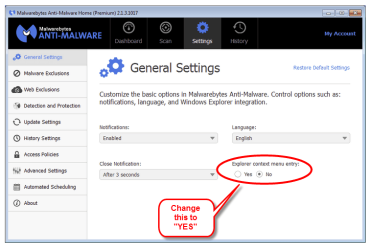
There is an "explorer context menu" scan that can be enabled from the dashboard > settings if you want to scan a single file/folder often (see screen shot).
For the record though, flat file scanning and custom scanning of the entire system/drives/volumes is a task better suited to your anti-virus. MBAM Threat scan is the recommended and suggested scan type to look for live malware on the system.

Worse, the OD scanner took 52 sec's to scan the MBAM removal tool, which is 314k.
Prescan operations necessitate loading the database and performing other essential tasks.
The time to do that will be determined by your system specs, as well as by the size of the MBAM database. It only takes a few seconds on my system, so I don't know why it takes so long on yours.
However, see above.
Also, you don't mention what file type you are scanning. So, you may be trying to scan a file type that MBAM does not target -- again a task better suited to your anti-virus.
MBAM does not target script files. That means MBAM will not target; JS, PY, .HTML, VBS, VBE, .CLASS, SWF, SQL, BAT, CMD, PDF, PHP, etc.
It also does not target documents such as; PDF, DOC, DOCx, XLS, XLSx, PPT, PPS, ODF, etc.
It also does not target media files; MP3, WMV, JPG, GIF, etc.
Scanning these files is a task for your AV.


Then there are the ads flashing along the bottom.... MBAM has become adware. :(
Yes, the ads are unpopular with many users (myself included).
However, they are only present in the scanner window.
Paid, MBAM Premium users rarely have occasion to see them, as all routine tasks (update checks and scans) are run silently from the system account, with no need to open the scanner window.
I'm afraid you won't find SAS or any other free, on-demand scanner any different re: marketing and ads.
To the contrary.

I will either find an alternative solution or use 1.75 until they retire it, then try the newest vers again at that time hoping they fixed at least everything but the adware... at which time if that's the only issue I'll write a FW policy to block the ad server or add the URL(s) to my hosts file.
If you have suggestions to change or improve the product, then the only way those suggestions might be implemented would be if they reach the ears/eyes of the MBAM product team.
That won't happen from here, unfortunately.
There is a special sub-forum for submitting product comments and suggestions >>HERE<<.
A suggestion to provide a feature to "save my custom scan settings" would be a good one.:)

In the "grass is always greener" department, I seriously doubt you'll find another, robust, on-demand anti-malware product that offers everything you want and nothing you don't.
But perhaps the other forum members here will have suggestions.

More info about v2.1.6 HERE
User Guide ONLINE
User Guide PDF
FAQ: Common Questions, Issues, and their Solutions

Cheers,
 

Attachments

  • ContextMenuScan-2015-04-04_11-39-24.png
    ContextMenuScan-2015-04-04_11-39-24.png
    39.9 KB · Views: 0

My Computer My Computer

Computer type
PC/Desktop
Computer Manufacturer/Model Number
Dell Studio XPS 8500
OS
OEM Windows 7 Ult (x64) SP1
CPU
Intel Core-i7 3770 @ 3.4 GHz
Motherboard
"Dell" branded
Memory
16 GB DDR3 SDRAM @ 1333 MHz
Graphics Card(s)
NVidia GeForce GT620 1 GB
Sound Card
THX TruStudio PC
Monitor(s) Displays
Dell U2410 Full HD
Hard Drives
2.0 TB SATA2 @ 7200 RPM
PSU
350W
Keyboard
MS 4000 Ergon - Wired
Mouse
Logitech Anywhere MX
Internet Speed
Cable HSI w/Turbo (router)
Antivirus
KIS-MBAM Premium-MBAE Premium
Browser
Fx (current version); IE
Other Info
And a Win7/64 Pro laptop; And a Win10/64 Pro desktop.
...Then there are the ads flashing along the bottom.... MBAM has become adware. :( ...

At this point, methinks you are being a wee bit picky. I see the same ads during a scan but they don't "flash" at me. They just set at the bottom of the scan window and do nothing except change ads without fanfare every so often. Big, fat, hairy deal! I can choose to look at them or ignore them (I generally ignore them after a quick glance at the first one). If you don't want to look at them, minimize the window while the scan is running or drag the window down until the ad portion is off screen. :rolleyes:

I will be the first to agree that, since 1.75, MBAM's UI has been counterintuitive (whoever designed it must have been drunk, high, insane, or any combination of the three). Manually starting a custom scan does require resetting the scan parameters each time and I agree it is annoying to have to do so but it doesn't take but a few seconds to do so. However, if one schedules a Custom Scan, the scan will retain its settings. I have a Custom Scan scheduled to run every morning during the wee hours. I manually run a Threat Scan during the day when I run my other daily quick scans (I know, it's most likely overkill but it doesn't take me any longer since it runs concurrently with my other security scans). When I check the logs, I find the scheduled scan runs the same amount of time as a manually run Custom Scan with the same settings so I'm reasonably confident the scheduled scan has retained its settings.
 

My Computer My Computer

Computer type
PC/Desktop
Computer Manufacturer/Model Number
Custom Build
OS
Win 7 Ultimate 64 bit
CPU
Intel i7-3930K
Motherboard
ASUS P9X79 WS
Memory
Kingston HyperX Genesis 32GB Kit (8x4GB Modules) 1600MHz DDR
Graphics Card(s)
MSI R7850 Twin Frozr 2GD5/OC Radeon HD 7850 2GB 256-bit GDDR
Sound Card
Asus Xonar Essence STX
Monitor(s) Displays
3x Asus VG248QE 24", Vizio 32" TV
Screen Resolution
1920 x 1080, ?
Hard Drives
Samsung 128GB 840 Pro SSD (1),
Samsung 4TB 850 EVO SSDs (4)
Samsung 4TB 850 EVO SSDs (16) external backup drives used in 2.5" hot swap bays in the computer.
PSU
Corsair HX750w
Case
Antec Two Hundred v2 (modified)
Cooling
Cooler Master GeminII S524 120mm (fan replaced with a 140mm)
Keyboard
Logitech G510s
Mouse
Logitech M525 (two in use)
Internet Speed
=< 32Mbps down, 8Mbps up
Antivirus
AVAST!, MBAM, SAS, Spybot S&D (all but MBAM free) Glary Util
Browser
IE11
Other Info
LSI 9211-8i HBA card (8 SATA III ports), 2.5" & 3.5" Hot Swap Bays, HooToo HT-CR001 PCI-E to USB 3.0 Internal Hub + 6 Slot Card Reader, and LG Model CH12LS28 BD-ROM Optical Drive. Also, ScanSnap S1500 ADF duplexing scanner, Canon 9000F flat bed scanner, Corsair SP2500 2.1 speakers, Samsung CLP 415nw laser color printer, Cyberpower PP2200SW UPS
^^ Thanks for the feedback, LF. ^^

I confess, I do not use "Custom" scans very much, so your input is very helpful in correcting/clarifying what I described earlier.

For the record, the THREAT scan is the scan type that is recommended for routine use.
It is designed to look in all areas where live malware may hide.
That is why it is the default scan type.

CUSTOM/FULL scans of the entire system volumes/drives/folders (manual or scheduled) are neither routinely necessary nor recommended.
It's reasonable to perform one upon first installing MBAM and from time to time thereafter.
It highly unlikely to find anything "live" that is not picked up on a Threat scan.
Depending on your system hardware, frequent, full scans could potentially cause unnecessary wear on your hard drive.
It is a task better suited to your antivirus.

The most critical component of MBAM Premium is the complementary real-time protection, alongside your AV (and safe computing practices). It is designed to help PREVENT infection.
Scans are just a "second opinion" that will only detect and remove infections that have already made it onto the system.

Having said all that, it's certainly up to the user whether or not and how to employ the many scanning options MBAM provides.:)

Cheers,
 

My Computer My Computer

Computer type
PC/Desktop
Computer Manufacturer/Model Number
Dell Studio XPS 8500
OS
OEM Windows 7 Ult (x64) SP1
CPU
Intel Core-i7 3770 @ 3.4 GHz
Motherboard
"Dell" branded
Memory
16 GB DDR3 SDRAM @ 1333 MHz
Graphics Card(s)
NVidia GeForce GT620 1 GB
Sound Card
THX TruStudio PC
Monitor(s) Displays
Dell U2410 Full HD
Hard Drives
2.0 TB SATA2 @ 7200 RPM
PSU
350W
Keyboard
MS 4000 Ergon - Wired
Mouse
Logitech Anywhere MX
Internet Speed
Cable HSI w/Turbo (router)
Antivirus
KIS-MBAM Premium-MBAE Premium
Browser
Fx (current version); IE
Other Info
And a Win7/64 Pro laptop; And a Win10/64 Pro desktop.
...Then there are the ads flashing along the bottom.... MBAM has become adware. :( ...

At this point, methinks you are being a wee bit picky.

I don't consider not wanting adware on my machine to be picky... in a program that's supposed to protect me from adware, it's especially annoying.

At this point methinks you are being a wee bit complacent. :) Maybe because adware is being shoved down our throats by programs that used to be freeware. Some people will give up and just consider it the new norm, even justifying it (not saying you just talking in general). Others will find other solutions. Different strokes.
 

My Computer My Computer

OS
Win 7 Ultimate 64-bit
[...] The most critical component of MBAM Premium is the complementary real-time protection, alongside your AV (and safe computing practices). It is designed to help PREVENT infection.[...]

Running a browser sandboxed is the only way to prevent online threats 100%. Assuming a clean system and safe offline practices (e.g. not using infected USB sticks, doing a few OD scans on any file you download and recover from the sandbox), a real-time AV is not needed and not nearly as effective. It also uses tons more resources, needs a lot of upkeep (upgrades, av db updates, cfg'ing, etc) and is not private or secure, especially with adware, cloud scanning and weak EULAs.

To each his/her own. Just thought I'd throw out the other side of the argument.
 

My Computer My Computer

OS
Win 7 Ultimate 64-bit
...Then there are the ads flashing along the bottom.... MBAM has become adware. :( ...

At this point, methinks you are being a wee bit picky.

I don't consider not wanting adware on my machine to be picky... in a program that's supposed to protect me from adware, it's especially annoying.

At this point methinks you are being a wee bit complacent. :) Maybe because adware is being shoved down our throats by programs that used to be freeware. Some people will give up and just consider it the new norm, even justifying it (not saying you just talking in general). Others will find other solutions. Different strokes.

Or maybe I have enough to worry about without sweating the small stuff. ;)
 

My Computer My Computer

Computer type
PC/Desktop
Computer Manufacturer/Model Number
Custom Build
OS
Win 7 Ultimate 64 bit
CPU
Intel i7-3930K
Motherboard
ASUS P9X79 WS
Memory
Kingston HyperX Genesis 32GB Kit (8x4GB Modules) 1600MHz DDR
Graphics Card(s)
MSI R7850 Twin Frozr 2GD5/OC Radeon HD 7850 2GB 256-bit GDDR
Sound Card
Asus Xonar Essence STX
Monitor(s) Displays
3x Asus VG248QE 24", Vizio 32" TV
Screen Resolution
1920 x 1080, ?
Hard Drives
Samsung 128GB 840 Pro SSD (1),
Samsung 4TB 850 EVO SSDs (4)
Samsung 4TB 850 EVO SSDs (16) external backup drives used in 2.5" hot swap bays in the computer.
PSU
Corsair HX750w
Case
Antec Two Hundred v2 (modified)
Cooling
Cooler Master GeminII S524 120mm (fan replaced with a 140mm)
Keyboard
Logitech G510s
Mouse
Logitech M525 (two in use)
Internet Speed
=< 32Mbps down, 8Mbps up
Antivirus
AVAST!, MBAM, SAS, Spybot S&D (all but MBAM free) Glary Util
Browser
IE11
Other Info
LSI 9211-8i HBA card (8 SATA III ports), 2.5" & 3.5" Hot Swap Bays, HooToo HT-CR001 PCI-E to USB 3.0 Internal Hub + 6 Slot Card Reader, and LG Model CH12LS28 BD-ROM Optical Drive. Also, ScanSnap S1500 ADF duplexing scanner, Canon 9000F flat bed scanner, Corsair SP2500 2.1 speakers, Samsung CLP 415nw laser color printer, Cyberpower PP2200SW UPS
Or maybe I have enough to worry about without sweating the small stuff. ;)

Well that's just it, Lady F. It's not that small to some of us. :D To those who have had reason to research/become familiar with aggregate profiling, data-mining, triangulation, etc... it's not just about 'showing some ads' ... but even if it were, I don't want to open a pipeline to a remote marketing server for spam to be funneled into my personal computer. Like leaving open a trash chute. But again... not everyone cares about privacy or spam. And marketers certainly want us to become numb to it and give up. I don't blame people for throwing their hands in the air.
 

My Computer My Computer

OS
Win 7 Ultimate 64-bit
I keep reading in the post (OD) (OD Scanner) and I have no idea what a (OD) is.

Could someone please explain.
 

My Computer My Computer

Computer type
PC/Desktop
Computer Manufacturer/Model Number
Home made Desktop
OS
Windows 10 Pro. 64/ version 1709 Windows 7 Pro/64
CPU
Intel i7-6800K @ 4.3
Motherboard
ASUS X-99 Deluxe II
Memory
Corsair Platinum 16 gig @2400
Graphics Card(s)
EVGA GTX 1070 OC
Monitor(s) Displays
Asus 27" LED LCD/VE278Q
Screen Resolution
1920-1080 or 1280-720 HDMI
Hard Drives
INTEL SSD 730-240 Gb Sata 3.0/
PSU
EVGA Platium 1200W
Case
Phanteks Luxe Tempered Glass 8 fans/ one radiator
Cooling
XSPC/ Water Cooled CPU
Keyboard
Das 4 Professional
Mouse
Logitech M705/MX Anywhere 2-S
Internet Speed
100 mbits
Antivirus
Microsoft Security Essentials/ Malwarebytes Premium 3.0/ SAS
Browser
I.E. 11 default/Firefox/ ISP Time Warner Cable/Spectrum
Other Info
LG BluRay Burner/
Sound system-KLipsch-THX/
Icy Dock ssd Hot Swap bays.

My Computer My Computer

Computer type
PC/Desktop
Computer Manufacturer/Model Number
Custom Build
OS
Win 7 Ultimate 64 bit
CPU
Intel i7-3930K
Motherboard
ASUS P9X79 WS
Memory
Kingston HyperX Genesis 32GB Kit (8x4GB Modules) 1600MHz DDR
Graphics Card(s)
MSI R7850 Twin Frozr 2GD5/OC Radeon HD 7850 2GB 256-bit GDDR
Sound Card
Asus Xonar Essence STX
Monitor(s) Displays
3x Asus VG248QE 24", Vizio 32" TV
Screen Resolution
1920 x 1080, ?
Hard Drives
Samsung 128GB 840 Pro SSD (1),
Samsung 4TB 850 EVO SSDs (4)
Samsung 4TB 850 EVO SSDs (16) external backup drives used in 2.5" hot swap bays in the computer.
PSU
Corsair HX750w
Case
Antec Two Hundred v2 (modified)
Cooling
Cooler Master GeminII S524 120mm (fan replaced with a 140mm)
Keyboard
Logitech G510s
Mouse
Logitech M525 (two in use)
Internet Speed
=< 32Mbps down, 8Mbps up
Antivirus
AVAST!, MBAM, SAS, Spybot S&D (all but MBAM free) Glary Util
Browser
IE11
Other Info
LSI 9211-8i HBA card (8 SATA III ports), 2.5" & 3.5" Hot Swap Bays, HooToo HT-CR001 PCI-E to USB 3.0 Internal Hub + 6 Slot Card Reader, and LG Model CH12LS28 BD-ROM Optical Drive. Also, ScanSnap S1500 ADF duplexing scanner, Canon 9000F flat bed scanner, Corsair SP2500 2.1 speakers, Samsung CLP 415nw laser color printer, Cyberpower PP2200SW UPS

My Computer My Computer

Computer type
PC/Desktop
Computer Manufacturer/Model Number
Home made Desktop
OS
Windows 10 Pro. 64/ version 1709 Windows 7 Pro/64
CPU
Intel i7-6800K @ 4.3
Motherboard
ASUS X-99 Deluxe II
Memory
Corsair Platinum 16 gig @2400
Graphics Card(s)
EVGA GTX 1070 OC
Monitor(s) Displays
Asus 27" LED LCD/VE278Q
Screen Resolution
1920-1080 or 1280-720 HDMI
Hard Drives
INTEL SSD 730-240 Gb Sata 3.0/
PSU
EVGA Platium 1200W
Case
Phanteks Luxe Tempered Glass 8 fans/ one radiator
Cooling
XSPC/ Water Cooled CPU
Keyboard
Das 4 Professional
Mouse
Logitech M705/MX Anywhere 2-S
Internet Speed
100 mbits
Antivirus
Microsoft Security Essentials/ Malwarebytes Premium 3.0/ SAS
Browser
I.E. 11 default/Firefox/ ISP Time Warner Cable/Spectrum
Other Info
LG BluRay Burner/
Sound system-KLipsch-THX/
Icy Dock ssd Hot Swap bays.
Thanks Lady.

I had no idea some one had invented a acronym for On Demand.

Googling On Demand Scanner I get lot of things like this.

OD Scanner - Industrial-Craft-Wiki

and this

OV Scanner - Industrial-Craft-Wiki

If you want to get technical, OD are initials, not an acronym since it doesn't from a word. If you don't want to get technical, I don't blame you. ;)

Edit: I found several links for On Demand scanners. Here are a few:

23 Free On-Demand Virus Scanners (Updated April 2015)

Free Standalone On demand Antivirus Scanners for Windows

On-Demand Scanner dictionary definition | On-Demand Scanner defined
 

My Computer My Computer

Computer type
PC/Desktop
Computer Manufacturer/Model Number
Custom Build
OS
Win 7 Ultimate 64 bit
CPU
Intel i7-3930K
Motherboard
ASUS P9X79 WS
Memory
Kingston HyperX Genesis 32GB Kit (8x4GB Modules) 1600MHz DDR
Graphics Card(s)
MSI R7850 Twin Frozr 2GD5/OC Radeon HD 7850 2GB 256-bit GDDR
Sound Card
Asus Xonar Essence STX
Monitor(s) Displays
3x Asus VG248QE 24", Vizio 32" TV
Screen Resolution
1920 x 1080, ?
Hard Drives
Samsung 128GB 840 Pro SSD (1),
Samsung 4TB 850 EVO SSDs (4)
Samsung 4TB 850 EVO SSDs (16) external backup drives used in 2.5" hot swap bays in the computer.
PSU
Corsair HX750w
Case
Antec Two Hundred v2 (modified)
Cooling
Cooler Master GeminII S524 120mm (fan replaced with a 140mm)
Keyboard
Logitech G510s
Mouse
Logitech M525 (two in use)
Internet Speed
=< 32Mbps down, 8Mbps up
Antivirus
AVAST!, MBAM, SAS, Spybot S&D (all but MBAM free) Glary Util
Browser
IE11
Other Info
LSI 9211-8i HBA card (8 SATA III ports), 2.5" & 3.5" Hot Swap Bays, HooToo HT-CR001 PCI-E to USB 3.0 Internal Hub + 6 Slot Card Reader, and LG Model CH12LS28 BD-ROM Optical Drive. Also, ScanSnap S1500 ADF duplexing scanner, Canon 9000F flat bed scanner, Corsair SP2500 2.1 speakers, Samsung CLP 415nw laser color printer, Cyberpower PP2200SW UPS
All I wanted to do is understand the OP problem so maybe I could help.
 

My Computer My Computer

Computer type
PC/Desktop
Computer Manufacturer/Model Number
Home made Desktop
OS
Windows 10 Pro. 64/ version 1709 Windows 7 Pro/64
CPU
Intel i7-6800K @ 4.3
Motherboard
ASUS X-99 Deluxe II
Memory
Corsair Platinum 16 gig @2400
Graphics Card(s)
EVGA GTX 1070 OC
Monitor(s) Displays
Asus 27" LED LCD/VE278Q
Screen Resolution
1920-1080 or 1280-720 HDMI
Hard Drives
INTEL SSD 730-240 Gb Sata 3.0/
PSU
EVGA Platium 1200W
Case
Phanteks Luxe Tempered Glass 8 fans/ one radiator
Cooling
XSPC/ Water Cooled CPU
Keyboard
Das 4 Professional
Mouse
Logitech M705/MX Anywhere 2-S
Internet Speed
100 mbits
Antivirus
Microsoft Security Essentials/ Malwarebytes Premium 3.0/ SAS
Browser
I.E. 11 default/Firefox/ ISP Time Warner Cable/Spectrum
Other Info
LG BluRay Burner/
Sound system-KLipsch-THX/
Icy Dock ssd Hot Swap bays.
It's late, I'm tired, and you want me to make sense? ;)
 

My Computer My Computer

Computer type
PC/Desktop
Computer Manufacturer/Model Number
Custom Build
OS
Win 7 Ultimate 64 bit
CPU
Intel i7-3930K
Motherboard
ASUS P9X79 WS
Memory
Kingston HyperX Genesis 32GB Kit (8x4GB Modules) 1600MHz DDR
Graphics Card(s)
MSI R7850 Twin Frozr 2GD5/OC Radeon HD 7850 2GB 256-bit GDDR
Sound Card
Asus Xonar Essence STX
Monitor(s) Displays
3x Asus VG248QE 24", Vizio 32" TV
Screen Resolution
1920 x 1080, ?
Hard Drives
Samsung 128GB 840 Pro SSD (1),
Samsung 4TB 850 EVO SSDs (4)
Samsung 4TB 850 EVO SSDs (16) external backup drives used in 2.5" hot swap bays in the computer.
PSU
Corsair HX750w
Case
Antec Two Hundred v2 (modified)
Cooling
Cooler Master GeminII S524 120mm (fan replaced with a 140mm)
Keyboard
Logitech G510s
Mouse
Logitech M525 (two in use)
Internet Speed
=< 32Mbps down, 8Mbps up
Antivirus
AVAST!, MBAM, SAS, Spybot S&D (all but MBAM free) Glary Util
Browser
IE11
Other Info
LSI 9211-8i HBA card (8 SATA III ports), 2.5" & 3.5" Hot Swap Bays, HooToo HT-CR001 PCI-E to USB 3.0 Internal Hub + 6 Slot Card Reader, and LG Model CH12LS28 BD-ROM Optical Drive. Also, ScanSnap S1500 ADF duplexing scanner, Canon 9000F flat bed scanner, Corsair SP2500 2.1 speakers, Samsung CLP 415nw laser color printer, Cyberpower PP2200SW UPS
Thanks Lady F. I came upon those links and more when I Googled before starting this thread. I came here to ask if there is specifically one (or two) that people would shout out as an alternative to MBAM because I didn't find any that could be compared. (IOW some don't scan for all types of malware, some are not shell integrated, some aren't free, some have very bad detection rates, etc.)

What I have come away with is that there aren't any good alternatives at this time to MBAM v2, except MBAM v1.75. Emsisoft Emergency Kit is certainly great and does an arguably better job than MBAM, and I have always liked its features better too. It would be the perfect alternative except for its drawback, as previously mentioned, which is dead-slow db updates. When you are doing an on-demand scan of a single file that should take seconds, using a scanner that takes 10min to update its viral db is unacceptable.

I have reverted to MBAM v1.75 for as long as it will be supported. When they retire it I'll come up with another solution. I have a few things in mind, and more possibilities might be available by then too.
 

My Computer My Computer

OS
Win 7 Ultimate 64-bit
Back
Top