
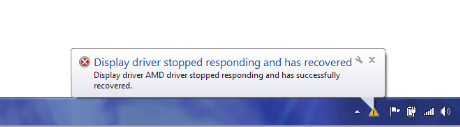
AMD display driver error when playing Minecraft (screenshot)

KTF15

New member
Local time
7:46 PM
Messages
2
Capture2.PNG
That error message always comes up when I get a few minutes into the game. The game will freeze and then flash black and then stay white until I force close it. I have a Sony Vaio S Series 64bit Laptop that came with Intel(R) HD Graphics 3000 and AMD Radeon(TM) HD 6630m graphics cards. But it seems the Radeon is giving me trouble. Plus, Minecraft is my only game and this computer is only 3 weeks old so it really shouldn't be acting up. Does anyone know how to fix this? Thanks in advance.
 

My Computer

OS
Windows 7 Home Premium 64bit
alright 1st check up with your graphics drivers here. Sony eSupport - Electronics - Select Your Model enter ur model and make. Find the radeon graphics driver, download it and install.
If that does not seem to work, try this Update graphics drivers:
AMD :http://support.amd.com/us/gpudownload/windows/Pages/auto_detect.aspx
As well mine-craft runs through java i believe, as i doubt java would be the problem. Optionally you can try to update that.
This seems to be a minor display driver problem. Please report back if any solutions are found, or if my steps did not take care of your problem. Thanks :)
 

My Computer

Computer type
Laptop
Computer Manufacturer/Model Number
Lenovo Y560 Laptop
OS
Microsoft Windows 7 Ultimate 64-bit 7601 Multiprocessor Free Service Pack 1
CPU
Intel(R) Core(TM) i7 CPU Q [email protected] (Turbo boost 2.93ghz)
Motherboard
Lenovo KL3
Memory
4.00 GB
Graphics Card(s)
ATI Mobility Radeon HD 5730
Sound Card
(1) ATI HDMI Audio (2) Realtek High Definition Audio
Monitor(s) Displays
1024 x 768 x 32 bits (4294967296 colors) @ 60 Hz
Screen Resolution
1366 x 768 x 32 bits (4294967296 colors) @ 60 Hz
Hard Drives
WDC WD5000BEVT-24A0RT0
Mouse
Logitech M305
Internet Speed
10 Mbps
Antivirus
My brain
Browser
Google Chrome
Other Info
Trying my best to learn.
alright 1st check up with your graphics drivers here. Sony eSupport - Electronics - Select Your Model enter ur model and make. Find the radeon graphics driver, download it and install.
If that does not seem to work, try this Update graphics drivers:
AMD :AMD Driver Autodetect
As well mine-craft runs through java i believe, as i doubt java would be the problem. Optionally you can try to update that.
This seems to be a minor display driver problem. Please report back if any solutions are found, or if my steps did not take care of your problem. Thanks :)
Yea I talked with Sony Support and they uninstalled the graphics cards along with checking for updates. As for the Java yea I updated that too. Thanks for the help though I really appreciate it! If you know anything else let me know. I'll just call Sony Support again tomorrow since they're closed today.
 

My Computer

OS
Windows 7 Home Premium 64bit
Back
Top