An application to report events

nima

New member
Hi all,

I have a Dell studio XPS 1640, with windows 7 Ultimate 64bit.
I have this problem that My laptop turn on automatically!
I posted my problem in this topic, but didn't find any solutions.
Now I want to know, if there is an application that report me, for example why system turned on, meaning says to me what was it's cause?

Best regards,
Nima
 

My Computer

Computer Manufacturer/Model Number
Dell studio XPS 1640
OS
Windows 7 Ultimate x64
CPU
Intel(R) Core(TM)2 Duo CPU T9400 @ 2.53GHz
Memory
4GB DDR3 1066
Graphics Card(s)
ATI Mobility Radeon HD 3670
Well windows keeps an event log, it can be found in the management console that can be reached by right clicking my computer and choosing manage.
There you can expand event viewer and then windows logs. It will help if you know the exact time the laptop last turned itself on, as there will be a lot of events listed in those various categories.
 

My Computer

Computer Manufacturer/Model Number
Insane hobo technologies. ;-)
OS
Windows 7 x64
CPU
Intel i7 2600k
Motherboard
Asrock z68 extreme 4 gen 3
Memory
G.skill Ripjaw 16gigs @ 1866
Graphics Card(s)
Nvidia gtx580 (evga)
Sound Card
Integrated HD audio + hdmi
Monitor(s) Displays
24" ASUS widescreen + 42" insignia
Screen Resolution
1080p (1920x1080)
Hard Drives
128 Samsung 830
256 Samsung 840
3 x 1tb storage drive (various)
1 western digital 1tb (eSATA)
1 Seagate 1tb (eSATA)
PSU
1 kilowatt SLI/Crossfire rated Silverstone modular
Case
NZXT Phantom + additional 220 fan
Cooling
Zalmann
Keyboard
Microsoft wireless 3000 (v2)
Mouse
MS - wireless 5000 (bluetrack)
Internet Speed
depends on if you ask me or my provider.
Other Info
The above information is provided as is, and the author assumes no responsibility for issues it may cause with your sanity or fanboyism.
Thank you Maguscreed,

But how I found which events is refer to turning on my system?
I filtered events by "Last 24 hours" options, because system turned on last night.
But I couldn't find correct event.
 

My Computer

Computer Manufacturer/Model Number
Dell studio XPS 1640
OS
Windows 7 Ultimate x64
CPU
Intel(R) Core(TM)2 Duo CPU T9400 @ 2.53GHz
Memory
4GB DDR3 1066
Graphics Card(s)
ATI Mobility Radeon HD 3670
it will take some digging around, like I said it's best to know exactly when it happened so you can use the times as a kind of reference point.
System and application might help narrow that down. If you have an idea of when you last turned it off. Just look for where the log starts back up after that time.
 

My Computer

Computer Manufacturer/Model Number
Insane hobo technologies. ;-)
OS
Windows 7 x64
CPU
Intel i7 2600k
Motherboard
Asrock z68 extreme 4 gen 3
Memory
G.skill Ripjaw 16gigs @ 1866
Graphics Card(s)
Nvidia gtx580 (evga)
Sound Card
Integrated HD audio + hdmi
Monitor(s) Displays
24" ASUS widescreen + 42" insignia
Screen Resolution
1080p (1920x1080)
Hard Drives
128 Samsung 830
256 Samsung 840
3 x 1tb storage drive (various)
1 western digital 1tb (eSATA)
1 Seagate 1tb (eSATA)
PSU
1 kilowatt SLI/Crossfire rated Silverstone modular
Case
NZXT Phantom + additional 220 fan
Cooling
Zalmann
Keyboard
Microsoft wireless 3000 (v2)
Mouse
MS - wireless 5000 (bluetrack)
Internet Speed
depends on if you ask me or my provider.
Other Info
The above information is provided as is, and the author assumes no responsibility for issues it may cause with your sanity or fanboyism.
Thanks alot for your helps,
Ok, tonight I try discover the time of turning on.
Is there any way that I can delete all events to searching events easiy?
Because there is very old events that confuse me, Can I remove all events? Or removing may be dangure for system?
 

My Computer

Computer Manufacturer/Model Number
Dell studio XPS 1640
OS
Windows 7 Ultimate x64
CPU
Intel(R) Core(TM)2 Duo CPU T9400 @ 2.53GHz
Memory
4GB DDR3 1066
Graphics Card(s)
ATI Mobility Radeon HD 3670
Dear Maguscreed,

I found events belong to automatically wake up system.
Last night, I cleared all events, and my lap top, waked up at 4:02 AM. There for I could find it's events.
Because of this problem,in battery option, I set "put the computer to sleep" after 1 min, and hibernate after 1 min on battery, there for system hibernated very soon.

This is link of system events pictures. I couldn't find what is the problem cause.
Can you pls look this pictures, perhaps you find.

Thanks a lot,
Nima
 

My Computer

Computer Manufacturer/Model Number
Dell studio XPS 1640
OS
Windows 7 Ultimate x64
CPU
Intel(R) Core(TM)2 Duo CPU T9400 @ 2.53GHz
Memory
4GB DDR3 1066
Graphics Card(s)
ATI Mobility Radeon HD 3670
Is there anything else plugged into the laptop?
A printer?
A mouse?
anything at all?
you may want to try disconnecting the external devices when you sleep next.

I would also pick either sleep or hibernate and disable the other. They aren't supposed to be working at the same time.
 

My Computer

Computer Manufacturer/Model Number
Insane hobo technologies. ;-)
OS
Windows 7 x64
CPU
Intel i7 2600k
Motherboard
Asrock z68 extreme 4 gen 3
Memory
G.skill Ripjaw 16gigs @ 1866
Graphics Card(s)
Nvidia gtx580 (evga)
Sound Card
Integrated HD audio + hdmi
Monitor(s) Displays
24" ASUS widescreen + 42" insignia
Screen Resolution
1080p (1920x1080)
Hard Drives
128 Samsung 830
256 Samsung 840
3 x 1tb storage drive (various)
1 western digital 1tb (eSATA)
1 Seagate 1tb (eSATA)
PSU
1 kilowatt SLI/Crossfire rated Silverstone modular
Case
NZXT Phantom + additional 220 fan
Cooling
Zalmann
Keyboard
Microsoft wireless 3000 (v2)
Mouse
MS - wireless 5000 (bluetrack)
Internet Speed
depends on if you ask me or my provider.
Other Info
The above information is provided as is, and the author assumes no responsibility for issues it may cause with your sanity or fanboyism.
Thanks for your reply.
Yes, I use a external wired mouse. I will disconnect it in next hibernate.
 

My Computer

Computer Manufacturer/Model Number
Dell studio XPS 1640
OS
Windows 7 Ultimate x64
CPU
Intel(R) Core(TM)2 Duo CPU T9400 @ 2.53GHz
Memory
4GB DDR3 1066
Graphics Card(s)
ATI Mobility Radeon HD 3670
Unless your computer has been hijacked?? I believe that there are malwares out there that enable a hijacker to remotely start your computer. Try checking your services by entering "services.msc" in the run box and check for anyway it can be accessed remotely. I would also do a FULL anti-virus with MSE and FULL anti malware check with Malwarebytes anti malware.
 

My Computer

OS
win7
This sounds like a BIOS setting commonly referred to as "wake on demand" - the actual wording is different from manufacturer to manufacturer. Some BIOS have settings that instruct the computer to "wake up" from sleep/hybernate mode based on a setting such as a set day and time, mouse movement, keyboard input or remote signal over the network.

Reboot the computer and enter the BIOS set up. Search for settings related to power management or device management then turn off those that may cause the event. For example, one of my laptops has a setting to turn the system on based on day and time - I turned that setting off.

Easiest solution is to power down the system when not in use.

Regards,
GEWB
 

My Computer

Computer type
PC/Desktop
Computer Manufacturer/Model Number
(7 different computers booting up to 10 systems)
OS
Linux Mint / XP / Win7 Home, Pro, Ultimate / Win8.1 / Win10
Other Info
Four desktops, two laptops, one notebook and one tablet
I out the mouse, but unfortunately my laptop woke up last night again :(
I'm really confused!

Thanks you wilywombat for your reply.
But I don't think that my computer be hijacked.
I have this problem about 1 year! And several times I installed fresh windows.
But I try what you said, maybe you're right.


Please tell me for check, if you found any possible reasons that maybe cause this problem.
Thanks again.
 

My Computer

Computer Manufacturer/Model Number
Dell studio XPS 1640
OS
Windows 7 Ultimate x64
CPU
Intel(R) Core(TM)2 Duo CPU T9400 @ 2.53GHz
Memory
4GB DDR3 1066
Graphics Card(s)
ATI Mobility Radeon HD 3670
Try this and see if it works (another place to check in Windows 7):


  1. Open the Control Panel then All Control Panel Items.
  2. Open Power Options.
  3. Your selected power plan is a radio button under Preferred plans. To the right of your selected plan click on the text link Change plan settings.
  4. The Change settings window opens. Click on the text link Change advanced power settings - the Power Options window opens.
  5. In the list box click the + symbol next to Sleep then click the + symbol next to Allow wake timers.
  6. If the Setting: is Enable, click on the word Enable - it turns into a drop list.
  7. Click the Enable drop list down arrow then click on Disable.
  8. Click the Apply button in the lower right corner.
  9. Click the OK button.

Done - you can close the Control Panel. I hope this works for you.

Regards,
GEWB
 

My Computer

Computer type
PC/Desktop
Computer Manufacturer/Model Number
(7 different computers booting up to 10 systems)
OS
Linux Mint / XP / Win7 Home, Pro, Ultimate / Win8.1 / Win10
Other Info
Four desktops, two laptops, one notebook and one tablet
Dear GEWB, thanks for your reply.
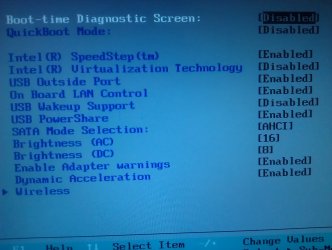
I checked BIOS, there was only one option about wake up, and it was disabled. I attached it's picture.
I had Vista on my computer, later I installed Seven. I feel after installing Seven, this problem stared. When I have Vista, there was any problem. I don't no, maybe this is irrelevant sense!
 

Attachments

  • IMAG0047.jpg
    IMAG0047.jpg
    893 KB · Views: 5

My Computer

Computer Manufacturer/Model Number
Dell studio XPS 1640
OS
Windows 7 Ultimate x64
CPU
Intel(R) Core(TM)2 Duo CPU T9400 @ 2.53GHz
Memory
4GB DDR3 1066
Graphics Card(s)
ATI Mobility Radeon HD 3670
Dear GEWB,
I did this settings in Power Options later, but didn't help :(
 

My Computer

Computer Manufacturer/Model Number
Dell studio XPS 1640
OS
Windows 7 Ultimate x64
CPU
Intel(R) Core(TM)2 Duo CPU T9400 @ 2.53GHz
Memory
4GB DDR3 1066
Graphics Card(s)
ATI Mobility Radeon HD 3670
Dear GEWB,
I did this settings in Power Options later, but didn't help :(

Well, it was worth the try - I'll keep thinking about this problem. If I have any other ideas I'll post in this thread.

Regards,
GEWB
 

My Computer

Computer type
PC/Desktop
Computer Manufacturer/Model Number
(7 different computers booting up to 10 systems)
OS
Linux Mint / XP / Win7 Home, Pro, Ultimate / Win8.1 / Win10
Other Info
Four desktops, two laptops, one notebook and one tablet
Hi all,

There is 3 nights that my laptop didn't wake up!
Last thing I do was cleaning system by Anti-virus and Anti Malware that wilywombat introduced.I use Kasper Internet Security, and is always update and clean my system, but that Anti-virus and Anti Malware found a remote program that I installed myself. I don't know why this remote application cause this problem, because I had that always on my system and used it.
But since that, by cleaning this remote application, my computer didn't wake up, I think that was the main problem.
I hope my computer doesn't wake up again and this problem be solved by removing that remote program and this topic be closed and I don't post again in this topic! LOL

Thanks again for your replies and your useful helps.
Also a special thank to wilywombat for his great help.

Best regards,
Nima
 
Last edited:

My Computer

Computer Manufacturer/Model Number
Dell studio XPS 1640
OS
Windows 7 Ultimate x64
CPU
Intel(R) Core(TM)2 Duo CPU T9400 @ 2.53GHz
Memory
4GB DDR3 1066
Graphics Card(s)
ATI Mobility Radeon HD 3670
Hi Nima, Glad to hear you got your problem sorted out. Don't be a stranger and come back to the forums...there's always something interesting to read! :D
 

My Computer

OS
win7
Thank wilywombat,
Yeah, sure. Always I will visit this great forum. There is very good and useful informationwith professional users.


My Computer

Computer Manufacturer/Model Number
Dell studio XPS 1640
OS
Windows 7 Ultimate x64
CPU
Intel(R) Core(TM)2 Duo CPU T9400 @ 2.53GHz
Memory
4GB DDR3 1066
Graphics Card(s)
ATI Mobility Radeon HD 3670
Back
Top