
Android device not recognized

Steampunk7

New member
Member
VIP
Local time
3:41 AM
Messages
119
Everything was right up until couple of days ago. Don't know if it was because of WU or what, but my Samsung 6 is not recognized any more. Not even as MTP. I ran sfc scan, everything was ok. I have installed both Intel Android Driver 1.10.0 and SAMSUNG_USB_Driver_for_Mobile_Phones.

When I connect cell phone to any of USB ports on my motherboard charging starts immediately, however I can not transfer files from or to the cell phone. My Samsung Galaxy 6 does not show up on PC anymore.

I checked Device Manager. There's this yellow mark by Unknown device. I clicked on Update Driver software, but to no avail (see attach.)
 

Attachments
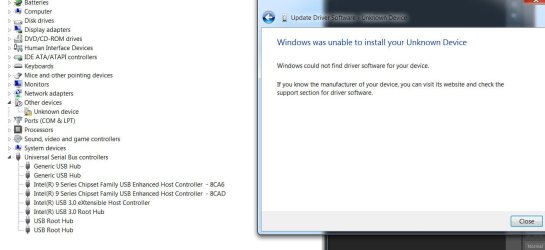
  • 1a.jpg
    1a.jpg
    82.1 KB · Views: 1
Last edited:

My Computer

Computer type
PC/Desktop
OS
Windows 7 Ultimate x64
CPU
Intel(R) Xeon(R) CPU E3-1231 v3 @ 3.40GHz
Motherboard
ASUSTeK COMPUTER INC. Z97-A Rev 1.xx
Memory
16 GB
Graphics Card(s)
AMD Radeon (TM) R9 390 Series
Sound Card
(1) AMD High Definition Audio Device (2) Realtek High Defi
No, because my Samsung Galaxy 6 does not show up on PC. Therefore I can not click Open device to view files. There is no Autoplay.
 

My Computer

Computer type
PC/Desktop
OS
Windows 7 Ultimate x64
CPU
Intel(R) Xeon(R) CPU E3-1231 v3 @ 3.40GHz
Motherboard
ASUSTeK COMPUTER INC. Z97-A Rev 1.xx
Memory
16 GB
Graphics Card(s)
AMD Radeon (TM) R9 390 Series
Sound Card
(1) AMD High Definition Audio Device (2) Realtek High Defi
Are you using the supplied USB connector to connect your device(s) directly to your computer? Can you connect these devices to a different computer?
 

My Computer

Computer type
PC/Desktop
OS
Windows 7 x64, Vista x64, 8.1 smartphone
CPU
Intel E8400 65W 64-bit
Motherboard
Gigabyte EP45-UD3LR
Memory
DDR2 2 x 2GB, 1GB x 2
Graphics Card(s)
XFX Radeon HD5750
Sound Card
AMD High Definition Audio; Realtek High Definition Audio
Monitor(s) Displays
iiyama prolite X2377HDS
Screen Resolution
1920 x 1080
Hard Drives
500GB 7200 rpm Seagate ST3500413AS 16MB, 500GB 5400 rpm Toshiba MQ02ABF050H 32MB, 200GB 7200 rpm Seagate ST3200820AS 8MB, 2TB 7200 rpm Western Digital WD20EZRX 64MB
PSU
Enermax Liberty Modular
Case
Antec P193 Midi Tower
Keyboard
Mionix ZIBAL 60
Mouse
Razer USB 2.0 Diamondback Mouse or Huion Graphics Tablet
Browser
Internet Explorer, Lunascape, Firefox, Opera, Avast Safezone
Are you using the supplied USB connector to connect your device(s) directly to your computer?


Yes. Just like every time before. As I said, the moment I connect it to PC it starts charging normally, but the device is not recognized.


Can you connect these devices to a different computer?


Yes, but it does not show up on my lap top either. What bothers me is the fact that everything was normal until a week or so ago. I suspect it was some of the WU. I restored my PC to the earliest date listed, but it must have been some update from even earlier time.
 

My Computer

Computer type
PC/Desktop
OS
Windows 7 Ultimate x64
CPU
Intel(R) Xeon(R) CPU E3-1231 v3 @ 3.40GHz
Motherboard
ASUSTeK COMPUTER INC. Z97-A Rev 1.xx
Memory
16 GB
Graphics Card(s)
AMD Radeon (TM) R9 390 Series
Sound Card
(1) AMD High Definition Audio Device (2) Realtek High Defi
Can you check the Device Manager of the Laptop? Is there any Unknown Device or Problem Device appearing in the Device Manager of your Laptop?
 

My Computer

Computer type
PC/Desktop
OS
Windows 7 x64, Vista x64, 8.1 smartphone
CPU
Intel E8400 65W 64-bit
Motherboard
Gigabyte EP45-UD3LR
Memory
DDR2 2 x 2GB, 1GB x 2
Graphics Card(s)
XFX Radeon HD5750
Sound Card
AMD High Definition Audio; Realtek High Definition Audio
Monitor(s) Displays
iiyama prolite X2377HDS
Screen Resolution
1920 x 1080
Hard Drives
500GB 7200 rpm Seagate ST3500413AS 16MB, 500GB 5400 rpm Toshiba MQ02ABF050H 32MB, 200GB 7200 rpm Seagate ST3200820AS 8MB, 2TB 7200 rpm Western Digital WD20EZRX 64MB
PSU
Enermax Liberty Modular
Case
Antec P193 Midi Tower
Keyboard
Mionix ZIBAL 60
Mouse
Razer USB 2.0 Diamondback Mouse or Huion Graphics Tablet
Browser
Internet Explorer, Lunascape, Firefox, Opera, Avast Safezone
Can you check the Device Manager of the Laptop? Is there any Unknown Device or Problem Device appearing in the Device Manager of your Laptop?


No, not on my laptop, only on PC (as shown in the first post).


Btw , yesterday, while I was reading and playing some music on my PC's WMP, my cell phone was connected to PC, charging. I was not working on PC. Then, out of the blue - a notification appeared "Installing device software". All drivers were installed and Samsung Galaxy 6 showed up on my PC. But, only for a couple of minutes and then it dissapeared.
 

My Computer

Computer type
PC/Desktop
OS
Windows 7 Ultimate x64
CPU
Intel(R) Xeon(R) CPU E3-1231 v3 @ 3.40GHz
Motherboard
ASUSTeK COMPUTER INC. Z97-A Rev 1.xx
Memory
16 GB
Graphics Card(s)
AMD Radeon (TM) R9 390 Series
Sound Card
(1) AMD High Definition Audio Device (2) Realtek High Defi
Back
Top