How do I get my android phone recognized by my laptop?

Alexandros81

New member
Local time
3:13 PM
Messages
15
Hi!
When I connect my Samsung phone to usb port of my pc and go to device manager it is not recognized.
It's not visible in Other Devices.
Any idea what I should do?

I want to connect to pc for exchanging data and also for developing android apps with Android Studio.

My phone is Samsung Galaxy A3, with 6.0.1 Android version.

Thanks
 

My Computer My Computer

At a glance

Windows 7 Home Premium 64-bitIntel(R) Core(TM)2 Duo CPU T5800 @ 2.00GHz3 GB
Computer type
Laptop
Computer Manufacturer/Model Number
HP G70
OS
Windows 7 Home Premium 64-bit
CPU
Intel(R) Core(TM)2 Duo CPU T5800 @ 2.00GHz
Memory
3 GB
Hi

try this

Check your USB settings in the A3 notification panel. Your A3 needs to be connected as a "media device," which you can set in the notification panel:
  • Swipe down from the top of the screen while your S3 is connected to your computer.
  • Tap "Connected as" and select "Media device (MTP)." Your device should get recognized in Windows.
notes
you also need to be using Windows media player 10>
and as W7 only naturally supports USB2 if your phone is USB3 you may need to install USB3 drivers


Roy
 

My Computer My Computer

At a glance

W7 home premium 32bit/W7HP 64bit/w10 tp insid...E5300 dual core3gbNvidia Geforce 7100 Nforce 630i
Computer type
PC/Desktop
Computer Manufacturer/Model Number
medionl/Aspire 6930G/acer x55a
OS
W7 home premium 32bit/W7HP 64bit/w10 tp insider ring
CPU
E5300 dual core
Motherboard
medion MS7366
Memory
3gb
Graphics Card(s)
Nvidia Geforce 7100 Nforce 630i
Monitor(s) Displays
avixc
Internet Speed
n (isp resticted to 72)
Antivirus
mse/pands
Browser
palemoon
Other Info
Belkin Fd7050 n USB using Railink RT2870 drivers, more upto date
@ Roy:
Hi.
I have connected my phone to my laptop and swap down from the top of the screen.
No indication of "Connected as" appears.

Also how do I check if my w7 has usb2 drivers?
How do I check if my phone is usb3?

My windows media player says it is version 12.0.76....
 

My Computer My Computer

At a glance

Windows 7 Home Premium 64-bitIntel(R) Core(TM)2 Duo CPU T5800 @ 2.00GHz3 GB
Computer type
Laptop
Computer Manufacturer/Model Number
HP G70
OS
Windows 7 Home Premium 64-bit
CPU
Intel(R) Core(TM)2 Duo CPU T5800 @ 2.00GHz
Memory
3 GB
Can't speak firsthand about a Galaxy A3 with Android 6.0.1, because I have a Galaxy S7 that is running Android 8.0.0.

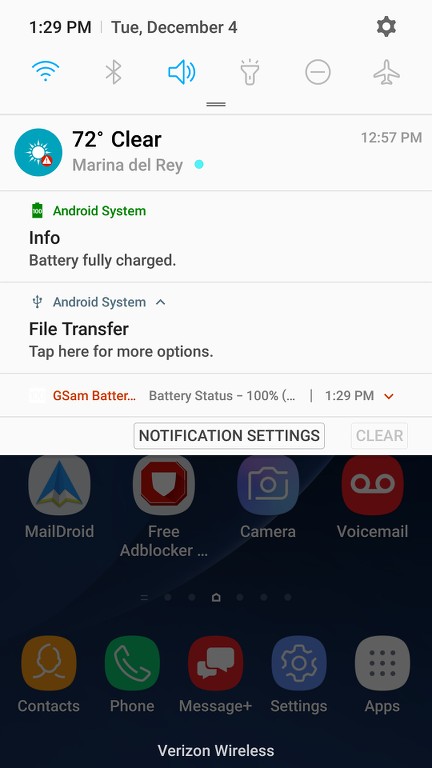
But in the dropdown resulting from swiping down at the top of the screen down toward the bottom there is an item in small font with an upward-pointing USB-looking icon to its left, named "Android system file transfer".


If I tap on that line it expands to a 2-line presentation that shows "File Transfer" on the first line and "Tap here for more options" on the second line.

pCRaHV.jpg


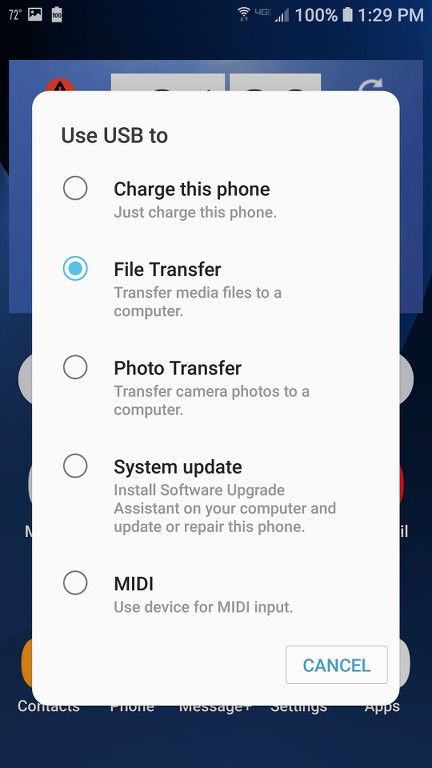
If I then tap on the second line, a new large window appears titled "Use USB to" with five radio button options available: charge this phone, file transfer, photo transfer, system update, and MIDI.

u3aA7O.jpg


The second one is checked by default, "file transfer". This is the new titling I suppose for the USB connection option that in older Android/Samsung implementations used to be shown as "MTP". And this is the setting which is required in order to make the phone visible to the PC and Windows Explorer (note that it will appear as a device in Explorer, with no drive letter assigned).

I believe the standard drivers required to "see" the Android phone from Win7 and Windows Explorer should be automatically installed once the device is connected properly via USB cable. In my Win7 the Samsung S7 phone shows up in Device Manager as follows:

BHIJyJ.jpg


with the driver titled "Samsung Android ADB Interface".

Although it's been a long time that I've been accessing first my S4 phone and now my S7 phone from my Win7 PC, I also have the Samsung USB Driver in my library. It says it's only needed if you are developing on Windows and want the Samsung Android device to be available in your development environment. I don't recall if I actually ever installed this driver. But I do know that for some time now other new Win7/Win10 installations have automatically installed the required drivers to access my S7 making them available to Explorer.

I do remember that with older versions of Android when I connected the phone I'd have to swipe down from the top of the screen to get a USB connection window to appear, and then I would have to manually tap on the "MTP" radio button option in order to make the phone visible because it wasn't checked by default. I think this has been changed and improved in newer Android versions, such as my current 8.0.0.

 

My Computer My Computer

At a glance

Windows 7 Pro x64 (1), Win7 Pro X64 (2)i5-3350p 3.1Ghz/6MB-cache (1); E8400 3.0Ghz/6...8GB PC3-12800 DDR3 (1); 4GB PC3-10600 DDR3 (2)ATI HD7750 (1), (see TV cards); ATI R7 250 (2)
Computer type
PC/Desktop
Computer Manufacturer/Model Number
Home-built, two systems (1) and (2)
OS
Windows 7 Pro x64 (1), Win7 Pro X64 (2)
CPU
i5-3350p 3.1Ghz/6MB-cache (1); E8400 3.0Ghz/6MB-cache (2)
Motherboard
ASUS P8Z77-V Pro (1); ASUS P5Q3 (2)
Memory
8GB PC3-12800 DDR3 (1); 4GB PC3-10600 DDR3 (2)
Graphics Card(s)
ATI HD7750 (1), (see TV cards); ATI R7 250 (2)
Sound Card
Realtek ALC892 HD Audio (1); Realtek ALC1200 HD Audio (2)
Monitor(s) Displays
Eizo HD2441W LCD, Eizo S2433W (1); Eizo 24" S2433W (2)
Screen Resolution
1920x1200, 1920x1200 (1); 1920x1200 (2)
Hard Drives
(1) 1TB SATA-II (7200RPM), 2x2TB SATA-III (7200RPM), 250GB SATA-III (10000RPM) for OS; 2x2TB external USB 3.0

(2) 320GB SATA-II (7200RPM), 750GB SATA-II (7200RPM), 150GB SATA-II (10000RPM) for OS; 2TB external USB 3.0
PSU
Nesteq ECS-6001 600W (1); Nesteq ECS-5001 500W (2)
Case
Acousti-Case 360 (1) and (2)
Cooling
Noctua NH-U12P SE2 for CPU, 2x120mm case fans (1) and (2)
Keyboard
IBM PS/2 (1) and (2)
Mouse
Logitech MX Revolution wireless (1); Microsoft wired (2)
Internet Speed
100mbps down / 10mbps up
Antivirus
Microsoft Security Essentials; Malwarebyte Anti-Malware Pro
Browser
Firefox
Other Info
Ceton InfiniTV 4-tuner cablecard-enabled TV card as well as Hauppauge HVR-2250 OTA/ATSC 2-tuner TV card in (1), running under Win7 WMC
You might need to investigate the USB settings in your phone settings.
 

My Computer My Computer

At a glance

Windows 7 Ultimate x64
Computer type
PC/Desktop
OS
Windows 7 Ultimate x64
Back
Top