
Android OS !

My Computer

Computer type
Laptop
Computer Manufacturer/Model Number
Gateway 17.3" LCD Intel Dual-Core, 8GB RAM 1TB HDD Windows 8 Laptop
OS
Windows 8 - 64-bit
CPU
2.2GHz Intel Pentium dual-core B960 processor with 2MB L3 ca
Memory
8GB DDR3
Graphics Card(s)
Intel HD Graphics with 128MB of dedicated system memory
Monitor(s) Displays
17.3" Ultrabright HD widescreen LED-backlit LCD
Screen Resolution
1280 X 1024
Hard Drives
1TB hard drive-1000 GB HDD
DVD-Super Multi DL drive
PSU
Intel B960 processor
Case
XXXXX
Cooling
XXXXX
Keyboard
Multi Gesture Touchpad
Mouse
USB - portable mouse... I added this
Antivirus
Avast
Browser
I E 10
Other Info
I see nothing about Motherboard info.
I'm not sure about Sound Card
Ports :(3) USB 2.0, (1) HDMI, (1) VGA, (1) Headphone out, (1) Microphone in, (1) Ethernet LAN

•Fast Wi-Fi wireless and wired Gigabit Ethernet networking
•HDMI output
•Kensington lock slot
I have no idea what all this actually means
I'll try to get this done this weekend.. thanks for the info.. I get so busy at times..
I don't have time to even open it lately.
That's a shame to me.. I really love this tablet. I also need to get my music on it, I'm not at all sure how or what I should do to accomplish this. I'm a huge music lover.
Thanks again, for your reply :)
I wish you a great T G I F.

You should be able to plug the device into the computer and the tablet should be recognized as a portable media device. Then, open Windows Media Player and click on the sync tab. Then, drag and drop all of the music you want into the sync tab.
 
Last edited:

My Computer

Computer type
PC/Desktop
Computer Manufacturer/Model Number
HP Pavilion P7-1010
OS
Windows 7 Professional x64 Service Pack 1
CPU
AMD Athlon X4 645
Motherboard
Foxxcon N-Alvorix RS880
Memory
6GB DDR3 1066
Graphics Card(s)
Sapphire Radeon HD 5670 512MB GDDR5
Sound Card
Realtek Integrated Audio
Monitor(s) Displays
HP 2011x
Screen Resolution
1600x900
Hard Drives
1. Crucial M4 128GB SSD
2. 1TB Seagate Barracuda 7200.12 RPM
3. 1TB Western Digital Caviar Green 5400RPM
PSU
Seasonic S12 II Bronze 380 Watt
Case
HP OEM
Cooling
Coolermaster Heatsink, AVC Case Fan
Keyboard
HP OEM- Made by Chicony
Mouse
HP OEM- Made by Logitech
Internet Speed
20MBit Down/4 Up
Antivirus
Microsoft Security Essentials
Browser
Internet Explorer 10
I have maybe a dumb question. I came from xda. But after learning so much of Android i felt like fixing up my laptop and i found these forums. I could swear this and xda are related? The Web design and Android app are so similar! Are they like by similar developers?
 

My Computer

OS
Windows 7 Home Premium x64
I have maybe a dumb question. I came from xda. But after learning so much of Android i felt like fixing up my laptop and i found these forums. I could swear this and xda are related? The Web design and Android app are so similar! Are they like by similar developers?

I can see what you mean. There are some similarities, especially with the app because they are both made with TapaTalk, so the design and layout do look the same, but both forums are run by different people.
 

My Computer

Computer type
PC/Desktop
Computer Manufacturer/Model Number
Custom Built
OS
Windows 8.1 Pro x64
CPU
Intel Core i7 4790k
Motherboard
MSI Z97S Krait Edition
Memory
8GB Corsair Dominator 1600MHz
Graphics Card(s)
MSI TwinFrozr GeForce GTX770
Sound Card
ASUS Xonar DX/XD 7.1
Monitor(s) Displays
Dell 24" S2409W + Dell 20" E207WFP
Screen Resolution
1920x1080 + 1680x1050
Hard Drives
1x 120GB OCZ Agility 3, 1x 750GB Western Digital Caviar Black, 1x 1TB Western Digital Caviar Blue
PSU
Corsair HX850 modular
Case
Fractal Design Define R4
Cooling
Corsair H60 w/ twin Corsair SP120 fans
Keyboard
Logitech G510S Keyboard
Mouse
Logitech G500S Laser Mouse
Internet Speed
40Mbps
Antivirus
Microsoft Security Essentials
Browser
Google Chrome
Other Info
LG Blu-Ray player
Now we're talking :D

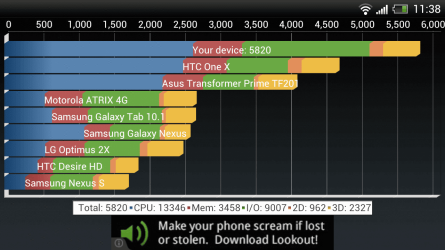
2012-07-15_11-38-45.png
 

My Computer

Computer type
PC/Desktop
Computer Manufacturer/Model Number
Custom Built
OS
Windows 8.1 Pro x64
CPU
Intel Core i7 4790k
Motherboard
MSI Z97S Krait Edition
Memory
8GB Corsair Dominator 1600MHz
Graphics Card(s)
MSI TwinFrozr GeForce GTX770
Sound Card
ASUS Xonar DX/XD 7.1
Monitor(s) Displays
Dell 24" S2409W + Dell 20" E207WFP
Screen Resolution
1920x1080 + 1680x1050
Hard Drives
1x 120GB OCZ Agility 3, 1x 750GB Western Digital Caviar Black, 1x 1TB Western Digital Caviar Blue
PSU
Corsair HX850 modular
Case
Fractal Design Define R4
Cooling
Corsair H60 w/ twin Corsair SP120 fans
Keyboard
Logitech G510S Keyboard
Mouse
Logitech G500S Laser Mouse
Internet Speed
40Mbps
Antivirus
Microsoft Security Essentials
Browser
Google Chrome
Other Info
LG Blu-Ray player
Very good score Everlong. ;)
 

My Computer

Computer type
PC/Desktop
Computer Manufacturer/Model Number
Custom Build
OS
Windows 10 Pro x64
CPU
Intel Core i5 4440 @Stock
Motherboard
Gigabyte Z97 D3H
Memory
4 x 4GB HyperX Fury DDR3
Graphics Card(s)
Gigabyte GTX 1050Ti O4G
Sound Card
Integrated
Monitor(s) Displays
Dell P2417H
Screen Resolution
1920 x 1080
Hard Drives
Samsung EVO 850 120GB / Toshiba DT01ACA050 1TB 7200prm 32MB
PSU
Riotoro Onyx 750W
Case
NZXT H500 Black-Red
Cooling
Stock CPU + NZXT 120mm + 2x120mm red fans
Keyboard
Modecom Volcano Lanparty
Mouse
Asus ROG Gladius / DeepCool E-Pad Plus
Internet Speed
DOCSIS 50/3 Mbit
Browser
Google Chrome
Other Info
Asus K55VJ(i5 3210M, GT635M / 2GB, 8GB DDR3, 500GB HDD)
If anybody has a Samsung Galaxy Tab 2 7.0, be sure to check for updates as there is an update from Android 4.0.3 to 4.0.4 which fixes a lot of the issues with Touchwiz. They fixed the weird graphics glitch I was having and overall, it runs smoother after the update.
 

My Computer

Computer type
PC/Desktop
Computer Manufacturer/Model Number
HP Pavilion P7-1010
OS
Windows 7 Professional x64 Service Pack 1
CPU
AMD Athlon X4 645
Motherboard
Foxxcon N-Alvorix RS880
Memory
6GB DDR3 1066
Graphics Card(s)
Sapphire Radeon HD 5670 512MB GDDR5
Sound Card
Realtek Integrated Audio
Monitor(s) Displays
HP 2011x
Screen Resolution
1600x900
Hard Drives
1. Crucial M4 128GB SSD
2. 1TB Seagate Barracuda 7200.12 RPM
3. 1TB Western Digital Caviar Green 5400RPM
PSU
Seasonic S12 II Bronze 380 Watt
Case
HP OEM
Cooling
Coolermaster Heatsink, AVC Case Fan
Keyboard
HP OEM- Made by Chicony
Mouse
HP OEM- Made by Logitech
Internet Speed
20MBit Down/4 Up
Antivirus
Microsoft Security Essentials
Browser
Internet Explorer 10

My Computer

Computer type
PC/Desktop
Computer Manufacturer/Model Number
Gigabyte Technology Co., Ltd.
OS
Win 7 Ultimate 64-bit SP1 (desktop)
CPU
Intel Core 2 Duo E8400
Motherboard
Gigabyte GA-EP35-DS3R
Memory
2x 2GB OCZ DDR II SDRAM PC2-6400
Graphics Card(s)
NVIDIA GeForce 9400GT
Monitor(s) Displays
HP 2009m(primary), Acer P191W
Screen Resolution
1600x900, 1440x900
Hard Drives
Internal:WD Caviar Black 640GB 32MB cache 7200RPM
External:Samsung Story Station 1TB HDD desktop drive
500GB Toshiba portable drive
PSU
Antec Earthwatts EA500D
Case
Antec Sonata III
Cooling
4 fans
Keyboard
Logitech Wave
Mouse
Logitech M-SBF90
Internet Speed
Slow due to home Wireless-G router
Antivirus
MSE, Hitman Pro, Malwarebytes
Browser
Chrome and Palemoon
Other Info
Laptop....Acer 5750Z-4835
15.6" HD Widescreen CineCrystal™ LED-backlit LCD Display: (1366x768 resolution, 16:9 aspect ratio)
Intel® Pentium® Processor B940 (2.0GHz, 2MB L3 cache)
Windows® 7 Home Premium,500GB Hard Drive,4GB DDR3 RAM, Intel® HD Graphics,8X DVD-Super Multi Double-Layer Drive
Multi-in-1 Digital Media Card Reader,802.11b/g/n Wi-Fi
Chrome and Palemoon, MSE, Hitman Pro

My Computer

Computer Manufacturer/Model Number
Samsung NP530U4B-S02IN
OS
Windows® 8 Pro (64-bit)
CPU
Intel® Core™ i5 Processor 2467M (1.60GHz, 3MB L3 Cache)
Motherboard
Samsung Electronics
Memory
6GB DDR3 System Memory at 1,333MHz (on BD 4GB + 2GB x 1)
Graphics Card(s)
AMD Radeon™ HD7550M 1GB DDR3 (Ext. Graphic)
Sound Card
Realtek High Definition Audio
Monitor(s) Displays
35.56cm (14.0) SuperBright 300nit HD LED Display
Screen Resolution
1366x768
Hard Drives
1TB S-ATA II Hard Drive (5400RPM) with ExpressCache 16GB SSD
Internet Speed
sucks
Antivirus
Microsoft Security Essentials
Browser
Google Chrome (Sync enabled)
Yea it's a custom ROM with a custom kernel too.
 

My Computer

Computer type
PC/Desktop
Computer Manufacturer/Model Number
Custom Built
OS
Windows 8.1 Pro x64
CPU
Intel Core i7 4790k
Motherboard
MSI Z97S Krait Edition
Memory
8GB Corsair Dominator 1600MHz
Graphics Card(s)
MSI TwinFrozr GeForce GTX770
Sound Card
ASUS Xonar DX/XD 7.1
Monitor(s) Displays
Dell 24" S2409W + Dell 20" E207WFP
Screen Resolution
1920x1080 + 1680x1050
Hard Drives
1x 120GB OCZ Agility 3, 1x 750GB Western Digital Caviar Black, 1x 1TB Western Digital Caviar Blue
PSU
Corsair HX850 modular
Case
Fractal Design Define R4
Cooling
Corsair H60 w/ twin Corsair SP120 fans
Keyboard
Logitech G510S Keyboard
Mouse
Logitech G500S Laser Mouse
Internet Speed
40Mbps
Antivirus
Microsoft Security Essentials
Browser
Google Chrome
Other Info
LG Blu-Ray player
I need help.. on my Nextbook Premium 8 Android Tablet 8"...using OS 4.0 Ice Cream Sandwich.
I think I've uninstalled the browser.. I used to have a small blue icon on my front opening page..
It's now gone, I was uninstalling a thing or so.. I do still have Google search in the upper left corner.
( I didn't like when I opened this tablet to start.. up came Nextbooks page.. everytime I tried to do anything..this was all about the table, where to buy it.. etc.) would that have been my browser ? if so it's now gone , would it be possible to download a different browser made for tablets.( Android )

OR.. do I have to contact Nextbook to get that browser back on the tablet ?
I know I've ask a lot of you guys.. sorry.. I know I can trust you to give me the help I need on this .

Thanks for any help on this .:)
 

My Computer

Computer type
Laptop
Computer Manufacturer/Model Number
Gateway 17.3" LCD Intel Dual-Core, 8GB RAM 1TB HDD Windows 8 Laptop
OS
Windows 8 - 64-bit
CPU
2.2GHz Intel Pentium dual-core B960 processor with 2MB L3 ca
Memory
8GB DDR3
Graphics Card(s)
Intel HD Graphics with 128MB of dedicated system memory
Monitor(s) Displays
17.3" Ultrabright HD widescreen LED-backlit LCD
Screen Resolution
1280 X 1024
Hard Drives
1TB hard drive-1000 GB HDD
DVD-Super Multi DL drive
PSU
Intel B960 processor
Case
XXXXX
Cooling
XXXXX
Keyboard
Multi Gesture Touchpad
Mouse
USB - portable mouse... I added this
Antivirus
Avast
Browser
I E 10
Other Info
I see nothing about Motherboard info.
I'm not sure about Sound Card
Ports :(3) USB 2.0, (1) HDMI, (1) VGA, (1) Headphone out, (1) Microphone in, (1) Ethernet LAN

•Fast Wi-Fi wireless and wired Gigabit Ethernet networking
•HDMI output
•Kensington lock slot
I have no idea what all this actually means
Hi LPT, I dont think you can uninstall the browser. Are you sure you've checked in the Apps Folder? If you cant find it anywhere then simply reset your tablet and it will be back. Remember to backup before performing the reset. ;)
 

My Computer

Computer Manufacturer/Model Number
Samsung NP530U4B-S02IN
OS
Windows® 8 Pro (64-bit)
CPU
Intel® Core™ i5 Processor 2467M (1.60GHz, 3MB L3 Cache)
Motherboard
Samsung Electronics
Memory
6GB DDR3 System Memory at 1,333MHz (on BD 4GB + 2GB x 1)
Graphics Card(s)
AMD Radeon™ HD7550M 1GB DDR3 (Ext. Graphic)
Sound Card
Realtek High Definition Audio
Monitor(s) Displays
35.56cm (14.0) SuperBright 300nit HD LED Display
Screen Resolution
1366x768
Hard Drives
1TB S-ATA II Hard Drive (5400RPM) with ExpressCache 16GB SSD
Internet Speed
sucks
Antivirus
Microsoft Security Essentials
Browser
Google Chrome (Sync enabled)
Dinesh hi... I have no idea where to look for my folders on this smaller tablet .( Nextbook -8" Android tablet ) I see Apps and Widgets on one screen. I see Settings..( lots here )
I see Video.. ( that works )I see Music ( I've not added any there yet )
I have my e-mail icon ( I don't think it shows any new arrivals )

How do I do a back up on this tablet ?
I have very little I've added to this tablet so far.. I used a SD micro card to do that.

Thanks so much for your kind reply.:)
 

My Computer

Computer type
Laptop
Computer Manufacturer/Model Number
Gateway 17.3" LCD Intel Dual-Core, 8GB RAM 1TB HDD Windows 8 Laptop
OS
Windows 8 - 64-bit
CPU
2.2GHz Intel Pentium dual-core B960 processor with 2MB L3 ca
Memory
8GB DDR3
Graphics Card(s)
Intel HD Graphics with 128MB of dedicated system memory
Monitor(s) Displays
17.3" Ultrabright HD widescreen LED-backlit LCD
Screen Resolution
1280 X 1024
Hard Drives
1TB hard drive-1000 GB HDD
DVD-Super Multi DL drive
PSU
Intel B960 processor
Case
XXXXX
Cooling
XXXXX
Keyboard
Multi Gesture Touchpad
Mouse
USB - portable mouse... I added this
Antivirus
Avast
Browser
I E 10
Other Info
I see nothing about Motherboard info.
I'm not sure about Sound Card
Ports :(3) USB 2.0, (1) HDMI, (1) VGA, (1) Headphone out, (1) Microphone in, (1) Ethernet LAN

•Fast Wi-Fi wireless and wired Gigabit Ethernet networking
•HDMI output
•Kensington lock slot
I have no idea what all this actually means
When you reset and android tablet, you lose only the downloaded apps, text SMS and contacts. Your music, videos and pics remain in the SD card.
 

My Computer

Computer Manufacturer/Model Number
Samsung NP530U4B-S02IN
OS
Windows® 8 Pro (64-bit)
CPU
Intel® Core™ i5 Processor 2467M (1.60GHz, 3MB L3 Cache)
Motherboard
Samsung Electronics
Memory
6GB DDR3 System Memory at 1,333MHz (on BD 4GB + 2GB x 1)
Graphics Card(s)
AMD Radeon™ HD7550M 1GB DDR3 (Ext. Graphic)
Sound Card
Realtek High Definition Audio
Monitor(s) Displays
35.56cm (14.0) SuperBright 300nit HD LED Display
Screen Resolution
1366x768
Hard Drives
1TB S-ATA II Hard Drive (5400RPM) with ExpressCache 16GB SSD
Internet Speed
sucks
Antivirus
Microsoft Security Essentials
Browser
Google Chrome (Sync enabled)
Then I should remove the micro-SD card.. then click the re-set button the tablet?
What should I expect to see happening on the tablet when this starts ? , if anything .
I'm guessing I should have it plugged in to electrical power or just using the batter to do this?

Turn on the tablet.. go to settings.. tap Reset ,go from there ?
I'm guessing I'll have to register it again .. YES Or NO ?
Thank you for helping me.
 

My Computer

Computer type
Laptop
Computer Manufacturer/Model Number
Gateway 17.3" LCD Intel Dual-Core, 8GB RAM 1TB HDD Windows 8 Laptop
OS
Windows 8 - 64-bit
CPU
2.2GHz Intel Pentium dual-core B960 processor with 2MB L3 ca
Memory
8GB DDR3
Graphics Card(s)
Intel HD Graphics with 128MB of dedicated system memory
Monitor(s) Displays
17.3" Ultrabright HD widescreen LED-backlit LCD
Screen Resolution
1280 X 1024
Hard Drives
1TB hard drive-1000 GB HDD
DVD-Super Multi DL drive
PSU
Intel B960 processor
Case
XXXXX
Cooling
XXXXX
Keyboard
Multi Gesture Touchpad
Mouse
USB - portable mouse... I added this
Antivirus
Avast
Browser
I E 10
Other Info
I see nothing about Motherboard info.
I'm not sure about Sound Card
Ports :(3) USB 2.0, (1) HDMI, (1) VGA, (1) Headphone out, (1) Microphone in, (1) Ethernet LAN

•Fast Wi-Fi wireless and wired Gigabit Ethernet networking
•HDMI output
•Kensington lock slot
I have no idea what all this actually means
Then I should remove the micro-SD card.. then click the re-set button the tablet?
What should I expect to see happening on the tablet when this starts ? , if anything .
I'm guessing I should have it plugged in to electrical power or just using the batter to do this?

Turn on the tablet.. go to settings.. tap Reset ,go from there ?
I'm guessing I'll have to register it again .. YES Or NO ?
Thank you for helping me.
I always do a reset from Android System Recovery. I would remove the Micro SD card if I were you. Yes, you will ahev to register it again with Google Play. I alos recommend you have the tablet plugged in or you could charge it to 100% first if you are going to reset the device on battery.
 

My Computer

Computer type
PC/Desktop
Computer Manufacturer/Model Number
HP Pavilion P7-1010
OS
Windows 7 Professional x64 Service Pack 1
CPU
AMD Athlon X4 645
Motherboard
Foxxcon N-Alvorix RS880
Memory
6GB DDR3 1066
Graphics Card(s)
Sapphire Radeon HD 5670 512MB GDDR5
Sound Card
Realtek Integrated Audio
Monitor(s) Displays
HP 2011x
Screen Resolution
1600x900
Hard Drives
1. Crucial M4 128GB SSD
2. 1TB Seagate Barracuda 7200.12 RPM
3. 1TB Western Digital Caviar Green 5400RPM
PSU
Seasonic S12 II Bronze 380 Watt
Case
HP OEM
Cooling
Coolermaster Heatsink, AVC Case Fan
Keyboard
HP OEM- Made by Chicony
Mouse
HP OEM- Made by Logitech
Internet Speed
20MBit Down/4 Up
Antivirus
Microsoft Security Essentials
Browser
Internet Explorer 10
Yes you can reset either via recovery as stated above or you can go to Settings and then reset. You just need to add your Google account after the reset has been done. Its advisable to remove the SD card and then reset. No idea what you'd see on the screen while its being reset. You can do it on battery power but make sure the battery is at least above 50%.


Hope this helps. :)
 

My Computer

Computer Manufacturer/Model Number
Samsung NP530U4B-S02IN
OS
Windows® 8 Pro (64-bit)
CPU
Intel® Core™ i5 Processor 2467M (1.60GHz, 3MB L3 Cache)
Motherboard
Samsung Electronics
Memory
6GB DDR3 System Memory at 1,333MHz (on BD 4GB + 2GB x 1)
Graphics Card(s)
AMD Radeon™ HD7550M 1GB DDR3 (Ext. Graphic)
Sound Card
Realtek High Definition Audio
Monitor(s) Displays
35.56cm (14.0) SuperBright 300nit HD LED Display
Screen Resolution
1366x768
Hard Drives
1TB S-ATA II Hard Drive (5400RPM) with ExpressCache 16GB SSD
Internet Speed
sucks
Antivirus
Microsoft Security Essentials
Browser
Google Chrome (Sync enabled)
Yes you can reset either via recovery as stated above or you can go to Settings and then reset. You just need to add your Google account after the reset has been done. Its advisable to remove the SD card and then reset. No idea what you'd see on the screen while its being reset. You can do it on battery power but make sure the battery is at least above 50%.


Hope this helps. :)
On my tablet, it says formatting /data and formatting /cache and a few other things. It also has the Android robot with this blue thing in the middle with a blue bar at the bottom.
 

My Computer

Computer type
PC/Desktop
Computer Manufacturer/Model Number
HP Pavilion P7-1010
OS
Windows 7 Professional x64 Service Pack 1
CPU
AMD Athlon X4 645
Motherboard
Foxxcon N-Alvorix RS880
Memory
6GB DDR3 1066
Graphics Card(s)
Sapphire Radeon HD 5670 512MB GDDR5
Sound Card
Realtek Integrated Audio
Monitor(s) Displays
HP 2011x
Screen Resolution
1600x900
Hard Drives
1. Crucial M4 128GB SSD
2. 1TB Seagate Barracuda 7200.12 RPM
3. 1TB Western Digital Caviar Green 5400RPM
PSU
Seasonic S12 II Bronze 380 Watt
Case
HP OEM
Cooling
Coolermaster Heatsink, AVC Case Fan
Keyboard
HP OEM- Made by Chicony
Mouse
HP OEM- Made by Logitech
Internet Speed
20MBit Down/4 Up
Antivirus
Microsoft Security Essentials
Browser
Internet Explorer 10
Ok I've just Re-set this tablet.. only took the little GREEN guy ( Android guy ) a few seconds to get this done.
I'm setting up my e-mail again... etc.
Thanks very much for your help. I did remove the micro SD card.. I'll work on that later.
Thanks again.
:)
 
Last edited:

My Computer

Computer type
Laptop
Computer Manufacturer/Model Number
Gateway 17.3" LCD Intel Dual-Core, 8GB RAM 1TB HDD Windows 8 Laptop
OS
Windows 8 - 64-bit
CPU
2.2GHz Intel Pentium dual-core B960 processor with 2MB L3 ca
Memory
8GB DDR3
Graphics Card(s)
Intel HD Graphics with 128MB of dedicated system memory
Monitor(s) Displays
17.3" Ultrabright HD widescreen LED-backlit LCD
Screen Resolution
1280 X 1024
Hard Drives
1TB hard drive-1000 GB HDD
DVD-Super Multi DL drive
PSU
Intel B960 processor
Case
XXXXX
Cooling
XXXXX
Keyboard
Multi Gesture Touchpad
Mouse
USB - portable mouse... I added this
Antivirus
Avast
Browser
I E 10
Other Info
I see nothing about Motherboard info.
I'm not sure about Sound Card
Ports :(3) USB 2.0, (1) HDMI, (1) VGA, (1) Headphone out, (1) Microphone in, (1) Ethernet LAN

•Fast Wi-Fi wireless and wired Gigabit Ethernet networking
•HDMI output
•Kensington lock slot
I have no idea what all this actually means
Yes you can reset either via recovery as stated above or you can go to Settings and then reset. You just need to add your Google account after the reset has been done. Its advisable to remove the SD card and then reset. No idea what you'd see on the screen while its being reset. You can do it on battery power but make sure the battery is at least above 50%.
I'm trying to get my Google Acct. re-set along with my mail acct.
I'll go on line to re-register this Nextbook.


Hope this helps. :)
On my tablet, it says formatting /data and formatting /cache and a few other things. It also has the Android robot with this blue thing in the middle with a blue bar at the bottom.

This sounds like mine.. only my Robot is Green.. he did his re-set work rather quickly.
Thanks so much for your help.:)
 

My Computer

Computer type
Laptop
Computer Manufacturer/Model Number
Gateway 17.3" LCD Intel Dual-Core, 8GB RAM 1TB HDD Windows 8 Laptop
OS
Windows 8 - 64-bit
CPU
2.2GHz Intel Pentium dual-core B960 processor with 2MB L3 ca
Memory
8GB DDR3
Graphics Card(s)
Intel HD Graphics with 128MB of dedicated system memory
Monitor(s) Displays
17.3" Ultrabright HD widescreen LED-backlit LCD
Screen Resolution
1280 X 1024
Hard Drives
1TB hard drive-1000 GB HDD
DVD-Super Multi DL drive
PSU
Intel B960 processor
Case
XXXXX
Cooling
XXXXX
Keyboard
Multi Gesture Touchpad
Mouse
USB - portable mouse... I added this
Antivirus
Avast
Browser
I E 10
Other Info
I see nothing about Motherboard info.
I'm not sure about Sound Card
Ports :(3) USB 2.0, (1) HDMI, (1) VGA, (1) Headphone out, (1) Microphone in, (1) Ethernet LAN

•Fast Wi-Fi wireless and wired Gigabit Ethernet networking
•HDMI output
•Kensington lock slot
I have no idea what all this actually means
Back
Top