
Solved animated gifs and windows photo viewer

fixed DLL init error

For anyone on windows 8 (or 8.1), you can get corgano's modification to work by going to the path that was installed by his installer C:/Windows/Gif

then right click rundll32 -> Properties -> compatibility -> set it to run for compatibility with windows 7

Then it should work fine.
 

My Computer My Computer

At a glance

Windows 8.1Sandy bridge 2600kGSkill 16gbEVGA 570Ti
Computer type
PC/Desktop
Computer Manufacturer/Model Number
Custom
OS
Windows 8.1
CPU
Sandy bridge 2600k
Motherboard
MSI P67
Memory
GSkill 16gb
Graphics Card(s)
EVGA 570Ti
Hard Drives
Seagate Barracuda 1TB
Corsair 250GB Solid State
Antivirus
My own brain
Browser
Chrome
Thank you, corgano for your program, works great, just what I was looking for! :cool:

It really sucks that MS did away with the native viewer for animated images and I absolutely hate opening them in IE or any other browser. HP sent my laptop back with Win 7 on it rather than the XP I sent it to them with and I soon discovered the issue with viewing animated gifs. Upon doing a search it led me here. I use both the old gifview and the XP Photo and Fax viewer. I like how the old one can stop the animation and I like the zoom feature of the updated one. Thanks again! :)
 

My Computer My Computer

At a glance

Windows 7 Professional 32-bit
Computer type
Laptop
Computer Manufacturer/Model Number
HP ProBook 4420s
OS
Windows 7 Professional 32-bit
Antivirus
AVG
Corgano, I installed your program, and on trying to open a .gif, I got an error

"Error lodaing C:\Windows\gif\shimgvw.dll

A dynamic link library (DLL) initialization routine failed"

Can you advise, please?

I had the same error running it in my Win 7 Pro x64, and found that it could be fixed by going into the rundll32.exe properties and selecting run in compatibility->win 7 fixed it. Not sure if SP1 somehow affects it in certain machines but it worked flawlessly after I did that.
 

My Computer My Computer

At a glance

Windows 7 Professional x64 SP1Intel core 2 duo e85006gb ddr3Radeon HD 5770
Computer type
PC/Desktop
Computer Manufacturer/Model Number
Custom
OS
Windows 7 Professional x64 SP1
CPU
Intel core 2 duo e8500
Memory
6gb ddr3
Graphics Card(s)
Radeon HD 5770
Hard Drives
A lot
Antivirus
none
Browser
Chrome
:confused::confused::mad::cry::huh: & that's just a smidge of how I feel!! I've been back & forth between the 2 different Gif/Photo Viewer threads 1000 times going back many pages each time (mainly looking for posts by Bongo & Britton), finally decided to just do it & this is what I ended up with! ( & I don't even like or ever deal with Google so almost backed away when I realized where I was going)
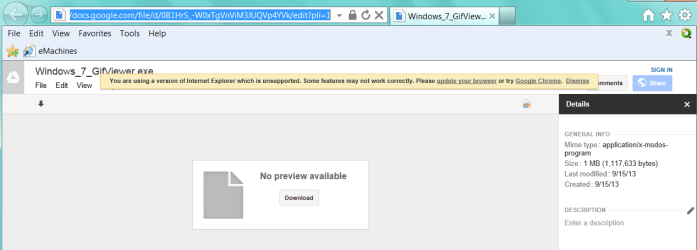
 

Attachments

  • 2014-01-17_175008.png _ try for GifViewer but got this.png
    2014-01-17_175008.png _ try for GifViewer but got this.png
    25.3 KB · Views: 6

My Computer My Computer

At a glance

Microsoft Windows 7 Home Premium 64-bit 7601 ...AMD Athlon(tm) II X2 220 Processor3.00 GBNVIDIA GeForce 6150SE nForce 430
Computer type
PC/Desktop
Computer Manufacturer/Model Number
emachines
OS
Microsoft Windows 7 Home Premium 64-bit 7601 Multiprocessor Free Service Pack 1
CPU
AMD Athlon(tm) II X2 220 Processor
Motherboard
eMachines EL1358G
Memory
3.00 GB
Graphics Card(s)
NVIDIA GeForce 6150SE nForce 430
Sound Card
Realtek High Definition Audio
Screen Resolution
1280 x 1024 x 32 bits (4294967296 colors) @ 60 Hz
Hard Drives
(1) WDC WD10 EADX-22TDHB0 SCSI Disk Device (2) Generic- Multi-Card USB Device
Keyboard
came with PC
Mouse
came with PC
Antivirus
Avast
Browser
IE 9
Other Info
don't know how to get info for the other 5 areas
Tried to use "XP Photo and fax viewer (For GIFS on Win 7)", but when I use the right click "Open With", and chose the "Photo and fax Viewer" I get this message.
Capture_zps76cfcd03.png
 

My Computer My Computer

At a glance

Windows 7 Pro 32 bit
Computer type
PC/Desktop
Computer Manufacturer/Model Number
Dell
OS
Windows 7 Pro 32 bit
To resolve the...

"Error loading C:\Windows\gif\shimgvw.dll
A dynamic link library (DLL) initialization routine failed"

... error, I set the properties of "C:\Windows\gif\rundll32.exe" to run in 'Windows XP SP3 Compatibility Mode'.
 

My Computer My Computer

At a glance

Windows 7 Ultimate x86
Computer type
PC/Desktop
OS
Windows 7 Ultimate x86
To resolve the...

"Error loading C:\Windows\gif\shimgvw.dll
A dynamic link library (DLL) initialization routine failed"

... error, I set the properties of "C:\Windows\gif\rundll32.exe" to run in 'Windows XP SP3 Compatibility Mode'.

It will actually work better if you set it to "Windows Vista" Compatibility Mode. That way you won't get that annoying UAC prompt.
 

My Computer My Computer

At a glance

Windows 7 Ultimate x64
Computer type
Laptop
Computer Manufacturer/Model Number
Dell
OS
Windows 7 Ultimate x64
Hey I downloaded the gifs viewer and all my gifs are slower than what they were before. Do you know how to speed them up?

Yeah, but that is another program, not windows photo viewer.
I corrected the compatibility of rundll32.exe to vista.
I was searching for the folder in the program folder , not in the windows folder.

That said, my problem of the gifs playing at half speed is still there.
my OS is a 64-bit system, is that a problem?

Thanks for the re-write of the original coder's program. But is there a reason as to why an animated gif that plays at normal speed in IE is slow in his/your programs, in regular or slideshow view mode?

Hi corgano,

Not sure if you're still willing to improve this, but there seems to still be some speed issues with some users--including me. I scrolled through this entire thread and the one on the MDL forums, and haven't seen anyone address this or even respond to these posts. To be clear, the issue is that gifs playback slower (doesn't seem as slow as 0.5x as one user suggested) in the Windows PF Viewer than in IE or Chrome.

Thanks

Edit: I am using Windows 8.1 Update 1 Pro x64 and have tried every possible compatibility setting with rundll32.exe
 

My Computer My Computer

At a glance

Windows 8.1 Pro x64 Update 1Intel Core i5-3317U8 GBIntel HD Graphics 4000
Computer type
Laptop
Computer Manufacturer/Model Number
Samsung
OS
Windows 8.1 Pro x64 Update 1
CPU
Intel Core i5-3317U
Memory
8 GB
Graphics Card(s)
Intel HD Graphics 4000
Screen Resolution
1366x768
Hard Drives
Samsung SSD 840 EVO 1TB
Antivirus
Windows Defender
Browser
Google Chrome Canary
To resolve the...

"Error loading C:\Windows\gif\shimgvw.dll
A dynamic link library (DLL) initialization routine failed"

... error, I set the properties of "C:\Windows\gif\rundll32.exe" to run in 'Windows XP SP3 Compatibility Mode'.

It will actually work better if you set it to "Windows Vista" Compatibility Mode. That way you won't get that annoying UAC prompt.

Hi, I'm running Window 7 pro x64, so where do you find "C:\Windows\gif\rundll32.exe" to change the compatibility to Vista?
Thanks John, roukie
 

My Computer My Computer

At a glance

windows 7 professionalHP probook 4510S
OS
windows 7 professional
CPU
HP probook 4510S
Gif's help

Hi Guys,

I just wanted to say thank you to all, for after reading a 100 posts or more, LOL, I finally found how to make windows 7 play the GIF's again...

Thanks again for all the help!

John Young:D:D:D:D:D:D
 

My Computer My Computer

At a glance

windows 7 professionalHP probook 4510S
OS
windows 7 professional
CPU
HP probook 4510S
Installed it, got the pop up that says it should work and opening it again will uninstall. Try opening gifs, doesn't work. Try setting the program as the default, get a pop up asking if I want to uninstall. Do so, install it again, still won't work.
 

My Computer My Computer

At a glance

Windows 7 64 bit
Computer type
PC/Desktop
OS
Windows 7 64 bit
I just noticed the same problem. Obviously my Windows Photo Viewer was not playing the animated GIFs. I tried as suggested, right-clicking & selecting to Open with Windows Explorer,... & that plays the animated GIF.:geek:
 
Last edited:

My Computer My Computer

At a glance

Windows 8 64-BitIntel Core i7-477016-Gig
Computer type
PC/Desktop
Computer Manufacturer/Model Number
Dell
OS
Windows 8 64-Bit
CPU
Intel Core i7-4770
Memory
16-Gig
Browser
IE
@Corgano: might be worth your time to put a link to post #97 in the same post with the download link. then you won't have the same questions repeated over 12 pages.

kinda sucks having to read an entire thread just to find the information from 2 posts...

thanks for this fix :)
 

My Computer My Computer

At a glance

all of the above
OS
all of the above
Thank you..
Had little problems but now all works 100% fine.
Thanks!
 

My Computer My Computer

At a glance

Win 7
Computer type
PC/Desktop
OS
Win 7
Another

@Corgano: I'm another happy user who joined this Forum to say "Thank You!"

I look forward to coming back whenever I have questions, or just to learn!
 

My Computer My Computer

At a glance

Windows 7 Home Premium 64-bit
Computer type
PC/Desktop
Computer Manufacturer/Model Number
HP/500-281
OS
Windows 7 Home Premium 64-bit
This sounded like a perfect solution to the problem as I was going through the thread and reading how it was working for others. Unfortunately, though, at the time of writing, this doesn't work on my system - Windows 7 64-Bit. As an interim solution I installed a third-party image viewer -IrfanView - just to be able to view GIFs animated, but this isn't ideal for obvious reasons. If you could get the program working for my system, Corgano, I'd be very very grateful. Feel free to ask if you want to know any more details about my system.
 

My Computer My Computer

At a glance

Windows 7 Ultimate 64-BitIntel Core i3-2100 @ 3.10GHz (Dual-Core)16GB DDR3Intel Graphics HD (Integrated)
Computer type
PC/Desktop
OS
Windows 7 Ultimate 64-Bit
CPU
Intel Core i3-2100 @ 3.10GHz (Dual-Core)
Motherboard
ASRock H61M-HVS
Memory
16GB DDR3
Graphics Card(s)
Intel Graphics HD (Integrated)
Hard Drives
Kingston 128GB SSD (OS Drive)
HITACHI 1TB HDD (Storage Drive)
@corgano Cheers mate didn't work then checked post 97 an works perfectly thank you
 

My Computer My Computer

At a glance

Windows 7 Home Premium
Computer type
PC/Desktop
Computer Manufacturer/Model Number
Acer
OS
Windows 7 Home Premium
Doesn't work at all. I ran 'XP Photo and fax viewer (For GIFS on Win 7).exe' and it prompted me to now try opening GIFs.

Upon opening, the image is still static. I tried setting rundll32.exe in the C:\Windows\gif folder to run in compatibility mode for Windows 7 and still nothing.

It's a shame as Microsoft really butchered everything with Windows 7. This thread is also all over the place which doesn't help matters.

I'm running W7 Enterprise 64-bit.

EDIT: This worked for me. Thank you!
 

My Computer My Computer

At a glance

Windows 7 64-bit
Computer type
PC/Desktop
OS
Windows 7 64-bit
Thanks!

Used the gifview in tandem with the gif format installer. Works like a charm :D
 

My Computer My Computer

At a glance

Windows 7 Professional X64
Computer type
PC/Desktop
OS
Windows 7 Professional X64
Thanks for this Corgano, Goofwear!

Does anyone know how to associate other file types to the "windows photo and fax viewer" that Corgano's installer makes for gif files? I want it to be used for all the compatible image types.
 

My Computer My Computer

At a glance

Windows 7 Professional 64-bitIntel Core i5-4690K4 GB DDR3 1600 MHzNvidia GTX 970
Computer type
PC/Desktop
Computer Manufacturer/Model Number
Custom Build
OS
Windows 7 Professional 64-bit
CPU
Intel Core i5-4690K
Motherboard
MSI Z97 Gaming 7
Memory
4 GB DDR3 1600 MHz
Graphics Card(s)
Nvidia GTX 970
Back
Top