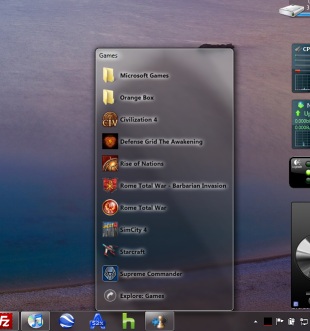
Announcing: 7stacks - stacks for 7 (freeware)

WOW that does look like a nice app, I may give it a try. Thanks for posting it.
 

My Computer My Computer

Computer Manufacturer/Model Number
AsRock
OS
Windows 7 Ultimate 32 Bit
CPU
Core 2 Quad
Motherboard
AsRock
Memory
Corsair 2 x 2GB
Graphics Card(s)
ATI Radeon HD2400 x2
Sound Card
IDK
Monitor(s) Displays
IDK
Hard Drives
500GB
PSU
IDK
Case
XBlade
Cooling
IDK
I am using it on Windows 7 Ultimate RTM 64bit without any problems. hopefully, sometime tomorrow I'll have it working on the laptop (also Ultimate RTM 64bit). It is pretty simple to use - assuming that you have already copied shortcuts into the folder....
Weirdly, I couldn't make it work on my Win7 Professional RTM x64 ... It works perfectly in RC bit though ... When I click create shortcut, it keep saying "the system cannot find the file specified" ... Not sure what's the problem? Any idea? Any pre-requisite software to install for this?
 

My Computer My Computer

OS
Windows 7 7137 x64
Thanks, Sergio. One of the first things I'm going to add in v1.1 is text under the icons when in Grid mode. I will also be adding image previews (for jpg, gif, png, and bmp). I would love to hear suggestions from anyone.

Looks interesting. I'm going to try it. I don't see the words "64 bit" anywhere. It works on both 32 and 64 bit I take it?
 

My Computer My Computer

Computer Manufacturer/Model Number
HP Media Center
OS
Windows 7 32 bit
CPU
AMD 5200+ dual core
Memory
2 GB
Graphics Card(s)
NVidia GeForce 6150SE 128 MB
Monitor(s) Displays
CRT
Screen Resolution
1280x1024
Hard Drives
500 GB Sata internal :

SIIG USB 3.0 docking stations w/WD Caviar Black 6 Gb/s drives
Keyboard
PS/2
Mouse
PS/2 Wheel Mouse
Other Info
SIIG USB 3.0 PCIexpress card.
If anyone using the RTM (build 7600) is having problems, and is willing to be a guinea pig, please email me via my website's contact form.

Thanks for the program. If I could make a suggestion.. if you must use the BrowseForFolder Dialog, could you include the text input? Thanks. :)

edit: btw is there some way to change the default options checked when making a new stack? Almost all the redos are because I forget to uncheck the Show Explorer and Browse Subfolders options. If they were off by default seems it would be a lot easier.

The stacks look very cool. :)
 
Last edited:

My Computer My Computer

Computer Manufacturer/Model Number
HP Media Center
OS
Windows 7 32 bit
CPU
AMD 5200+ dual core
Memory
2 GB
Graphics Card(s)
NVidia GeForce 6150SE 128 MB
Monitor(s) Displays
CRT
Screen Resolution
1280x1024
Hard Drives
500 GB Sata internal :

SIIG USB 3.0 docking stations w/WD Caviar Black 6 Gb/s drives
Keyboard
PS/2
Mouse
PS/2 Wheel Mouse
Other Info
SIIG USB 3.0 PCIexpress card.
looks good man.

works fine under my OS
 

My Computer My Computer

OS
Windows 7 Pro x64
CPU
Intel Core 2 Quad Q6600 [2.4Ghz] OC speeds 3.2Ghz
Motherboard
ASUS P5QL-E
Memory
Kingston HyperX KHX8500D2K2-4G 1066Mhz 8GB (2GB*4)
Graphics Card(s)
ASUS GeForce GTX 550 Ti
Sound Card
OnBoard
Monitor(s) Displays
Samsung SyncMaster T220
Screen Resolution
1680*1050
Hard Drives
Intel SSD 320 Series 80GB
PSU
Corsair TX750W
Case
CM 690 II
Cooling
Cooler Master Hyper 212+
Keyboard
Logitech G510
Mouse
Logitech G400
Internet Speed
50Mb :D
Can someone post some screenshots of it?
 

My Computer My Computer

Computer Manufacturer/Model Number
Samsung NP530U4B-S02IN
OS
Windows® 8 Pro (64-bit)
CPU
Intel® Core™ i5 Processor 2467M (1.60GHz, 3MB L3 Cache)
Motherboard
Samsung Electronics
Memory
6GB DDR3 System Memory at 1,333MHz (on BD 4GB + 2GB x 1)
Graphics Card(s)
AMD Radeon™ HD7550M 1GB DDR3 (Ext. Graphic)
Sound Card
Realtek High Definition Audio
Monitor(s) Displays
35.56cm (14.0) SuperBright 300nit HD LED Display
Screen Resolution
1366x768
Hard Drives
1TB S-ATA II Hard Drive (5400RPM) with ExpressCache 16GB SSD
Internet Speed
sucks
Antivirus
Microsoft Security Essentials
Browser
Google Chrome (Sync enabled)
screenshot are on the website(see 1st post)

1.jpg


clicky
 

My Computer My Computer

OS
Windows 7 Pro x64
CPU
Intel Core 2 Quad Q6600 [2.4Ghz] OC speeds 3.2Ghz
Motherboard
ASUS P5QL-E
Memory
Kingston HyperX KHX8500D2K2-4G 1066Mhz 8GB (2GB*4)
Graphics Card(s)
ASUS GeForce GTX 550 Ti
Sound Card
OnBoard
Monitor(s) Displays
Samsung SyncMaster T220
Screen Resolution
1680*1050
Hard Drives
Intel SSD 320 Series 80GB
PSU
Corsair TX750W
Case
CM 690 II
Cooling
Cooler Master Hyper 212+
Keyboard
Logitech G510
Mouse
Logitech G400
Internet Speed
50Mb :D
Looks good, I'd like to try this later on. Thnx a lot for making it.
 

My Computer My Computer

Computer Manufacturer/Model Number
SevenForums
OS
7 Prof
CPU
Q9550
Motherboard
Maximus II Formula
Memory
2x2 Mushkin Ascent 8500
Graphics Card(s)
4870X2
Sound Card
X-Fi Xtreme Gamer
Monitor(s) Displays
LN32A550
Screen Resolution
1920x1080
Hard Drives
Intel G2 80GB
5x1TB
PSU
Corsair 1000
Case
Cosmos
Cooling
Yates^13
Keyboard
G15v1
Mouse
MX518
Internet Speed
6Mbps
screenshot are on the website(see 1st post)

Just a note:

I have a dark wallpaper similar to the image. But you can select white text on black background. Makes it much easier to read the entries in the stack. Don't be discouraged by the screen shot. The white text stands out nicely.
 

My Computer My Computer

Computer Manufacturer/Model Number
HP Media Center
OS
Windows 7 32 bit
CPU
AMD 5200+ dual core
Memory
2 GB
Graphics Card(s)
NVidia GeForce 6150SE 128 MB
Monitor(s) Displays
CRT
Screen Resolution
1280x1024
Hard Drives
500 GB Sata internal :

SIIG USB 3.0 docking stations w/WD Caviar Black 6 Gb/s drives
Keyboard
PS/2
Mouse
PS/2 Wheel Mouse
Other Info
SIIG USB 3.0 PCIexpress card.
Not Working with Comodo Firewall

Ok. Installed it on my Windows 7 Ultimate and created the stack. But when I clicked any of the items in the stack, my firewall, which is comodo asks for permission. When I click allow nothing happens. But if the firewall is exited, the program inside the stack works. So is there any conflict with Comodo ?
 

My Computer My Computer

OS
Windows 7 Ultimate
Ok. Installed it on my Windows 7 Ultimate and created the stack. But when I clicked any of the items in the stack, my firewall, which is comodo asks for permission. When I click allow nothing happens. But if the firewall is exited, the program inside the stack works. So is there any conflict with Comodo ?
I have it running with Comodo just fine, but im not running defense plus either. Just the firewall.
 

My Computer My Computer

OS
Windows 7 Ultimate x64 RTM
CPU
Intel Core i7 860
Motherboard
MSI P55-GD64
Memory
2x2GB G.Skill Ripjaws
Graphics Card(s)
Sapphire Raedon HD 4890
Monitor(s) Displays
Dell 2208 WFP
Screen Resolution
1680x1050
Hard Drives
2x80 GB Intel X25M G2 SSDs RAID0
1x1 TB WD Caviar Black
1x1 TB WD Caviar Green
1x2 TB Caviar Black
1x2 TB Caviar Green
PSU
Corsair HX520
Case
Thermaltake Mozart TX
Keyboard
Saitek Cyborg
Mouse
Razer Copperhead
Internet Speed
6 Mb/s
Ok. Installed it on my Windows 7 Ultimate and created the stack. But when I clicked any of the items in the stack, my firewall, which is comodo asks for permission. When I click allow nothing happens. But if the firewall is exited, the program inside the stack works. So is there any conflict with Comodo ?
I have it running with Comodo just fine, but im not running defense plus either. Just the firewall.

So what's your firewall Security Level and Defense+ Security Level?
 

My Computer My Computer

OS
Windows 7 Ultimate
Ok. Installed it on my Windows 7 Ultimate and created the stack. But when I clicked any of the items in the stack, my firewall, which is comodo asks for permission. When I click allow nothing happens. But if the firewall is exited, the program inside the stack works. So is there any conflict with Comodo ?
I have it running with Comodo just fine, but im not running defense plus either. Just the firewall.

So what's your firewall Security Level and Defense+ Security Level?
My Defense Plus is disabled. This has to be the root of your problem(not that defense + needs to be disabled but you might have blocked something) as this as a network connection will have no effect on the program other then aut updates(if it has auto updates, i forgot).
 

My Computer My Computer

OS
Windows 7 Ultimate x64 RTM
CPU
Intel Core i7 860
Motherboard
MSI P55-GD64
Memory
2x2GB G.Skill Ripjaws
Graphics Card(s)
Sapphire Raedon HD 4890
Monitor(s) Displays
Dell 2208 WFP
Screen Resolution
1680x1050
Hard Drives
2x80 GB Intel X25M G2 SSDs RAID0
1x1 TB WD Caviar Black
1x1 TB WD Caviar Green
1x2 TB Caviar Black
1x2 TB Caviar Green
PSU
Corsair HX520
Case
Thermaltake Mozart TX
Keyboard
Saitek Cyborg
Mouse
Razer Copperhead
Internet Speed
6 Mb/s
For the life of me I cannot find where you got the Games folder icon to use with your stack Alastria. Can you please let me know where you located it? Thanks.
 

My Computer My Computer

OS
Windows 7
This app is great! The only thing I'd like to see is for the program to integrate into explorer so I can drag/drop.

Unfortunately though, I'm getting a bug when right clicking icons. It doesn't happen all the time, but it reports a memory error whenever I try to right click a good 80% of the time.

I'm running 64bit if that matters.
 

My Computer My Computer

OS
Windows 7 Ultimate 64 bit
The 1.5 beta 1 is just out. But Alastria, I still having problem running it in my Windows 7 Professional 64 bit, like in the old 1.2. When I click on create shortcut on desktop, it says the system cannot find specified files. Is there any pre-requisite software needed for 7stacks?

Perhaps screenshot can tell the problem better ...


I had tried every combination of settings and still no avail. It works pretty well in W7 Beta ><
 
Last edited:

My Computer My Computer

OS
Windows 7 7137 x64
Working OK here .. only problem I see is that it still seems confused about my taskbar being set at 'Autohide' .. I think someone else mentioned this way back at the beginning of this thread.

Nice app though .. well done Alastria!!
 

My Computer My Computer

OS
Windows 7 64bit RTM
CPU
AMD Athlon 64 X2 3800+
Motherboard
ASUS M2N-E SLI
Memory
4G Dual channel
Graphics Card(s)
POV GeForce 7600 GT
Sound Card
USB 2.1
Monitor(s) Displays
Samsung 17 in LCD
Hard Drives
80G Western Digital
250G Western Digital
500G Buffalo Drivestation
I'm running this on Windows 7; like it a lot, but I get the UAC dialog every time I launch it. Any ideas how to stop this? Makes it pointless to use if I have to do multiple actions to use it.

m
 

My Computer My Computer

Computer Manufacturer/Model Number
Lenovo T510
OS
Windows 7 Ultimate
CPU
i5 2.53 GHz
Memory
4 GB
Graphics Card(s)
NVS 3100M
hi,Alastria. i really love this app.but i've got a problem:huh: when i push the button create shortcut on desktop it says that "the system cannot find the file specified" and i don't know how to solve this, plz help me thx!:D
 

My Computer My Computer

OS
win 7
@jassonaxz

I too have this problem and emailed the author. He mentioned he knew about this problem and was working on the new version to fix it, but it was last year reply. Seems like there is no any news or update from him in the official site until now, I guess we can just forget about this software, unfortunately.
 

My Computer My Computer

OS
Windows 7 7137 x64
Back
Top