
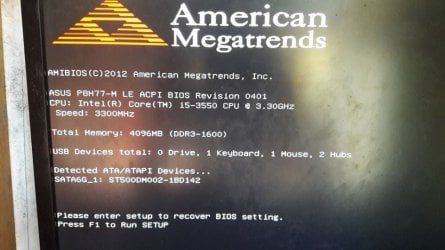
C chubalz New member Member VIP Local time 12:26 AM Messages 131 Jan 27, 2017 #1 Whenever i start my computer this bios settings always appear. I already load optimized default still no fix Attachments 16298588_1429749680369376_499628866128658236_n.jpg 61.8 KB · Views: 0 My Computer OSWindows 7 Ultimate 64 Bit SP1CPUPentium Dual Core E6500 2.93 GhzMemory2 Gig DDR2Graphics Card(s)ATI Radeon HD 4300 SeriesHard Drives160 Gig
Whenever i start my computer this bios settings always appear. I already load optimized default still no fix
HAVOC New member Guru VIP Local time 12:26 AM Messages 1,355 Location Connecticut Jan 27, 2017 #2 Have you replaced the CMOS battery? My Computer Computer typePC/DesktopComputer Manufacturer/Model Numbercustom buildOSWindows 7 Professional 64bitCPUIntel i7-5960XMotherboardEVGA X99 ClassifiedMemory64GB Corsair Dominator 2400MHzGraphics Card(s)3 EVGA GTX980'sSound Cardon boardMonitor(s) Displays3 Dell E2715H 27"Screen Resolution1920x1080 (5760x1080)Hard DrivesSamsung 950 Pro 1TB M.2 SSD, Western Digital Black 2TB HDD's x5 Western Digital Black 1TB HDD's x3PSUCorsair AX1200iCaseCorsair 750DCoolingCorsair H110i GTKeyboardCorsair K70MouseCorsair M45Internet Speed250 down/10 upAntivirusMicrosoft Security EssentialsBrowserIE 11, Google Chrome
C chubalz New member Member VIP Thread Starter Local time 12:26 AM Messages 131 Jan 27, 2017 #3 Not yet. My Computer OSWindows 7 Ultimate 64 Bit SP1CPUPentium Dual Core E6500 2.93 GhzMemory2 Gig DDR2Graphics Card(s)ATI Radeon HD 4300 SeriesHard Drives160 Gig
torchwood Well-known member Guru Gold Member VIP Local time 6:26 AM Messages 7,391 Jan 27, 2017 #4 and have you just updated your Bios, the TO RECOVER Bios settings, message would imply its failed. Roy My Computer Computer typePC/DesktopComputer Manufacturer/Model Numbermedionl/Aspire 6930G/acer x55aOSW7 home premium 32bit/W7HP 64bit/w10 tp insider ringCPUE5300 dual coreMotherboardmedion MS7366Memory3gbGraphics Card(s)Nvidia Geforce 7100 Nforce 630iMonitor(s) DisplaysavixcInternet Speedn (isp resticted to 72)Antivirusmse/pandsBrowserpalemoonOther InfoBelkin Fd7050 n USB using Railink RT2870 drivers, more upto date
and have you just updated your Bios, the TO RECOVER Bios settings, message would imply its failed. Roy
C chubalz New member Member VIP Thread Starter Local time 12:26 AM Messages 131 Jan 27, 2017 #5 I didnt update my bios My Computer OSWindows 7 Ultimate 64 Bit SP1CPUPentium Dual Core E6500 2.93 GhzMemory2 Gig DDR2Graphics Card(s)ATI Radeon HD 4300 SeriesHard Drives160 Gig
HAVOC New member Guru VIP Local time 12:26 AM Messages 1,355 Location Connecticut Jan 28, 2017 #6 You should install a new battery first. Update your BIOS (we can help with that if needed). Is the time in Windows usually wrong? Can you boot into Windows? My Computer Computer typePC/DesktopComputer Manufacturer/Model Numbercustom buildOSWindows 7 Professional 64bitCPUIntel i7-5960XMotherboardEVGA X99 ClassifiedMemory64GB Corsair Dominator 2400MHzGraphics Card(s)3 EVGA GTX980'sSound Cardon boardMonitor(s) Displays3 Dell E2715H 27"Screen Resolution1920x1080 (5760x1080)Hard DrivesSamsung 950 Pro 1TB M.2 SSD, Western Digital Black 2TB HDD's x5 Western Digital Black 1TB HDD's x3PSUCorsair AX1200iCaseCorsair 750DCoolingCorsair H110i GTKeyboardCorsair K70MouseCorsair M45Internet Speed250 down/10 upAntivirusMicrosoft Security EssentialsBrowserIE 11, Google Chrome
You should install a new battery first. Update your BIOS (we can help with that if needed). Is the time in Windows usually wrong? Can you boot into Windows?