Any software for removing bad sector

navin007

New member
Local time
5:31 PM
Messages
12
Hello Friends,
I have 3 hdd two sata 1 ide all three of them cannot install any windows accept winxp and cannot install Microsoft office 2007 or further so when the troubleshooting process started it came out through a seatools cd of Seagate website downloaded for Seagate hdd I ran it and got that it detected a badsector after the last 90% scan so I need a software or steps through which I can repair it .


please help me
 

My Computer

Computer type
PC/Desktop
Computer Manufacturer/Model Number
custom build
OS
windows7
CPU
AMD Phenom 2x2 555
Motherboard
GA880gm-usb3
Memory
6gb
Graphics Card(s)
9800gt
Hard Drives
500gb x2
Antivirus
kaspersky
Browser
mozila
Sector failures are hardware related -- and despite what may read, software can NOT repair hardware failures.
 

My Computer

Computer type
PC/Desktop
Computer Manufacturer/Model Number
Custom
OS
Win7 Pro 32-bit, Win8 Pro 32-bit
CPU
AMD Phenom II X6 1090T
Motherboard
Gigabyte
Memory
4GB ddr3 1300
Graphics Card(s)
AMD HD 4290 onboard
Sound Card
Builtin Realtek HD Audio
Monitor(s) Displays
Samsung 24" widescreen, LG 23" widescreen
Screen Resolution
1920x1200/1920x1080
Hard Drives
Kingston 256GB SSD
Keyboard
Logitech Illuminated Keyboard
Mouse
Logitech M705 wireless mouse
Antivirus
Norton Av 2013
Browser
IE v10
I agree with "Mark Phelps". I have just ditched a 2TB HDD.
How old are your discs ? I made the mistake of recycling a very old HDD into a near new rig.
... BUT ...
I have been looking at "Spinrite", not yet downloaded because it is not cheap about us$90. Unfortunately no trial version. But many users swear by it.

I am still in investigation/homework stage ... so far downloaded the MP3 tutorials 54mbUsing "duck" search engine finds best results:- https://duckduckgo.com/?q=spinrite&kaa=p
- (the kaa=p parameter ensures visited links are colored)

Hope this is of some help :)
 
Last edited:

My Computer

Computer type
PC/Desktop
Computer Manufacturer/Model Number
Toshiba, Lenovo (laptops) + 4 rigs
OS
XP Pro (x86) | 7 HP (x86) & (x64) | 7 Pro (x64)
the 3 of the hdd are too old and 2 of them I found in junk area but they are at present been used as extra drive but not for installation here our company is not ready to buy any hdd because our company doesn't have any fund to expence on so they have told me that you manage now it is with the IT manager and I have to repair it
 

My Computer

Computer type
PC/Desktop
Computer Manufacturer/Model Number
custom build
OS
windows7
CPU
AMD Phenom 2x2 555
Motherboard
GA880gm-usb3
Memory
6gb
Graphics Card(s)
9800gt
Hard Drives
500gb x2
Antivirus
kaspersky
Browser
mozila
Hi navin007 :)

Sounds like you are confronted by a difficult situation.
If the old HDDs are mechanically faulty, there is no work around.

A few faulty sectors can be reallocated sometimes, but if the disc surface is in an advanced stage of disintegration, a lot of faulty sectors, no amount of wishing will remediate the disc.

Did you have a look at Spinrite ? There are free alternatives from what I have read so far.
 

My Computer

Computer type
PC/Desktop
Computer Manufacturer/Model Number
Toshiba, Lenovo (laptops) + 4 rigs
OS
XP Pro (x86) | 7 HP (x86) & (x64) | 7 Pro (x64)
If there is only a couple of bad sectors in the surface, you don't need to buy any expensive tools like "Spinrite" to fix them. "Seatools for DOS" is capable to repair disc manufactured by "Seagate".

1. Make sure you are using the latest version of "Seatool" - SeaTools for DOS | Seagate

2. Boot from the CD and run a "Long Test".

seatools-2.png


Note the total number of errors it founds. If there are too many errors ( more than 10 bad sectors ), it is better not to attempt repairing the disk.

3.When the scan finishes, choose "Repair this and All remaining".

von3a0.jpg


4. Rerun the test and make sure it passes without showing errors.


WD disks can be also repaired by the same way. Run "Extended" test with "WD Data Lifeguard Diagnostics" and it will auto fix the bad sectors even without the knowledge of the user.


What these tools do is nothing but marking the bad sectors as unusable in an internal table called "G-list" and allocate some spare sectors from the hidden sector reserve as replacements. Since had disks are using "Logical Block Addressing", use or OS will never know about this. To them the drive will appears to be fixed.
 

My Computer

Computer type
PC/Desktop
OS
Windows 7 Ultimate x64
i used the seatools and did long scan when I gone to fix error it gave the error cannot fix I think so there might be a hardware failure and the hdd's are out of warranty
 

My Computer

Computer type
PC/Desktop
Computer Manufacturer/Model Number
custom build
OS
windows7
CPU
AMD Phenom 2x2 555
Motherboard
GA880gm-usb3
Memory
6gb
Graphics Card(s)
9800gt
Hard Drives
500gb x2
Antivirus
kaspersky
Browser
mozila
many time I noted that I am not able to move data and even not able to delete so this may be the problem caused.
 

My Computer

Computer type
PC/Desktop
Computer Manufacturer/Model Number
custom build
OS
windows7
CPU
AMD Phenom 2x2 555
Motherboard
GA880gm-usb3
Memory
6gb
Graphics Card(s)
9800gt
Hard Drives
500gb x2
Antivirus
kaspersky
Browser
mozila
i used the seatools and did long scan when I gone to fix error it gave the error cannot fix I think so there might be a hardware failure and the hdd's are out of warranty


How may errors it detected ?. If there are too may, there is no point in trying to fix.
 

My Computer

Computer type
PC/Desktop
OS
Windows 7 Ultimate x64
only one that also in last 90% of scanning and it cannot erase the data also due to that bad sector.
 

My Computer

Computer type
PC/Desktop
Computer Manufacturer/Model Number
custom build
OS
windows7
CPU
AMD Phenom 2x2 555
Motherboard
GA880gm-usb3
Memory
6gb
Graphics Card(s)
9800gt
Hard Drives
500gb x2
Antivirus
kaspersky
Browser
mozila
Hi

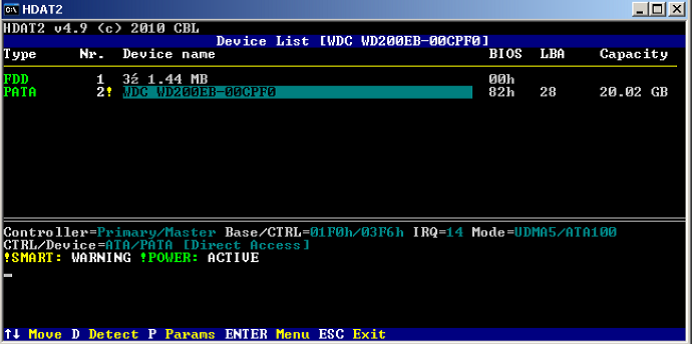
If "Seatool" can't fix a Seagate HDD, it's condition will be bad and i wouldn't recommend using it. However as a learning experience, you can give a try to HDAT2.

1. Download HDAT2 from http://www.hdat2.com/files/hdat2iso_50_lite.exe

2. Double click the self extracting archive file to extract the ISO file. Then burn the ISO to a blank CD.

3. Boot from the CD and select your HDD for testing.

hdat1.png


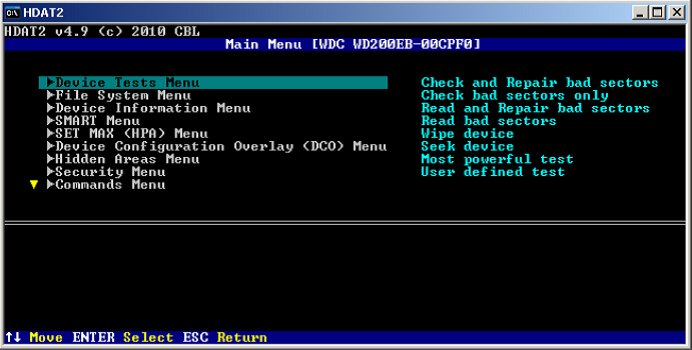
4. From the "Devices Test Menu" choose the option "Check and Repair Bad Sectors".

hdat2.png


Depending on the size of disk and the number of bad sectors, this will take sometime to complete. After it is successful in repairing bad sector, rerun "Seatool" and make sure the disk passes the surface test.
 

My Computer

Computer type
PC/Desktop
OS
Windows 7 Ultimate x64
Back
Top