Any Unnecessary?

maranatha4u

New member
Member
VIP
Local time
12:50 PM
Messages
157
Location
Lakeland, Florida USA
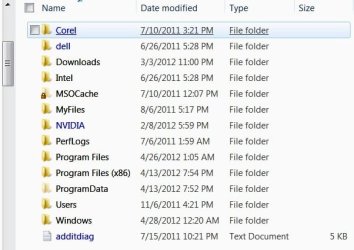
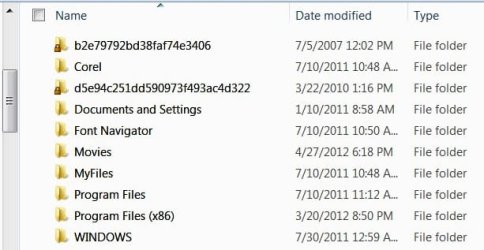
I have a dual partition PC, A Dell Optiplex 760. I just wondered if anyone could tell me how - OF THE ITEMS LISTED ON EACH DRIVE (2 screenshots attached, one for the C drive and one for the E drive) whether I could eliminate any items to free up some drive space.
 

Attachments

  • CDRIVE.jpg
    CDRIVE.jpg
    36.7 KB · Views: 10
  • EDRIVE.jpg
    EDRIVE.jpg
    29.6 KB · Views: 15

My Computer

Computer Manufacturer/Model Number
Dell Optiplex 760
OS
Windows 7 Pro, 64-bit
I have a dual partition PC, A Dell Optiplex 760. I just wondered if anyone could tell me how - OF THE ITEMS LISTED ON EACH DRIVE (2 screenshots attached, one for the C drive and one for the E drive) whether I could eliminate any items to free up some drive space.
Was this running Windows XP previously? If you're fine with the way Windows 7 is working now, and you want to get rid of XP, then you can use the Disk Cleanup utility to remove your previous operating system. If on the other hand you want to stay with XP and want to remove Windows 7, then you can boot into XP and do the same thing against Windows 7, although Windows XP might not be aware of all of the new Windows 7 folders.
 

My Computer

Computer Manufacturer/Model Number
Homebuilt
OS
Windows 7 Ultimate x64
CPU
AMD Phenom II X6 1100T Black Edition
Motherboard
Asus M4A785-M
Memory
8GB DDR2 Corsair PC2-6400
Graphics Card(s)
AMD Radeon HD 6870
Monitor(s) Displays
LG W2343 23" monitor
Screen Resolution
1920 x 1080 (1080p)
Hard Drives
system boot: Corsair Force 3 240GB.
additional: Seagate 750GB, Samsung 750GB, Hitachi 1.0TB, WDC 1.5TB, Seagate 1.5TB.
PSU
OCZ-ZT750W
Case
Cooler Master Haf X
Keyboard
Logitech 920 Illuminated Keyboard
Internet Speed
25Mbps
bbbl,
A snapshot of DiskManagement output would help.

HOW TO POST A SNAPSHOT OF DISK MANAGEMENT DISPLAY
Run disk management:
WIN |
type DISKMGMT.MSC | ENTER
WIN=
key with Microsoft logo on top.


Maximize the output of Disk Management:
ALT-Spacebar
key combo | X key (selects Maximize) |
Drag the field separators (such as between Status and Capacity) to show entire field.


Make a snapshot:
WIN |
type SNIPPING | ENTER | New
Drag the cursor around the area you want to snip.
File | Save as | select save location and name | Save


Post the snapshot:
Post a File or Screenshot in Seven Forums

=====================================
To see what's using how much space on your disk:
JAM Software - Windows Freeware

=========================================

Please upload these files:
Install CCleaner:
CCleaner - PC Optimization and Cleaning - Free Download

list of STARTUP PROGRAMS

CCleaner | Tools
icon | Startup button | Windows tab |
click on Save to text file button (bottom right side) |
accept Startup.txt as file name | SAVE button

list of SCHEDULED TASKS

CCleaner | Tools
icon | Startup button | Scheduled Tasks tab |
click on Save to text file button (bottom right side) |
enter Scheduled Tasks as File name | Save button

List of INSTALLED PROGRAMS

CCleaner | Tools
icon | Uninstall button |
click on Save to text file button (bottom right side) |
accept install.txt as File name | Save button


UPLOAD the startup.txt file
UPLOAD the Scheduled Tasks.txt file
UPLOAD the install.txt file.

HOW TO UPLOAD
Post a File or Screenshot in Seven Forums

 

My Computer

Computer Manufacturer/Model Number
Toshiba Satellite S875D-S7239 laptop
OS
MS Windows 7 Ultimate SP1 64-bit
CPU
AMD A10-4600M
Motherboard
AMD Pumori (Socket FT1)
Memory
6.00 GB Dual-Channel DDR3 @ 798MHz (11-11-12-28)
Graphics Card(s)
AMD Radeon HD 7660G
Sound Card
High Definition Audio Device
Monitor(s) Displays
Generic PnP Monitor (1600x900@60Hz)
Screen Resolution
1600x900@60Hz
Hard Drives
SSD 119GB Corsair CSSD-V128GB2 ATA Device
Keyboard
Standard PS/2 Keyboard
Mouse
HP Wireless Optical Mobile Mouse Model FHA-3410
Internet Speed
What the local pub, local coffee shop offers.
Other Info
Optical Drive:MATSHITA BD-CMB UJ160B ATA Device


Also have an Asus ha1002xp netbook with Win 7 Ultimate installed.
I have a dual partition PC, A Dell Optiplex 760. I just wondered if anyone could tell me how - OF THE ITEMS LISTED ON EACH DRIVE (2 screenshots attached, one for the C drive and one for the E drive) whether I could eliminate any items to free up some drive space.
Was this running Windows XP previously? If you're fine with the way Windows 7 is working now, and you want to get rid of XP, then you can use the Disk Cleanup utility to remove your previous operating system. If on the other hand you want to stay with XP and want to remove Windows 7, then you can boot into XP and do the same thing against Windows 7, although Windows XP might not be aware of all of the new Windows 7 folders.
______________________________________________________________

No, this never had XP - just Windows 7 Pro. But, I do the CC Cleaner and see if this help. Thanks so much,
 

My Computer

Computer Manufacturer/Model Number
Dell Optiplex 760
OS
Windows 7 Pro, 64-bit
Thanks So Much

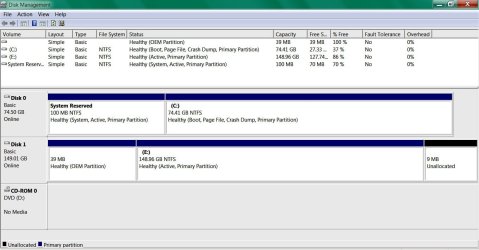
Thanks so much for your help here. Here's the screenshot as you suggested I do below. I do us CCLeaner very frequently, too.


________________________________________________________________
bbbl,
A snapshot of DiskManagement output would help.

HOW TO POST A SNAPSHOT OF DISK MANAGEMENT DISPLAY
Run disk management:
WIN |
type DISKMGMT.MSC | ENTER
WIN=
key with Microsoft logo on top.


Maximize the output of Disk Management:
ALT-Spacebar
key combo | X key (selects Maximize) |
Drag the field separators (such as between Status and Capacity) to show entire field.


Make a snapshot:
WIN |
type SNIPPING | ENTER | New
Drag the cursor around the area you want to snip.
File | Save as | select save location and name | Save


Post the snapshot:
Post a File or Screenshot in Seven Forums

=====================================
To see what's using how much space on your disk:
JAM Software - Windows Freeware

=========================================

Please upload these files:
Install CCleaner:
CCleaner - PC Optimization and Cleaning - Free Download

list of STARTUP PROGRAMS

CCleaner | Tools
icon | Startup button | Windows tab |
click on Save to text file button (bottom right side) |
accept Startup.txt as file name | SAVE button

list of SCHEDULED TASKS

CCleaner | Tools
icon | Startup button | Scheduled Tasks tab |
click on Save to text file button (bottom right side) |
enter Scheduled Tasks as File name | Save button

List of INSTALLED PROGRAMS

CCleaner | Tools
icon | Uninstall button |
click on Save to text file button (bottom right side) |
accept install.txt as File name | Save button


UPLOAD the startup.txt file
UPLOAD the Scheduled Tasks.txt file
UPLOAD the install.txt file.

HOW TO UPLOAD
Post a File or Screenshot in Seven Forums
 

Attachments

  • DISK MGMT SCREENSHOT.jpg
    DISK MGMT SCREENSHOT.jpg
    85.3 KB · Views: 21

My Computer

Computer Manufacturer/Model Number
Dell Optiplex 760
OS
Windows 7 Pro, 64-bit
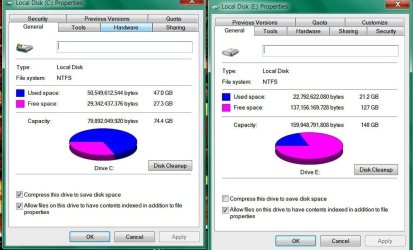
Karl, here's another screenshot - both C & E drives (panoramic screenshot).

_____________________________________________________________________

bbbl,
A snapshot of DiskManagement output would help.

HOW TO POST A SNAPSHOT OF DISK MANAGEMENT DISPLAY
Run disk management:
WIN |
type DISKMGMT.MSC | ENTER
WIN=
key with Microsoft logo on top.


Maximize the output of Disk Management:
ALT-Spacebar
key combo | X key (selects Maximize) |
Drag the field separators (such as between Status and Capacity) to show entire field.


Make a snapshot:
WIN |
type SNIPPING | ENTER | New
Drag the cursor around the area you want to snip.
File | Save as | select save location and name | Save


Post the snapshot:
Post a File or Screenshot in Seven Forums

=====================================
To see what's using how much space on your disk:
JAM Software - Windows Freeware

=========================================

Please upload these files:
Install CCleaner:
CCleaner - PC Optimization and Cleaning - Free Download

list of STARTUP PROGRAMS

CCleaner | Tools
icon | Startup button | Windows tab |
click on Save to text file button (bottom right side) |
accept Startup.txt as file name | SAVE button

list of SCHEDULED TASKS

CCleaner | Tools
icon | Startup button | Scheduled Tasks tab |
click on Save to text file button (bottom right side) |
enter Scheduled Tasks as File name | Save button

List of INSTALLED PROGRAMS

CCleaner | Tools
icon | Uninstall button |
click on Save to text file button (bottom right side) |
accept install.txt as File name | Save button


UPLOAD the startup.txt file
UPLOAD the Scheduled Tasks.txt file
UPLOAD the install.txt file.

HOW TO UPLOAD
Post a File or Screenshot in Seven Forums
 

Attachments

  • C&E DRIVES.jpg
    C&E DRIVES.jpg
    77.1 KB · Views: 13

My Computer

Computer Manufacturer/Model Number
Dell Optiplex 760
OS
Windows 7 Pro, 64-bit
Does the PC boot properly into Windows 7 with the E drive completely disconnected?

In your opinion, what is the purpose of the E drive? Do you keep any of your personal files on E, or are they all on C?
 

My Computer

Computer type
PC/Desktop
Computer Manufacturer/Model Number
Ignatz Special; 4 speed manual gearbox; factory air conditioning; one of one
OS
Windows 7 Home Premium SP1, 64-bit
CPU
Intel Skylake i5-6600K, not overclocked
Motherboard
AsRock Z170M Extreme 4, micro ATX
Memory
8 GB HyperX DDR4-2666 (2 x 4 GB)
Graphics Card(s)
none; graphics are integrated on CPU
Sound Card
onboard: Realtek ALC1150; external: USB Behringer UF0-202
Monitor(s) Displays
Dell S2340M 23 inch IPS
Screen Resolution
1600 x 900
Hard Drives
System: Crucial MX100 series SSD, 128 GB;
Data: Samsung Spinpoint 103SJ, 1 TB;
Backup: WD Caviar Green WD30EZRX-00D8PB0, 3 TB
PSU
Rosewill SilentNight 500 watt fanless, semi-modular
Case
Antec Solo II
Cooling
Noctua NH-U12S; Noctua F12 intake, Noctua S12A exhaust
Keyboard
Microsoft 200 6JH-00001 USB
Mouse
Dell or Microsoft optical wired; USB
Antivirus
Microsoft Security Essentials and Malwarebytes Premium
Browser
Pale Moon
Other Info
All fans PWM; speeds at idle: CPU circa 500 rpm; intake circa 600 rpm; exhaust circa 600 rpm; CPU temps 27 idle and 47 C load in a warm room (27 C/81 F) when running Intel Extreme Tuning Utility stress test.
There are always ways to make some room. But first we should know what's on those partitions. In any case, those system files you listed for C must stay. On E, I am not sure what's on there. Maybe you can clarify. There is a bootmgr on E - how come.
 

My Computer

Computer Manufacturer/Model Number
HP, Dell, Gateway, Toshiba - 4 laptops and 2 desktops
OS
Vista, Windows7, Mint Mate, Zorin, Windows 8
CPU
from 1.6GHz Duo to i7
Monitor(s) Displays
2x HP w2207
Hard Drives
5x HDD, 7x SSD, 12x Externals
Keyboard
with trackball - no mices
Mouse
Trackball mice
Internet Speed
DSL 6000
  • Like
Reactions: Arc
Anything on that E drive you want? I see no signs of a boot mgr on your E. What I see is that the E could receive bootmgr files (the active flag is set).
 

My Computer

Computer Manufacturer/Model Number
Toshiba Satellite S875D-S7239 laptop
OS
MS Windows 7 Ultimate SP1 64-bit
CPU
AMD A10-4600M
Motherboard
AMD Pumori (Socket FT1)
Memory
6.00 GB Dual-Channel DDR3 @ 798MHz (11-11-12-28)
Graphics Card(s)
AMD Radeon HD 7660G
Sound Card
High Definition Audio Device
Monitor(s) Displays
Generic PnP Monitor (1600x900@60Hz)
Screen Resolution
1600x900@60Hz
Hard Drives
SSD 119GB Corsair CSSD-V128GB2 ATA Device
Keyboard
Standard PS/2 Keyboard
Mouse
HP Wireless Optical Mobile Mouse Model FHA-3410
Internet Speed
What the local pub, local coffee shop offers.
Other Info
Optical Drive:MATSHITA BD-CMB UJ160B ATA Device


Also have an Asus ha1002xp netbook with Win 7 Ultimate installed.
Does the PC boot properly into Windows 7 with the E drive completely disconnected?

In your opinion, what is the purpose of the E drive? Do you keep any of your personal files on E, or are they all on C?
_______________________________________________________________________

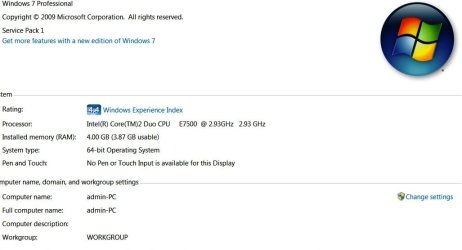
I really have no clue, ignatzatsonic. I purchased the computer from some other original owner. Attached is a screenshot of the specs. All the personal files are on the C drive. I had HEARD that putting certain files on one drive and certain ones on the other would improve performance; this is just what I had heard anyways.
 

Attachments

  • PC SPECS SCREENSHOT.jpg
    PC SPECS SCREENSHOT.jpg
    39 KB · Views: 14

My Computer

Computer Manufacturer/Model Number
Dell Optiplex 760
OS
Windows 7 Pro, 64-bit
Does the PC boot properly into Windows 7 with the E drive completely disconnected?

If you boot into Windows 7 with E disconnected, can you then use all your programs as you normally would?

Do you knowingly install any programs to the E drive?

Do you have a Windows 7 Professional installation disc and/or Product Key?


It appears programs have been installed to E in the past and I am wondering if you did so or if it was the previous owner?
 

My Computer

Computer type
PC/Desktop
Computer Manufacturer/Model Number
Ignatz Special; 4 speed manual gearbox; factory air conditioning; one of one
OS
Windows 7 Home Premium SP1, 64-bit
CPU
Intel Skylake i5-6600K, not overclocked
Motherboard
AsRock Z170M Extreme 4, micro ATX
Memory
8 GB HyperX DDR4-2666 (2 x 4 GB)
Graphics Card(s)
none; graphics are integrated on CPU
Sound Card
onboard: Realtek ALC1150; external: USB Behringer UF0-202
Monitor(s) Displays
Dell S2340M 23 inch IPS
Screen Resolution
1600 x 900
Hard Drives
System: Crucial MX100 series SSD, 128 GB;
Data: Samsung Spinpoint 103SJ, 1 TB;
Backup: WD Caviar Green WD30EZRX-00D8PB0, 3 TB
PSU
Rosewill SilentNight 500 watt fanless, semi-modular
Case
Antec Solo II
Cooling
Noctua NH-U12S; Noctua F12 intake, Noctua S12A exhaust
Keyboard
Microsoft 200 6JH-00001 USB
Mouse
Dell or Microsoft optical wired; USB
Antivirus
Microsoft Security Essentials and Malwarebytes Premium
Browser
Pale Moon
Other Info
All fans PWM; speeds at idle: CPU circa 500 rpm; intake circa 600 rpm; exhaust circa 600 rpm; CPU temps 27 idle and 47 C load in a warm room (27 C/81 F) when running Intel Extreme Tuning Utility stress test.
Does the PC boot properly into Windows 7 with the E drive completely disconnected?

If you boot into Windows 7 with E disconnected, can you then use all your programs as you normally would?

Do you knowingly install any programs to the E drive?

Do you have a Windows 7 Professional installation disc and/or Product Key?


It appears programs have been installed to E in the past and I am wondering if you did so or if it was the previous owner?

REPLY IS BELOW


_____________________________________________________________________


Does the PC boot properly into Windows 7 with the E drive completely disconnected?
I'm not tech-savvy enough to answer your question here. If there's a way to test this, I'd love to know and then get back with you with the results.

If you boot into Windows 7 with E disconnected, can you then use all your programs as you normally would?
Once again, I'm not knowledgeable enough to answer your question, I'm sorry.

Do you knowingly install any programs to the E drive?
Knowingly, no. All my program downloads - at least to my knowledge - have been on the C drive.

Do you have a Windows 7 Professional installation disc and/or Product Key?
I do not; I purchased the PC from the seller just this way with Windows 7 Pro already installed.

It appears programs have been installed to E in the past and I am wondering if you did so or if it was the previous owner?
No, these programs had already been there from the previous owner, but I know so little about them and their function that I haven't touched them. I didn't want to just remove them, especially with my limited knowledge, as I know doing so could really cause a great deal of PC trouble (if I don't really know what I'm doing).
 

My Computer

Computer Manufacturer/Model Number
Dell Optiplex 760
OS
Windows 7 Pro, 64-bit
An easy way to disconnect E is to open the case and physically remove the drive's cables. Do you know what a hard drive looks like? Drives will have 2 cables connected to them. Do you have any way of distinguishing between C and E by eyesight? If not, you may have to disconnect a drive at random and see if you can then boot. If you still can boot with only 1 drive connected, post a picture of Disk Management. We need some way of determining which drive is bootable by itself.

I'm guessing the previous owner had a Windows install on Drive 1, then installed Drive 2 and put Windows on it without ever removing Windows on Drive 1.

So, it may be that you can simply reformat E (the old drive 1 in my scenario) and then carry on with C alone, using E for some other purpose.

Are you sure that PC has NO Windows product key? Look for a sticker on the bottom. Possibly a "Certificate Of Authenticity".

I'd wait for input from others.

If you have a product key, you can download and burn a Windows 7 disk and activate it.

Is this a name brand PC, such as HP or Acer?
 

My Computer

Computer type
PC/Desktop
Computer Manufacturer/Model Number
Ignatz Special; 4 speed manual gearbox; factory air conditioning; one of one
OS
Windows 7 Home Premium SP1, 64-bit
CPU
Intel Skylake i5-6600K, not overclocked
Motherboard
AsRock Z170M Extreme 4, micro ATX
Memory
8 GB HyperX DDR4-2666 (2 x 4 GB)
Graphics Card(s)
none; graphics are integrated on CPU
Sound Card
onboard: Realtek ALC1150; external: USB Behringer UF0-202
Monitor(s) Displays
Dell S2340M 23 inch IPS
Screen Resolution
1600 x 900
Hard Drives
System: Crucial MX100 series SSD, 128 GB;
Data: Samsung Spinpoint 103SJ, 1 TB;
Backup: WD Caviar Green WD30EZRX-00D8PB0, 3 TB
PSU
Rosewill SilentNight 500 watt fanless, semi-modular
Case
Antec Solo II
Cooling
Noctua NH-U12S; Noctua F12 intake, Noctua S12A exhaust
Keyboard
Microsoft 200 6JH-00001 USB
Mouse
Dell or Microsoft optical wired; USB
Antivirus
Microsoft Security Essentials and Malwarebytes Premium
Browser
Pale Moon
Other Info
All fans PWM; speeds at idle: CPU circa 500 rpm; intake circa 600 rpm; exhaust circa 600 rpm; CPU temps 27 idle and 47 C load in a warm room (27 C/81 F) when running Intel Extreme Tuning Utility stress test.
He posted a snapshot of diskmanagement in post #5.
 

My Computer

Computer Manufacturer/Model Number
Toshiba Satellite S875D-S7239 laptop
OS
MS Windows 7 Ultimate SP1 64-bit
CPU
AMD A10-4600M
Motherboard
AMD Pumori (Socket FT1)
Memory
6.00 GB Dual-Channel DDR3 @ 798MHz (11-11-12-28)
Graphics Card(s)
AMD Radeon HD 7660G
Sound Card
High Definition Audio Device
Monitor(s) Displays
Generic PnP Monitor (1600x900@60Hz)
Screen Resolution
1600x900@60Hz
Hard Drives
SSD 119GB Corsair CSSD-V128GB2 ATA Device
Keyboard
Standard PS/2 Keyboard
Mouse
HP Wireless Optical Mobile Mouse Model FHA-3410
Internet Speed
What the local pub, local coffee shop offers.
Other Info
Optical Drive:MATSHITA BD-CMB UJ160B ATA Device


Also have an Asus ha1002xp netbook with Win 7 Ultimate installed.
It appears the E has an old XP installation on it with it's Windows and Documents and Settings files. If you don't have any need for XP, and say it isn't booting anyway - or even offering to boot on a Dual Boot Menu - then I would reclaim the entire E drive for storage by backing up any files you have on it and then Deleting it in Disk Management. Partition or Volume - Delete

Then create a new Partition there for storage of your files and a Win7 backup image. Partition or Volume - Create New
Backup Complete Computer - Create an Image Backup

Another possible usage of the empty E drive is to install Windows 8 Consumer Preview from it's bootable ISO file burned to DVD, which will confgure a Dual Boot Menu with Win7. http://www.eightforums.com/tutorial...llation-windows-8-windows-7-vista.html?filter[2]=Installation%20and%20Setup

Label the Drives in the Properties Name Box Windows 7 Home Premium and Data so you can find them easier.
 
Back
Top