Solved Any USB device's (except USB keys) drivers are being installed

Thibextra

New member
Local time
2:48 PM
Messages
4
I don't lnow what is happening.

I bought two mice for my computer, but when I plug them Windows Update tells me that he was unabled to install the drivers, and I have no iead why...

I tried deleting them from the peripheral manager, the websites don't give any driver so that I can install them myself, I tried deleting files in the /inf folder to re-install them afterward, but nothing.

I don't know what to do and it is getting on my nerves..

Thank you in advance for any help !
 

My Computer My Computer

At a glance

Windows 7 Professional 64bIntel core I5 3610QM6GBNvidia GT 630M
Computer type
PC/Desktop
Computer Manufacturer/Model Number
Asus N56VM
OS
Windows 7 Professional 64b
CPU
Intel core I5 3610QM
Motherboard
Laptop
Memory
6GB
Graphics Card(s)
Nvidia GT 630M
Hard Drives
750gb
Antivirus
Avira Antivir free
Browser
Google Chrome
Do the mice work?
 

My Computer My Computer

At a glance

W7 Pro x64 SP1 | W10 Pro IP x64 | W8.1 Pro x6...i7-4790k @ 4GHz (4.4GHz Boost)16GB DDR3 Kingston HyperX Fury @ 1600MHz CL 9...EVGA GTX 980 Classified
Computer type
PC/Desktop
Computer Manufacturer/Model Number
Custom Build
OS
W7 Pro x64 SP1 | W10 Pro IP x64 | W8.1 Pro x64 VM | Linux Mint VM
CPU
i7-4790k @ 4GHz (4.4GHz Boost)
Motherboard
ASUS Sabertooth Z87 (BIOS Rev 2004)
Memory
16GB DDR3 Kingston HyperX Fury @ 1600MHz CL 9-9-9-27
Graphics Card(s)
EVGA GTX 980 Classified
Sound Card
Realtek Onboard
Monitor(s) Displays
Samsung S27D390
Screen Resolution
1920 x 1080
Hard Drives
240GB Intel 520 Series SSD |
Samsung 850 EVO 120GB SSD |
2TB WD Caviar Black |
2TB WD Caviar Green
PSU
Corsair HX850-80 Gold Modular
Case
Cooler Master Silencio 650
Cooling
Corsair H80i w/2 x Corsair SP120 | 2 x 120mm Noctua NF-S12B
Keyboard
Microsoft Sidewinder X4
Mouse
Gigabyte M6900 optical
Internet Speed
152mb
Antivirus
F-Secure
Browser
Firefox 38.0
Other Info
Backup Rig: Win 7 Pro 64-bit | AMD A10-5800k | ASUS F2A85-V Pro | 8GB Samsung DDR3 @1600MHz | 120GB Toshiba SDD | 2TB Seagate HDD | Cooler Master Silencio 550
  1. I echo Boozad's question: Do the mice work?
  2. Be careful. Simply deleting files from /inf can be dangerous. Have you put them back?
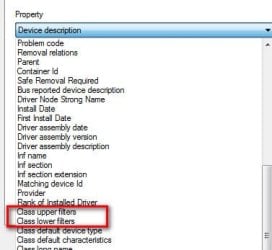
  3. Check if any class upper or lower filters are defined. In device manager right click any mouse, select->Properties->Details tab. Use pull down menu and check if class upper filters and/or class lower filters. If yes, copy/paste what you find
p.s. Only interested in class filters. Ignore any device upper/lower filters if you see them
 

Attachments

  • Filters.jpg
    Filters.jpg
    18.7 KB · Views: 17

My Computer My Computer

At a glance

Desk 1: Win 7 Pro x32; Desk 2: Windows 10 x64
Computer type
PC/Desktop
Computer Manufacturer/Model Number
Dell Optiplex 360 and Optiplex 755
OS
Desk 1: Win 7 Pro x32; Desk 2: Windows 10 x64
Hard Drives
500GB Crucial SSD in both Desktops
Other Info
Buffalo 6TB NAS, Raid 1
Hey, sorry for the late answer.

So, no the miec doesn't work on my computer, but they do on others, for example on my roomate's mac.

And for class upper filter : Other device
class lower filter : unknown

Yes I replaced the files in the /inf folder.

Thank you again for your help !
 

My Computer My Computer

At a glance

Windows 7 Professional 64bIntel core I5 3610QM6GBNvidia GT 630M
Computer type
PC/Desktop
Computer Manufacturer/Model Number
Asus N56VM
OS
Windows 7 Professional 64b
CPU
Intel core I5 3610QM
Motherboard
Laptop
Memory
6GB
Graphics Card(s)
Nvidia GT 630M
Hard Drives
750gb
Antivirus
Avira Antivir free
Browser
Google Chrome
And for class upper filter : Other device
class lower filter : unknown
I think you're saying the mouse shows up under Other devices as Unknown, like below?
> Have these new mice always appeared as "Unknown"?
> The mice may not have installed correctly before but did they just start appearing as Unknown sometime after you made changes to /inf?
> I'm guessing you still have a working mouse listed under Mice and other pointing devices? If yes, whatever you do DON'T UNINSTALL IT!

Since the new mouse is Unknown, it seems even the MS generic mouse driver isn't installing. Let's update files in your /inf
  1. Navigate to C:\Windows\System32\DriverStore\FileRepository
  2. Scroll down and look for folder names starting with msmouse.inf. If you find more then one, select the folder with the most recent date
  3. Copy msmouse.inf and msmouse.pnf to your Windows\inf folder
  4. Reboot. Is mouse still an Unknown? If yes right click it select Update Driver
If mouse still appears under unknown, provide a Problem Device Report
  • Make sure devices are connected and powered on
  • Click the Start Orb, type msinfo32 in the search box. Hit Enter
  • Click the + sign next to Components to expand it
  • Click Problem Devices. Anything appear?
  • If yes, click on it, Ctrl-A to select all, Ctrl-C to copy it, Ctrl-V to paste into next post
  • On the other hand, if no devices are listed, tell me so
 

Attachments

  • Mouse.jpg
    Mouse.jpg
    27.4 KB · Views: 12

My Computer My Computer

At a glance

Desk 1: Win 7 Pro x32; Desk 2: Windows 10 x64
Computer type
PC/Desktop
Computer Manufacturer/Model Number
Dell Optiplex 360 and Optiplex 755
OS
Desk 1: Win 7 Pro x32; Desk 2: Windows 10 x64
Hard Drives
500GB Crucial SSD in both Desktops
Other Info
Buffalo 6TB NAS, Raid 1
Hey, thank you again for your help, only one mouse is connected when I did this, but I assume it is the same problem for both.

Gaming Mouse USB\VID_1D57&PID_AD03\5&21B7E6E9&0&1 Les pilotes de ce périphérique ne sont pas installés. (Device drivers aren't installed)
Microsoft Teredo Tunneling Adapter ROOT\*TEREDO\0000 Ce périphérique ne peut pas démarrer. (this device can't start)
Non disponible USB\VID_8087&PID_0024\5&1DD33EB4&0&1 Les pilotes de ce périphérique ne sont pas installés. (Device drivers aren't installed)
Non disponible USB\VID_8087&PID_0024\5&2318F200&0&1 Les pilotes de ce périphérique ne sont pas installés. (Device drivers aren't installed)

This is what I get... The two last appeared when after uninstalling everything related to USB ports, I asked for windows to install the drivers again.
Don't worry about my last mouse, it is my trackpad, plugged in PS2 on my laptop so there shouldn't be any problem :)

Thank you again !
 

My Computer My Computer

At a glance

Windows 7 Professional 64bIntel core I5 3610QM6GBNvidia GT 630M
Computer type
PC/Desktop
Computer Manufacturer/Model Number
Asus N56VM
OS
Windows 7 Professional 64b
CPU
Intel core I5 3610QM
Motherboard
Laptop
Memory
6GB
Graphics Card(s)
Nvidia GT 630M
Hard Drives
750gb
Antivirus
Avira Antivir free
Browser
Google Chrome
First
Four devices in the report. Unplug the mouse. Run another Problem Device Report. Are the other 3 devices still in the report? (I want to know if they're related to the mouse). If other 3 still there when mouse unplugged, they're not related

Next
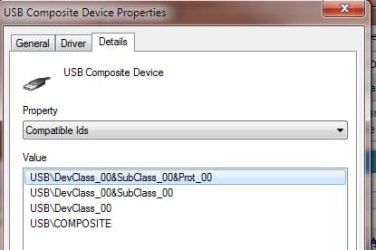
OK. Looks like your mouse is a USB Composite device.. (Right click->Properties select Details tab. Use pulldown to select Compatible Ids you see something like below?) As a Composite device it probably doesn't use the MS mouse driver

So we want to repeat what we did before but this time search DriverStore for folder names that begin usb.inf. If more then one, select the folder with most recent date.

Copy usb.inf and usb.pnf to Windows\inf. Then reboot. Does USB composite device driver install? You can also try right click the device select Update Driver

So at this point, watch device manager as you unplug/replug the mouse. When mouse is connected does it still appear as unknown? Or does a new USB Composite device appear in Device Manager?

p.s. You're most welcome. Hope we can fix
p.p.s. When copying from DriverStore to /inf, it's OK to overwrite if file currently exists
 

Attachments

  • Mouse.jpg
    Mouse.jpg
    16 KB · Views: 11
Last edited:

My Computer My Computer

At a glance

Desk 1: Win 7 Pro x32; Desk 2: Windows 10 x64
Computer type
PC/Desktop
Computer Manufacturer/Model Number
Dell Optiplex 360 and Optiplex 755
OS
Desk 1: Win 7 Pro x32; Desk 2: Windows 10 x64
Hard Drives
500GB Crucial SSD in both Desktops
Other Info
Buffalo 6TB NAS, Raid 1
The two last appeared when after uninstalling everything related to USB ports, I asked for windows to install the drivers again.
Footnote: I think those two new problem devices are USB hubs. Just noticed that usb.inf is used to install BOTH usb composite device and usb hub drivers. So fixing usb.inf may fix your usb hubs too! <fingers crossed>
 
Last edited:

My Computer My Computer

At a glance

Desk 1: Win 7 Pro x32; Desk 2: Windows 10 x64
Computer type
PC/Desktop
Computer Manufacturer/Model Number
Dell Optiplex 360 and Optiplex 755
OS
Desk 1: Win 7 Pro x32; Desk 2: Windows 10 x64
Hard Drives
500GB Crucial SSD in both Desktops
Other Info
Buffalo 6TB NAS, Raid 1
Hey, yeah the two last are still here after I unplugged the mouse.

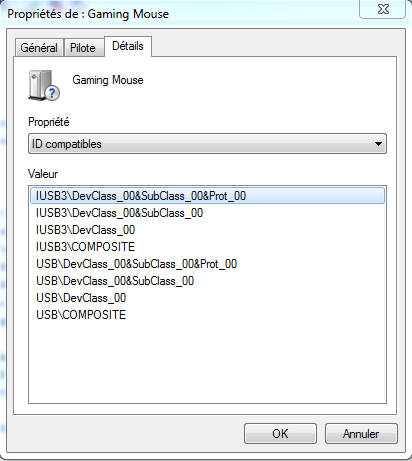
Then, going to the Compatible IDs, I get this :

305c33b24bbc0d0fa9b75a5528fe81ae.png


Man, you are a genius, after moving the usb.inf to the inf folder, I was first surprised that Windows didn't even ask me to replace the files...

I asked the device manager to update the device list, and tons of peripheral appeared, and windows update had been able to look for and find them.

Thank you very very much again !!!!
 

My Computer My Computer

At a glance

Windows 7 Professional 64bIntel core I5 3610QM6GBNvidia GT 630M
Computer type
PC/Desktop
Computer Manufacturer/Model Number
Asus N56VM
OS
Windows 7 Professional 64b
CPU
Intel core I5 3610QM
Motherboard
Laptop
Memory
6GB
Graphics Card(s)
Nvidia GT 630M
Hard Drives
750gb
Antivirus
Avira Antivir free
Browser
Google Chrome
Hey Hey! Glad your problem is fixed!!! Happy Computing :)
 

My Computer My Computer

At a glance

Desk 1: Win 7 Pro x32; Desk 2: Windows 10 x64
Computer type
PC/Desktop
Computer Manufacturer/Model Number
Dell Optiplex 360 and Optiplex 755
OS
Desk 1: Win 7 Pro x32; Desk 2: Windows 10 x64
Hard Drives
500GB Crucial SSD in both Desktops
Other Info
Buffalo 6TB NAS, Raid 1
Back
Top