Hello,
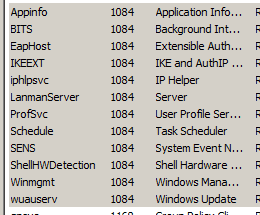
I'm noticing that 1.5GB of ram and 25% of cpu is being consumed by svchost.exe and the services tab in task manager shows that aelookupsvc & appinfo are the ones that are related to that svchost.exe. I did some google search about those two services and found that aelookupsvc is important service if there're old softwares in the computer or something like that and since I got none then I disabled it and restarted the computer to see the results but it didn't even minimize the issue as the same 1.5GB ram is still being used by now appinfo service only and when searching on google about appinfo service I was left confused as some said it's an important service and shouldn't be stopped and it was true cause when I disabled it I faced some issues as not being able to run services.exe and I had to boot in safe mode and enable it again (put on manual as it was before) to back to normal again.. But that will leave my problem unsolved
So, is there a fix to stop this appinfo service from consuming the ram without disabling it or something?
I'm noticing that 1.5GB of ram and 25% of cpu is being consumed by svchost.exe and the services tab in task manager shows that aelookupsvc & appinfo are the ones that are related to that svchost.exe. I did some google search about those two services and found that aelookupsvc is important service if there're old softwares in the computer or something like that and since I got none then I disabled it and restarted the computer to see the results but it didn't even minimize the issue as the same 1.5GB ram is still being used by now appinfo service only and when searching on google about appinfo service I was left confused as some said it's an important service and shouldn't be stopped and it was true cause when I disabled it I faced some issues as not being able to run services.exe and I had to boot in safe mode and enable it again (put on manual as it was before) to back to normal again.. But that will leave my problem unsolved
So, is there a fix to stop this appinfo service from consuming the ram without disabling it or something?
My Computer
- Computer type
- PC/Desktop
- OS
- win7 ultimate 64bit