Asus Eee PC charging problem

ogie57

New member
Local time
3:42 AM
Messages
1
Hi,
I have charging problem in my laptop (Asus Eee PC).
some times ago, I pulled off my charging adapter unexpectedly while no battery were plugged in. When I started system again, the laptop did not work with charging adapter, the charging indicator did not get fixed when I plugged battery in and finally battery were dead. Also, there was a noise inside the laptop like tik tik tik.
I got the laptop to be checked by a repair guy. He first removed the battery and used his charger, computer turned on. then he used my charger and laptop worked again. Finally, he plugged the battery in and surprisingly it started charging. Moreover, there was no noise anymore. Magically the laptop was working fine for some months.
Tonight, the charging adapter just plugged off unexpectedly again and the same situation just happened. I did the same procedure, but it does not work. the charging LED does not get fixed and battery does not charge.

Please help me what should I do before going to the company again?

Thax
 

My Computer

Computer type
Laptop
Computer Manufacturer/Model Number
ASUS Eee PC
OS
7 starter 32 bit
Hello and welcome ogie mate have you tested the adaptor at all? might be an idea to test the voltage on that with a digital multimeter but even so the volts might be right but the current not. But it is a starting point.

Now another thing might be to get anew battery if it is reasonably old and I can only say if you don't mind me saying so - the way the machine has been run is a little careless mate;)

When you do get the machine up and running I would run these too
http://www.sevenforums.com/tutorials/1538-sfc-scannow-command-system-file-checker.html
http://www.sevenforums.com/tutorials/433-disk-check.html < if necessary include the /f and /r in the command line as per Option2 - it could be something simple in the filing system that is not right.
 

My Computer

Computer type
PC/Desktop
Computer Manufacturer/Model Number
Own build (new) Desk1 / Asus ROG Win 7 / Desk2 1st build
OS
Desk1 7 Home Prem / Desk2 10 Pro / Main lap Asus ROG 10 Pro 2 laptop Toshiba 7 Pro Asus P2520 7 & 10
CPU
Desk1 i5 3750K / Laptop i7 GTX 860M / Desk2 i5 2500
Motherboard
Desk1 Asus P877-V / Desk2 Gigabyte H67 UD3H / Laptop ?
Memory
Desk1 8GB (1866) / Desk2 16GB (1333) / Laptop 8Gb DDR3
Graphics Card(s)
Desk 1& 2NVidia GTX 650 & Laptops on board Intel
Sound Card
Desk 1 & 2 -XONAR DG Realtek High Def audio Laptop
Monitor(s) Displays
Desk 1 Benq HD 2450 / Desk2 Philips 24" / Laptop 17.5"
Screen Resolution
1920x1080 D1 & D2 & Laptop 1
Hard Drives
Desk1 Samsung 120GB 830 SSD
Asus ROG 256GB 850 Pro SSD
Desk2 Samsung 840 256 SSD
Toshiba 120GB EVO
PSU
Desk 1 Corsair HX 1050/ Laptop ? / Desk 2 Corsair HX 650
Case
Desk 1 Cooler HAF XM ? Toshiba laptop / Desk2 Coolermaster
Cooling
Fans on all Desk1 -2 Desk2 - all Coolermasters 5 Laptop ?
Keyboard
Desk 1 MS Sidewinder X6 Desk 2 MS Sidewinder X 4
Mouse
Desk 1&2 - Gigabyte MS 900 gamer - laptop - Logitec wireless
Internet Speed
ADSL2+
Other Info
One other Desktop (tester) and spare Toshba laptop both with SSD's
Running Kaspersky 2016 ISS on all machines config'd identically
Logitec audio stereo systems on each machine (x3)
Canon MG5250MFC
Router/modem TP-Link running WPA2SK
guide to trobleshoot asud eeepc 1015 power adapter od dc jack faults
Asus Eee Pc 1015 DC Jack or power adapter faults - AtoZ Computer Solutions +60107951427
Hmm nice link rohaiza well done!!

While we are at it and waiting the reply for our posts if the OP feels the machine needs cleaning then it might as well throw in my ditty re cleaning .

SLOT CLEANING

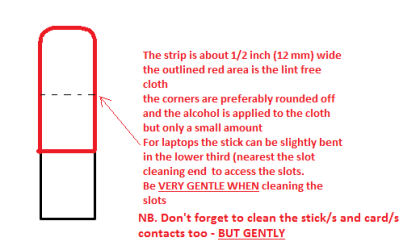
Now as for the slots toclean them use a strip of old credit card (or any card thin enough some arebetter than others ) about 1/2 inch wide nip the corners off one end - preferably round them off hold a piece of thin lint free cloth over theend dab on some form of alcohol - isopropyl alcohol (what we swab the skin withbefore an injection) is good and GENTLYswipe along the slots.

This can also be done for the GPU slot/s andalso the contacts of the sticks or cards - not the stick but some lint freecloth of course. See my pic for the sick but please be very gentle doing it ifyou are in any doubt - please ask before doing it but I use this all the timeand have yet to damage anything
 

Attachments

  • STICK CLEANER.PNG
    STICK CLEANER.PNG
    15.1 KB · Views: 2

My Computer

Computer type
PC/Desktop
Computer Manufacturer/Model Number
Own build (new) Desk1 / Asus ROG Win 7 / Desk2 1st build
OS
Desk1 7 Home Prem / Desk2 10 Pro / Main lap Asus ROG 10 Pro 2 laptop Toshiba 7 Pro Asus P2520 7 & 10
CPU
Desk1 i5 3750K / Laptop i7 GTX 860M / Desk2 i5 2500
Motherboard
Desk1 Asus P877-V / Desk2 Gigabyte H67 UD3H / Laptop ?
Memory
Desk1 8GB (1866) / Desk2 16GB (1333) / Laptop 8Gb DDR3
Graphics Card(s)
Desk 1& 2NVidia GTX 650 & Laptops on board Intel
Sound Card
Desk 1 & 2 -XONAR DG Realtek High Def audio Laptop
Monitor(s) Displays
Desk 1 Benq HD 2450 / Desk2 Philips 24" / Laptop 17.5"
Screen Resolution
1920x1080 D1 & D2 & Laptop 1
Hard Drives
Desk1 Samsung 120GB 830 SSD
Asus ROG 256GB 850 Pro SSD
Desk2 Samsung 840 256 SSD
Toshiba 120GB EVO
PSU
Desk 1 Corsair HX 1050/ Laptop ? / Desk 2 Corsair HX 650
Case
Desk 1 Cooler HAF XM ? Toshiba laptop / Desk2 Coolermaster
Cooling
Fans on all Desk1 -2 Desk2 - all Coolermasters 5 Laptop ?
Keyboard
Desk 1 MS Sidewinder X6 Desk 2 MS Sidewinder X 4
Mouse
Desk 1&2 - Gigabyte MS 900 gamer - laptop - Logitec wireless
Internet Speed
ADSL2+
Other Info
One other Desktop (tester) and spare Toshba laptop both with SSD's
Running Kaspersky 2016 ISS on all machines config'd identically
Logitec audio stereo systems on each machine (x3)
Canon MG5250MFC
Router/modem TP-Link running WPA2SK
Back
Top