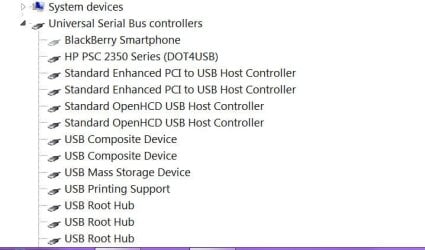
Hi, I have been doing an awful lot of reading about this but not finding any real solutions.
My device manager is showing 4 USB Root Hubs, 2 are running at High speed and having nothing plugged into them, and two are running at Full Speed and these are showing my devices that I have plugged in, these being an XBOX 360 controller, a USB wireless keyboard/mouse and my printer.
The controller and printer are plugged into the back of the machine where there are 6 ports, the USB keyboard is plugged into the front where I have two expansions that are plugged into two of the USB headers on the motherboard, 2 are from the actual case (coolermaster cm690II) and 2 are from an aero cool fan controller.
The device manger shows 2 enhanced usb drivers, and 2 open HCD drivers, but non of my equipment is running at High Speed only showing up on the Full Speed USB root hubs, this means they are only running at USB 1.1 rates.
When I plug my portable USB HDD in, it says that the device can perform faster, opens up and shows me two hubs both with six ports each.
Now there are six ports on the back of the motherboard and then there are 3 headers on the motherboard (which can take 2 ports each) so that is where the two sets of six are coming from, but why are non of my devices actually running at High speed even though Windows tells me that the USB HDD can run faster?
The device is terribly slow.
I have tried uninstalling from the device manager and rebooting, I have tried installing the latest Chipset drivers 15.56 Nvidia Nforce (980A) but the chipset dirvers do not specifically mention anything about USB, and the installed drivers for the USB are microsoft ones?
Please Help someone? Thanks
My device manager is showing 4 USB Root Hubs, 2 are running at High speed and having nothing plugged into them, and two are running at Full Speed and these are showing my devices that I have plugged in, these being an XBOX 360 controller, a USB wireless keyboard/mouse and my printer.
The controller and printer are plugged into the back of the machine where there are 6 ports, the USB keyboard is plugged into the front where I have two expansions that are plugged into two of the USB headers on the motherboard, 2 are from the actual case (coolermaster cm690II) and 2 are from an aero cool fan controller.
The device manger shows 2 enhanced usb drivers, and 2 open HCD drivers, but non of my equipment is running at High Speed only showing up on the Full Speed USB root hubs, this means they are only running at USB 1.1 rates.
When I plug my portable USB HDD in, it says that the device can perform faster, opens up and shows me two hubs both with six ports each.
Now there are six ports on the back of the motherboard and then there are 3 headers on the motherboard (which can take 2 ports each) so that is where the two sets of six are coming from, but why are non of my devices actually running at High speed even though Windows tells me that the USB HDD can run faster?
The device is terribly slow.
I have tried uninstalling from the device manager and rebooting, I have tried installing the latest Chipset drivers 15.56 Nvidia Nforce (980A) but the chipset dirvers do not specifically mention anything about USB, and the installed drivers for the USB are microsoft ones?
Please Help someone? Thanks
My Computer
At a glance
Windows 7 64 bitAMD hexa core AMD Phenom II X6 1090T BE proce...8gb 2 x 4gb Crucial Tactical Tracers Elite DD...MSI NVIDIA GTX660OC 2048MB AT 1215MHZ
- Computer type
- PC/Desktop
- Computer Manufacturer/Model Number
- Nomad Creative Solutions (Home build)
- OS
- Windows 7 64 bit
- CPU
- AMD hexa core AMD Phenom II X6 1090T BE processor 3.2ghz
- Motherboard
- ASUS M4N98TD EVO with sli NVIDIA 980a chipset
- Memory
- 8gb 2 x 4gb Crucial Tactical Tracers Elite DDR3 1600mhz
- Graphics Card(s)
- MSI NVIDIA GTX660OC 2048MB AT 1215MHZ
- Sound Card
- Onboard VIA HD audio 1708S
- Monitor(s) Displays
- samsung 40 inch LED monitor
- Screen Resolution
- 1920 X 1080 P
- Hard Drives
- 1 TB Samsung f3 spinpoint
1 TB SATA WDC green
500GB SATA Seagate
250 GB IDE Samsung
- PSU
- 800w PSU
- Case
- Coolermaster CM690 II Advanced
- Cooling
- 1x140mm In, 2x120mm In, 2x140mm Out, 1x120mm Out
- Keyboard
- WIRELESS KEYBOARD/TOUCH PAD
- Internet Speed
- 10.6MBPS
- Other Info
- WINDOWS 7 HOME PREMIUM 64 BIT SP1
Tuniq Tower 120 Extreme CPU cooler